
Build a proposal
Services, packages, add-ons, the engagement letter and the billing schedule, priced once and presented as a choice.
On this page
A proposal prices the work, presents it to the client as a choice, and carries your engagement letter. When the client accepts and signs, Practice sets up the work and the billing from it, without anyone typing it in again. See What happens when a proposal is accepted.
The Proposals page has two views: Pipeline, your proposals by stage, and Templates, proposals you've saved to reuse.
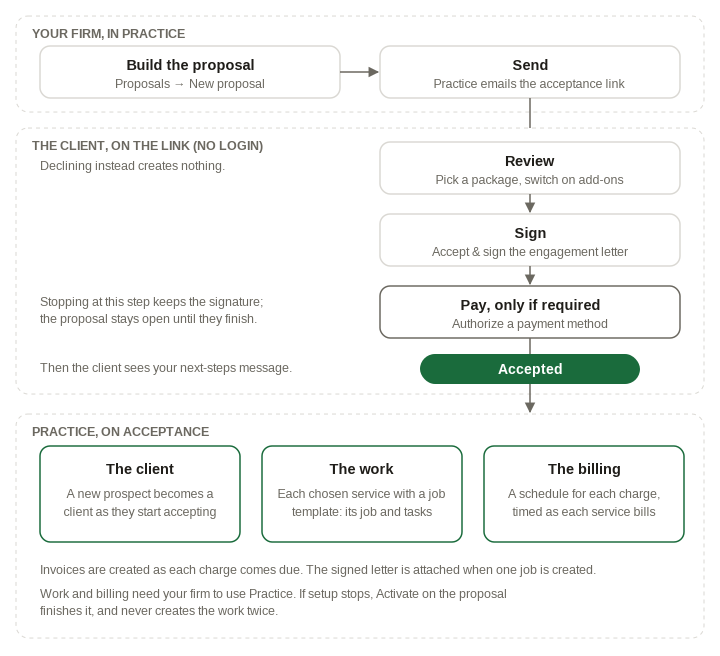 A proposal, from building it to the client accepting it
Recipient, expiry and engagement letter
- Recipient: choose Existing client and pick them, or New prospect and enter a Full name and Email. A prospect Becomes a client on acceptance.
- Expires: when the proposal stops being open. It stays open through the end of the day you pick, in your firm's time zone. Once it has expired, the link tells the client so, and they can't accept. A quote from October shouldn't still be live in March.
- Engagement letter: the letter the client signs when they accept. A proposal can't be sent without one. Engagement letters are written in Templates, Engagement letters.
Packages: the client picks one
Under Packages — recipient picks one, add a package for each option, such as good, better and best. Give each a name and, if you like, a short badge (Badge (optional)).
Choosing among three options is a different question from deciding whether to say yes at all, which is why packages work.
Add services to a package with Add service. Services come from your services library (Settings, Services), and their prices fill in from it. Edit any line to change its price on this proposal.
Each line shows:
- One-time or Recurring (monthly, quarterly, annually or weekly).
- For a service priced per unit, a Base and a Unit price, and whether the firm or the client sets the quantity (Firm sets or Client sets).
- A Client-facing description: deliverables, timeline, limits. Write it for the client. Prepare and file Form 1120-S, including K-1s for two shareholders tells them what they're buying; 1120S prep invites a question.
- Engagement-letter terms: scope wording added to the engagement letter when this service is included.
A service can carry a job template, set on the service in Settings, Services. Its name shows on the line. Accepting a service with a template creates that work; a service without one creates no work.
Itemized or lump sum
A package is Itemized (each line priced) or Lump sum. A lump sum takes an amount Due today, a Recurring amount with how often, and a First charge date for when recurring billing starts. Per-service prices are ignored for a lump sum.
Save as reusable package keeps a package you've settled on; it appears under Saved packages for the next proposal.
Add-ons: the client can toggle them on
Under Add-ons — recipient can toggle on, Add add-on for optional extras, such as a quarterly review or an extra entity. The client switches them on themselves, so you don't have to sell them.
Presentation
- Proposal from: whose name it comes from.
- Intro message: a short personal note at the top.
- Next-steps message: shown to the client right after they accept. It heads off the "so what happens now" email.
Payment
Choose how the client pays, then:
- Require payment to accept: as the screen says, The client signs, then pays the on-acceptance amount. The proposal is accepted once the payment goes through. If your firm can't take that kind of payment yet, the switch is off and says why.
- Pass card surcharge to client.
Billing timeline previews the money for the first package and any add-ons once services are added, so you see the cadence before the client does.
Save and send
- Preview shows the proposal as the client will see it.
- Save draft keeps it to finish later.
- Save as template saves the whole proposal to reuse.
- Send: see Send and track a proposal.
Notes and limits
- A proposal goes to an existing client or a prospect, who becomes a client on acceptance.
- A proposal whose services carry no templates still sets up billing, and creates no work.
- A sent proposal can't be edited. Void it and send a new one, or, once it's accepted, raise a change order.