
What happens when a proposal is accepted
What the client does to accept, and the client record, work and billing Practice sets up the moment they do.
On this page
Acceptance is the moment a proposal stops being a document and becomes a client, work and billing.
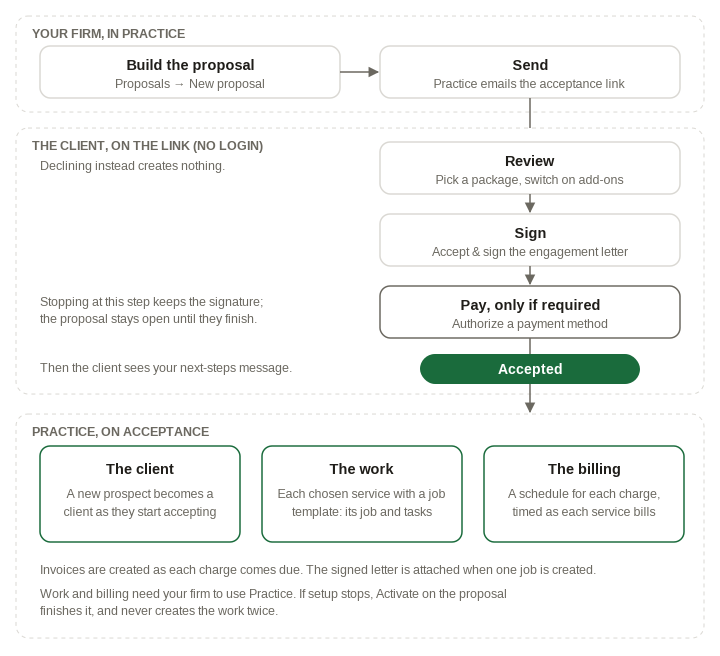 A proposal, from building it to the client accepting it
What the client does
The client opens the link from your email. No login is needed. Across the top, the steps read Review, Sign, Pay (only when the proposal requires payment) and Done.
- Review. Under Choose your plan they pick a package, see what's included and what's due today and after, and switch on any Optional add-ons. They choose Accept & sign.
- Sign. They sign your engagement letter. If the letter has places for a spouse and the spouse has an email address on the client, the spouse is asked to sign too.
- Pay, if you turned on Require payment to accept. The page reads Your agreement is signed. and asks for payment details on file to start work. The acceptance completes only once a payment method is authorized. If they stop here, their signature is kept and they can come back to finish.
- Done. They see your Next-steps message.
They can also choose Decline proposal and give a reason.
What Practice sets up
The client. A proposal to a new prospect creates the client record when the prospect starts accepting, named from what you entered, so the engagement letter can be addressed to them.
The work. For each service in the chosen package, and each add-on they switched on, that carries a job template, Practice applies the template to the client: a job with its tasks, or a single task for a one-task template. Services without a template create no work. If exactly one job is created, the signed engagement letter is attached to it.
The billing. Practice sets up a billing schedule for each charge:
- For an itemized package, each line bills the way its service is set to in Settings, Services: On acceptance; On date, a set number of days after acceptance; On milestone, when the work reaches a stage you chose; or Recurring, starting on acceptance and repeating at its frequency.
- For a lump-sum package, the amount due today is billed on acceptance, and the recurring amount starts on its first-charge date.
- Add-ons the client switched on are billed line by line, either way.
As each charge comes due, Practice creates its invoice. If the client authorized a payment method, it's charged to that; otherwise the invoice waits as a draft for you to review and send.
The terms. The signed engagement letter is kept with the client's documents.
For a change order, the new scope and billing are applied to the original proposal instead.
Work and billing are set up only if your firm uses Practice. For a firm without Practice, the proposal is still accepted and signed.
See what was created
Open the accepted proposal. It lists:
- Work created: the tasks, with a count.
- The jobs created, under your firm's word for a job.
- Draft invoices (review + send): invoices from the schedule.
- Billing schedule: each schedule with its next charge, and Stop billing from this schedule to end one. Ending a schedule doesn't change invoices it already created.
- Payment, Signature and the Timeline of the proposal.
After your first few acceptances, check that the client record looks right, the work landed in the right pipeline with sensible dates, and the billing matches what you proposed. Once a services setup has proved itself, every acceptance from it behaves the same way.
If the setup didn't finish
If the client accepted but the work and billing weren't set up, the proposal says so: The client accepted, but the work and billing were not set up. Choose Activate. If it can't, the reason appears on the proposal. Activating again never creates the work twice.
Only accepted proposals do anything
Draft, sent, viewed, declined, expired and voided proposals create no work and no billing. A proposal agreed on a call isn't accepted until the client accepts it through the link.
Notes and limits
- Acceptance is recorded with its date and time on the proposal's Timeline.
- Declining creates nothing, and the proposal stays as a record.
- A voided or expired proposal can't be accepted.