
Billing a Books Client Through Practice
If your firm also uses Practice, bill your clients there and let Books keep your firm's own books in step: what posts, what waits for a person, how to read the figures, and how to move your invoices into Books for good.
On this page
If your firm also uses Practice, you probably bill your clients there: the engagement, the time, the invoice and the payment link all live in one place. Billing from Practice is what keeps your firm's own books right while you do.
Every invoice, payment, credit and void you record in Practice is posted to Firm Books for you, to the accounts you chose, and anything Books can't post on its own waits on one screen with the reason and the choices you have.
This article is for firms that use Practice. A firm without Practice never sees this page.
Practice is where you change or void what Practice billed. An entry posted from Practice can't be edited or voided in the register; hover Edit or Void… and Books tells you where to go instead. A void you make in Practice reaches these books on the next sync. A change to something that already posted doesn't follow on its own: it waits under Needs a person until someone decides whether these books follow Practice.
Understand the page
The page has up to three parts, top to bottom.
- Move your Practice invoices into Books: a one-time move that makes Books the home of your invoices. See Move your invoices into Books.
- The agreement between Practice and your books, with the clearing account below it.
- Needs a person, then Sync now and Pause.
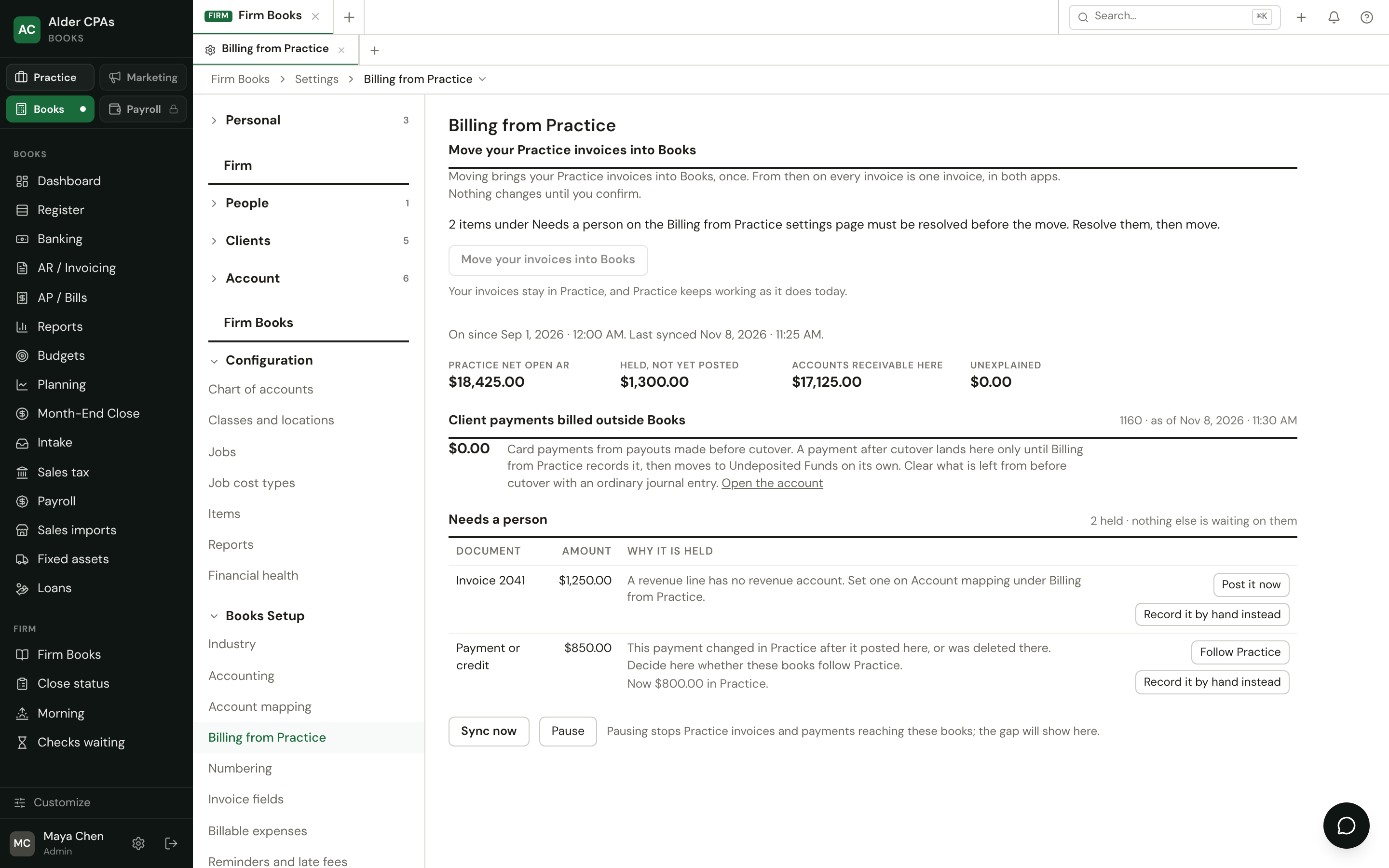 Billing from Practice with Practice and the firm's books in agreement, two items held for a person, and the clearing account at zero
The status line
The first line says when billing from Practice started and when it last ran: On since Sep 1, 2026 · 12:00 AM. Last synced Nov 8, 2026 · 11:25 AM. Books syncs every firm every five minutes, so on a normal day the last sync is a few minutes old.
While it is paused, the line says so instead, with the reason the person gave: Paused since Nov 8, 2026 · 9:14 AM — Year-end cleanup in Practice. Practice invoices and payments are not reaching these books; the gap shows below.
The four figures
| Figure | What it is |
|---|---|
| Practice net open AR | What your clients owe according to Practice. |
| Held, not yet posted | The part of that figure sitting under Needs a person: invoices and payments Practice has that these books don't yet, or a change Practice made after something posted. |
| Accounts receivable here | Your receivables account in Firm Books, for the customers who are Practice clients. |
| Unexplained | Practice net open AR less Accounts receivable here less Held, not yet posted. |
Unexplained is the figure to watch. At $0.00, every dollar of difference between Practice and your books is accounted for by something waiting on a person. In the example above, Practice says $18,425.00 is owed, Firm Books holds $17,125.00, and the $1,300.00 between them is what the two held items leave out: Invoice 2041's $1,250.00, and the $50.00 the payment changed by in Practice. So nothing is unexplained.
If Firm Books has receivables from customers who aren't clients in Practice (a Books invoice for a one-off speaking fee, for example), a line under the figures lists them: Receivables from customers not in Practice: with the total and each customer. Those are left out of the comparison on purpose, so they never hide a difference.
Client payments billed outside Books
This card shows the balance of the clearing account for card payments that reached your bank through payouts before Billing from Practice recorded them, with the account number and the time it was read.
The page explains it: Card payments from payouts made before cutover. A payment after cutover lands here only until Billing from Practice records it, then moves to Undeposited Funds on its own. Clear what is left from before cutover with an ordinary journal entry. Open the account opens its register.
If no account is set for it, the card says so and links to Account mapping, where you set one.
What posts, and where
Each sync reads Practice and posts what is new to Firm Books:
- An invoice debits Accounts Receivable and credits revenue: each line to the account mapped for its Practice service (see Choose the accounts Practice billing posts to).
- A payment credits Accounts Receivable and lands in Undeposited Funds, ready to be deposited.
- A credit, write-off, service charge or retainer posts to the account mapped for it. A retainer is owed to the client until it is drawn, so it posts to Client retainers held, a liability.
- A void in Practice reverses what posted here.
In the register, these entries carry a badge that says where they came from: From Practice invoice, From Practice payment or adjustment, or From Practice opening receivables (the receivables Practice held on the day billing from Practice started).
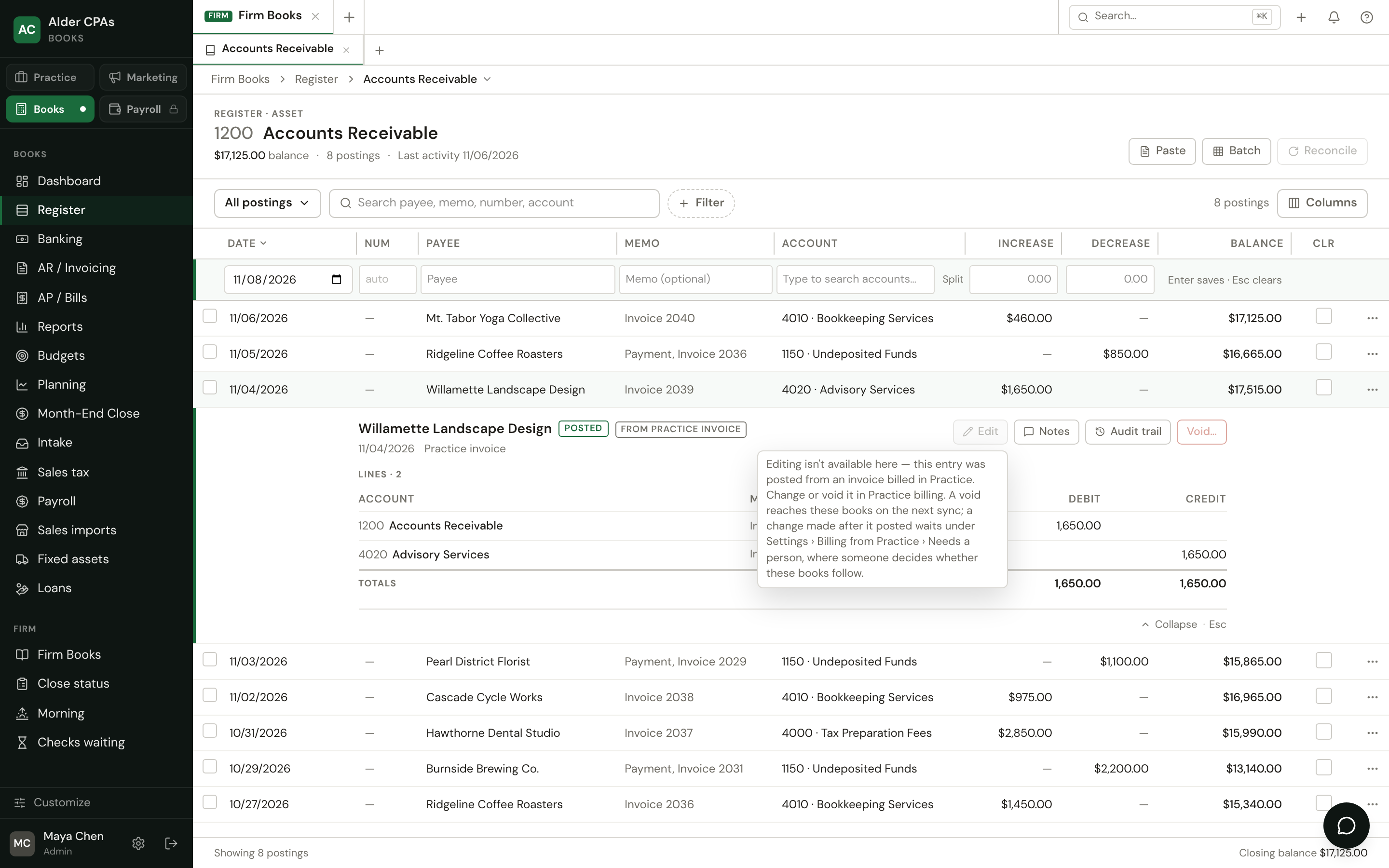 A Practice invoice in Firm Books' Accounts Receivable register, with its badge and the reason Edit is off
Edit, Void…, Duplicate and Memorize are off for these entries, and hovering one tells you why and where to go. For an invoice:
Editing isn't available here — this entry was posted from an invoice billed in Practice. Change or void it in Practice billing. A void reaches these books on the next sync; a change made after it posted waits under Settings › Billing from Practice › Needs a person, where someone decides whether these books follow.
A payment's sentence is the same, naming a payment or adjustment recorded in Practice. For the opening receivables: … It is the receivables Practice held at cutover. Correct the single invoice in Practice; the change then waits under Settings › Billing from Practice › Needs a person.
Work through Needs a person
Anything Books can't post by itself is held here, one row per document, with nothing else waiting on it: the rest of your billing keeps posting. The heading counts them (2 held · nothing else is waiting on them). When the list is empty it says Nothing is waiting on a person.
Each row shows the Document (Invoice 2041, Retainer, or Payment or credit), its Amount, Why it is held in a full sentence, and only the buttons that apply to that reason. For a payment, adjustment or retainer that changed or was deleted in Practice after it posted, Amount is the figure these books posted (the amount a reversal takes back), and under the sentence Books shows Practice's figure now, for example Now $800.00 in Practice., or Deleted in Practice.
To resolve one:
- Read Why it is held. Most reasons name the fix.
- If the fix is somewhere else (an account to map, a correction in Practice), make it first.
- Click the button for what you want. Every choice except Post it now opens a box that names the consequence and asks Why — the next person reading this will see it. The confirm button waits until you write a reason (Say why first.).
- Confirm. The row leaves the list, and the reason is kept with the decision.
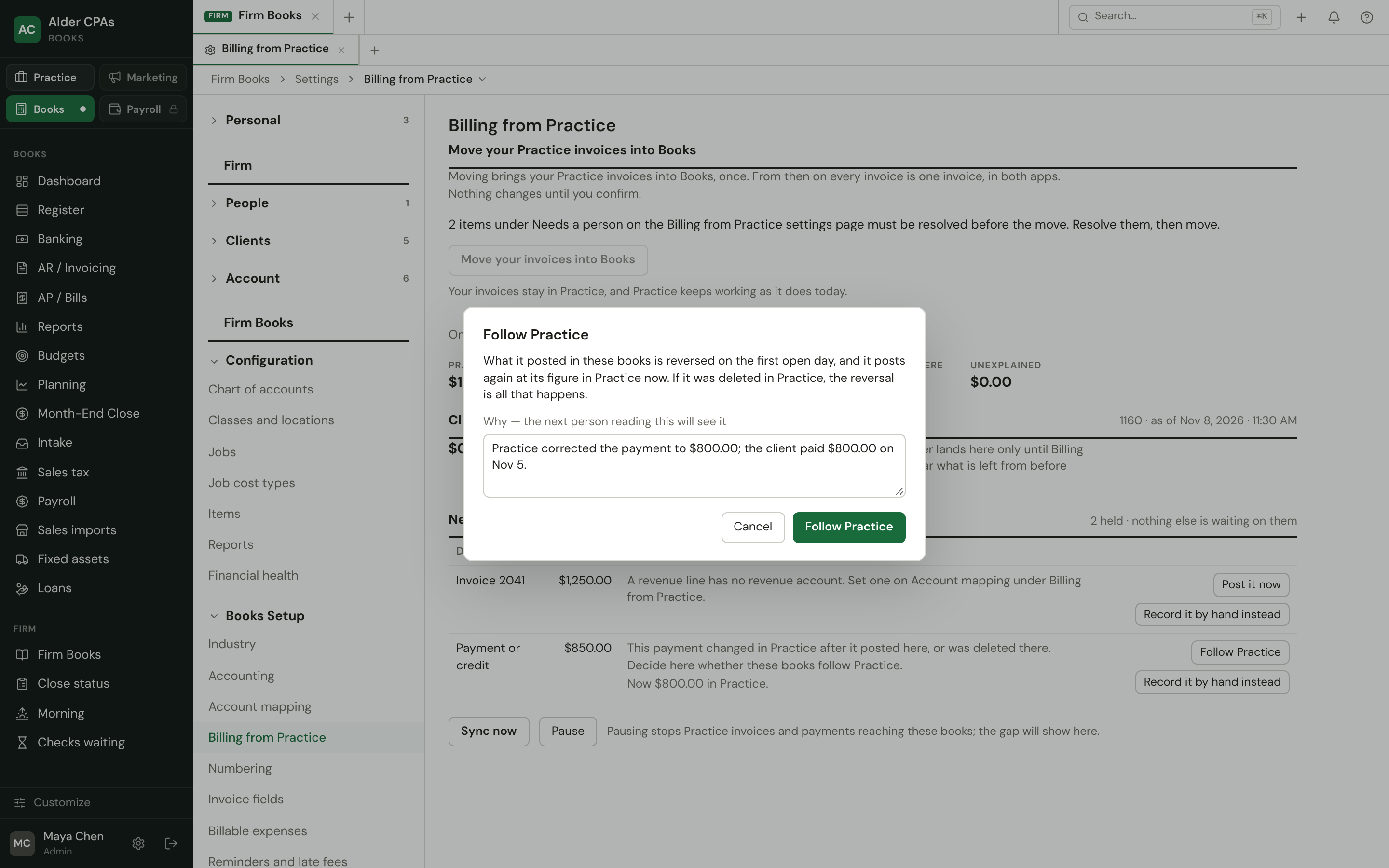 Follow Practice asks why, and says what it will do
The choices
Post it now
Runs a sync for this document right away. Use it after you've fixed the cause, such as mapping the missing account. If the cause is still there, the row stays and says why: It is still held. …
Record it by hand instead
Books won't post this document. The box says so by name: Books will not post Invoice 2041 ($1,250.00). Record it in these books by hand. If Practice later voids an invoice that had already posted here, that void is still reversed.
Reverse it
Reverses what this document posted, on the first open day, with you as the person who reversed it.
Follow Practice
Reverses what it posted, on the first open day, and posts it again at its figure in Practice now. If it was deleted in Practice, the reversal is all that happens.
Post in the first open period
Posts it on the first open day on or after its own date, when its own date is in a closed period.
Post against an account
For a payment that came back. You choose The account the money left from (a bank or other current asset account in Firm Books); Accounts Receivable goes back up by the amount and that account goes down by it. Undeposited Funds is not touched.
Why something is held
The sentence on the row is the reason. The ones you'll meet most:
| Why it is held | What to do |
|---|---|
| A revenue line has no revenue account. Set one on Account mapping under Billing from Practice. (also tax, write-off, service charge, retainer, or the receivables and undeposited funds accounts) | Map the account, then Post it now, or wait for the next sync. |
| The invoice's total does not equal the sum of its lines, so it cannot post balanced. Correct it in Practice. | Fix the invoice in Practice. |
| This invoice changed in Practice after it posted. Decide here whether to reverse and repost it. | Follow Practice, or Record it by hand instead. |
| This payment changed in Practice after it posted here, or was deleted there. Decide here whether these books follow Practice. | The same, for anything other than an invoice. The first words name the document: This payment…, This credit memo…, This write-off…, This refund…, This service charge…, This returned payment…, and so on. |
| This invoice posted to these books and was then deleted in Practice. Decide here whether to reverse it. | Reverse it, or Record it by hand instead. |
| Its date falls in a closed period. Decide here whether to post it in the earliest open period. | Post in the first open period, reopen the period and Post it now, or record it by hand. |
| A payment came back. Which account the money left from is yours to say. | Post against an account. |
| This invoice is dated before these books' cutover, so posting it would count it twice against opening receivables. Decide here. | Record it by hand instead is the only choice: the opening receivables already include it. |
| This invoice was voided in Practice, but who voided it cannot be read, and a reversal needs a person's name on it. Decide here. | Reverse it puts your name on the reversal. |
| A customer with this client's name already exists on these books and is not linked to Practice. Link them, or rename one. | Rename or link the customer, then Post it now. |
A change after posting never follows silently. Books compares every posted payment, adjustment and retainer with Practice on each sync, and checks every posted invoice. If the amount changed or the record was deleted, the document is held here instead of being rewritten behind your back. You decide, and your reason is recorded.
Sync now, Pause and Resume
- Sync now runs a sync for your firm right away and says Synced. Use it after a fix when you don't want to wait for the next five-minute run.
- Pause stops Practice invoices and payments reaching these books. It asks why (Say why billing from Practice is being paused. if you leave it blank) and says what it does: Practice invoices and payments stop reaching these books until you resume. Pausing posts nothing and reverses nothing. While paused, the gap shows in the figures, and Sync now is hidden.
- Resume turns it back on and syncs: Resumed, and caught up.
Choose the accounts Practice billing posts to
Your firm's Account mapping has a Billing from Practice group, shown on Firm Books when your firm uses Practice. Its heading counts your Practice services and write-off reasons.
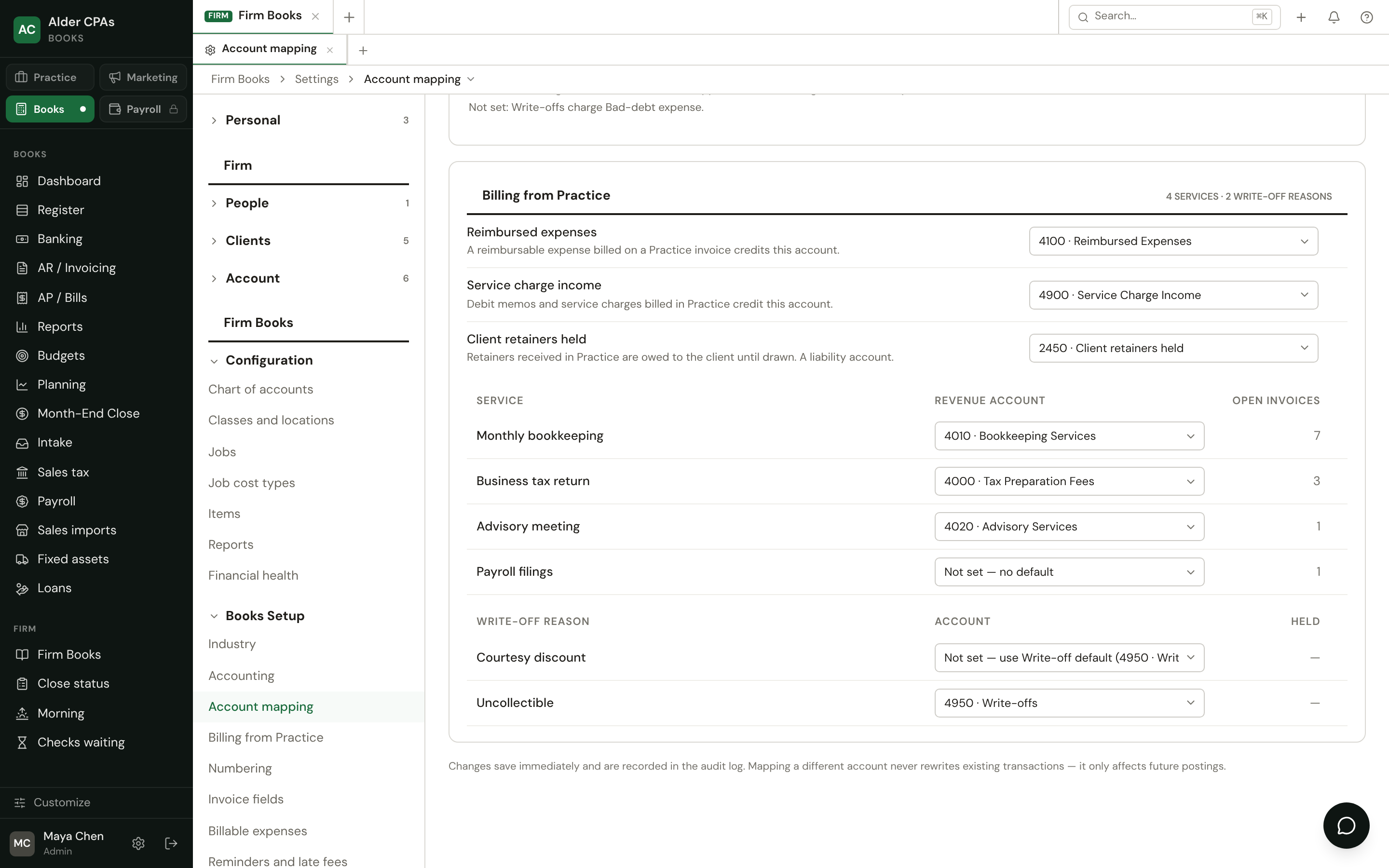 Account mapping's Billing from Practice group: three accounts, then one row per Practice service and write-off reason
- Reimbursed expenses: A reimbursable expense billed on a Practice invoice credits this account.
- Service charge income: Debit memos and service charges billed in Practice credit this account.
- Client retainers held: Retainers received in Practice are owed to the client until drawn. A liability account.
- Service: one row per service in Practice, with its Revenue account and how many Open invoices bill it. A service with no account of its own uses Service revenue, then Revenue default, and the picker says which (Not set — use Revenue default (4010 · Bookkeeping Services)). With neither set it reads Not set — no default, and an invoice billing that service is held until you choose one.
- Write-off reason: one row per reason in Practice, with its Account and how many documents are Held for want of one. A reason with no account uses Write-off default, then Sales returns.
A change saves as you make it and only affects what posts from then on: an invoice that already posted keeps its accounts.
Move your invoices into Books
At the top of the page, Move your Practice invoices into Books offers to make Books the one home of your invoices: Moving brings your Practice invoices into Books, once. From then on every invoice is one invoice, in both apps. Nothing changes until you confirm.
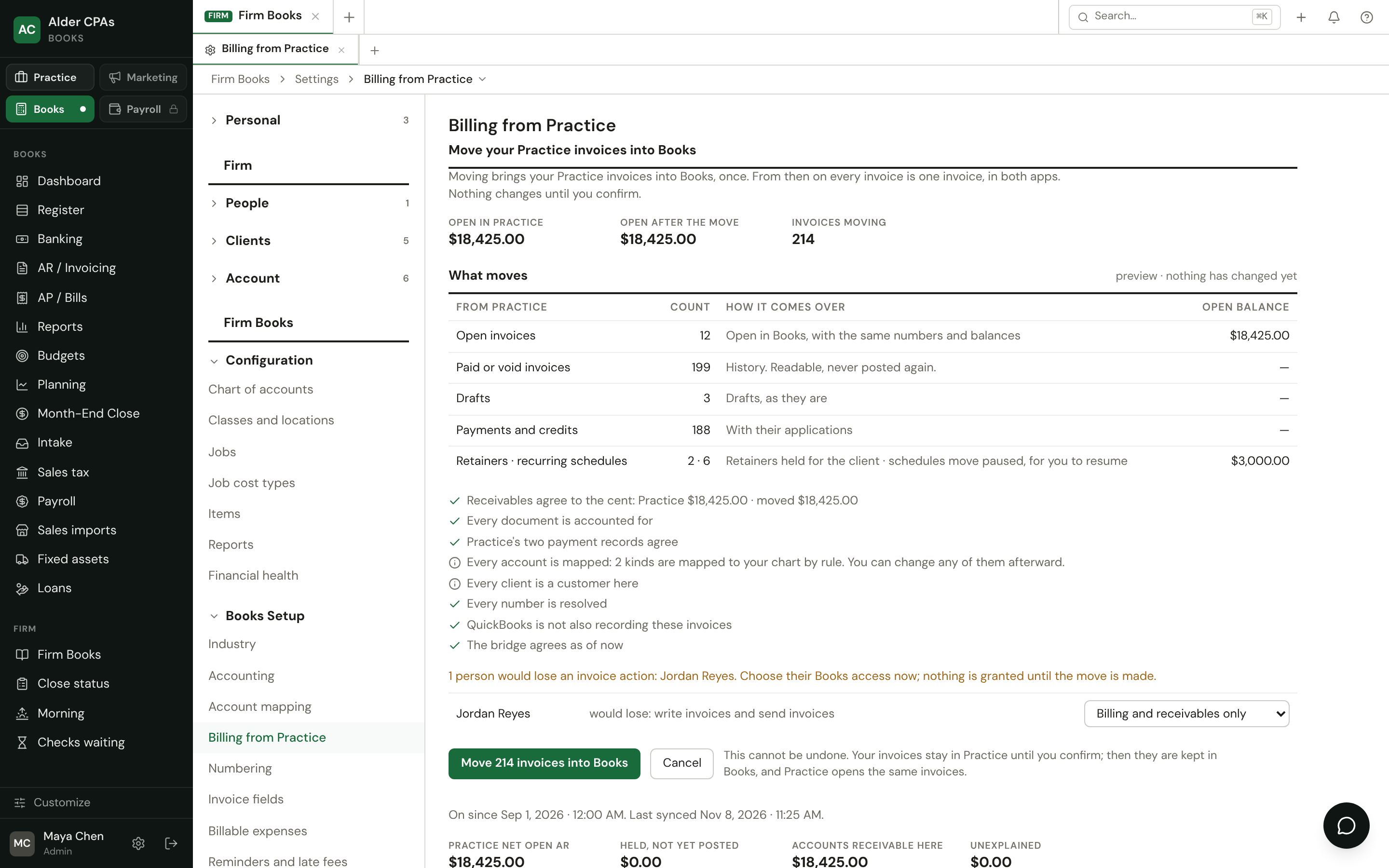 The move's preview: what moves, the checks it ran, and the one member whose access needs a choice
What you see before anything happens is a full rehearsal, worked out with every check the real move runs:
- Three figures: Open in Practice, Open after the move, and Invoices moving.
- What moves: Open invoices (open in Books, with the same numbers and balances), Paid or void invoices (history, readable, never posted again), Drafts, Payments and credits (with their applications), and Retainers · recurring schedules (schedules move paused, for you to resume).
- The checks:
- Receivables agree to the cent (with both figures)
- Every document is accounted for
- Practice's two payment records agree
- Every account is mapped (how many kinds map to your chart by rule, and any account the move adds; you can change any of them afterward)
- Every client is a customer here (and how many are linked or added by rule)
- Every number is resolved
- QuickBooks is not also recording these invoices
- while billing from Practice is on, The bridge agrees as of now
- Anyone on your team who would lose an invoice action, for example 1 person would lose an invoice action: Jordan Reyes. Choose their Books access now; nothing is granted until the move is made. Pick the Books access each should have; No Books access (they lose it) is a choice too. (If your firm hasn't turned Books on yet, the line ends nothing is granted until Books turns on.)
To move:
-
Resolve everything under Needs a person first. While anything is held there, the move is off; when nothing else stops it, the section says so in one sentence: 2 items under Needs a person must be resolved before the move. Resolve them, then move.
With one item left it reads 1 item under Needs a person must be resolved before the move. Resolve it, then move. When you resolve the last one on this page, the preview comes back in the move section, with no need to reload the page, and the move button turns on unless something else stops the move (see If the move is off).
-
Read the preview and choose access for anyone listed.
-
Click Move 214 invoices into Books (the count is yours). This cannot be undone. Your invoices stay in Practice until you confirm; then they are kept in Books, and Practice opens the same invoices. If your firm hasn't turned Books on yet, the button reads Turn on Books and move 214 invoices instead, and the move turns Books on with your invoices in it.
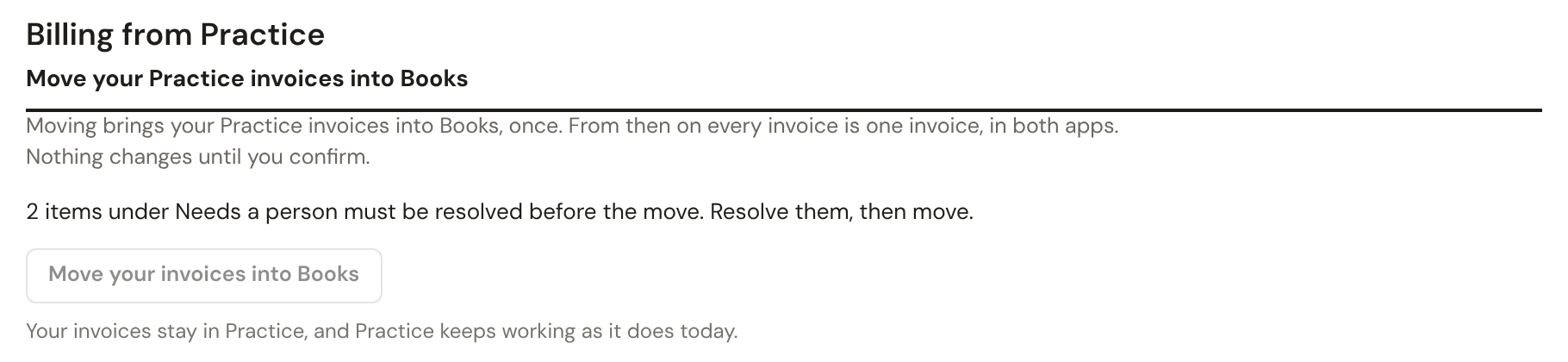 The move held while two items wait under Needs a person: one sentence, and the move button off
When it's done the section says Your invoices are in Books as of Nov 8, 2026. Practice opens the same invoices. with what moved, receivables before and after, how many recurring schedules are paused until you resume them, and Open invoices.
From then on the page shows Invoices are kept in Books since …, and What happened keeps the record of the move: when, who, the figures, and the next invoice number. Billing from Practice is retired, because there's nothing left to copy.
If the move is off
Almost anything that stops the move shows one sentence that names it and says what to do, and the move button stays off with that sentence as its reason. Books runs the same checks when the move is made, so the move refuses exactly where the preview does.
Books names one blocker at a time; when you clear it here, the next one, if any, takes its place. After a fix you make in Practice, reload this page (or click Sync now) to see it.
2 items under Needs a person must be resolved before the move. Resolve them, then move.
Decide each item under Needs a person on this page. The move turns on when the last one is resolved.
Billing from Practice shows $375.00 unexplained between Practice and these books; the move waits until it is $0.00. Sync now, or resolve what is under Needs a person, then move.
Click Sync now, look at Unexplained again, and resolve anything under Needs a person. The move waits until Unexplained is $0.00. If it is still above $0.00 after a sync with nothing held, contact support.
QuickBooks company “Alder CPAs” still receives this firm's invoices from Practice, so the same revenue would be recorded twice. Turn off its invoice sync in Practice's QuickBooks settings, then move.
In Practice, open its QuickBooks settings and turn off invoice sync for that company.
Invoice number 2107 is on two invoices in Practice. Give one of them a new number in Practice, then move.
Renumber one of the two invoices in Practice.
The recurring schedule “Monthly bookkeeping” in Practice has no lines. Change or end it in Practice, then move.
Change or end that schedule in Practice. The sentence names what Books can't carry: a schedule with no lines, one built from a line template, one that creates its invoices more than 60 days ahead, or one that belongs to an archived client.
A sentence that ends … so nothing was moved. Contact support …; your invoices stay in Practice.
Contact support, and give them the sentence as it reads (it says what stopped the move). Nothing changes: your invoices stay in Practice.
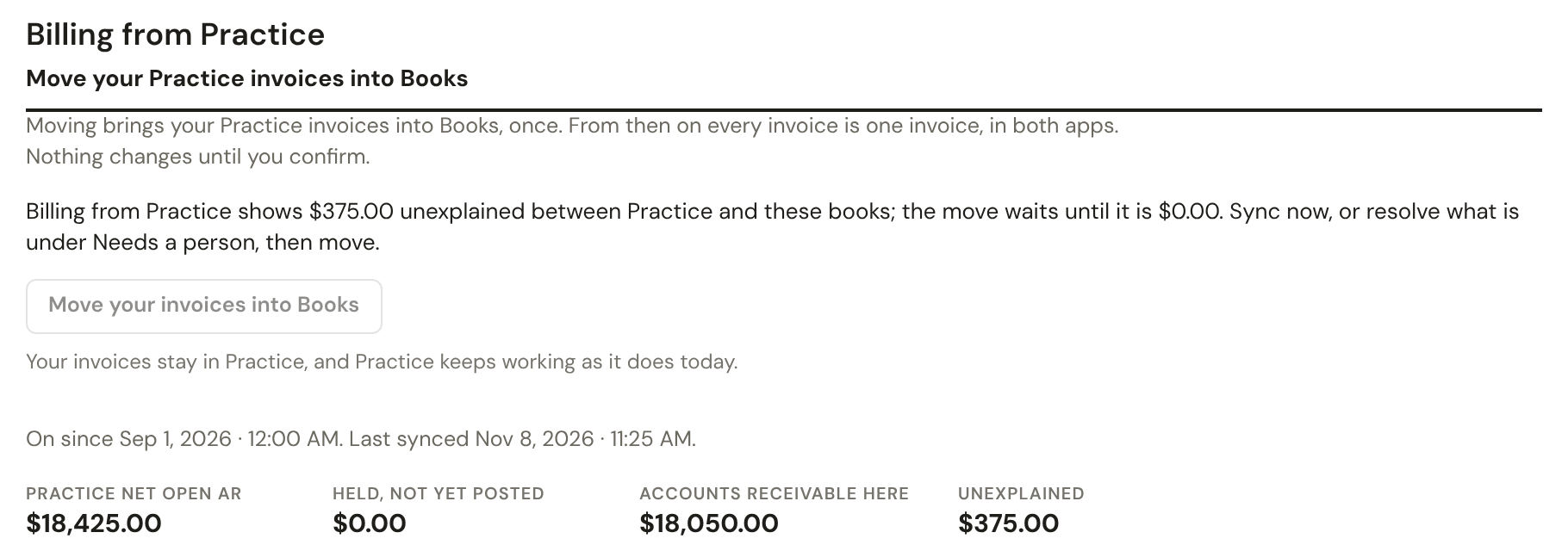 The move held by an unexplained difference: the sentence names the amount and what to do
Who can do what
- Opening this page, pausing and resuming, and moving your invoices need the Settings — Firm permission. Without it the page says You need the "Settings — Firm" permission to change billing from Practice. Ask an admin to grant it. with Try again under it.
- Sync now needs someone who can write in Firm Books. A held item is always decided by a person, signed in, never by an API key.
Questions people ask
Why hasn't a Practice invoice reached these books? Check, in order: is it under Needs a person? Is billing from Practice paused? Was it created in the last few minutes (click Sync now)? Is it dated before your cutover? Those are held on purpose, because your opening receivables already include them.
What is waiting under Needs a person? Every invoice, payment, credit or retainer Books couldn't post or wouldn't change without you, each with its reason. Its total is Held, not yet posted.
Which account do Practice invoice lines post to? The account mapped for the line's Practice service in Account mapping → Billing from Practice, or the fallback the picker names. Tax, reimbursed expenses, service charges and retainers have their own rows.
Tips
- Keep Unexplained at $0.00. If it isn't, something changed that no row explains; click Sync now and look again before you close the month.
- Map every Practice service before the month you close, so nothing is held for want of an account. The Open invoices count shows which services matter most.
- Write a reason a stranger could follow. Practice corrected the payment to $800.00; the client paid $800.00 on Nov 5. is what the next person reads in the record.
- To change an invoice that posted, change it in Practice, then decide here under Needs a person. The decision makes the entries and keeps your reason with them.