
Review What Your Client Entered
See every bill, invoice, bank line and entry your client made in their own books, with Books' checks pointing out the ones worth a second look.
On this page
When a client signs in to their own books and enters bills, sends invoices or categorizes bank lines, you still own the result. Entered by your client gathers everything the people at a client entered in one list and runs a set of checks over it, so you can spend your review time on the handful of entries that look off instead of opening every one.
Everything on this page has already posted. It is a list to look over, not a queue to approve. A row with no flag needs nothing from you, and nothing waits for you before it reaches the books.
Who can enter what is set on Client access: see Give a Client Access to Their Books, and What They Can See.
What counts as a client entry
A row is anything a person at the client created first in their books:
- a Bill, an Invoice, a Vendor or a Customer,
- a Bank line they categorized,
- a Journal entry (a deposit or a transfer they recorded reads as one too),
- a Reconciliation they did.
A bill's or invoice's own posting is the bill or invoice, not a second row. Something your team created and the client later changed is not a client entry.
Understand the page
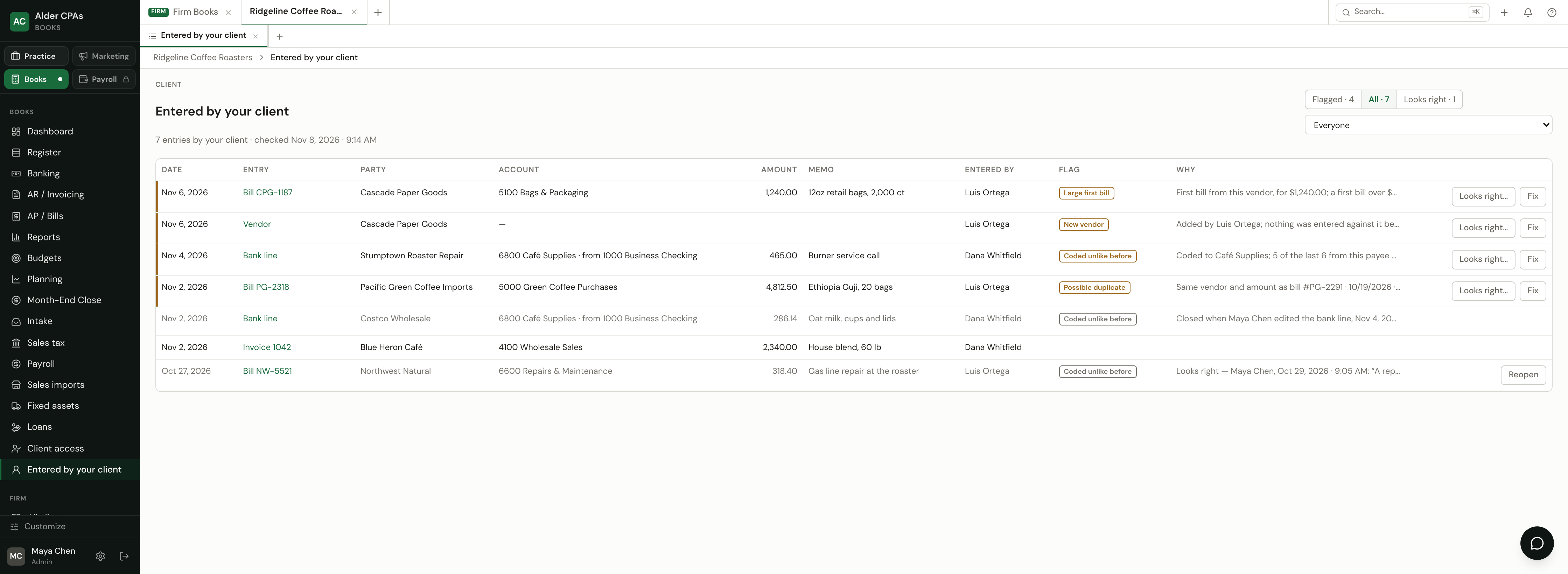 Every entry Ridgeline Coffee Roasters' people made, with four open flags, one marked Looks right and one closed after an edit
The line under the title counts everything the client entered, for example 7 entries by your client, names the person when everything listed was entered by one person, and ends with when the checks last ran: checked Nov 8, 2026 · 9:14 AM.
Three buttons at the top right choose what is listed, each with its count:
- Flagged (where the page opens) — entries with a flag still open.
- All — every client entry, flagged or not.
- Looks right — flags your team marked Looks right, with the reason given.
Beside them, Everyone narrows the list to one person at the client.
The columns are Date, Entry, Party, Account, Amount, Memo, Entered by, Flag and Why. A few details:
- Entry names what it is and its own number, such as Bill CPG-1187 or Invoice 1042. Click it to open the entry.
- Account shows where the money went. A two-line entry reads like 6800 Café Supplies · from 1000 Business Checking; a bill names the accounts it charged and an invoice the accounts it earned. Several accounts read 3 accounts, and a longer journal entry 4 lines; hover for every line.
- Entered by appears only when more than one person at the client entered the rows shown. Hover it for when they entered it.
- Why gives the reason for the flag in one line, with the figures behind it. Hover it to read the whole sentence.
A row with an open flag carries an amber bar on its left edge. Rows are newest first, by when they were entered.
Opening the page runs the checks again, so a flag on an entry someone has since fixed closes before you see it.
The flags
Each flag, and why it is raised, as the Why column puts it:
Coded unlike before
The entry went to an account none of this vendor's, customer's or payee's last 12 entries used, while most of them went somewhere else: Coded to Café Supplies; 5 of the last 6 from this payee went to Repairs & Maintenance. It needs at least four earlier entries, and three in four of them to one other account.
A bill reads …earlier bills from this vendor went to…, an invoice …earlier invoices to this customer went to…. A bank line is checked only when it went to a single account.
New vendor · New customer
Someone at the client added a vendor or customer: Added by Luis Ortega; nothing was entered against it before.
Possible duplicate
A bill or invoice for the same vendor or customer and the same amount as an earlier one within 31 days: Same vendor and amount as bill #PG-2291 · 10/19/2026 · $4,812.50. On a bank line, the same payee and amount as an entry already in the books.
Large first bill · Large first payment
The first bill from a vendor over $500.00, or a first payment to a payee over the bank line's own threshold: First bill from this vendor, for $1,240.00; a first bill over $500.00 is flagged.
Unusual amount
A bank line well away from this payee's usual amount, with the usual amount for comparison.
Round amount
A bank line for a large round amount.
Weekend
Dated on a weekend, which is rare for this business.
Month-end check
A line coded to an account the month-end check expects to be empty, one whose name says uncategorized, suspense or "ask my accountant": Coded to Ask My Accountant; the month-end check expects $0.00 there.
Reconciliation review
A reconciliation your client did still has review flags open: 2 review flags are open on this reconciliation.
Unusual amount, Possible duplicate on a bank line, Large first payment, Round amount and Weekend are the same markers the Review queue raises on bank lines, carried over when your client is the one who categorized the line, unless someone already dismissed the marker in the Review queue. One entry can carry more than one flag.
Handle a flag
Each open flag has two buttons.
Looks right
When the entry is fine as it is:
- Click Looks right….
- Type a Reason. It is required, and it is kept with the flag.
- Click Looks right.
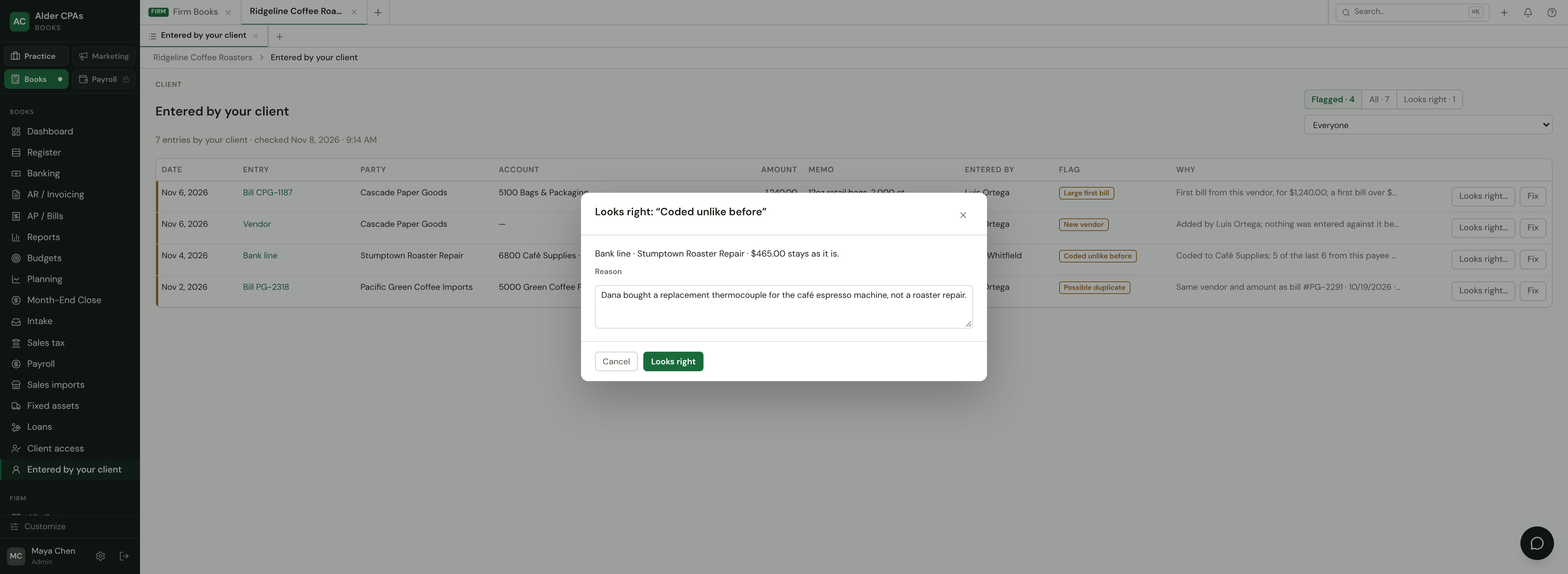 Marking a coding flag Looks right, with the reason
The entry stays exactly as it is. The flag moves to Looks right, where it reads, for example, Looks right — Maya Chen, Oct 29, 2026 · 9:05 AM: "A repair to the gas line, not the monthly bill." A flag you marked Looks right stays that way: the checks never raise the same flag on that entry again.
Fix
When the entry is wrong, click Fix. It opens the entry where you change it: the bill, the invoice, the vendor or customer, the journal entry, or the reconciliation.
A bank line your client categorized has already posted, so Fix opens the entry posted from it in All transactions, where Edit and Void… are. Clicking the entry's name in the Entry column goes to the same place. Fix itself changes nothing.
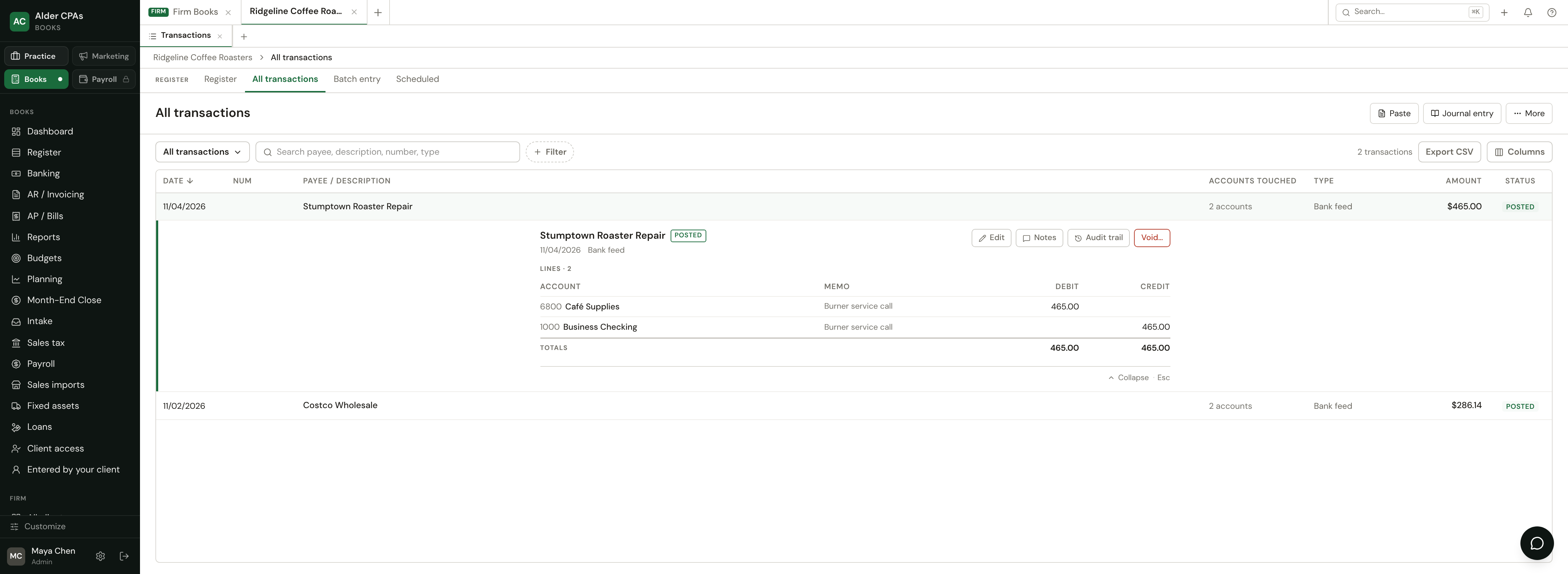 Fix on the Stumptown Roaster Repair bank line opens its posted entry in All transactions
Once someone at your firm changes the entry, the flag closes the next time the checks run, and says who and when: Closed when Maya Chen edited the bank line, Nov 4, 2026 · 9:22 AM. What counts as a change:
| Entry | Closes as edited when someone at your firm… |
|---|---|
| Bill, invoice | saves a change to it |
| Vendor, customer | edits or archives it |
| Journal entry | edits it |
| Bank line | changes or unmatches the line, or edits the entry posted from it |
| Reconciliation | reopens it, or posts an adjustment on it |
When someone at your firm voids a bill, an invoice or a journal entry, its flag closes: Closed when Maya Chen voided the bill, …. A bank line your client categorized reads as voided too, not edited, when someone at your firm voids the entry posted from it with Void… in All transactions.
The bank line stays under All with its closed flag, and its Entry link opens the voided entry. A flag whose reason has gone away for any other reason closes too: Closed, Nov 8, 2026 · 10:14 AM: the check no longer finds it. Closed flags show under All.
To edit a posted entry, see Using the Register.
Reopen
Changed your mind about a flag you marked Looks right? Find it under Looks right, click Reopen, give a reason, and it goes back to open.
Spot client entries everywhere else
You don't have to come to this page to know who entered something:
- In the Register, the Bills list and the Invoices list, a small person icon marks each row your client entered. Hover it: Entered by Dana Whitfield (your client), Nov 5, 2026 · 9:40 AM · 1 open flag. The icon is amber while a flag is open.
- The filter menu on those lists gains Entered by, with Entered by the client and Entered by the firm.
- When lines waiting in the Review queue were first worked on by your client, an Entered by the client pill narrows the queue to them.
- On your firm dashboard, the Client entries card lists each client with open flags or entries this week, with the oldest open flag, and links to that client's page.
Why can't I …
- … click Looks right or Reopen? Both need permission to post entries for this client. Without it the buttons stay off, and hovering them says why. You can still read the list and use Fix to open an entry.
- … let my client see this page? It is for your firm only. A client user can't open it.
- … find a flag I marked Looks right under Flagged? It moved to Looks right.
A good routine
- Open Entered by your client for each client with client users before you start the month's close.
- Work the Flagged list top to bottom. Most flags take one look: a reason and Looks right, or Fix.
- If the same person keeps coding the same payee wrong, make a bank rule for that payee, or narrow their access on Client access.