
Morning: What Ran Overnight, and How to Undo It
Morning is your firm's daily brief: today's work across every client, then what the overnight routine drafted, found and used for each client, why it skipped one, and how to take back anything it left.
On this page
Morning is the first screen to open on a working day. The top half is today's work for every client: invoices and bills past due, bank lines nobody has reviewed, and reconciliations due.
The bottom half is what Books' overnight routine did while you were away: the draft questions it wrote to clients, the reminders now due, the tax flags it found and the AI credits it used, one row per client. Nothing the routine does posts to anyone's books.
The overnight routine drafts; it never posts. A draft question goes to the client only when a person opens it on Client questions, clicks Review and send and sends it. A suggestion waits in the Review queue for someone to accept it. The one thing the routine sends on its own is a reminder about a question the client already has, and only if an owner turned on automatic reminders. Morning lists every reminder it sent.
Understand the Morning screen
At the top, the date of the night you are looking at and, when the routine ran, run finished 2:41 AM (or run started 2:00 AM, still running). Times are in your firm's time zone. On the right, the Night picker goes back six nights before today.
Today's work
Today's work shows whether or not the overnight routine ran, so Morning is useful from your first day. A line over the table says how many clients have something waiting, for example 3 of 7 clients have work today., and which month the reconciliations are for: Reconciliations due are for Oct 2026. When nothing waits it says so: Nothing waits today: no invoice or bill past due, no line to review and no reconciliation due.
| Column | What it counts |
|---|---|
| Books | The client. Clients with something waiting come first; a client with nothing waiting stays on the list, in gray. |
| Invoices past due | What the client's customers owe past the due date, from the receivables aging. |
| Bills past due | What the client owes its vendors past the due date, from the payables aging. |
| Lines to review | Bank and card lines still waiting in the Review queue, for example 14 lines. |
| Reconciliations due | Accounts not reconciled through the last month that has ended, for example 2 accounts. |
A figure that needs you is a link: click it to open that client's invoices, bills, Review queue or Reconcile page. If one client's figures can't be read, its cell says not read (hover it for the reason) instead of showing a dash, so a failed read never looks like nothing past due.
Overnight
The Overnight table has one row per client the routine touched that night:
| Column | What it shows |
|---|---|
| Client | The client. |
| Draft questions | Questions the routine wrote to this client that night, and how many bank lines they ask about, for example 1 · 4 lines. |
| Reminders due | Questions to this client that have waited long enough to remind them about now. |
| Suggestions | Category suggestions AI made on this client's bank lines that night. |
| Tax flags | Tax flags opened and resolved during the night, for example 2 opened, 1 resolved or 1 opened · 1 resolved. The bottom row counts the opened ones. |
| Credits | The AI credits that night's work used for this client. |
The last column holds the actions: Review draft while that night's question is still a draft, Send reminders when reminders are due, and the reason the routine did nothing for the client when it skipped one. The bottom row totals every column.
Under the table, if the routine sent automatic reminders that night, a line names each client and how many it got, for example 4 reminders sent automatically to clients this night: Alberta Street Bakery (1), Burnside Bike Works (1), Ridgeline Coffee Roasters (2).
A client that only got reminders that night still has a row in the table. It counts reminders for every question, whichever way it was asked. Below that, any AI work that failed or was thrown out is listed as released, for example 1 piece of work released: the assist could not be reached. Released work is never charged.
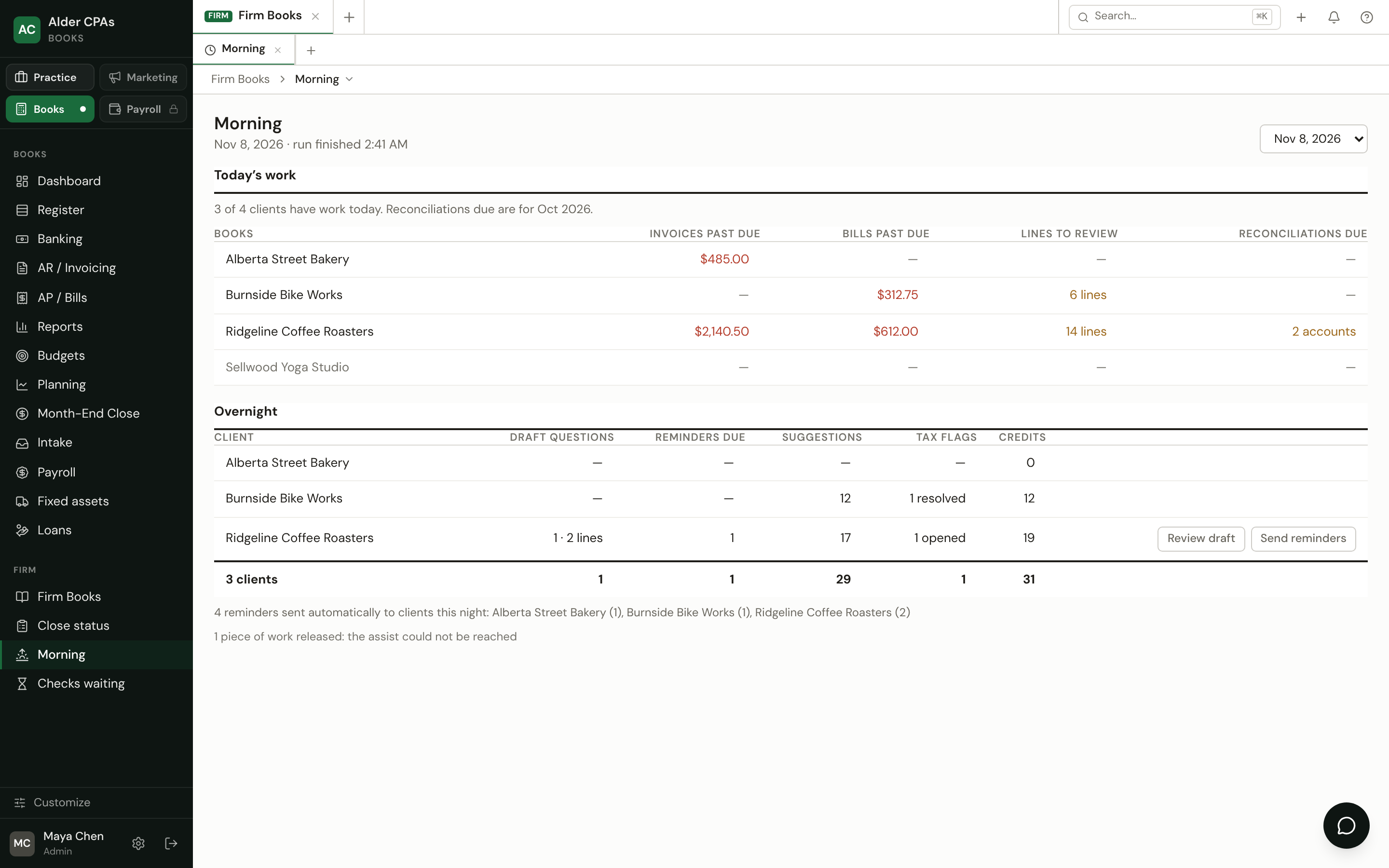 Morning for Alder CPAs: today's work for four clients, then last night's Overnight table with a draft question and a reminder due for Ridgeline Coffee Roasters, and the line of reminders sent automatically
Pick an earlier night in the Night picker and the table shows what that night drafted and found. Reminders due is a figure about now, so it is counted for the latest night only: on an earlier night each client's cell and the total show a dash, and a line under the table says Reminders due are counted for the latest night only; an earlier night shows what it drafted, sent and found.
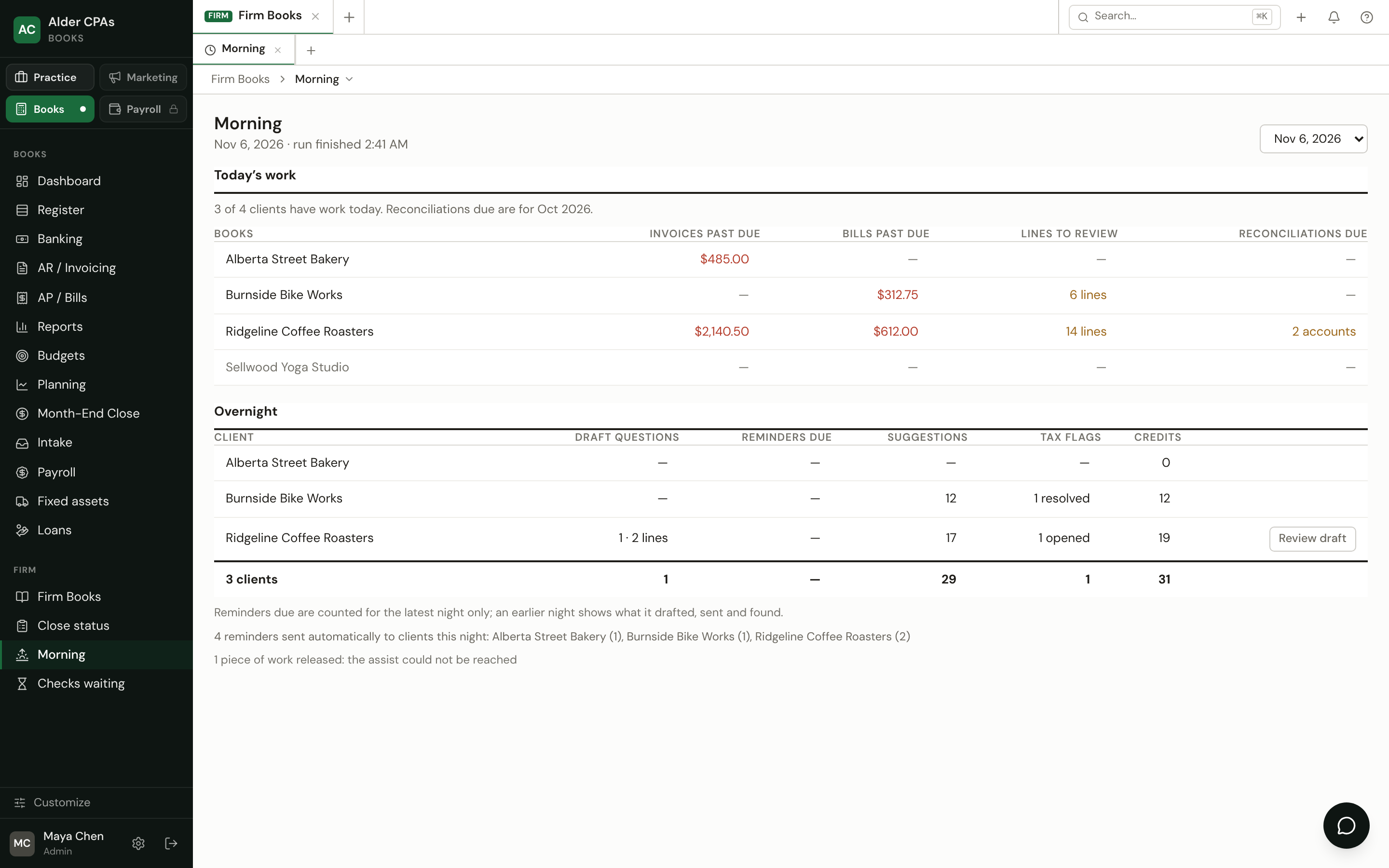 An earlier night picked in the Night picker: Reminders due is a dash for each client and in the total, with the note under the table
What did the overnight routine do?
Each night, at the hour an owner chose in Settings → Account → AI, Books works through its steps. The first two are for every client whose plan includes AI review (Premium clients):
-
Tax flags. It checks the client's books for the current tax year and opens a tax flag for anything worth a look. The Tax flags column counts them; open the client's Reports → Tax flags to see each one.
-
Draft questions. It looks for bank lines that were already waiting in the Review queue at the previous night's run and that have no suggestion at all (from a rule, your history or AI), or that AI suggested with less confidence than you set beside Ask the client when AI is less sure than.
It puts up to 20 of them into one draft question to the client, with a covering message, addressed to the client's primary contact (or, failing that, the first contact with an email or a mobile number). A line that is already on an open question is not added again.
-
Reminders. For every client, Premium or not: if an owner turned on Remind clients about unanswered questions, it sends the reminders that are due: up to 2 per question, 3 days apart (Settings → Account → AI names your firm's gap), from your firm's address. Morning lists the reminders each night sent, by client.
The routine never posts an entry, never accepts a suggestion, never changes a category and never sends a draft question. When a night has nothing for a client, the client has no row.
Review and send a draft question
-
On the client's row, click Review draft. The client's Client questions page opens.
-
Find the question marked Drafted overnight (hover it: Drafted by the overnight routine. Nothing is sent until you review and send it.). Click Review and send on it.
-
A window opens, titled for example Review the question drafted overnight for Dana Whitfield. It holds what the routine wrote: the contact it addressed (chosen in To while that person is still a contact with an email address), the message, each line with its question, and the choices the routine tied to accounts.
Change anything you like. Books checks the question as you edit it, the same way it checks one you write yourself.
-
Click Send question (or Send 2 questions, and so on). Books says Sent. The email goes out within a few minutes, and the question is listed below.
The question you sent is listed as a new question, Going out and then Waiting, and is reminded, re-sent or withdrawn like any other. The draft it came from stays on the list marked Sent after review, so you can see which questions began overnight.
Review and send needs the same permission as asking a client a question. See Ask a client about a transaction, and track their answers.
To drop a draft instead, click Withdraw on it. Books says The question was withdrawn, and its link no longer works. and the draft moves to Withdrawn. Nothing was ever sent to the client.
Send reminders that are due
Click Send reminders on the client's row. The client's Client questions page opens; on each question still waiting, click Re-send. Books says A reminder goes out by email within a few minutes, with a fresh link. (For a question sent the older way, Books says the link was re-sent and the earlier one no longer works.) Each reminder carries a fresh link.
Why did it skip a client?
A client the routine skipped shows the reason in the last column:
| What it says | Why | What to do |
|---|---|---|
| Off plan | The client's plan doesn't include AI review, so the routine checked no tax flags and drafted no question for it. Automatic reminders still go to its unanswered questions if they are on. | Move the client to Premium if you want the routine to work its books. |
| No contact on file | There were lines to ask about, but the client has no contact with an email or a mobile number. Hover it: Add an email or a consented mobile to the primary contact | Add an email to the client's primary contact. The next night's run can then draft the question. |
| Failed | A step failed for this client. Hover it for the step and the reason. | Fix what the reason names; the next night tries again. |
A client that doesn't appear at all had nothing that night: no lines to ask about, no AI work, no reminders sent and, on the latest night, no reminders due.
When the night itself didn't run
- The overnight routine is off. with Turn it on in Settings: nobody has turned the routine on, or it was turned off. An owner turns it on in Settings → Account → AI.
- The overnight routine works on Premium books only, and none of this firm’s books are on Premium, so there is nothing for it to run. No run is recorded and nothing failed. with See plans in Billing.
- The overnight routine was not on yet at that night’s hour, so no run was due. Or, for tonight, The run is due at 2:00 AM.
- No run that night. The run that was due did not start. An alert was raised. The routine was on but no run was recorded for that night. See the alert opens the alert on your firm's Integrity alerts page.
- The run failed at 2:03 AM. followed by the step and An alert was raised., with See the alert.
- Nothing waits from that night. The routine ran and found nothing to leave for you.
How do I undo something it did?
Drafted a question
Withdraw it on the client's Client questions page. Until a person sends it, it was never sent. Once someone has used Review and send, withdraw the question that went out, as with any question.
Made a category suggestion
Nothing to undo: a suggestion posts nothing. Pick a different category in the Review queue, or leave it.
Opened a tax flag
Review it on the client's Reports → Tax flags. A flag changes nothing in the books.
Used AI credits
Credits for work that finished are spent. Work that failed or was thrown out is released and never charged.
Sent a reminder (automatic reminders on)
A sent email can't be called back. An owner can stop future ones: turn off Remind clients about unanswered questions in Settings → Account → AI. To stop reminders for one question, Withdraw it.
To stop the routine altogether, an owner turns off Overnight routine in Settings → Account → AI. Turning off AI reads there stops it too.
Who sees what
Morning is a firm page, in the sidebar's Firm section. In the Overnight table each member sees only the clients whose books they can see: a client you have no access to is left out of its rows, its totals and the line of reminders sent. Only an owner can change the overnight settings. A business keeping its own books has no Morning in its sidebar.
Tips
- Open Morning before the Review queue. Lines to review and Reconciliations due tell you which client to start with, and every red or amber figure is one click from the work.
- Use the Night picker after a weekend. Step back through Saturday and Sunday to see what each night drafted.
- A Credits figure with no drafts and no flags usually means categorization suggestions; the Suggestions column says how many.
- For the settings that drive all of this, see AI Settings and Credits. For how automation earns the right to post at all, see How Rules and Matches Earn Automatic Posting.