
Proposals: Suggestions Waiting for a Decision
Review, approve or decline what a tool connected through an API key asked to do in a client's books, and see what changed since it asked.
On this page
Your firm can connect other tools to Books with an API key: an assistant that prepares the month-end close, a script that tidies up payables, an AI agent working alongside you. Most of what a key may do, it does directly, the same way the member it belongs to could.
Some things Books never lets a key do on its own, such as closing or reopening a month, moving money, voiding or reversing entries, removing records, and turning on automation Books earns, such as automatic posting. When a tool asks for one of those, Books records it as a proposal, and nothing happens until a person in your firm approves it. Keys work only for clients on Premium, so proposals come only for those clients.
The Proposals page lists a client's proposals: the ones waiting for a person, and the ones decided or expired in the last 30 days. A proposal waits for 7 days; after that it can no longer be approved, and it leaves the waiting list.
A proposal changes nothing until you approve it. When you open one, Books checks it again right then, as you, and shows you what it would do now beside what it would have done when it was proposed. Approve runs the action as you; Decline leaves the books exactly as they are.
Understand the Proposals page
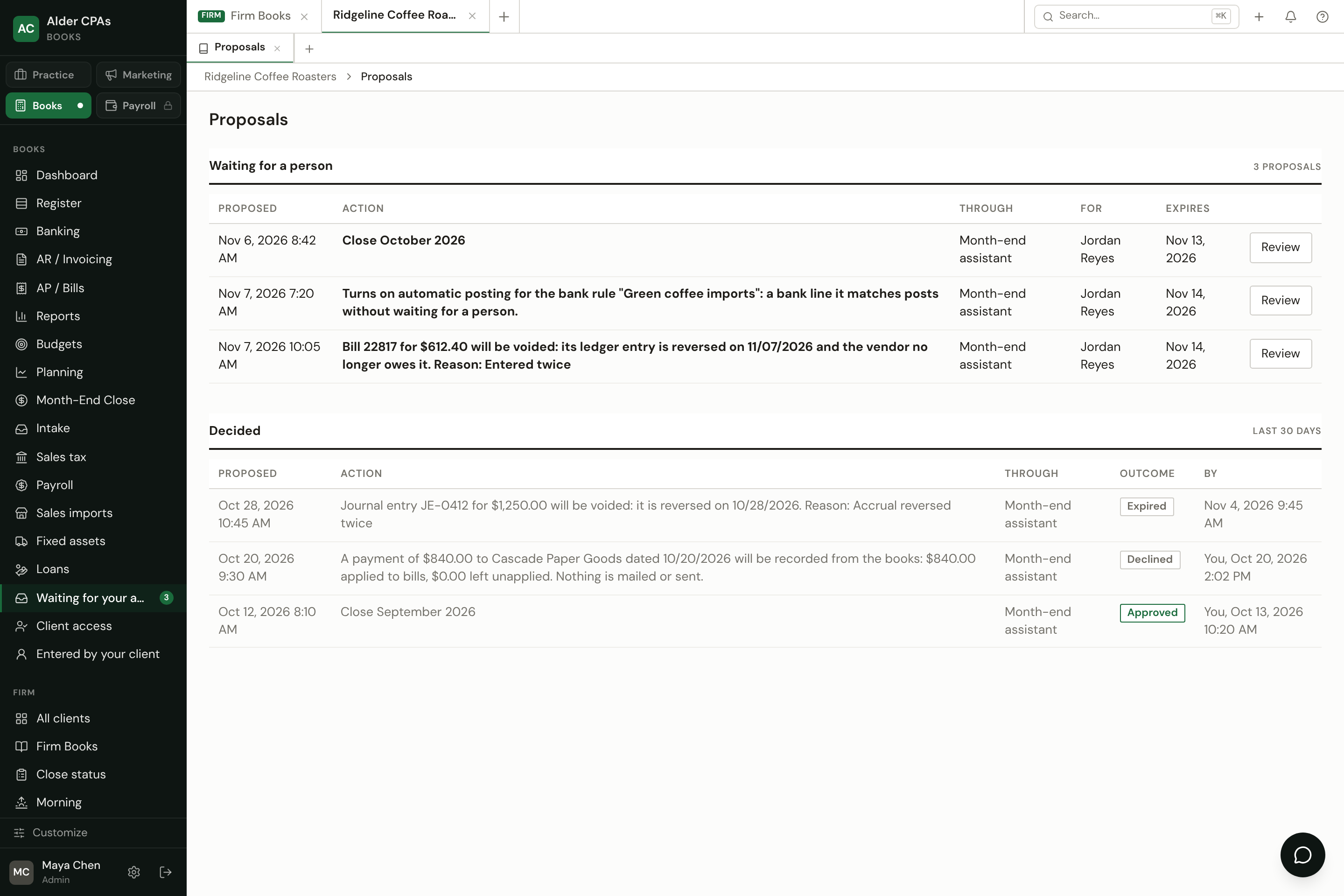 The Proposals page for Ridgeline Coffee Roasters: three proposals waiting for a person; below, one that expired, one declined and one approved
Waiting for a person lists the open proposals, the one that has waited longest first. The count beside the heading reads, for example, 3 proposals. The columns:
- Proposed — the date and time the tool asked.
- Action — what it asks for. A month-end close reads as Close October 2026; anything else reads as Books' own sentence for the action, such as Bill 22817 for $612.40 will be voided: its ledger entry is reversed on 11/07/2026 and the vendor no longer owes it. Reason: Entered twice.
- Through — the name of the API key (or connected app) that made the proposal, such as Month-end assistant.
- For — the member the key belongs to and acts for. It reads You when that is you.
- Expires — the date it expires, 7 days after it was proposed. Once that moment passes, it shows under Decided as Expired the next time the page loads.
Each row ends with Review, which opens the proposal.
Decided (last 30 days) lists what has been settled, in gray, the most recently decided first, with the same Proposed, Action and Through columns, then:
- Outcome — Approved, Declined, Expired (nobody decided it within its 7 days, or it was closed because the outside-firm access it was made through ended), or Didn't go through (approved, but the action itself was refused; see Why can't I approve this?).
- By — who decided and when, for example You, Oct 13, 2026 10:20 AM. An expired proposal usually shows only when it expired; one closed because access ended shows who ended it.
You see a proposal only if you hold every permission Books lists for its action for this client. A proposal to close a month is visible to people who can close months; one to void a bill, to people who can void.
A few actions list no permission, and anyone who can open the client's books sees those. So two people in your firm can see different lists for the same client, and an empty list means there is nothing waiting that you can decide.
Waiting proposals also show on the client's dashboard among what needs attention, as 3 proposals to review, with Open.
Review a proposal
- Click Review on the proposal. A panel opens on the right.
- Read the line under the title: Proposed Nov 6, 2026 8:42 AM by Month-end assistant, acting for Jordan Reyes.
- Compare the two columns:
- When proposed — what the action would have done when the tool asked.
- Now — what it would do if you approved it this minute. Books works this out again when you open the panel, running every check the real action runs, as you, and writing nothing. While it checks, the button reads Checking….
- Read the sentence under the columns. It says what approving does, in plain words. For a month-end close it names the consequence: Locks October 2026 for Ridgeline Coffee Roasters. Entries dated in October will be refused unless an owner or admin posts with a written reason, or October is reopened. For anything else it usually ends …as it stands now.
- Click Approve (for a close, Approve and close October) or Decline.
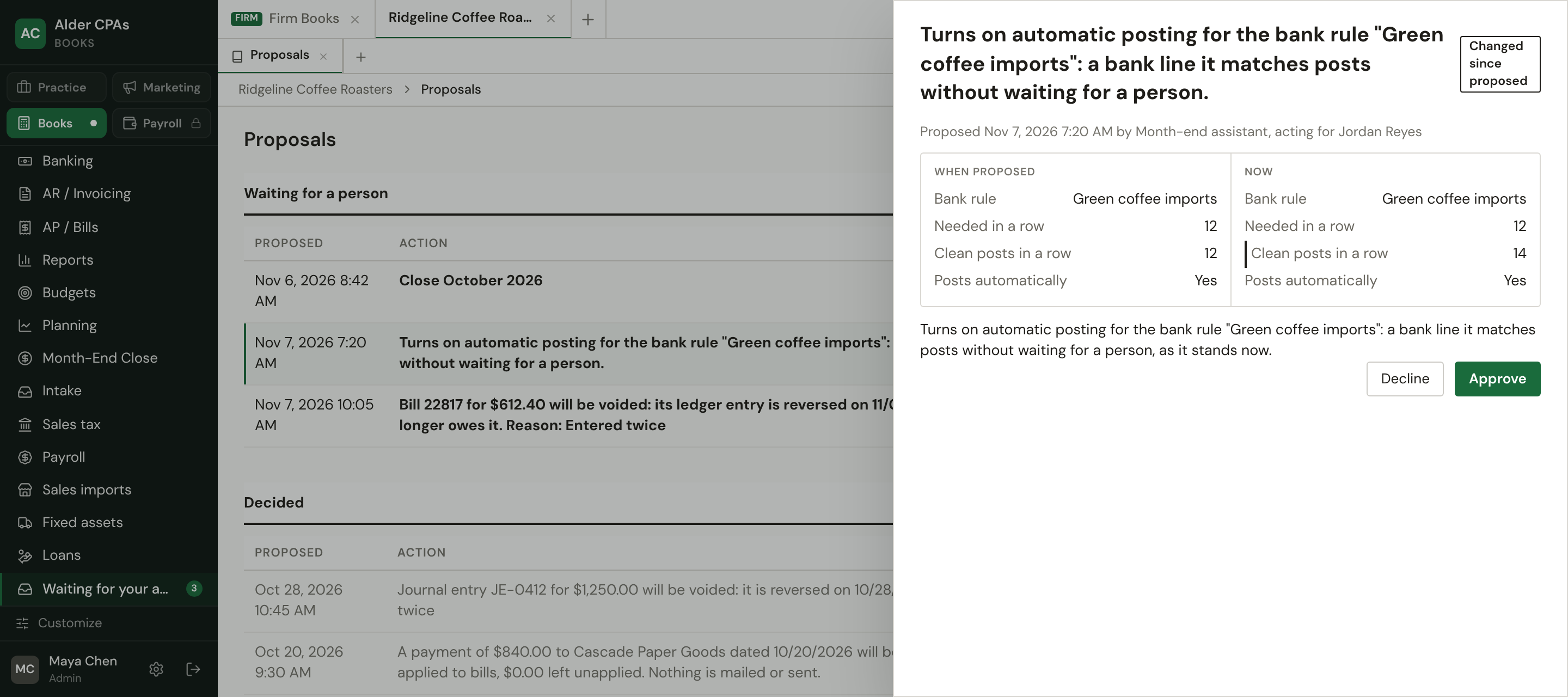 Reviewing a request to turn on automatic posting for a bank rule: the rule has two more clean posts than when the assistant asked
Changed since proposed
Books is often asked to do something a day or two before anyone looks at it, and the books move in between. When what the action would do now differs from what it would have done when proposed, the panel's title carries a Changed since proposed marker, and each line that moved is marked with a dark bar on its left in the Now column. A line that has disappeared since is listed as None.
In the example above, the assistant asked to turn on automatic posting for the Green coffee imports bank rule when the rule had 12 clean posts. Two more of its suggestions have been posted unchanged since, so Clean posts in a row reads 12 under When proposed and 14 under Now. You approve what the Now column shows, not what the tool saw.
The marker appears only when a line you can see has moved, or when the action would now be refused.
What the lines mean
For a month-end close, the lines are Period, Close (Soft close or Hard close) and Unreconciled accounts. A hard close says so in the sentence under the columns: …for good. Entries dated in October will be refused, and it cannot be reopened.
For any other action, the panel lists what the action reports about itself, field by field, in words: money as dollars, dates as dates, yes or no as Yes or No, and the main total in bold. A request to turn on automation reads, for example, Bank rule, Needed in a row, Clean posts in a row and Posts automatically.
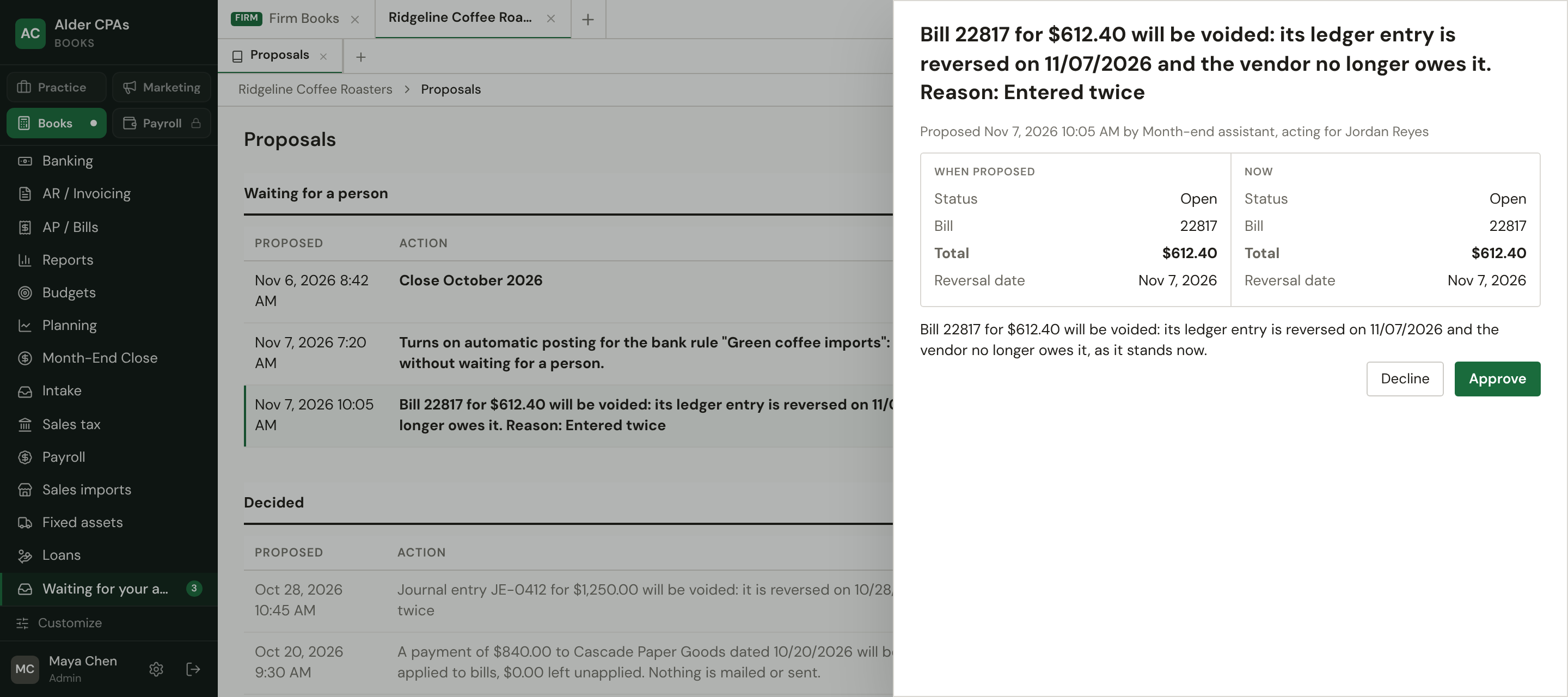 A bill void proposal, shown line by line
Approve a proposal
Click Approve. Books runs the action for real, as you, with your permissions.
The notice confirms it, for example Approved: Close October 2026, and the proposal moves to Decided as Approved, with You and the time under By.
Approving is the same as doing it yourself in Books: the same checks and the same refusals. If your connection drops and you click Approve again in the same panel, Books does the action only once.
The Waiting for your approval count in the sidebar goes down as soon as you approve or decline, and so does the count on the client's dashboard.
Decline a proposal
- In the panel, click Decline.
- Add a Reason (optional). The window says what declining does: Nothing changes in the books. Month-end assistant is told it was declined.
- Click Decline, or Keep it to go back to the panel.
The notice confirms Declined: …, and the proposal moves to Decided as Declined.
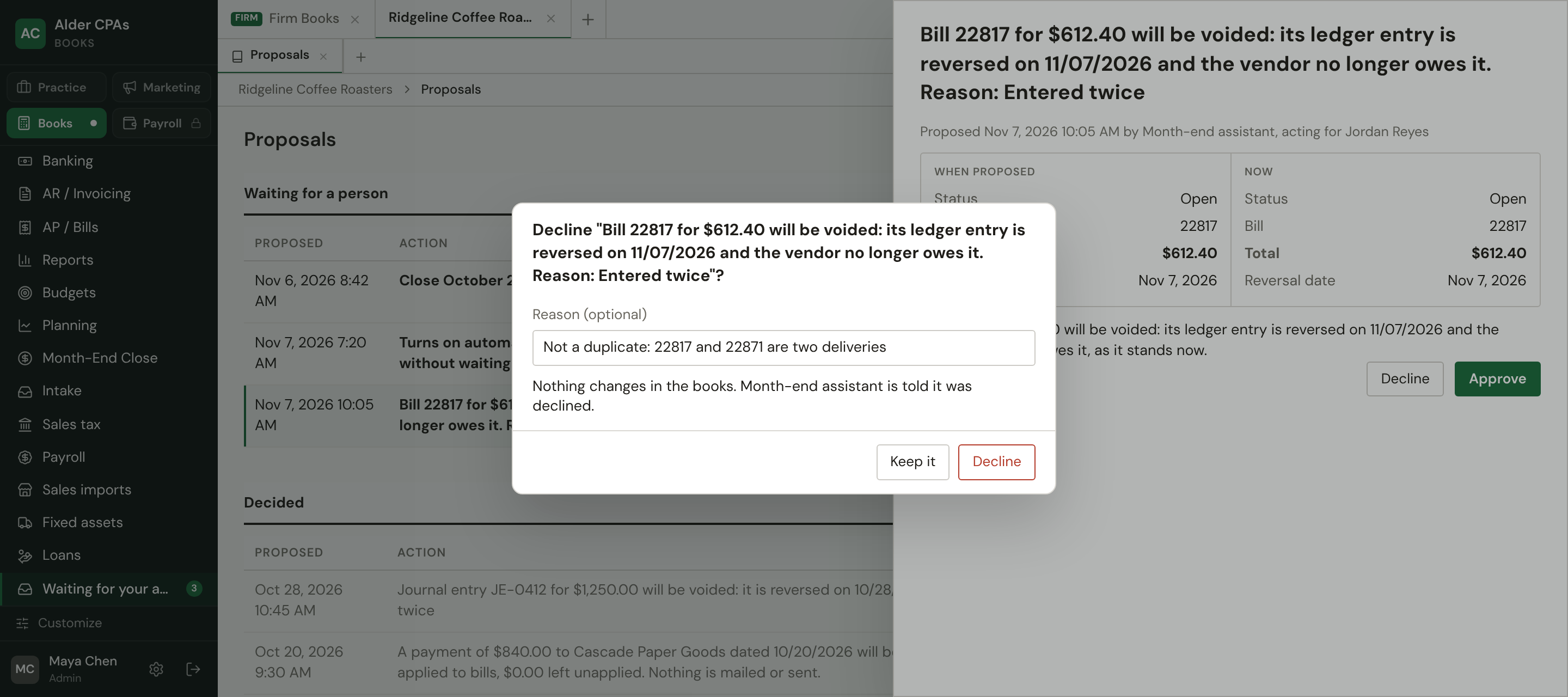 Declining the bill void, with a reason
Decline appears only when you may decline that proposal; you need the same permissions as for approving it.
What kinds of things arrive as proposals?
Anything Books will not let a key do on its own for the member it acts for. The common ones:
-
Closing or reopening a month.
-
Moving money: recording or changing bill payments, paying selected bills, refunds, applying credits.
-
Reversing or voiding: voiding an invoice, bill, payment, deposit, journal entry or expense; writing off an invoice; undoing an import.
-
Removing records: deleting an account, customer, vendor, item, job, budget or schedule.
-
Turning on automation: automatic posting for a bank rule (see How Rules and Matches Earn Automatic Posting), for a vendor's captured bills, or for payroll or sales imports; letting a vendor's receipts confirm themselves; or having Books fill in a vendor's account on captured bills.
A key can't turn any of these on by itself. Approving runs the same checks as turning it on yourself, so a rule or vendor that hasn't earned it is still refused. Turning any of them off never arrives here: a key that may make changes turns each of them off directly.
What a key can do directly, it does directly, so those actions never appear here. A key made Read only can't make proposals at all.
Why is this proposal here?
Because a tool your firm connected asked for it. Through names the key or app, and For names the member it acts for. A key can do only what its member can do, so a proposal is always something that member could have done in Books themselves.
If you don't recognize the tool, ask the member named under For. API keys are made under Settings → API keys; see API Keys and Connecting Other Tools.
Revoking a key does not withdraw what it proposed. Its proposals stay on this page for a person to decide.
Why can't I approve this?
When Approve can't be used, it is grayed out; hover it to see why. The panel's Now column shows the same reason. If something changes while the panel is open, Approve stays available, and the reason appears in red when you click it. The ones you can meet:
You need the "Lock a period" permission to approve this for this client. Ask an admin to grant it. (the name in quotes is the permission you're missing)
The action needs a permission your role doesn't have. Ask an admin, or ask someone who has it to approve. This is rare: you see only proposals whose permissions you hold, so it appears when your role changed after the page loaded.
That proposal expired. Ask for it again.
It passed its Expires time while you had it open, so it can be neither approved nor declined. Approve and Decline both say so, and the list behind the panel updates and shows it under Decided as Expired. Have the tool propose it again if it is still wanted.
That proposal was already decided.
Someone else approved or declined it while you had it open. The list behind the panel updates and shows it under Decided.
The action's own reason, such as a closed month
Approving now would be refused by the action itself, for the reason shown. Fix what it names, or decline.
Didn't go through
Rarely, an action that checked out when you opened the panel is refused when it actually runs, because something changed in the seconds between. The panel then shows the action's own reason in red, and the proposal moves to Decided marked Didn't go through. Nothing was changed in the books. Fix what the reason names and have the tool propose it again, or do it yourself in Books.
Tips
- Read the Now column, not the Action column. The Action text was written when the tool asked; Now is what will actually happen.
- Name keys after what they do. The key's name is what appears under Through, so Month-end assistant tells your team far more than Key 2.
- Decline with a reason. It is recorded with the decision.