
Ask a client about a transaction, and track their answers
Send your client a short question about bank lines only they can explain, see who has answered, remind or withdraw, and use their answer when you categorize.
On this page
Some bank lines only your client can explain: a Venmo payment to a person, a large charge from a new vendor, a deposit with no invoice behind it. Client questions is where you ask about them and keep track of the answers.
Your client gets an email from your firm with a link, answers on their phone in a minute without signing in, and the answer comes back to the bank line in your Review queue. You can also ask about an entry in the register, a bill, an invoice or a journal entry.
An answer never posts anything on its own. When the client picks a choice you tied to an account, that account is waiting on the bank line in Review, and you still click to post it. Nothing on the books changes until you act.
Understand the Client questions page
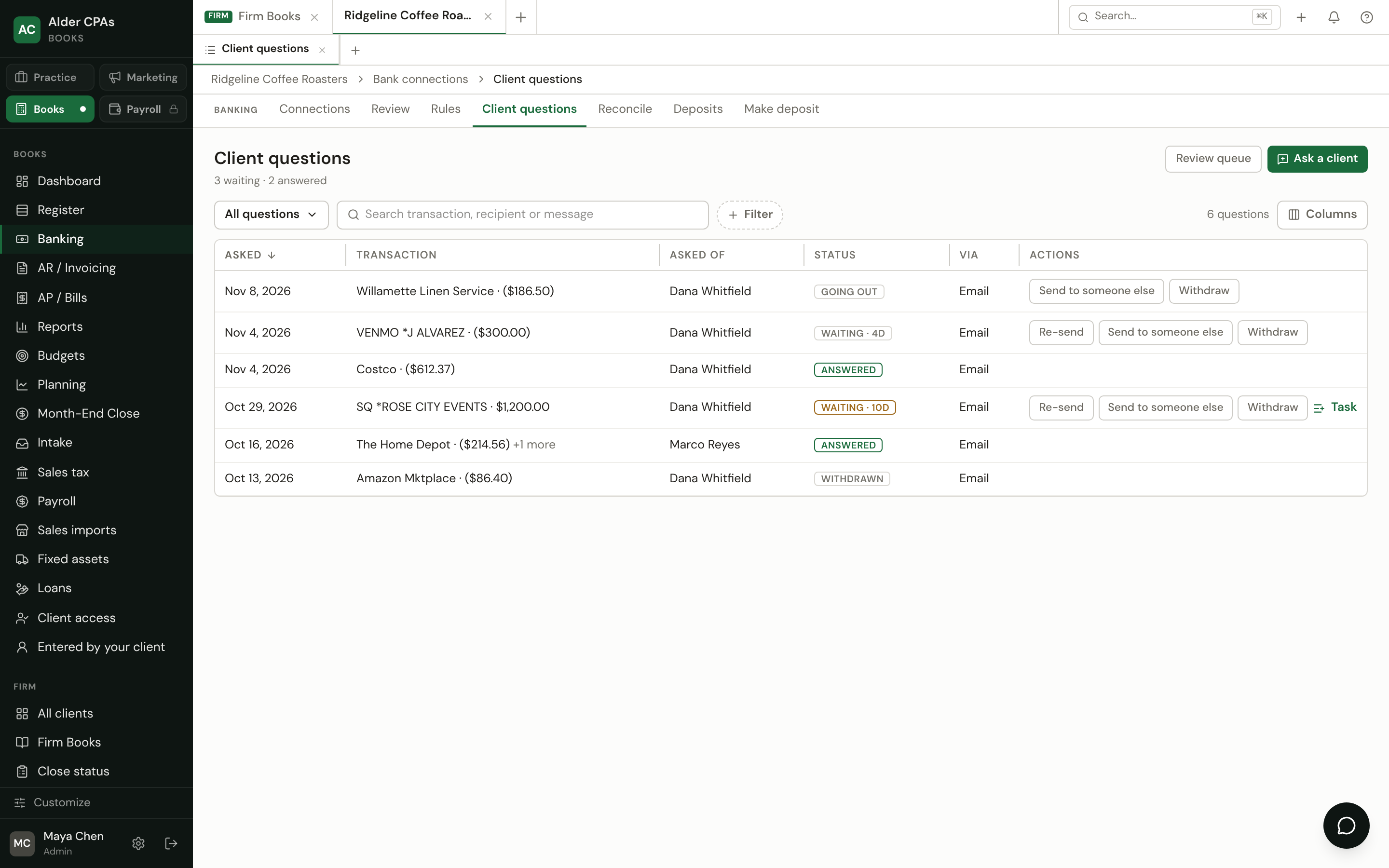
The page lists every question asked for this client, newest first. Under the title, a count tells you where things stand, for example 3 waiting · 2 answered. Questions whose email could not be sent, or that bounced, are counted separately in red as not sent.
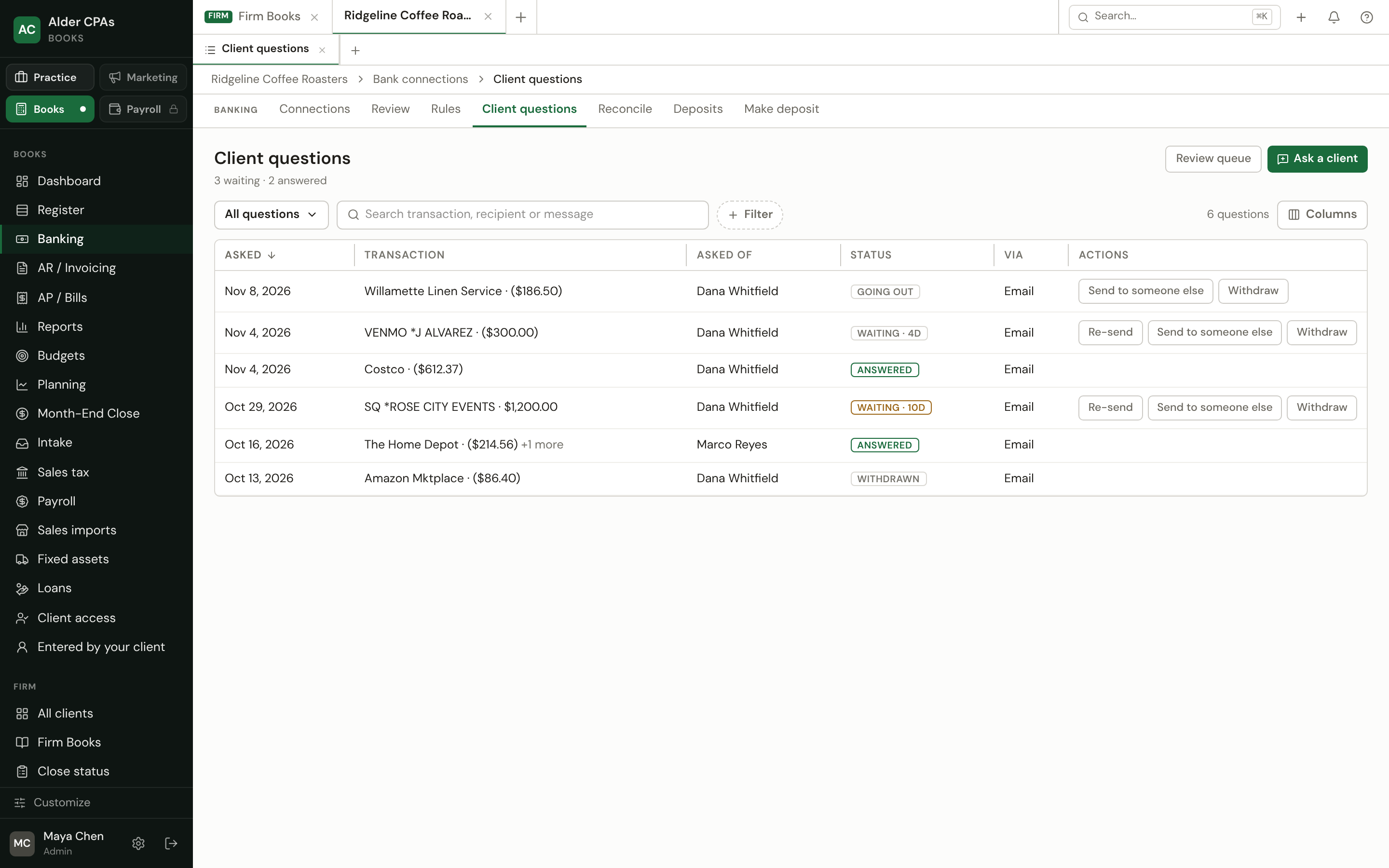 The Client questions page for Ridgeline Coffee Roasters, with questions going out, waiting, answered and withdrawn
The columns, in order:
- Asked — the day the question was sent (or created, if it has not gone out yet).
- Transaction — the bank line's payee and amount. A question about several lines shows the first one and +1 more, +2 more and so on.
- Asked of — the contact you sent it to.
- Status — where the question stands (see the statuses below).
- Via — Email.
- Actions — Re-send on a waiting question, Send to someone else on one that is going out or waiting, Review and send on a question the overnight routine drafted, and Withdraw while the client can still answer or a draft is still a draft.
An Amount column is also available; turn it on with Columns.
What each status means:
Going out
You asked a few minutes ago and the email is on its way.
Waiting · 3d
The client has the email and has not answered. The number is whole days since it was sent. At 7 days the badge turns amber.
1 of 2
Some lines of an older question have an answer and some don't (the Partly answered filter). A question asked from Books arrives fully answered, because the client sends every answer at once.
Answered
The client sent their answers.
Not sent
The email could not be sent. Hover the badge to see why.
Bounced
The email came back. Hover the badge for the address. Books won't email that address again, so Re-send is off: correct the contact's email, then withdraw the question and ask again, or use Send to someone else.
Marked as spam
The client marked the email as spam. Books won't email that address again; reach them another way.
Withdrawn
You withdrew the question. The client's link no longer works.
Drafted overnight
A question the overnight routine wrote for your review. Nothing has gone to the client. See Send a question the overnight routine drafted below.
Sent after review
An overnight draft someone reviewed and sent. The question that went out is listed as its own row.
Draft
A question that was prepared but never sent.
Use Search transaction, recipient or message to find a question by any of those, or Filter to narrow by Status (including Waiting 7+ days), Via, Asked of or Asked date.
Has my client answered?
Look at the Status column: Answered means yes. Click any row to open the question in a panel on the right:
-
To — who it went to, and their email address.
-
Your message, in quotes.
-
Each bank line: date, payee and amount. Under it, the answer, starting with how it came in: Dana Whitfield’s secure link · answered Nov 5, 2026 when it was sent from the emailed link, then the choice they picked in quotes, any words they typed in italics, and the name of any receipt they attached, with a paperclip.
An answer recorded before Books kept track of how answers arrive reads Answered and the date, without saying how it came in.
-
If the client sent a file Books couldn't keep, it is named under the answer with the reason, for example 1 file the client sent wasn’t kept: shelf-quote.pdf (the file did not finish uploading).
-
A withdrawn question says so at the bottom.
-
A line with no answer yet reads Not answered yet. Choices offered: followed by each choice and the account it is tied to, for example “Café supplies” → 6800 · Café Supplies.
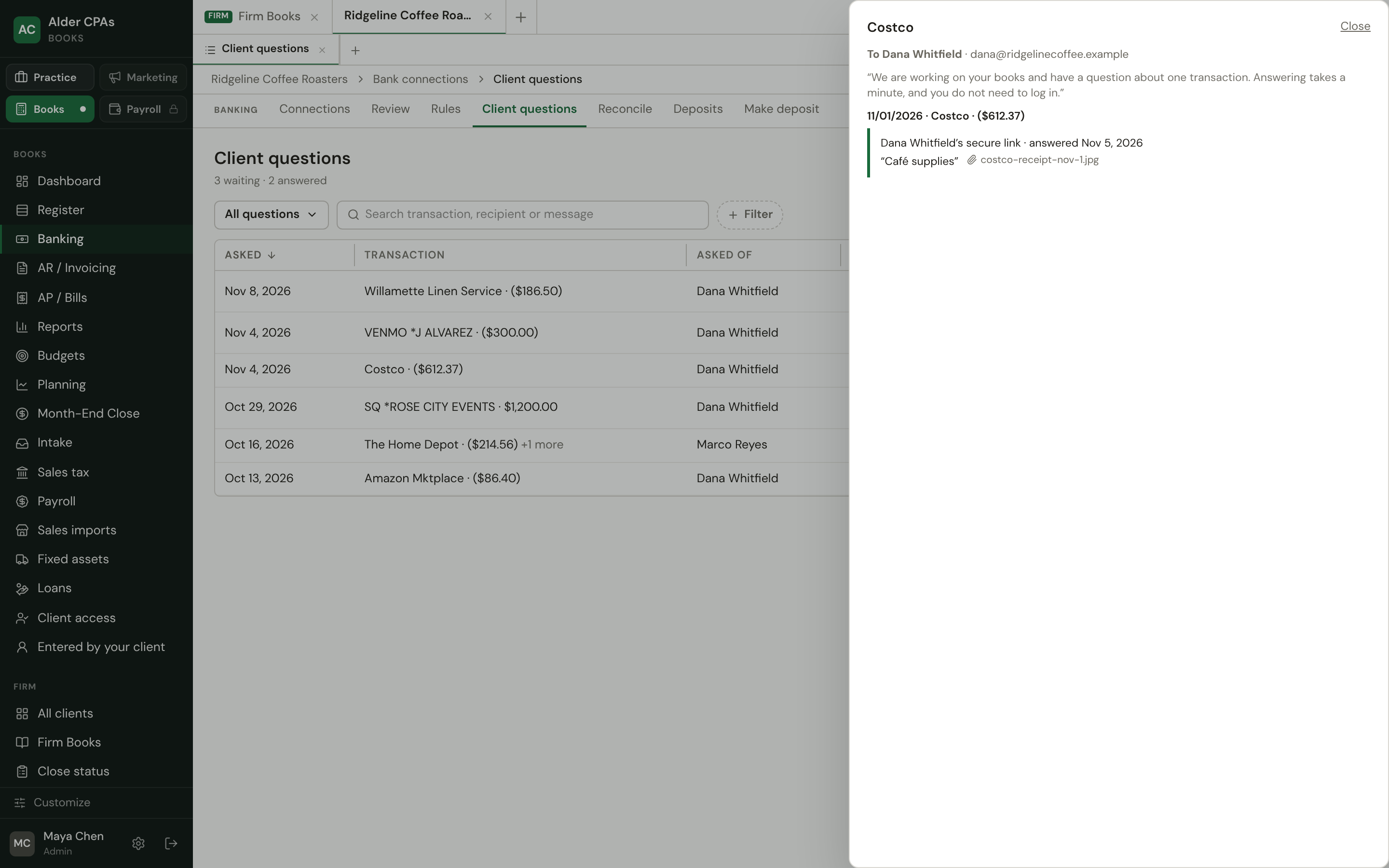 An answered question opened: the link sent to Dana Whitfield was used, with her choice and the receipt she attached
The answer panel is careful about who answered. An answer sent from the emailed link names the link, not the person, because whoever holds the link can answer. Press Esc or click Close to go back to the list.
You don't have to keep checking. When every line of a question has an answer, Books notifies the people assigned to that client (owner, reviewer, partner, manager, bookkeeper or preparer, or the firm's owners and admins if no one is assigned), each by their own notification settings: Ridgeline Coffee Roasters answered your questions. The notification opens this page.
Ask about a transaction
You can ask from two places. Both open the same window and send the same email.
From the Review queue, when you are looking at one line: open the line's ⋯ menu and choose Ask client…. See Reviewing Bank Transactions for the queue itself.
From Client questions, when you want to ask about several lines at once:
- Click Ask a client.
- Check the bank lines to ask about. The list shows the client's lines that are waiting for review, newest first, with date, payee, bank account and amount. One question can hold up to 20 lines.
- Click Continue.
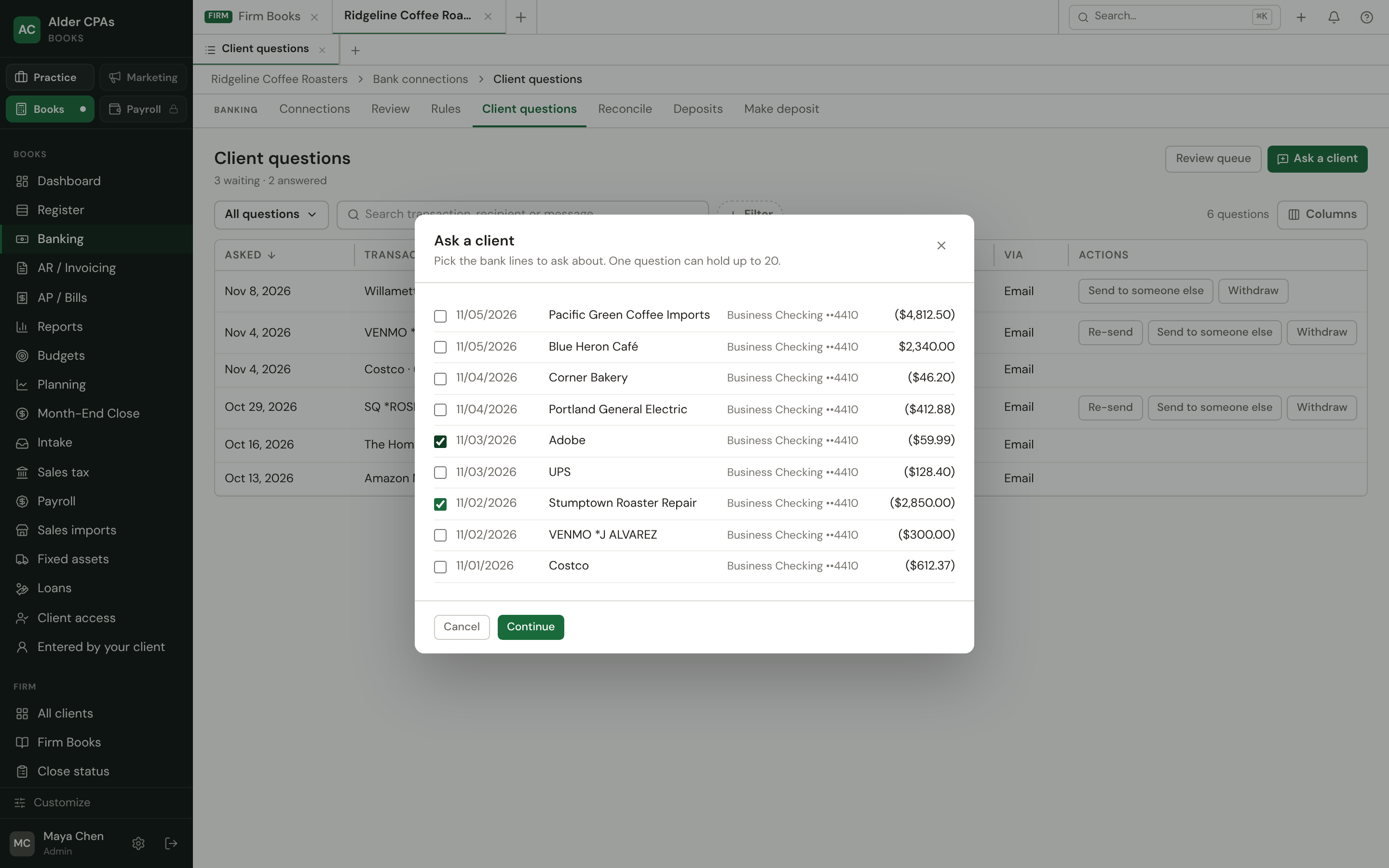 Picking two bank lines to ask about
Then fill in the question:
- To — pick the contact. The list holds the client's contacts that have an email address, with the primary contact first and already chosen.
- Answer by — the date you would like an answer. It starts 7 days out. The client sees it on their answer page, and reminders mention it.
- Message — the short note that opens the email.
- For each line, write the Question and choose How can Dana answer?:
- Pick an account — the client chooses from a few plain-language choices you write. Next to each choice, pick the account it posts to, or Not business. Use Add a choice for more, up to 6.
- Yes or no
- Written answer
- Send a file — the client uploads a document as the answer.
- Click Send question (or Send 2 questions, and so on).
With several lines, the window first shows them as a list with Date, Payee, Answer type and Amount. Uncheck a line to leave it out, and click Review each question to write each question and its choices.
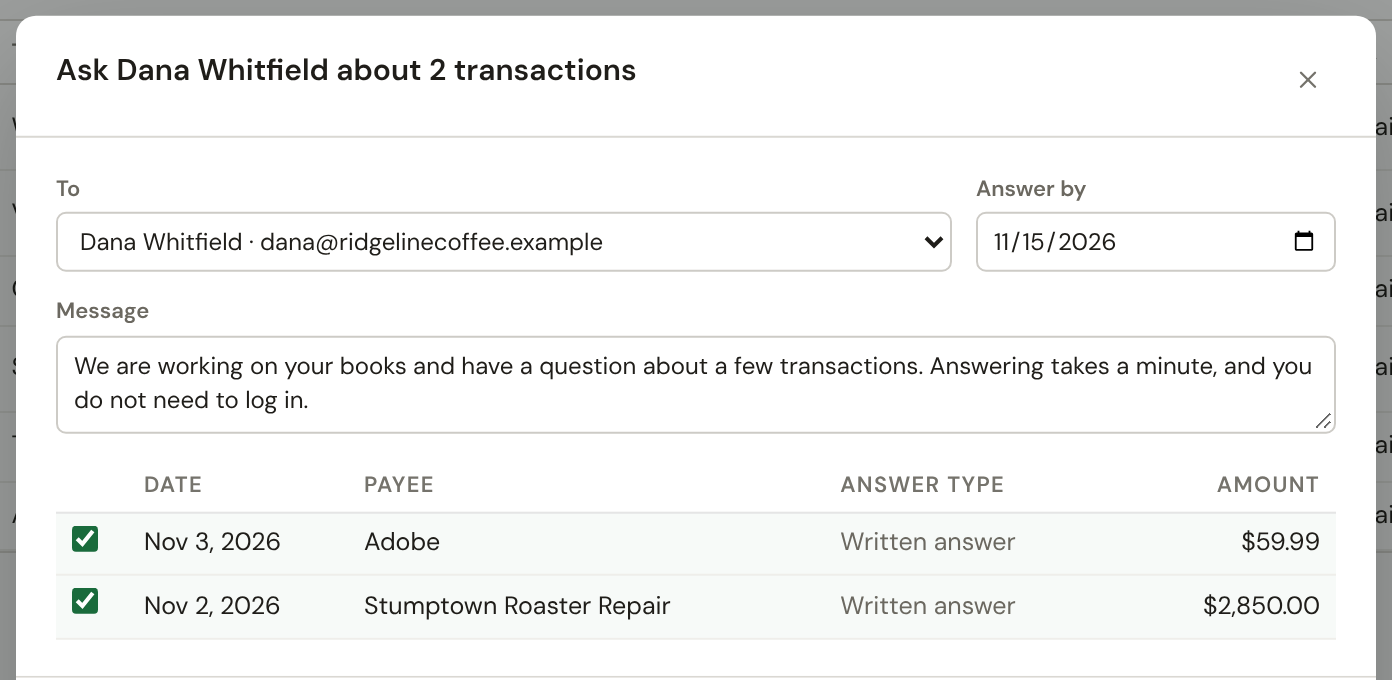 The ask window for two lines, before reviewing each question
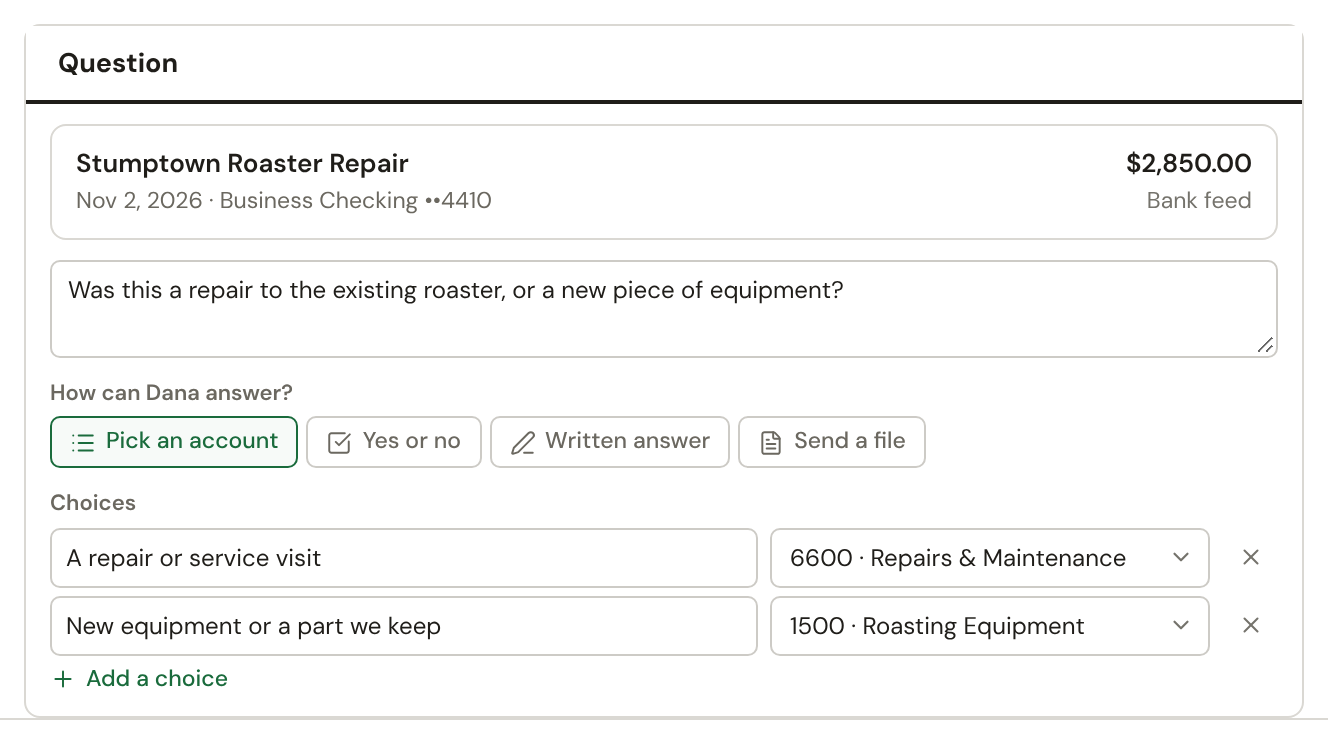 One question set to Pick an account, with two choices tied to accounts
The client sees only the words of each choice. The client never sees account numbers or your list of accounts: the account behind a choice is yours, and it is what Books puts on the bank line when the client picks that choice. Their page names only the line's current category.
Books checks the question as you write it. A moment after each change, Books runs the same checks the real send runs. If something is wrong, the reason appears in the window and Send question stays off until it is fixed, so you find out before you send, not after.
When AI is available to your firm, the Message and each Question may start as a draft written from the transaction, marked Drafted, and the draft may also suggest how the client answers and the choices. Hover the mark to see how many AI actions it used.
Edit freely; the mark goes away once you change the words. Otherwise they start with plain wording: We are working on your books and have a question about one transaction. Answering takes a minute, and you do not need to log in. and What was this for?.
Once sent, the window closes and Books says Asked. The email goes out within a few minutes, and the question is listed below. The question appears on Client questions as Going out, then Waiting once the email has gone.
In the Review queue, the bank line shows Asked, with the number of days after the first day, and Ask client… is turned off for that line while the question is open (once it is answered, you can ask a follow-up): A question is already open on this line. A second link to the same person about the same charge is confusing — re-send it from the question log.
Ask about an entry, a bill or an invoice
Questions aren't only for bank lines waiting in Review. You can ask about something already on the books:
- In the register, open a posted entry's row menu and choose Ask the client.
- On a bill (once saved) or an invoice, click Ask the client among the actions at the top of the page. A draft doesn't offer it, and on a void bill or invoice it is off (a void bill says This bill is void, so there is nothing to ask about.). On a journal entry, it is with the buttons under the lines.
The same window opens for that one transaction, and the client gets the same email. Afterward the entry carries a small badge, Asked, Not sent or Answered (hover it for when, and whether the email went), and opening it shows a Client question section:
- while it waits, the question, who it went to and when, the date you asked for an answer, and Withdraw (it asks Withdraw this question? first, and says Dana Whitfield's link stops working and the reminders stop. They see the question as withdrawn.);
- once answered, Dana Whitfield · answered with the time, the choice they picked and their own words.
The section always has Open in Client questions, which opens this page with the client's whole list. (With Practice, it has Open conversation instead: see If you also use Practice.)
In the register, when the client picked a choice you tied to an account, the section offers Recategorize to that account, so their answer becomes the entry's category in one click. If the entry was already handled before the answer arrived (recategorized by hand, voided, or the bill or invoice edited after you asked), it says This answer arrived after the transaction was handled, so nothing was changed. and doesn't offer Recategorize to.
Send a question the overnight routine drafted
If an owner has turned on the overnight routine in Settings → AI, Books may write a draft question during the night for a client on Premium, while AI reads is on, about bank lines AI could not place. It never sends one: a person reviews it here first. Morning lists the clients with a draft, and its Review draft button opens this page.
-
Find the question marked Drafted overnight. Hover it: Drafted by the overnight routine. Nothing is sent until you review and send it.
-
Click Review and send.
-
The ask window opens, titled for example Review the question drafted overnight for Dana Whitfield, with the routine's message and the lines it asks about. With more than one line, click Review each question to see and edit each question and any choices it tied to accounts.
To starts on the contact the routine addressed, while that person is still a contact with an email address. Edit anything, as you would a question you wrote.
-
Click Send question (or Send 2 questions, and so on). Books checks it first, the same way it checks any question.
Books says Sent. The email goes out within a few minutes, and the question is listed below. The question that went out is a new row, Going out and then Waiting, and works like any other question. The draft stays on the list as Sent after review. Review and send needs the same permission as Ask a client.
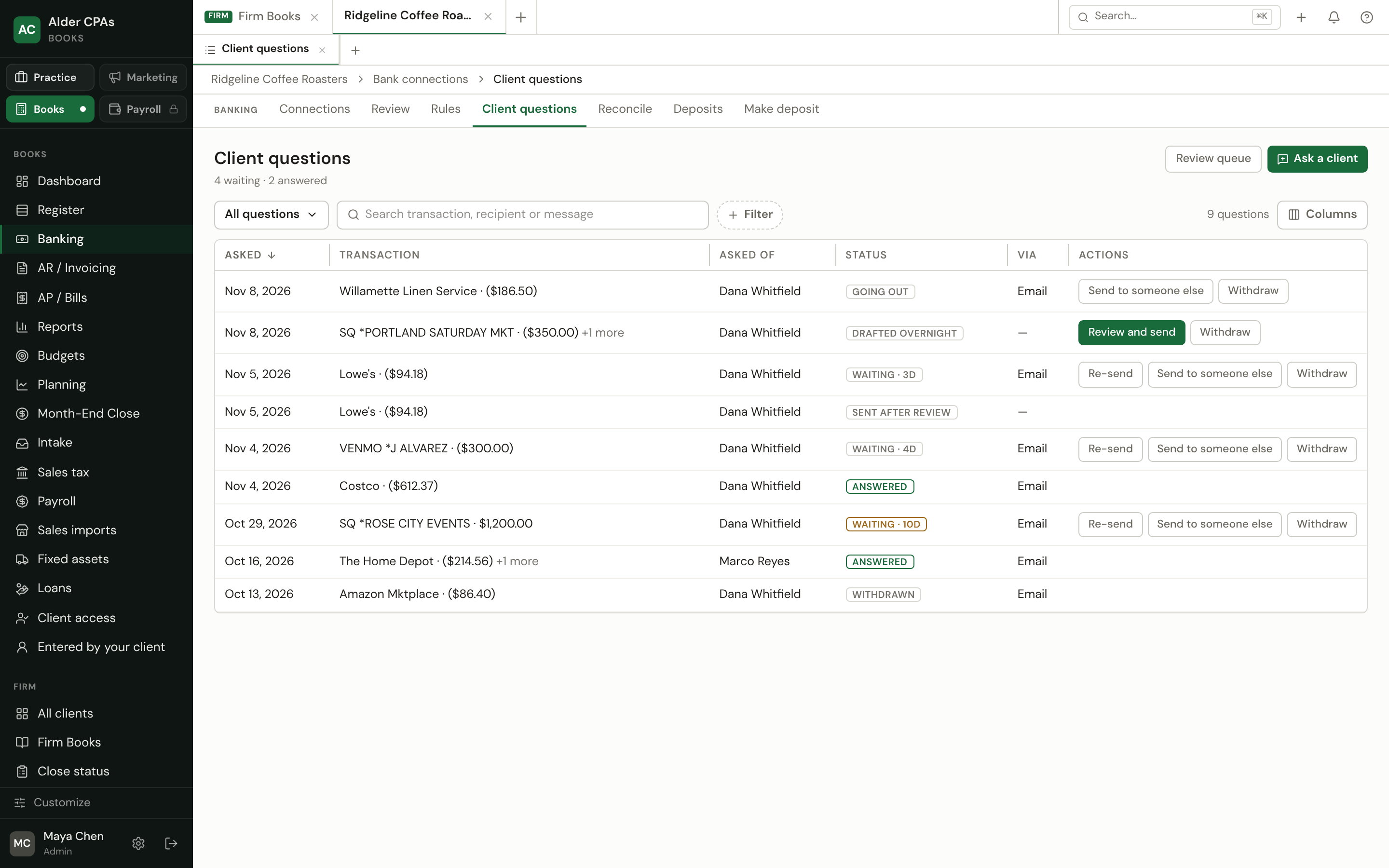 A question the overnight routine drafted, with Review and send, beside an earlier draft marked Sent after review and the question it became
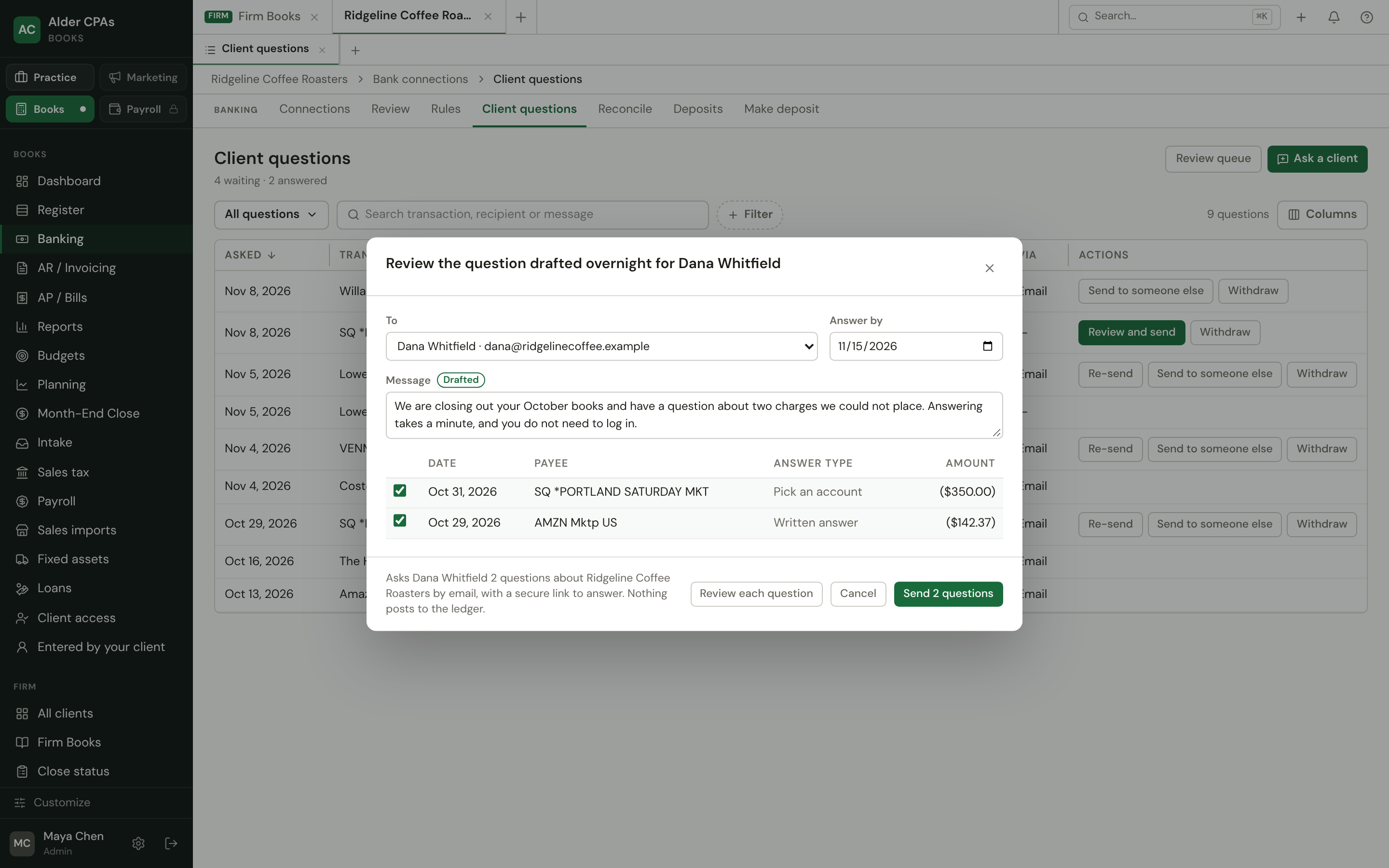 Reviewing the overnight draft for Dana Whitfield before it is sent
To drop a draft instead, click Withdraw. Books says The question was withdrawn, and its link no longer works. and the draft moves to Withdrawn. Nothing was ever sent to the client.
What your client sees, and how they answer
Your client gets an email from your firm. The subject is your firm's name and the question's title, such as Alder CPAs: 2 questions about your transactions (or A question about a transaction for one line). Your Message opens the email, and the Answer the questions button opens an answer page under your firm's name. No sign-in and no account are needed: the link is the key.
On the page, which fits a phone screen:
- At the top, your firm's name and the due date (Due Nov 15, 2026), the title, your message, and a progress bar (2 of 2 answered · saved).
- For each line, a card with the payee, amount and date. It also says which category the line is in right now, for example Now in Repairs & Maintenance: the posted category, or Books' suggestion for a line not yet posted. No account numbers are shown.
- Your question, and the way to answer you chose: a list of your choices (with Something else — I'll explain at the end, which opens In your own words), Yes and No buttons, a box for a written answer, or a place to upload the file.
- Under every question except a file request: Add a receipt or invoice (optional). The page takes what Books can keep: PDF or photo (JPEG, PNG, WebP or HEIC) · up to 10 MB each, and it turns away any other file before it uploads. A file request takes the same kinds of file.
Each pick is saved as soon as the client makes it, and typed words are saved when they leave the box, so they can stop and come back to the same link. Send answers sends everything to you.
If an answer is missing, the page says A few questions still need an answer — they're marked below. and marks each one This one needs an answer. Once sent, the page reads Thank you — your answers are with Alder CPAs., and the answers can't be changed from the link.
The link lasts 45 days. A withdrawn question, or a link that has expired, opens a page that says This link is no longer available and asks the client to contact whoever shared it.
How the answer reaches the bank line
The answers arrive in Books when the client clicks Send answers, all together. Picks the client made but did not send yet stay on their page.
What Books records for each line:
| The client… | Books shows |
|---|---|
| picked one of your choices | the choice's words (and, in Review, the account you tied it to) |
| chose Something else — I'll explain | their own words |
| answered a Yes or no question | Yes or No |
| uploaded a file as the answer | Sent a file: and the file name |
| attached a receipt or invoice | the file name, beside the answer |
A receipt or invoice the client sends is attached to the question in Books and listed with the answer. If a file couldn't be kept (it didn't finish uploading, or it isn't a PDF or photo up to 10 MB), the question's panel names it and says why, so nothing goes missing quietly.
Back in the Review queue, the line's Asked marker becomes Answered. Hover it to read the answer word for word, with how it came in: The link sent to Dana Whitfield was answered 11/05/2026: “Café supplies”. Attached: costco-receipt-nov-1.jpg. If the client picked a choice tied to an account, the line's category switches to that account with a C chip, and Add posts it.
If you had already posted, matched or excluded the line before the answer arrived, the answer is kept as a note on the record and nothing is suggested for posting again: This arrived after the line was already handled — it is a note on the record, not something to post again.
Remind your client
Click Re-send on a waiting question. Books says A reminder goes out by email within a few minutes, with a fresh link.
Your client gets a reminder email, Reminder — Alder CPAs: 2 questions about your transactions, that reads Alder CPAs is still waiting on a few answers from you by November 15. It only takes a minute — no login needed. Each reminder carries a fresh link. Links from earlier emails keep working until they expire.
Remind automatically
An owner can have Books send reminders for the firm's clients. In Settings → AI, with the Overnight routine on, turn on Remind clients about unanswered questions and confirm. Anyone else can't change the switch; it says Only an owner can change this.
During the overnight routine, Books re-sends questions that are still waiting: up to 2 reminders per question, a set number of days apart (the setting shows how many), from your firm's address.
Reminders you send yourself count toward the 2. If the client stops these reminders from the link in the email, the question's panel shows Unsubscribed by <address> on <date> under who it went to (or Couldn't check who unsubscribed. with Retry if Books couldn't read it).
Send a question to someone else
If you asked the wrong person, or the email bounced, you don't have to start over. On a question that is going out or waiting, click Send to someone else. If its email is still on its way, Books says An email for this question is still going out. Wait for it before sending the question to someone else. Try again in a few minutes.
- Under Who should answer it?, pick another contact with an email address.
- Under Why does it go to them?, say why. The reason is kept with the question's history.
- Books checks the change and says what will happen, for example Dana Whitfield’s link stops working, and Marco Reyes (marco@ridgelinecoffee.example) is emailed the question with their own link.
- Click Send to Marco Reyes.
Books says The question now waits on Marco Reyes. An email with their own link goes out within a few minutes. The person it was sent to first can no longer open or answer it.
Withdraw a question
Click Withdraw on a question that is going out or waiting. Books says The question was withdrawn; no reminder follows it. It moves to Withdrawn, no more reminders follow it, and the client's link stops working.
To ask again, withdraw it and ask a new question.
Why can't I…
…click Ask a client? The button is off and says why:
- There are no bank lines waiting for review, so there is nothing to ask about yet. Questions are about lines in the Review queue. Bring in the client's bank activity first.
- This client has no contacts on file to ask. Add one on the client's record first.
…send the question? Send question stays off until Books accepts the question, and the reason is shown in the window:
- This client has no contact with an email address, so there is no one to send the question to. Add an email to a contact first. The To list reads No contact with an email address, and an Add a contact link takes you to where the client's contacts are kept.
- A pick-an-account question needs at least one choice. Add a choice or ask for a written answer.
- Two choices on one question have the same words, so the answer could not tell them apart. Reword one.
- A choice with no account: Choice 1.1 resolves to nothing — map it to an account or mark it not-business. Pick an account for it, or Not business.
- Asking needs the Post journal and register entries permission on the client. Without it, Ask a client is off and says You need the "Post journal and register entries" permission for this. Ask an admin to grant it.
Questions also have limits: a message of up to 2,000 characters, each question up to 400, each choice up to 60 characters, up to 6 choices, and up to 20 lines per question.
…re-send a question? Re-send appears only on a waiting question. It is off when the email bounced or was marked as spam (hover it for why). If the last email for it is still on its way, Books says An email for this question is still going out. Wait for it before sending a reminder. Try again in a few minutes. Re-sending and Send to someone else need the same permission as asking.
…withdraw a question? A question can be withdrawn by anyone who may ask this client questions, or by the member who asked it. Anyone else sees Withdraw off with Only a member who can ask this client questions, or the member who asked this one, can withdraw it.
…ask about a line in Review? If a question about that line is still open, Ask client… is turned off. Re-send the open question from Client questions instead. Once it is answered, you can ask again.
…ask about an entry in the register? Ask the client is off when the entry isn't posted (Only a posted entry can be asked about. Post it first.), when it already has a question waiting (This transaction already has a question waiting on the client. Withdraw it first to ask again.), or when no contact has an email address (No client contact has an email address.).
…find Client questions on my own books? When the books are your own business's, there is no client to ask, and the page takes you to Review.
If you also use Practice
With Practice, each question you ask from Books also appears on the client's page in Practice, so your whole team sees it next to everything else you have asked them:
-
The client's page. The Questions card on the client's Overview lists their requests, including the ones asked from Books: Questions · 2 waiting, each with Sent Nov 7 · due Nov 15 · 0 of 2 answered and Waiting, Answered or Canceled. Answers show right on the card.
-
A thread per question. Click one to open the Question request drawer: each question with its answer, and a Thread where your message and the client's answers sit. Write in Reply to the client in this request's thread to follow up without leaving the question. Copy link gives you a fresh link to send another way (earlier links keep working), and Withdraw this request withdraws it in Books too.
-
One conversation. When the client's portal is on, the question is also posted to the client's conversation in Practice, so whoever picks up the client next can see what was asked and when.
-
A signed-in portal. A client who signs in to your portal sees how many questions they have to answer on their home page (for example 2 questions to answer) and can answer there, signed in.
Books then knows who answered: the panel reads Dana Whitfield, signed in · answered Nov 5, 2026, and the Review hover Dana Whitfield answered 11/05/2026, signed in: …. A question asked from Books is shown only to the person it was sent to, not to everyone with access to that client's portal.
-
The conversation, one click away. On an entry's Client question section, Open conversation opens the client's thread in Practice. (Without Practice, the same place offers Open in Client questions.)
-
A task for the overdue ones. On a question waiting 7 days or more, a Task button appears in Books. It creates a Practice task titled Follow up with Dana Whitfield on an unanswered question, linked to the question, already filled in. Press Enter to create it.
-
Contacts in one place. The Add a contact link in the ask window opens the client's page in Practice, where contacts are kept for every product.
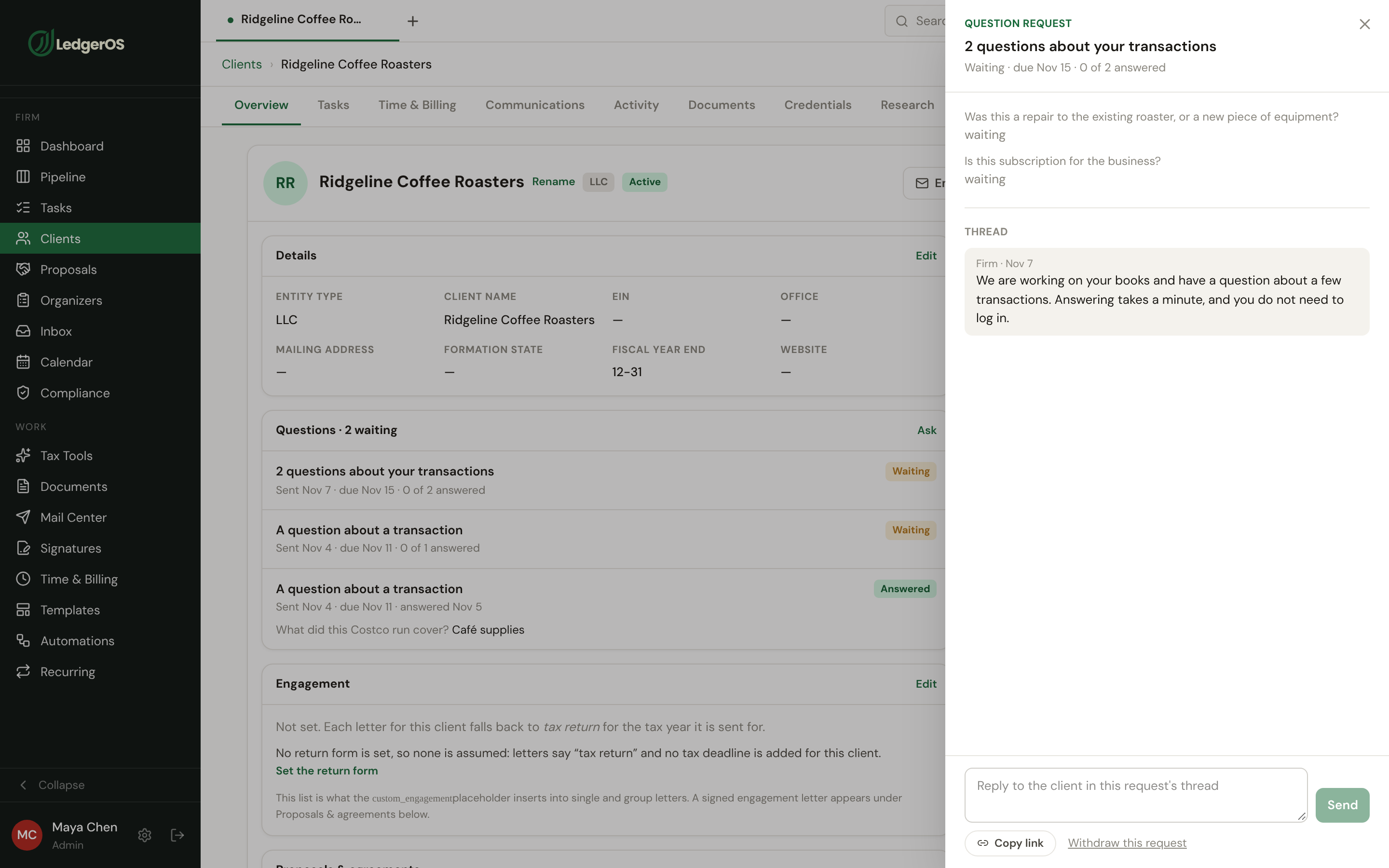 A question asked from Books, open on Ridgeline Coffee Roasters' page in Practice
 With Practice, a Task button on a question waiting 7 days or more
Shortcuts and tips
- Ask about everything at once. One question can carry up to 20 lines, so at month end pick every unclear line from Ask a client and send one email instead of a dozen.
- Make choices do the posting. Write two or three choices in your client's words ("A repair or service visit", "New equipment or a part we keep") and tie each to an account. When the answer comes back, the line is already categorized for you to confirm.
- Esc closes the question panel or the ask window. If a list is open inside the window, such as the account picker, Esc closes just the list.
- Shift-click a column header to sort by a second column as well. With a column header focused, Alt+← and Alt+→ make that column narrower or wider.
- Filter Status → Waiting 7+ days before your weekly check-in to see who to nudge.