
How Books Earns Trust Before It Automates Anything
The one pattern behind Books' learned automation: it suggests, counts how often you accept, offers, and only then runs on its own, with a marker, a list of what it did and a way to undo it.
On this page
Books does a lot of work for you, but where it learns to do something for you (categorizing bank lines, matching payments, reading bills and receipts), it never starts out doing it on its own.
Each of these follows the same path: it suggests, it counts how often a person accepts the suggestion without changing it, it offers to take over once that count is high enough, and only after someone accepts the offer does it act on its own. When it does, you can see exactly what it did and take any of it back. A correction starts the count over.
This article explains that pattern and where you'll meet it. The details of each place are in the articles linked below. (Some automation is a setting you choose directly rather than something Books earns, such as a scheduled entry set to post automatically. Those are covered in their own articles.)
Earning trust never turns anything on by itself. Reaching the count only makes Books offer. Someone with the right permission turns it on, and Books checks the count again at that moment, so a stale screen can't turn on something that hasn't earned it. Turning automation off is never blocked by the count or your plan.
Only a person turns automation on. A tool your firm connected to Books with an API key can't turn any of it on. When a tool asks to turn on automatic posting for a rule, a vendor's bills, payroll or sales imports, receipts that confirm themselves or a filled-in account, Books checks the request as it would for you; if it passes, Books keeps it for a person in your firm to approve, and nothing changes until someone does.
If it doesn't pass, the tool is refused with the reason. A tool's request to turn on automatic bank matches is refused: a person turns those on in Books. Turning automation off is different: a tool whose key may make changes can turn off automatic posting for a rule, a vendor's bills, or payroll or sales imports, automatic bank matches, a vendor's receipts that confirm themselves, and a filled-in account, directly, without waiting for approval, just as you can.
The four steps
| Step | What happens | What you see |
|---|---|---|
| 1. Suggest | Books proposes an answer and waits. Nothing posts. | A suggested category, a proposed match, an account on a bill line. |
| 2. Count | Each time a person accepts the suggestion unchanged, the count goes up (for bank matches, a match Books confirmed on its own counts too). A correction starts it over. | A counter, such as 4/12 on a rule, or 3 of 5 receipts matched in a row with no change. |
| 3. Offer | At the threshold, Books offers to do it for you. You can accept or leave it. | Turn on, Turn on auto-post, Enable or Fill it in. |
| 4. On its own | Books acts without waiting, but checks every item again first. Anything that fails a check waits for you, with the reason. | An Auto or Filled marker, a list of what it did, and Undo. |
Three rules hold everywhere:
- Only accepted suggestions count. Accepting a suggestion as it was is what earns trust. For bank matches, a match Books confirmed on its own also counts. Changing it is a correction, and a correction resets the count to zero. For captured bills, receipts and filled-in accounts, a correction also turns the automation off until someone turns it on again.
- It's checked every time, not once. Turning automation on doesn't switch off Books' checks. Each item is checked again before it posts (the period is open, the plan still includes it, the item looks like the ones that earned the trust), and anything that fails waits in review with the reason.
- What it did is never hidden. Every automatic action carries a marker, appears in a list you can review, and can be taken back. Undoing an automatic action counts as a correction.
Where Books earns trust
| Where | What it suggests | What earns it | Offered at | Plan |
|---|---|---|---|---|
| Bank rules (Banking → Rules) | A category for matching bank lines | A person posting the rule's suggestion with its category unchanged | 12 clean posts | Automatic posting needs Premium |
| Bank matches (per bank account) | A match to an entry already on the books | Confirming the match Books proposed | 25 clean confirms | Premium |
| Captured bills (per vendor) | The bill read from an uploaded or emailed document | Posting a captured bill from that vendor exactly as read | 5 in a row | Premium |
| Account on a bill line (per vendor and account) | The expense account for a line | Keeping the suggested account on a captured bill | 3 in a row | Any plan |
| Receipts (per vendor) | A match between a receipt and a card line | Confirming the proposed match with no change | 5 in a row | Premium |
| Payroll imports (per payroll provider) | An imported payroll run, ready to post | Imports from that provider that posted clean | 3 in a row | Premium |
| Sales imports (per point-of-sale system) | An imported sales report, ready to post | Imports from that system that a person posted with no warning | 3 in a row | Premium |
Suggestions in the Review queue
Every bank line in Banking → Review starts as a suggestion: a category from a rule (R), from the payee's history (H), from the bank's own category (B), or a suggested category (S), or a proposed match to something already on the books. Nothing posts or matches until you click Add, Match or Confirm (or Post in the line's editor), unless a rule or the bank account has earned automatic posting and you turned it on. See Reviewing Bank Transactions.
Bank rules and bank matches
A bank rule earns automatic posting one clean post at a time. At 12, its Auto-post column on Banking → Rules shows Turn on. A bank account earns automatic matching the same way, at 25 clean confirms.
Both are covered in detail, with every check Books makes before it posts, in How Rules and Matches Earn Automatic Posting. Creating and ordering rules is in Bank Rules.
Captured bills, per vendor
When a bill is read from a document, it waits in the bills inbox for a person to check it. Each time someone posts a captured bill from a vendor exactly as it was read, the vendor's count goes up.
A bill whose vendor, number, date, lines or total had to be changed starts the count over. So does finding a bill wrong after it was posted from capture: voiding it, changing its vendor or total, or changing the account or amount on one of its lines.
The count lives on the vendor's Settings tab, under Automatic posting:
- While earning: 2 of 5 bills in a row from the Bill inbox have come through exactly as read. A bill whose vendor, number, date, lines or total had to be changed restarts the count.
- When earned: Northwest Dairy Supply: the last 5 bills read from the Bill inbox came through exactly as read. Turn on auto-post? with Turn on auto-post.
- When on: Auto-post is on. A bill from Northwest Dairy Supply in the Bill inbox posts itself only when every check passes; anything else waits in review with the reason. with the number posted automatically so far, and Auto-post is on — turn off.
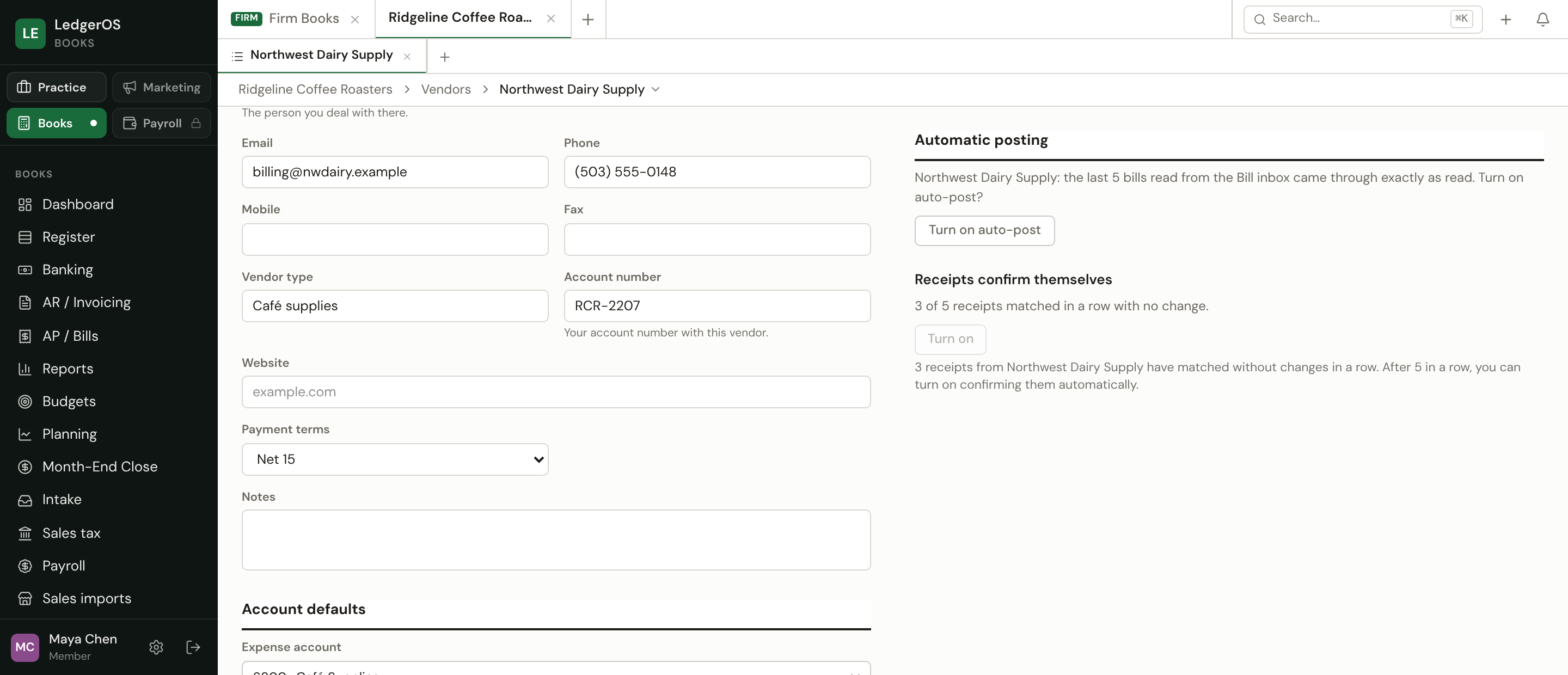 A vendor's Settings tab: captured bills have earned automatic posting, and receipts are 3 of 5 on the way
Even with auto-post on, a captured bill posts itself only when every check passes, including: the vendor on the bill matches one of your vendors exactly, its lines add up to its total, it isn't a duplicate of a bill already entered, its date isn't in a closed period, and it looks like this vendor's usual bills. Anything else waits in the inbox, and the reason is shown when you open it for review, such as This bill does not look like this vendor's usual.
When it turns itself off. If someone voids a bill that posted itself, changes its vendor, date or total, or changes the account or amount on one of its lines, auto-post turns off for that vendor and the count starts over.
The vendor page says so: Auto-post turned itself off on Nov 5, 2026: bill RCL-2291 needed a correction, so the count restarted from zero. Bills from Rose City Linen in the Bill inbox wait in review until the run is clean again.
Turning on auto-post needs permission to manage the client's bills and vendors. When Turn on auto-post is grayed out, the line under it says why, for example Auto-post becomes available after 2 more clean bills in a row. or Restore this vendor before turning on auto-post.
The account on a bill line: Fill it in
When Books reads a captured bill, it suggests an expense account for each line. Each time a person keeps the suggested account for a vendor, Books counts it, and the line shows the count: 1 of 3 used as suggested.
After 3 in a row, the line offers to fill the account in for you: Bills from Northwest Dairy Supply have kept 6800 · Café Supplies each time. Fill it in for you from now on? It never posts on its own. Choose Fill it in, or Keep suggesting.
Filling in an account is not posting. Each filled line still goes to review, or to the vendor's own auto-post if that vendor has earned it. If someone changes a filled-in account on a later bill, the fill stops and the line reads Changed on an earlier bill; counting again from 0.
Receipts that confirm themselves
When a receipt matches a card line, Books proposes the match and you confirm it. Each match from a vendor confirmed with no change counts toward letting that vendor's receipts confirm themselves. The vendor's Settings tab shows the count under Receipts confirm themselves, and after 5 in a row offers Turn on.
Once you turn it on, a receipt from that vendor that matches a card line for the same amount, to the cent, posted on the receipt's date or up to 5 days after, is confirmed and the line posted to the receipt's accounts without a person. Matches that include a tip still wait for you. Each one shows on Posted automatically, with Undo.
Books looks for these matches when a receipt is saved without a card line chosen, when someone who can manage bills opens Posted automatically, and on its own once a day, so a receipt saved before its card line arrived doesn't have to wait for someone to look.
Each receipt it confirms is confirmed on behalf of the person who turned the vendor's receipts on. If that person is no longer active in your firm, or the client is no longer on Premium, the receipt waits for a person instead.
Matching a receipt to a different line than the one proposed is a correction: the count goes back to zero and, if the vendor's receipts were confirming themselves, that stops.
See what ran on its own
Each place has its own list, so you can check what Books did without searching for it.
- Bank lines: Banking → Connections, under Bank automation · last 7 days, with View all for the last 30 days. See How Rules and Matches Earn Automatic Posting.
- Bills, filled-in lines and receipts: the card at the top of AP / Bills says what happened since you last looked, for example 2 bills posted automatically since you last looked. Its review link opens Posted automatically.
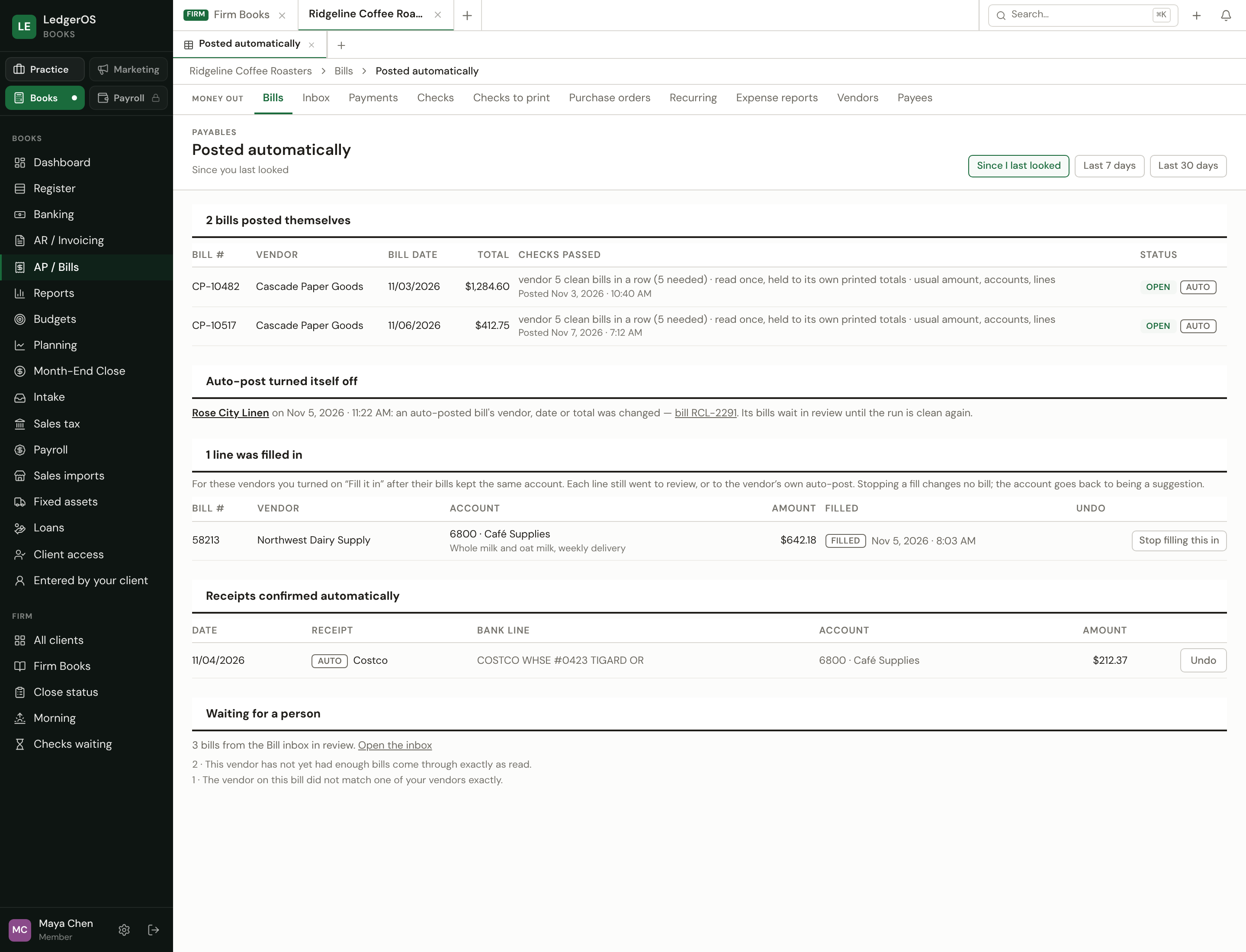 Posted automatically: two bills that posted themselves, a vendor whose auto-post turned itself off, a filled-in line and a receipt that confirmed itself
Posted automatically shows, for the period you pick (Since I last looked, Last 7 days or Last 30 days):
- The bills that posted themselves (the heading reads, for example, 2 bills posted themselves) — each bill with its vendor, date and total, the checks it passed, under Checks passed (for example vendor 5 clean bills in a row (5 needed)), when it posted, and an Auto marker.
- Auto-post turned itself off — each vendor whose auto-post stopped, when, why and on which bill. Its bills wait in review until the run is clean again.
- Clean run toward auto-post started over — each vendor whose auto-post wasn't on but whose count of clean bills was set back to zero by a correction, when, why and on which bill. Its count of clean bills starts again from zero.
- The lines that were filled in (for example, 1 line was filled in) — each filled line with its bill, vendor, account and amount, marked Filled.
- Receipts confirmed automatically — each receipt with its card line, account and amount, marked Auto.
- Waiting for a person — how many captured bills are in review, and why the ones that didn't post themselves stopped.
Undo what it did
A bank line a rule posted, or a match Books confirmed
Undo in the bank automation list. See Undo an automatic post.
A bill that posted itself
Open the bill and void it, or correct it. Either one turns auto-post off for that vendor and starts its count over.
A filled-in account
Stop filling this in on Posted automatically or on the bill line. The account goes back to being a suggestion; no bill changes.
A receipt that confirmed itself
Undo on Posted automatically. The window names what happens: Unposts the $212.37 Costco card line from 6800 · Café Supplies and returns the receipt to unmatched. Costco receipts stop confirming themselves, and the streak starts again from 0. Click Undo the match.
Turn it off
Turning automation off never needs it to be earned and is never blocked by your plan:
- A rule: its ⋯ menu → Turn off automatic posting.
- A bank account's matches: Turn off on its card in the bank feed settings.
- A vendor's bills: Auto-post is on — turn off on the vendor's Settings tab.
- A vendor's receipts: On — turn off under Receipts confirm themselves.
- A filled-in account: Stop filling this in.
What was already posted stays posted; turning automation off only stops what comes next.
When the plan changes
Automatic posting by rules, automatic bank matches, bills from the Bill inbox that post themselves, payroll and sales imports that post on arrival, and receipts that confirm themselves are part of Premium.
If a client leaves Premium, rules, bank matches, bills from the Bill inbox and receipts stop acting on their own and the work waits for a person, with the reason shown, for example Automatic posting is a premium feature. The counts are kept, so nothing has to be earned again when the client is back on Premium. Rule, history and bank-category suggestions, the counts themselves, and filling in accounts work on every plan.
Tips
- Read the counter before you're offered. Every place shows its count while it earns, so an offer never comes as a surprise, and a count that keeps resetting tells you the suggestion isn't reliable yet.
- Make suggestions narrow. A rule or vendor that always means the same thing earns trust quickly. One that covers several kinds of spending keeps getting corrected.
- Check Posted automatically each week. It is the short list of everything Books did without you, with Undo beside what can be taken back.
- A correction is information, not a failure. When you change a suggestion, the count starts over, so Books earns that trust again before it acts on its own.