
The Audit Log and Integrity Alerts
Find out who changed what and when in the audit log, search inside what each change did, and read, snooze or acknowledge an integrity alert when Books finds the ledger disagreeing with itself.
On this page
Books writes down every posting, edit, void, close, setting change and integrity event as it happens, with who did it and when. The Audit log is where you read that record back: for one client, or for every client in your firm at once. Integrity alerts are the other half: checks that the documents and the ledger still agree, and the alerts Books raises when they do not.
A client's audit log opens on This client only. Click All clients to see the same period across your whole firm. Both choices are kept in the page address, so a link you share opens the same view.
Understand the audit log
The log is a list of events, newest first. Its columns, in order:
Timestamp
When the event happened, in your firm's time zone, or the client's own zone when you're looking at one client that has one.
Event
What happened, in a few words: Posted, Reversed, Period closed, Period reopened, Setup done and so on.
User
Who did it. A change made through an API key reads "<key name>, acting for <member>", so you can tell a connected tool from a person and know whose behalf it acted on. A change nobody made by hand reads System, or the name of the service that made it.
Client
Which client the event belongs to, or — for a firm-level event.
Entity
Which record: the period's month, the customer's name, the account, followed by its kind. Only when nothing names the record do you see a short id.
Details
The reason the person gave, when there is one; otherwise a short sentence naming the event and the record it happened to. A change to a role's permissions names the permission the way Settings → Roles does: Permission granted on Role: Staff · Lock a period.
IP
The address the change came from, where Books recorded one.
Above the list are the period chips: Last 7 days, Last 30 days (the default) and Custom range, which opens two date boxes. The period is counted in calendar days in your firm's time zone, or the client's own zone when you're looking at one client that has one.
Anything done in a closed month under an override stands out, so you can find every one: the override itself reads Closed-month override, and a void or an edit made under one reads Voided (override) or Edited (override).
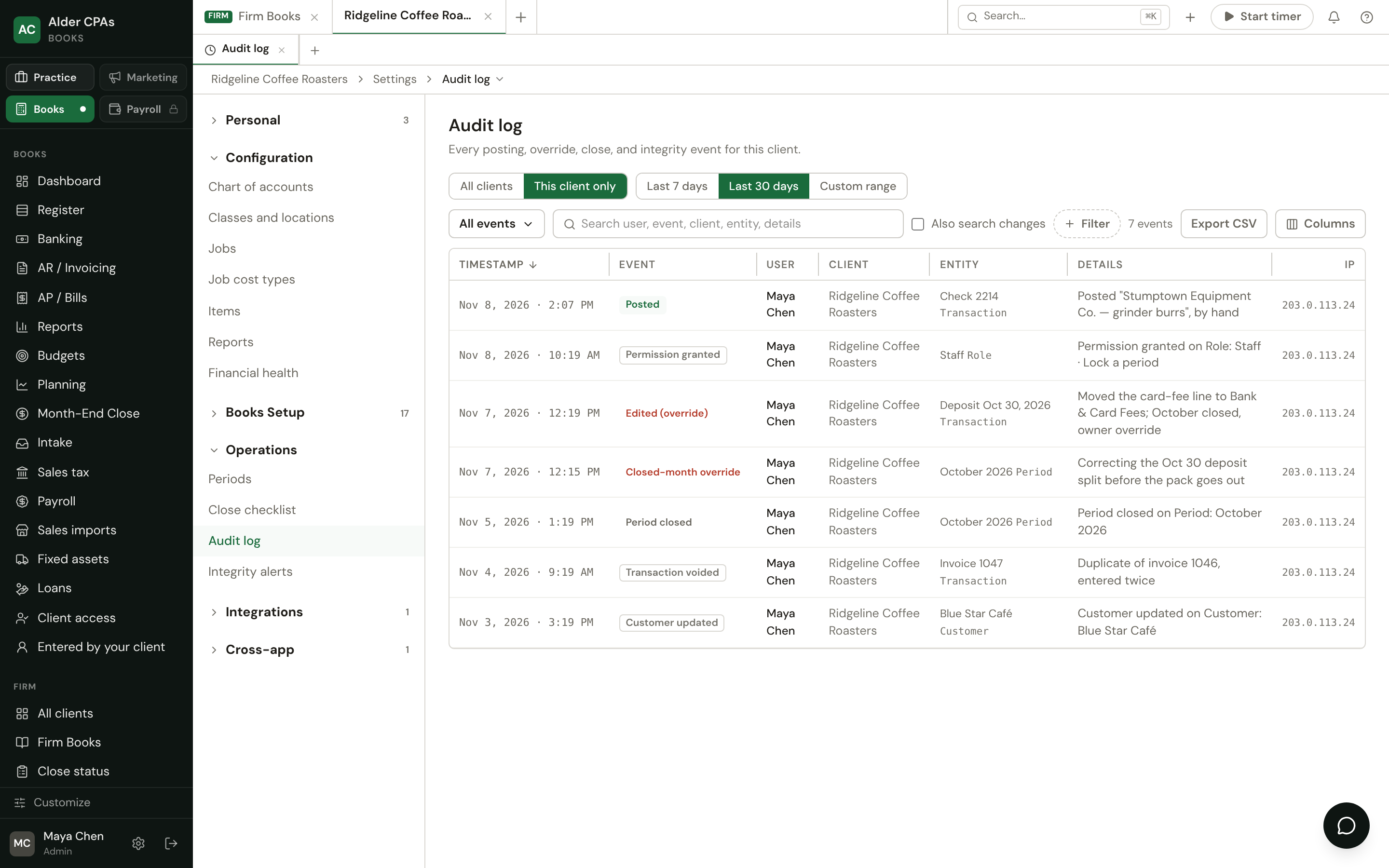 The audit log for Ridgeline Coffee Roasters over the last 30 days: a posting, a permission granted to the Staff role, an edit and a closed-month override in October, the October close, a void and a customer update
Find who changed something
- Open Settings → Audit log for the client (or your firm's settings for everyone).
- Pick the period, or choose Custom range and enter the two dates.
- Type in Search user, event, client, entity, details. Every word you type must appear somewhere in the event, so
Maya voidfinds Maya Chen's voids. - Narrow further with the Event, User, Client, Entity and Date filters. Their menus offer only what the chosen period actually holds.
- Click any row to open the Audit event panel.
The search and filters run against every event in the period, not just the rows already on screen, so a match you haven't scrolled to is still found. Export CSV downloads every event your search and filters keep, in the columns shown, not just the page you can see.
Search inside what each change did
Turn on Also search changes to look inside the before-and-after of every event, not just its own fields. Search for an old amount, a memo, or a customer's former email address, and Books finds the edit that changed it. A row found that way says · found in the change.
It is slower, so it is off when you open the page, unless the link you followed had it on. If it runs long, Books says Searching inside what each event changed. with a Search without changes button.
If it runs out of time, it says so plainly (The search inside changes took too long and was stopped.) with Retry and Search without changes, and never shows the period as having no events. Narrowing the period is the quickest fix.
Read one event in full
The Audit event panel shows the event's Summary, its Event type (the exact name Books recorded), the Entity, the IP address, a Log ID you can quote to your team, and the Reason if one was given. Below that are Before state, After state and Diff: exactly what the record looked like before and after, as Books stored it.
For a reclassification (lines moved to another account in bulk), the panel offers Move them back…, which opens the reclassify tool on that batch so you can undo it.
One account's history
Every account in the chart of accounts has its own Audit tab, the same log narrowed to that account. Open the account from the chart of accounts and pick Audit.
Understand integrity alerts
Books runs checks that the documents and the ledger agree: every invoice, bill and payment has its posting, the receivables and payables control accounts equal what the documents say is still open, the bank lines agree with the register, and the reconciliations still follow on from each other. When a check fails, Books opens an alert.
An alert is either a Warning or Critical:
-
A warning leaves posting alone. Its banner says "Warning · postings still allowed".
-
Only the trial-balance check pauses posting, and it does so the moment it finds debits and credits that don't match. From then until someone acknowledges the alert, or the next check finds the books balanced, Books refuses new postings to that client and edits to its posted entries.
Other clients carry on normally, and everyone can still read the books. A person trying to post sees Posting is paused for these books while an integrity alert is open. Clear the alert to post again. Other critical alerts never pause anything.
Where you see an alert depends on how serious it is:
- A critical or pausing alert shows everywhere in your firm, on every client's pages and your firm pages, so nobody misses it.
- A warning shows only on its own client's pages (a firm-level warning, on your firm pages).
- The alert chip appears only for the people who can act on it: your firm's owner and admins. Everyone else still sees the count on the Settings gear.
The Integrity alerts page lists the client's Open alerts: each one's level, whether it is open, snoozed or acknowledged, when it was found, its likely cause, and by how much it is off.
A critical integrity-check alert that hasn't paused posting reads Critical · postings still allowed.
Books runs the receivables, payables and bank-feed checks, and the balance checks, again every 15 minutes. When the figures agree again, the alert clears itself. When Books can't name a likely cause for a balance difference that hasn't paused posting, the banner says: Books checks again every 15 minutes, and the alert clears itself once the figures agree.
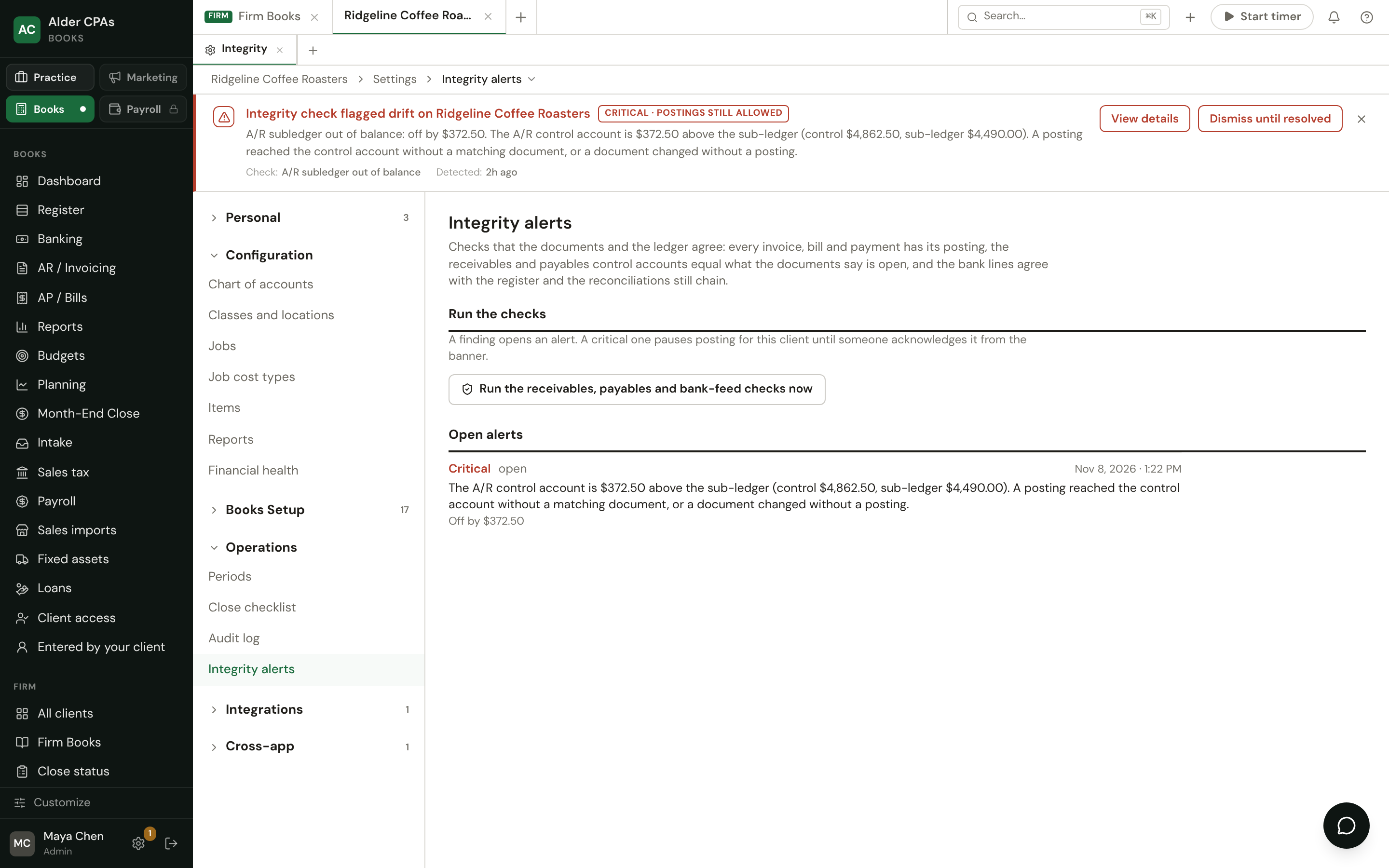 A critical A/R subledger alert on Ridgeline Coffee Roasters, off by $372.50, with its banner above the Integrity alerts page
Run the checks now
You don't have to wait for the next scheduled check.
- Open Settings → Integrity alerts.
- Click Run the receivables, payables and bank-feed checks now.
- Books answers line by line: Receivables, Payables and Bank feeds, each with nothing found or how many findings, how many new alerts that opened, and how many earlier ones have resolved since the last check. If a control account is not set up, the line ends — the control account is not mapped.
Running the checks can open a new critical alert. These three checks never pause posting, even though the line above the button says a critical alert does. Only the trial-balance check pauses posting, and it runs with the scheduled checks every 15 minutes, not from this button.
Open, snooze or acknowledge an alert
Click the alert's banner or chip to open its panel. It shows the Check, the Severity, the Client, and for a control-account check the Control balance, the Subledger sum and the Drift between them (the trial-balance check shows Drift only); then when it was First detected, and on a paused alert, Postings paused at. Below that are a Timeline, and the Likely cause where Books can tell.
Snooze 24 hours hides the banner until the same time tomorrow and changes nothing about posting. The toast tells you when it returns.
Once posting is paused, snoozing isn't offered: Postings have been paused since Nov 8, 2026 · 1:09 PM, so this alert can’t be snoozed. Acknowledge it with a note instead. Snoozing is for your firm's owner and admins, on a firm-level alert as much as on a client's.
Acknowledge closes the alert. It needs a Root-cause note of at least 10 characters: under the box, Books counts what you've typed and, while the note is too short, says how many more it needs (4 more characters required). The note is permanent: it goes on the alert and into the audit log as the reason, and the alert is marked acknowledged.
Two kinds of alert are not about your books, and ask for no note. A failure of LedgerOS's overnight routine says This is a failure of LedgerOS’s overnight routine, not a problem in your books, so acknowledging it needs no note. The audit log records who acknowledged it and when. An alert about a step on our side asks nothing at all: Nothing is needed from your firm. This step is on our side, and the alert clears on its own once it is done.
What the button says depends on the alert:
- Once posting is paused, it reads Acknowledge and resume postings, and the toast confirms Postings to Ridgeline Coffee Roasters have resumed.
- On any alert that hasn't paused posting, it reads Acknowledge, and the toast says The alert is resolved and recorded in the audit log. Nothing was paused, so nothing has to resume.
You can acknowledge a balance difference without fixing it. The difference stays in the books, and that check won't raise it again until it clears and comes back. Fix the cause first when you can.
The Timeline shows the moments the alert itself records, each with its date and time: when the check found the difference (A/R subledger out of balance detected · +$372.50 difference), and, on a paused alert, the pause: New postings to Ridgeline Coffee Roasters paused.
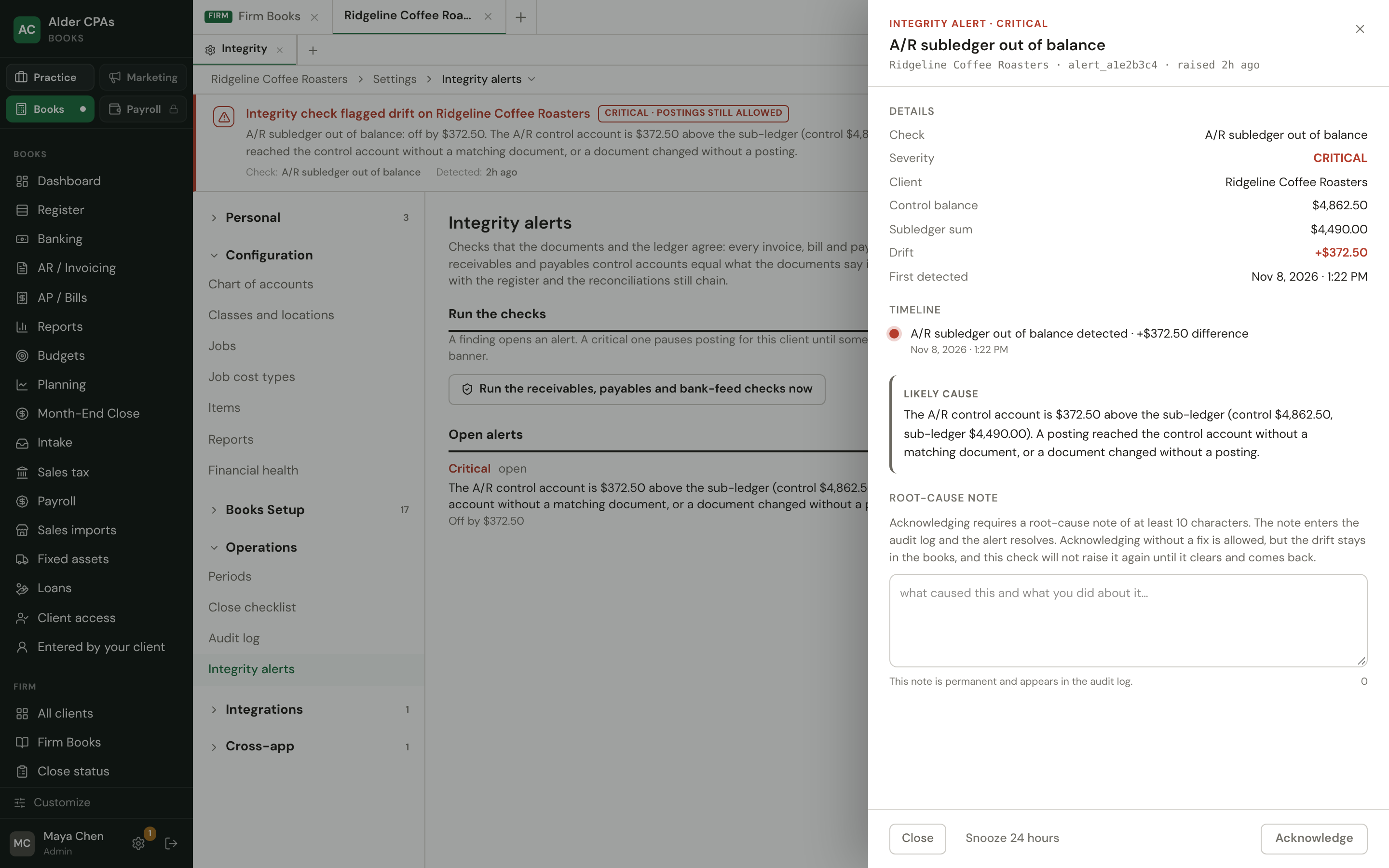 The panel for the A/R subledger alert: control balance $4,862.50, subledger sum $4,490.00, drift +$372.50, and a timeline showing when it was found
The panel's small heading tells you where the alert stands: Integrity alert · Critical or · Warning while posting isn't paused, · Paused once it is.
When posting is paused
Once posting is paused, the panel opens with a red box that says so: All postings to Ridgeline Coffee Roasters are paused. Its debits and credits do not match. Until it is acknowledged with a root-cause note, the books refuse every new posting for this client. The middle sentence names what the check found, so a trial-balance difference reads as debits and credits, never as a control account.
The trial-balance check pauses posting the moment it finds a difference: debits and credits that don't match mean an entry moved one side only. Its Likely cause gives the difference in dollars (Total debits and total credits in these books differ by $186.40.).
While posting is paused, Books refuses new postings and edits to posted entries. Acknowledge the alert with a note saying what you found and what you will correct, then make the correction. If the books come back into balance first, the next check clears the alert itself.
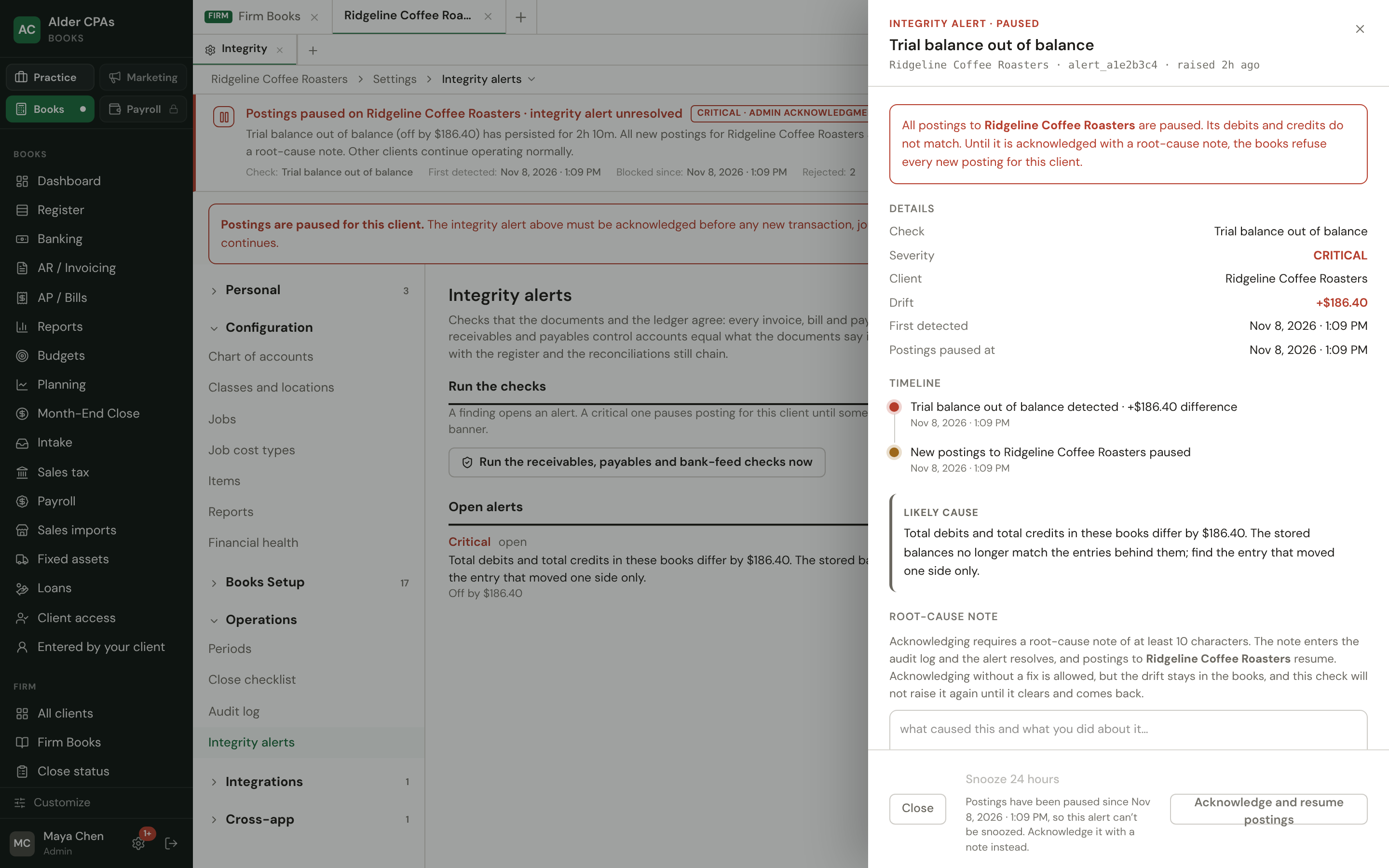 A paused trial-balance alert on Ridgeline Coffee Roasters: the red box says postings are paused because its debits and credits do not match, the drift is +$186.40, and the timeline shows the pause
Why can't I…
| What you see | Why, and what to do |
|---|---|
| Your role does not include viewing the audit log. A firm owner or admin can view it, or give your role the "View audit log" permission. | Your role can't read the log. Ask your firm's owner or an admin, or have them add the permission to your role under Settings → Roles. |
| Snooze 24 hours is grayed out with Only firm owners and admins can snooze integrity alerts. | Snoozing and acknowledging are for your firm's owner and admins. Ask one of them. |
| Snooze is grayed out with Postings have been paused since Nov 8, 2026 · 1:09 PM, so this alert can’t be snoozed. Acknowledge it with a note instead. | Posting is paused, and a snooze never hides a pause. Acknowledge it with a note. |
| The acknowledge button stays gray | The note is shorter than 10 characters. |
| Posting is paused for these books while an integrity alert is open. when you post or edit a posted entry | The trial-balance check found this client's debits and credits don't match. An owner or admin acknowledges the alert, or the books come back into balance and the next check clears it, and posting resumes. |
| No audit events in this period. | Nothing happened in the period you picked. Widen it, or switch to All clients. |
Tips
- Start from the record, not the log. An account's Audit tab, or the history shown when you open a transaction in the register, is the fastest answer to "who changed this?"
- Write the note you'd want to read in a year. An acknowledgment note is permanent and shows up as the reason in the audit log: say what caused the alert and what you did about it.
- Share a link. The period, the scope and Also search changes all live in the page address, so the link you send a colleague opens on exactly what you are looking at.
Related: Firm-Wide Lists: Open Questions, Bank Connections, Anomalies and Report Sends