
Closing and Locking Periods; Reopening One
Choose how a client's months are locked when they close, see who locked each one and when, protect closed months with a closing password, and reopen a month when a correction has to go back into it.
On this page
Locking a month is how you say a client's books for that month are finished. Once a month is locked, Books refuses anything that would change it, unless someone with the right permission deliberately goes back in, gives a reason, and leaves a record. The Periods page is where you choose how strict that lock is, and where you can see every month of the year at a glance: open, soft locked or hard locked, when, and by whom.
Months lock in order, oldest first, and a hard lock is final. Locking October also locks any earlier month that is still open, all in one step. A soft-locked month can be reopened; a hard-locked one can never be reopened or posted into again, and it also stops any earlier month from being reopened.
Understand the Periods page
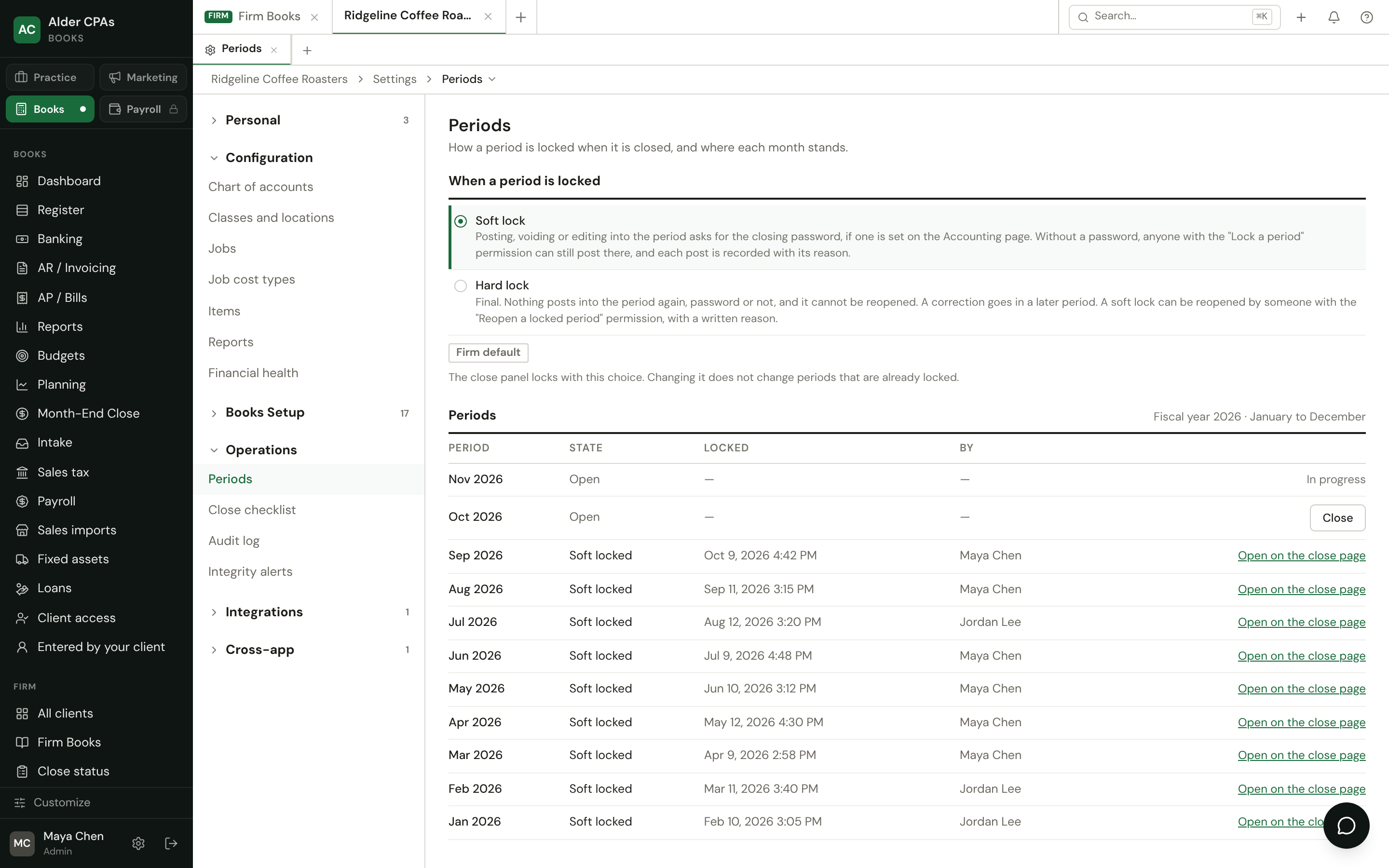 The Periods page for Ridgeline Coffee Roasters: soft lock chosen, January to September locked
When a period is locked
The two choices decide what the close panel's Lock button does for this client:
Soft lock
The month refuses new postings, edits and voids, but a member with the Lock a period permission can still post, edit or void into it on purpose, giving a written reason that is recorded. If the client has a closing password (see Protect locked months with a closing password), Books asks for it first. A soft lock can be reopened.
Hard lock
Final. Nothing posts into the month again, password or not, and it can never be reopened. A correction goes in a later month.
Changing the choice affects the next month you lock. It does not change months that are already locked.
The marker under the choices says where the setting comes from: Firm default when the client follows the firm's choice (set in Defaults for New Clients). Choosing here makes it this client's own. Changing it needs the Lock a period permission; without it, the choices are turned off and the page says why.
The period list
Below the choice, every month of the fiscal year so far is listed, newest first, through the current month (or the latest posted entry, if later), with its State (Open, Soft locked or Hard locked), when it was Locked, and who locked it (By). When the books cover more than one fiscal year, a menu at the top right picks the year; otherwise the year is named there, such as Fiscal year 2026 · January to December.
The last column says what you can do with each month:
- Close — an open month that has ended. It takes you to that month's close.
- In progress — the current month (or a later one). It can't be locked until it is over.
- Open on the close page — a soft-locked month. Reopening happens on its close page.
- Final, cannot be reopened — a hard-locked month.
Lock a month
Months are locked from their close page (Month-End Close, then the month, or Close on the Periods page). The checklist, the pre-check and everything else on that page are covered in Close a Month, Step by Step. The lock itself works like this:
- Click Lock and the month, for example Lock Oct 2026, in the Lock card. It uses the client's lock policy. Under the Hard lock policy the confirm button reads Hard-lock Oct 2026.
- Read the window. If earlier months are still open, it names them: locking this month locks them too, because a closing date covers everything before it. If the close still has open items, it lists them, and locking acknowledges them.
- Confirm. A notice confirms what was locked, for example Sep–Oct 2026 locked.
Locking several months is one act. If any one of them can't be locked, none of them is: the notice names the month that refused and why, and ends Nothing was locked. Nothing is left half-done, which matters most under the Hard lock policy, where a month that locked could never be unlocked.
Locking is always done by a person. The close never locks a month on its own, and an API key can't lock one.
Why can't I lock this month?
| What you see | What to do |
|---|---|
| Nov 2026 ends Nov 30, 2026; lock it once the month is over. | Wait until the month has ended. |
| Business Checking must be reconciled through Oct 31, 2026 before this period can close. | The account is set to require reconciliation before close. Finish its reconciliation through the month end. |
| A note in the Lock card naming reconciliations with open review flags, with Review them | Accept or fix each flag on those reconciliations. |
| The trial balance does not balance, so this period cannot be locked. | Find the entry that is off on the trial balance. |
| Lock is grayed out, with You need the "Lock a period" permission to lock a period. Ask an admin to grant it. | Ask an admin for the permission on this client. |
Who locked this period?
The Locked and By columns of the period list show when each month was locked and by whom. The close page's Lock card shows the same, for example Locked Sep 11, 2026 · 3:15 PM. Every lock, every reopen (with its reason) and every override into a closed month is also kept in the client's audit log.
Reopen a month
Reopen a soft-locked month when a correction really belongs in it: a vendor's invoice for August that arrived in October, say.
- Open the month's close page (from the Periods page, Open on the close page).
- Click Reopen and the month, for example Reopen Aug 2026. The button is shown only to members with the Reopen a locked period permission.
- Read the window. It says postings dated in that month will be accepted again and entries in it can be edited and voided, and it names every later closed month that reopens with it, so that no open month sits beneath a locked one.
- Under Why is this period being reopened?, write the reason: at least ten characters. It is kept in the audit log.
- Click Reopen period. Reopen period stays grayed out until the reason is long enough. If the client has a closing password, Books asks for it now: Aug 2026 is closed, Enter the closing password to reopen Aug 2026. Enter it and click Unlock for 15 minutes, and the reopen goes ahead. A notice names every month that reopened, for example Aug 2026 and Sep 2026 reopened.
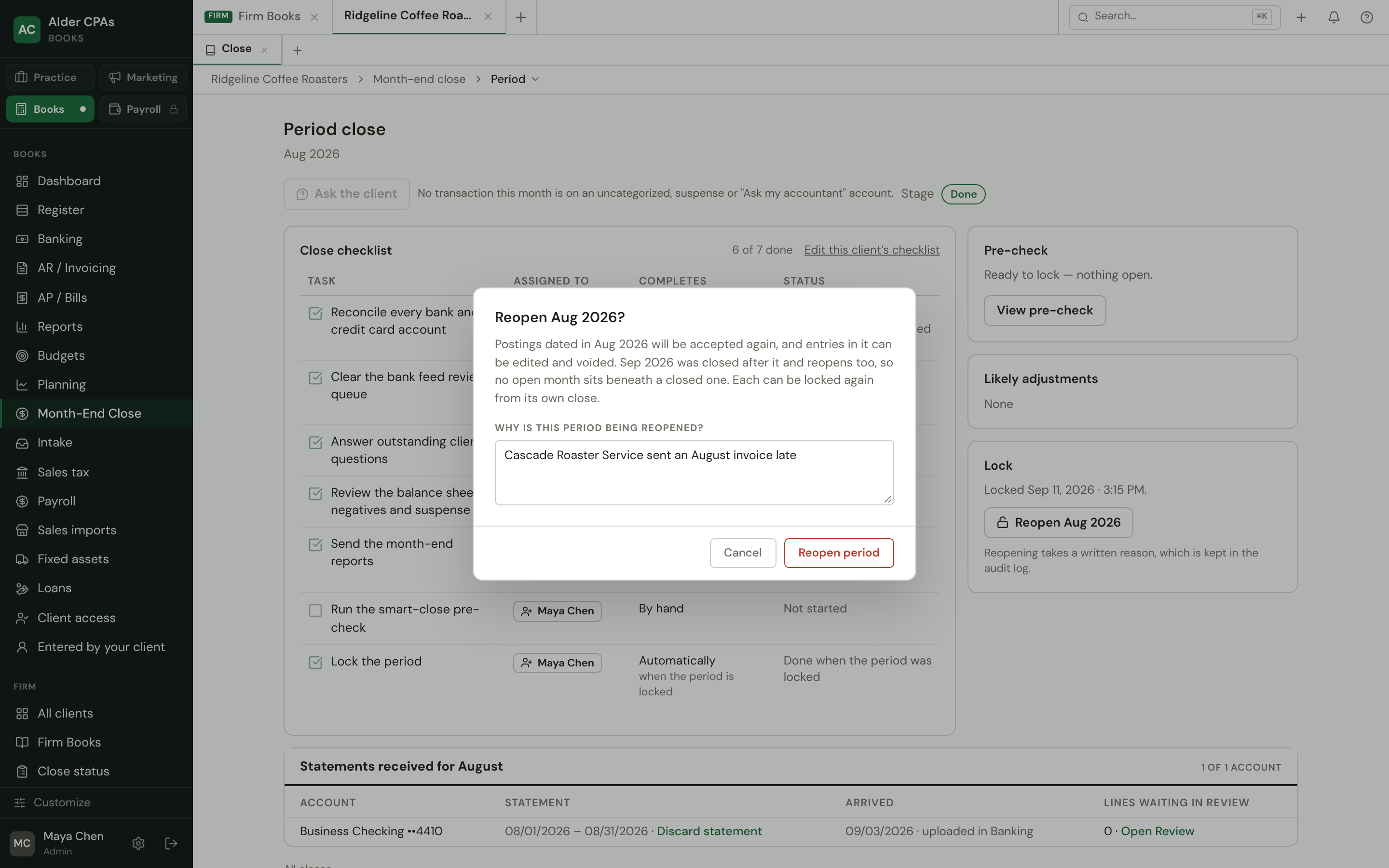 Reopening August 2026, which reopens September with it
When the correction is in, lock the months again from their close pages: the oldest first, or simply the latest one, which locks the earlier open months with it.
Why can't I reopen this month?
- It is hard locked. The close page shows no Reopen button, and the Periods page says Final, cannot be reopened. Record the correction in an open month instead.
- A later month is hard locked. A month reopens only together with every later locked month, and a hard lock is final, so the window says the month cannot be reopened and names the hard-locked month.
- You don't see Reopen at all. Reopening needs the Reopen a locked period permission, which is separate from Lock a period. Ask an admin. With a closing password set, Reopen a locked period is still all you need: the password prompt for a reopen doesn't ask for Lock a period.
- The reason is too short. It must be at least ten characters. Reopen period stays grayed out, and the note under the box says how many more characters it needs.
- You clicked Cancel on the password. The month stays locked, and the window says This period is closed. Enter the closing password to reopen it, then try again. Click Reopen period and enter the password.
Protect locked months with a closing password
A closing password adds a second check before anyone goes back into a soft-locked month, whether to post, edit, void or reopen it. It is set per client.
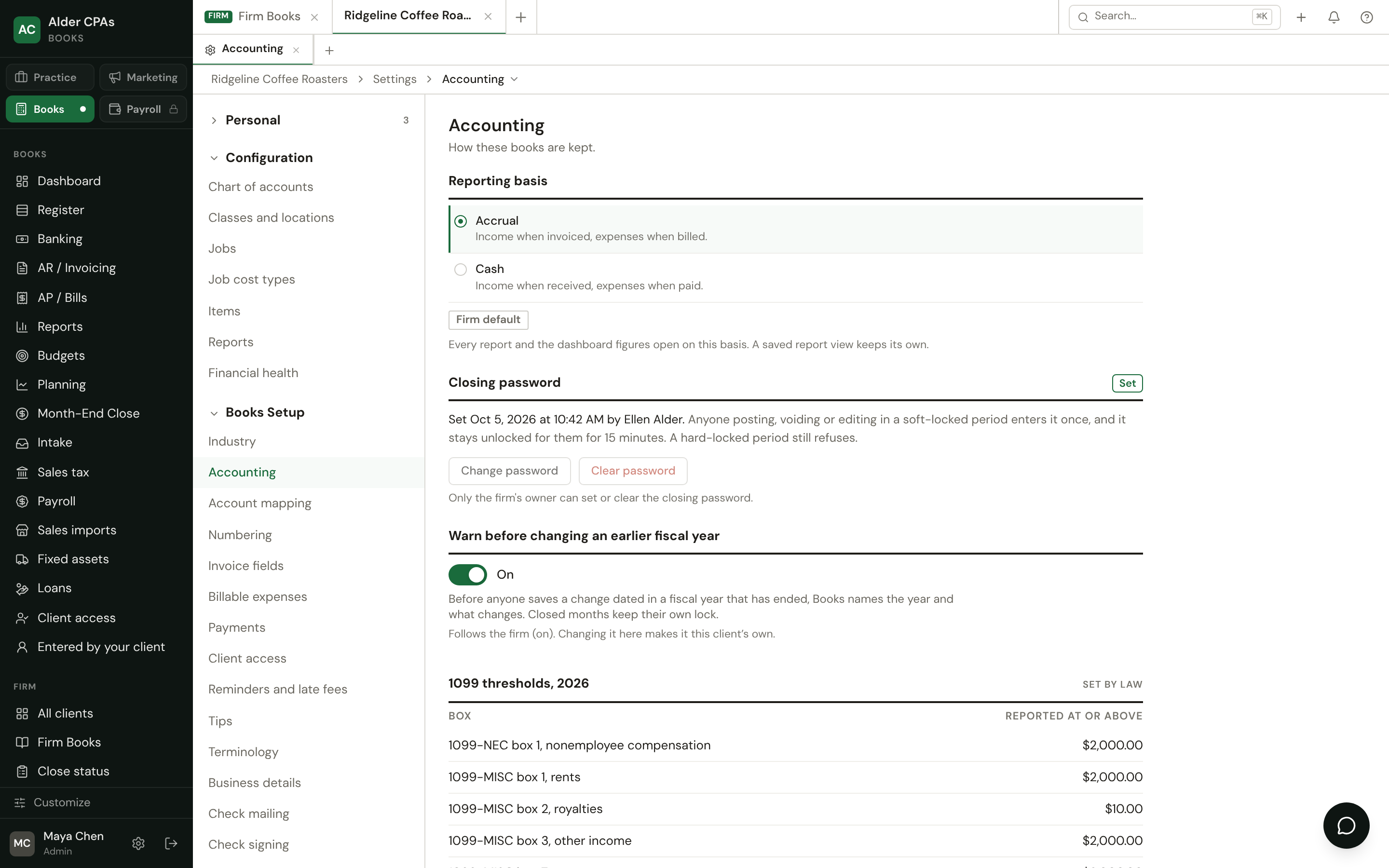 The closing password on the Accounting page, set by the firm's owner
- Only the firm's owner can set, change or clear it. Anyone else sees the buttons turned off with Only the firm's owner can set or clear the closing password.
- Click Set a password (or Change password), type it in Closing password (New closing password when changing it) and again in Type it again, then click Set password (or Change password). It must be 8 to 128 characters. A new password ends every unlock running under the old one.
- The section says when it was set and by whom, for example Set Oct 5, 2026 at 10:42 AM by Ellen Alder.
- Clear password asks first, and names what it opens up: the soft-locked months that will take posts with no password, and anyone with an unlock running, whose unlock ends.
Entering it
When you post, edit, void or reopen in a soft-locked month, Books asks for the password in a window titled with the month, such as Aug 2026 is closed. Type it and click Unlock for 15 minutes, or press Enter. Books then finishes what you were doing. A wrong password is refused with That closing password is not correct. and every failed try is recorded in the audit log.
The unlock is yours alone, covers every closed month of that client, and lasts 15 minutes; after that Books asks again. It unlocks only the kind of thing you were doing:
| You were | The window says | The unlock needs | It lets you |
|---|---|---|---|
| Posting, editing or voiding | Enter the closing password to unlock closed periods for 15 minutes, and what you were saving is sent again. | Lock a period | post, edit and void in closed months |
| Reopening a month | Enter the closing password to reopen Aug 2026. | Reopen a locked period | reopen months |
So a member who just reopened August with the password, and then wants to post into a still-locked month, is asked again.
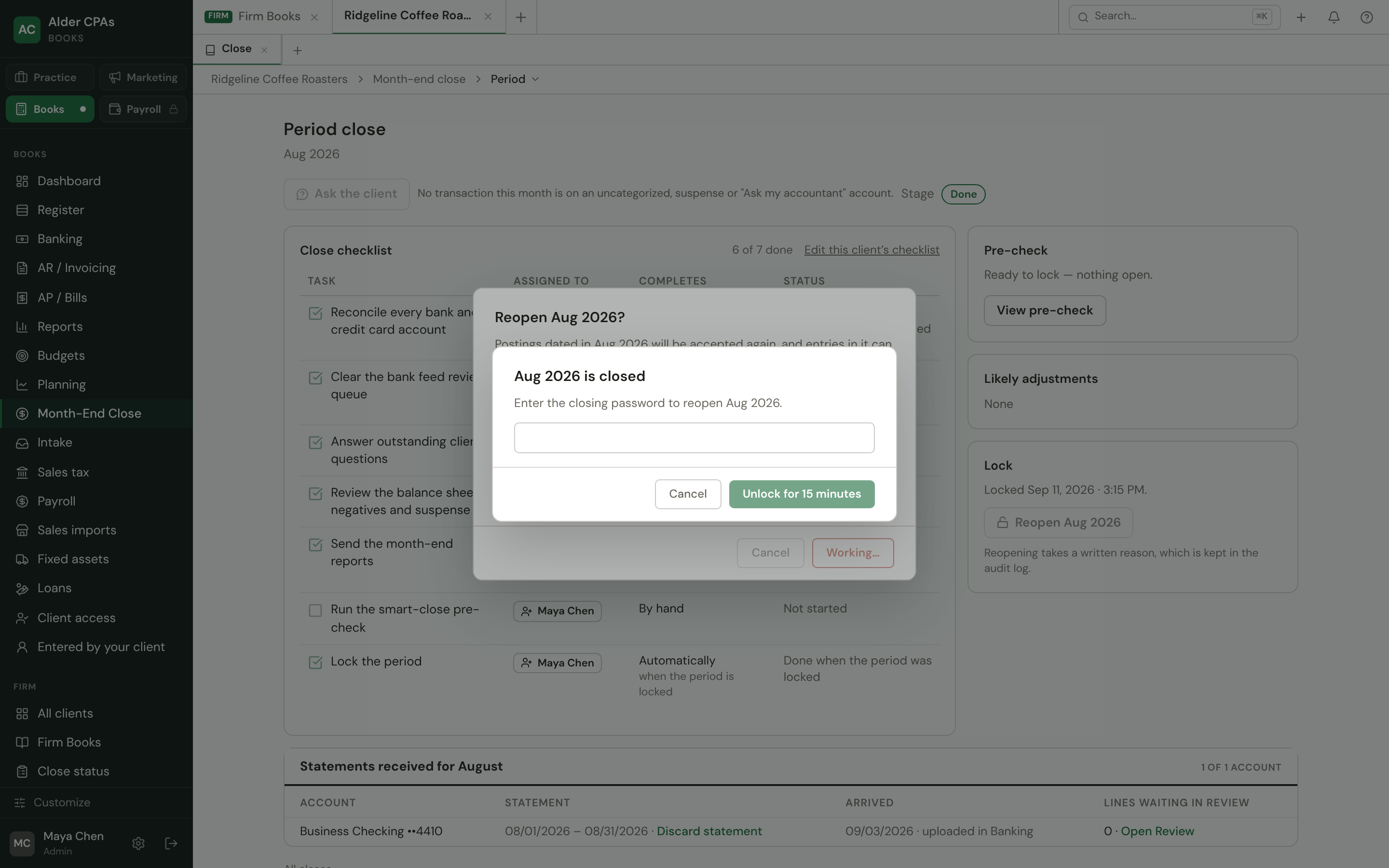 The closing password prompt, shown when reopening August
A hard-locked month still refuses, password or not.
What a closed month refuses
Anything dated in a locked month is checked before it is saved: new entries, invoices, bills, payments, edits, voids, and moving an entry's date into the month.
- Soft locked: the refusal names the month and the way forward, for example October 2026 is closed — a member with the Lock a period permission can override the close to void this, or record a correction in November 2026. A member who holds that permission is offered the override where the screen allows it, and gives a reason of at least ten characters, which is kept with the change and in the audit log. With a closing password set, they enter it first.
- Hard locked: the refusal says the lock is final, for example May 2026 is hard-locked, so this entry can't be moved to May 15, 2026 — a hard lock is final. Choose a date in an open month. No one can override it.
The month named for the correction is the client's current month.
Recommended routine
- Lock every month once its close is done, so last month's figures can't drift after you have reported them.
- Use Hard lock only where locked months must never change. The lock type is a client setting that applies to every month locked while it is set, so use it for a client whose locked months must never change, or switch to it just before locking a year that must never change (such as one whose tax return is filed), then switch back. Soft lock with a closing password protects a month nearly as well and still leaves a way back in.
- Give the closing password to as few people as possible, and give Reopen a locked period to fewer still: reopening changes figures somebody may already have seen.
- Prefer a correction in the current month over reopening an old one when the amount is small and nothing has to be restated.