
Close a Month, Step by Step
Work a month's close checklist, run the pre-check, lock the month, reopen it when you must, and see exactly what changed after it closed.
On this page
Month-end close is where you finish a month and lock it so it stays the way you reported it. Each month has a close checklist, a pre-check that reads the ledger for anything still open, and a Lock button. After a month is locked, Books keeps track of anything posted into it later, so you can see what changed since you closed.
Locking is always something a person does. Books ticks checklist items it can prove and tells you when a month is ready, but it never locks a month by itself. Once a month is soft locked, postings dated in it are refused unless someone allowed to post into a locked month gives a written reason (and the closing password, if the client has one), or the month is reopened. A hard-locked month refuses postings for good. Check the pre-check before you lock.
Understand the Month-end close page
The page opens with one sentence telling you where you are, for example October is the month being closed. Four items are left. The month being closed is the oldest month that has ended and is not locked yet. Closes run in order, so that month comes first in the list, with a Continue the October close button above it. Every other month follows, newest first.
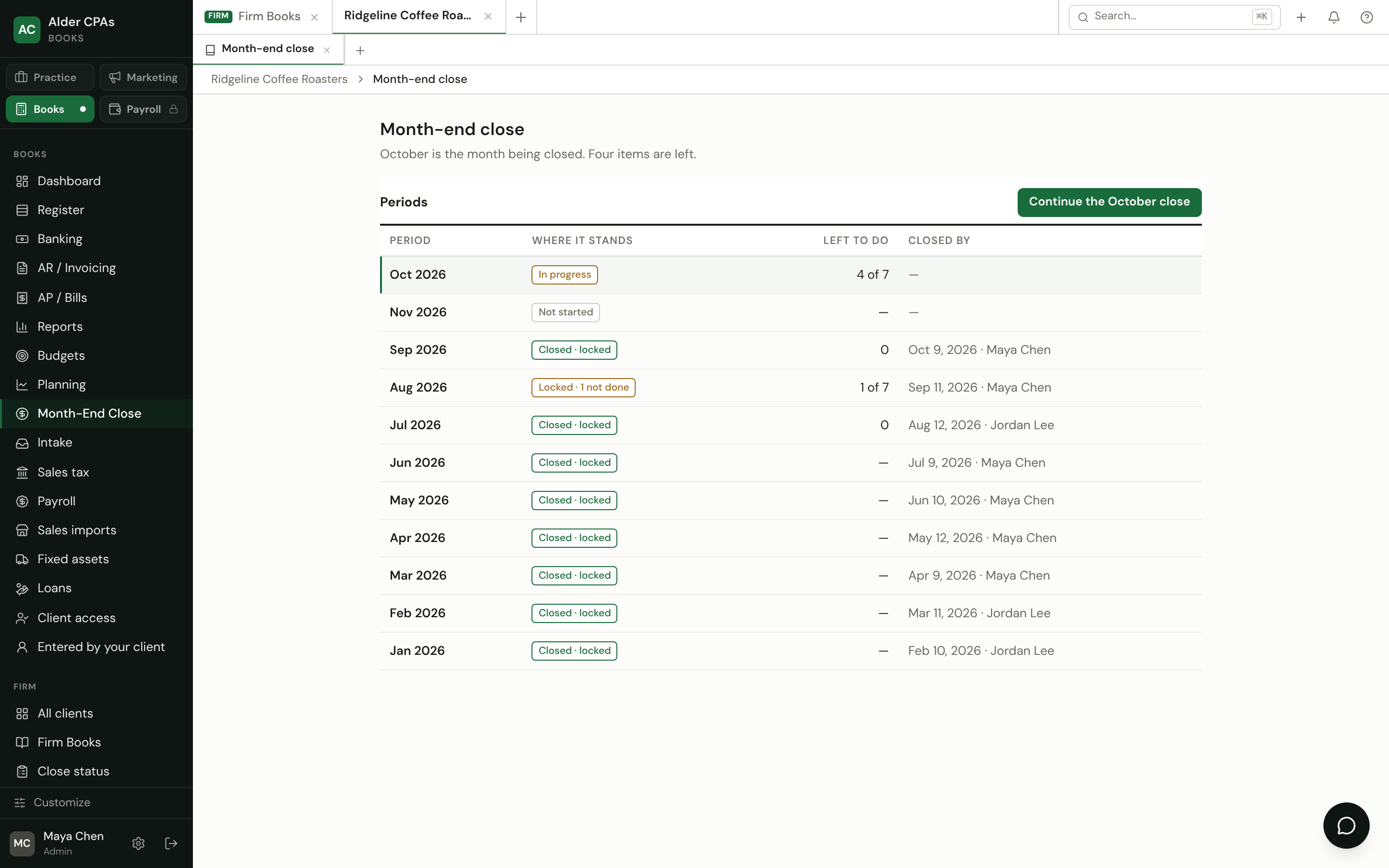 The Month-end close page for Ridgeline Coffee Roasters, with October being closed
The list shows up to twelve months of these books, running through today or through the latest posted entry if that is later. It never goes back before the books start. Each row has four columns:
- Period. Click a month to open its close.
- Where it stands:
- Not started means no checklist item is done yet, or no close has been opened.
- In progress means at least one checklist item is done.
- Closed · locked means the month is locked.
- Locked · 1 not done means the month was locked while checklist items were still open. Locking acknowledges open items. It doesn't complete them.
- Left to do. How many checklist items are still open, such as 4 of 7. A dash means the month has no checklist to count. 0 means the month was closed with everything done.
- Closed by. When the month was locked and who locked it, such as Oct 9, 2026 · Maya Chen. An open month shows a dash, even if it was locked once and then reopened.
When every month that has ended is locked, the sentence reads Every month that has ended is closed, through September 2026.
Work through a month's close
Click a month to open its Period close page. To jump to another month without going back, click Period at the end of the breadcrumb and choose another month.
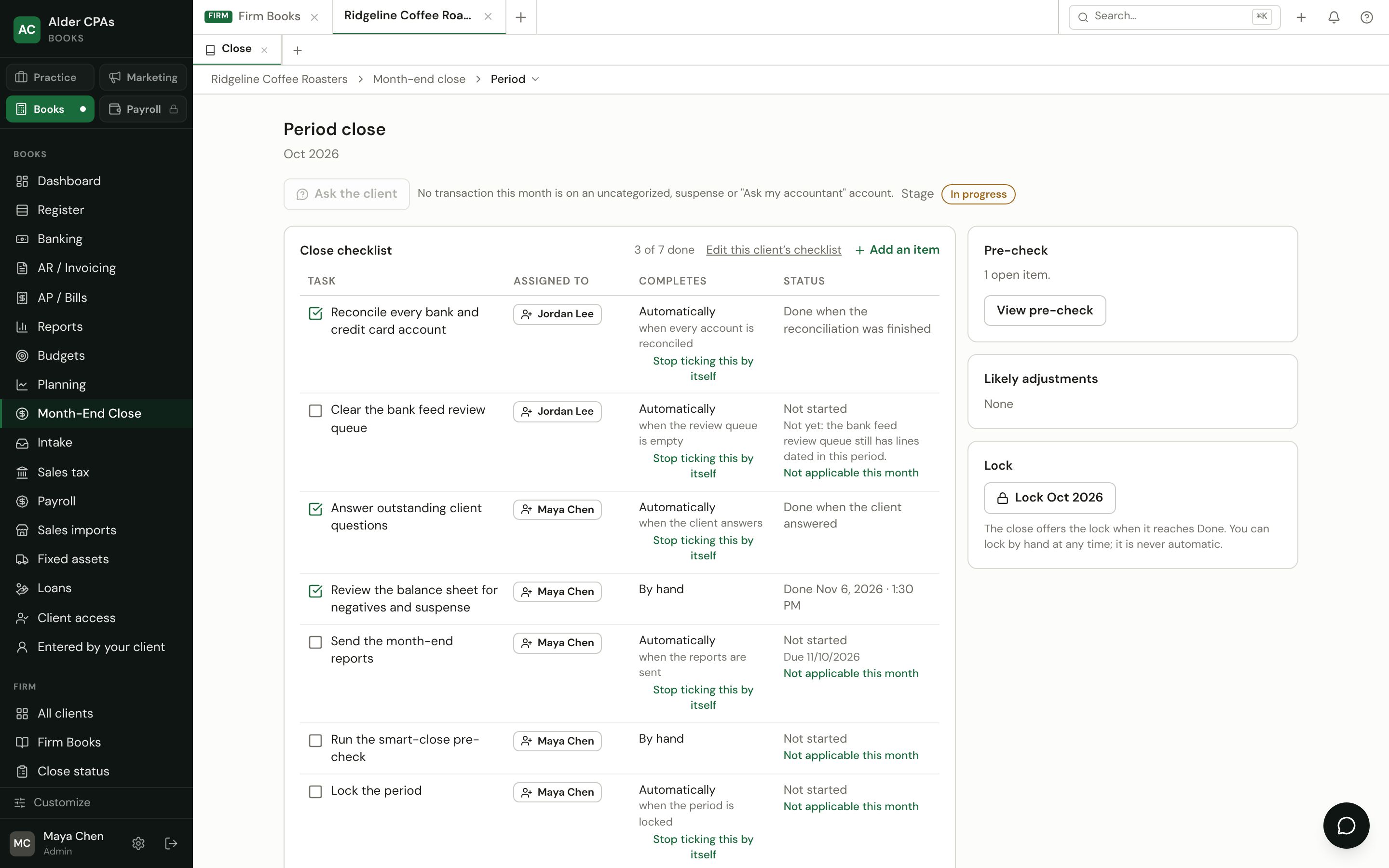 October's close: the checklist, the pre-check and the Lock card
Open the close
A month you haven't started says No close has been opened for this period yet. The pre-check for that month already shows under it. Click Open the Oct 2026 close to create the month's checklist from the client's close checklist.
If your firm doesn't have a close checklist yet, opening the first close also sets up the default one, and the page says so: Opening it also sets up the close checklist. Opening that first close needs the Manage — Templates permission, which owners and admins have by default. Anyone else sees This firm has no close checklist yet. An owner or admin opens the first close, which sets it up.
The close checklist
The checklist has four columns: Task, Assigned to, Completes and Status. The count at the top, such as 3 of 7 done, tells you how far along you are.
- Tick an item with the box in front of its name. To undo it, tick the box again.
- Assign it. Click the name under Assigned to to hand the item to someone else in your firm.
- Completes says how the item gets done. By hand means a person ticks it. Automatically means Books ticks it when something happens in the books, and the line under it says what. On the default checklist:
| Item ticks itself… | When |
|---|---|
| when every account is reconciled | Every bank and card account with activity is reconciled through the month end |
| when the review queue is empty | The bank feed Review queue has nothing left for the month |
| when the client answers | Your client answers the last open question |
| when the reports are sent | The month-end reports go out |
| when the period is locked | You lock the month |
- Status says how the item was completed. An item Books ticked reads, for example, Done when the reconciliation was finished; one a person ticked reads Done Nov 6, 2026 · 1:30 PM. An automatic item that is still open says why Books hasn't ticked it yet, for example Not yet: the bank feed review queue still has lines dated in this period. A due date shows as Due 11/10/2026.
Each time you open a month's close, Books re-checks the automatic items against the ledger. An item whose condition is already true gets ticked even if the event that normally ticks it never happened. The exception is when the reports are sent: it ticks only once a month-end report or a customer statement has actually gone out for that month.
If you untick an item Books completed, Books leaves it alone for the rest of that month. Completes then reads By hand this period, and the status explains: Reopened after Books completed it — Books will not tick it again this period.
Add, skip or change items
- Add an item adds a one-off task to this month only. Type What needs doing, optionally choose Assign to and a Due date, then click Add. Pressing Enter in the name field also adds it.
- Not applicable this month settles an item that doesn't apply, such as sending reports for a month with no reports. Enter Why it does not apply (at least three characters) and click Mark Not applicable. The item then counts as settled, and its status shows the reason. Click Clear to undo it. A done item can't be marked not applicable, so untick it first.
- Stop ticking this by itself turns off the automatic rule for this item in checklists made from now on, for every client on that checklist. This month's checklist, and any already made, keep ticking it. You need the Manage — Templates permission.
- Edit this client’s checklist opens this client's close checklist settings.
When a month is locked, its checklist can't be changed. The boxes are grayed out, and pointing at one shows This period is locked.
Run the pre-check
The Pre-check card reads the ledger for the month and counts what's still open: 1 open item. or Ready to lock — nothing open. Click View pre-check to see every check, including the ones that passed.
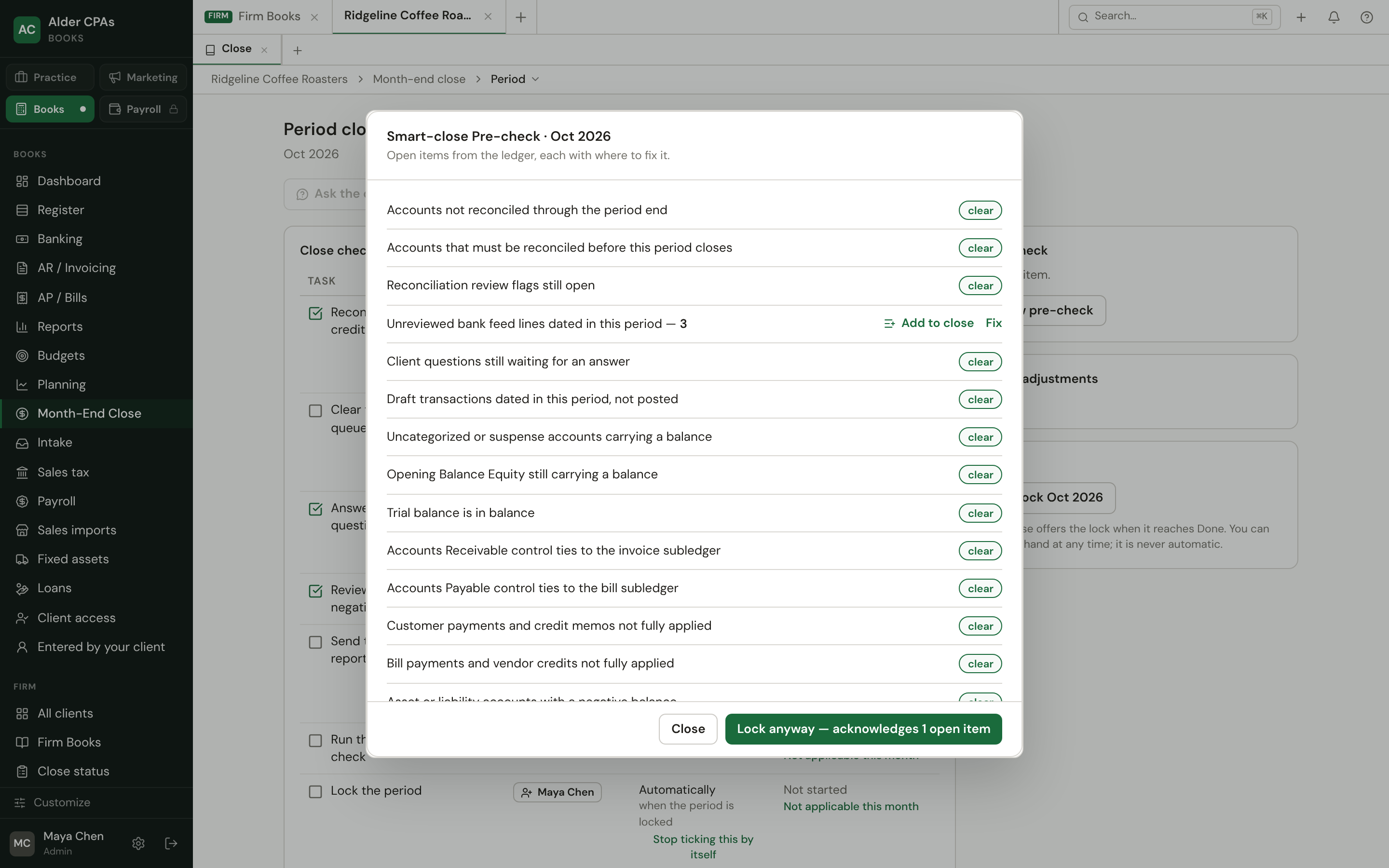 The pre-check for October, with three unreviewed bank feed lines still open
Each check shows clear when nothing is open, or its count with a Fix link to the screen where you fix it. The pre-check looks for:
- accounts not reconciled through the month end, or still needing a reconciliation before the month can close
- reconciliation review flags still open
- unreviewed bank feed lines and unusual transactions dated in the month
- client questions waiting for an answer
- draft transactions dated in the month that were never posted
- uncategorized or suspense accounts, and Opening Balance Equity, still carrying a balance
- whether the trial balance is in balance
- whether Accounts Receivable and Accounts Payable tie to the open invoices and bills
- customer payments, credit memos, bill payments and vendor credits not fully applied
- asset or liability accounts with a negative balance
- invoices 30 or more days overdue, and bills coming due
- meal and travel receipts missing substantiation, which are listed for your information and don't count as open
A check that couldn't run says not measured. It never counts as clear, and the month isn't Ready to lock while one is unmeasured. In the books' first year, the Opening Balance Equity check says not checked yet when the account still holds a balance, because that check only counts once the books are more than a year old.
Add to close next to an open check adds it to this month's checklist, so you or a colleague can track the fix. The title fills in for you.
The Likely adjustments card next to the pre-check lists entries you may need to post before you lock. It's for information only.
Lock the month
- In the Lock card, click Lock Oct 2026. You can also click the lock button at the bottom of the pre-check, which reads Lock anyway — acknowledges 1 open item while something is still open.
- Read the confirmation. It lists every open pre-check item by name and how many checklist items aren't done, such as 4 of 7 checklist items not done. Locking acknowledges them.
- Click Lock Oct 2026 (or press Enter). A notice confirms Oct 2026 locked.
The Lock button is highlighted once the close reaches its Done stage. Until then, the card reads The close offers the lock when it reaches Done. You can lock by hand at any time; it is never automatic.
A closing date covers everything before it. If an earlier month is still open when you lock, Books locks it too, oldest first. The confirmation names those months, and its title shows the whole range, for example Lock Jul–Oct 2026? You can't end up with a locked October sitting on top of an open September.
Which kind of lock you get depends on the client's lock setting:
- A soft lock (the default) can be reopened later.
- A hard lock is final. The confirm button reads Hard-lock Oct 2026, and the confirmation tells you the lock is final. Any correction goes in a later month. A hard-locked month shows Hard locked with the date and time, and it has no Reopen button.
Why can't I lock this month?
The Lock button is grayed out, or the lock is refused, for one of these reasons. Books says why, either next to the button or in a notice when you try to lock.
| What you see | What to do |
|---|---|
| Nov 2026 ends Nov 30, 2026; lock it once the month is over. | Wait until the month has ended. A month counts as over once its last day has passed, or once entries dated after it have been posted. |
| You need the "Lock a period" permission to lock a period. Ask an admin to grant it. | Ask an owner or admin. They have Lock a period by default, and they can grant it to you. |
| 2 review flags are open on Oct 2026 reconciliation. Accept or fix each one before this period can close. | Click Review them to go to the reconciliation, then accept or fix each flag. See Reconcile an Account. |
| Business Checking must be reconciled through Oct 31, 2026 before this period can close. | That account is set to require a reconciliation before close. Finish a reconciliation through the month end. |
| The trial balance does not balance, so this period cannot be locked. | Debits and credits don't match. Find the cause before you close the month. |
Everything else the pre-check finds, like unreviewed bank lines or open client questions, doesn't stop the lock. Books lists those items in the confirmation, and you lock with them acknowledged.
What is left before I can close?
Check three places:
- Left to do on the Month-end close page.
- The checklist count, such as 3 of 7 done.
- The pre-check's open items.
Only the reasons in the table above actually stop a lock. Everything else is your firm's own standard for a finished month.
Reopen a locked month
You may need to reopen a soft-locked month to post a late bill or fix an entry.
-
Open the month and click Reopen Sep 2026 in the Lock card.
-
Read the message. It names any later months that are locked too. Every month locked after this one reopens with it, so no open month ends up underneath a locked one.
-
Under Why is this period being reopened?, enter the reason, in at least ten characters. Until it is long enough, Reopen period stays grayed out, and a note beside the buttons says how many more characters it needs, for example The reason needs at least 10 characters — 4 more. The reason is kept in the audit log.
-
Click Reopen period.
-
If the client's books have a closing password, Books asks for it next, in a window titled with the month, such as Aug 2026 is closed: Enter the closing password to reopen Aug 2026. Enter it and click Unlock for 15 minutes (or press Enter).
The reopen then goes through, with no second click. A wrong password keeps the window open with That closing password is not correct. Cancel leaves the month locked, and the reopen window says This period is closed. Enter the closing password to reopen it, then try again.
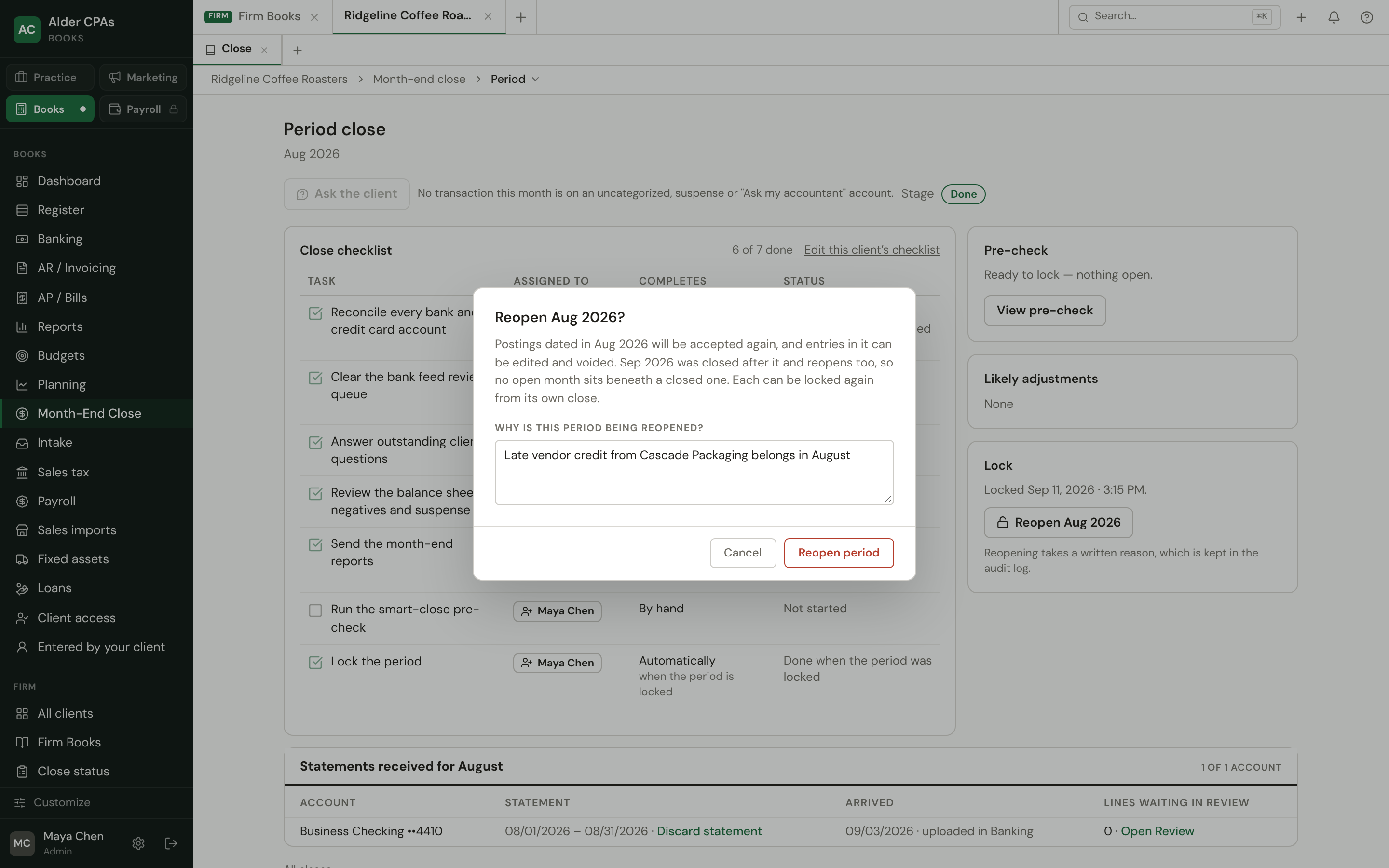 Reopening August names September, which is locked after it and reopens too
A notice names every month that reopened, for example Aug 2026 and Sep 2026 reopened. Re-lock each one from its own close when you're done.
What stops a reopen:
- The month is hard locked. A hard lock is final, so there is no Reopen button.
- A later month is hard locked. Reopen period stays grayed out, and the dialog says A later month is hard locked, so this month cannot be reopened. Record the correction in an open month instead.
- You don't have the Reopen a locked period permission. Without it, the Reopen button doesn't appear. Owners and admins have it by default. It is also the only permission the closing password asks for when you reopen: you don't need Lock a period to reopen a month.
The closing password you give to reopen only reopens. It doesn't let you post, edit or void in a month that is still locked. Each of those asks for the password again, and that unlock needs Lock a period. Once a month is reopened, nothing in it asks for the password.
Reopening a month changes figures somebody may already have reported. When a late entry is all you need, check whether it belongs in the current month instead.
Who locked this period?
- Closed by on the Month-end close page shows the date and the person who locked each month.
- The Lock card on the month's close shows when it was locked, such as Locked Oct 9, 2026 · 4:42 PM.
- The list of closes on the Since the close page shows each time the month was closed, such as Closed Oct 9, 2026 · 4:42 PM by Maya Chen (latest), if you have the View — Audit permission. Without it, the list shows only the latest close, with no name.
See what changed since the close
A month that has been closed at least once has a Since this period closed section at the bottom of its close. It shows how many Accounts changed, how many entries were posted since the close and dated on or before the month end (Entries posted since, dated 09/30/2026 or before), and the Largest change. If nothing changed, it says so: Nothing has changed in September 2026 since it closed on Oct 9, 2026 · 4:42 PM.
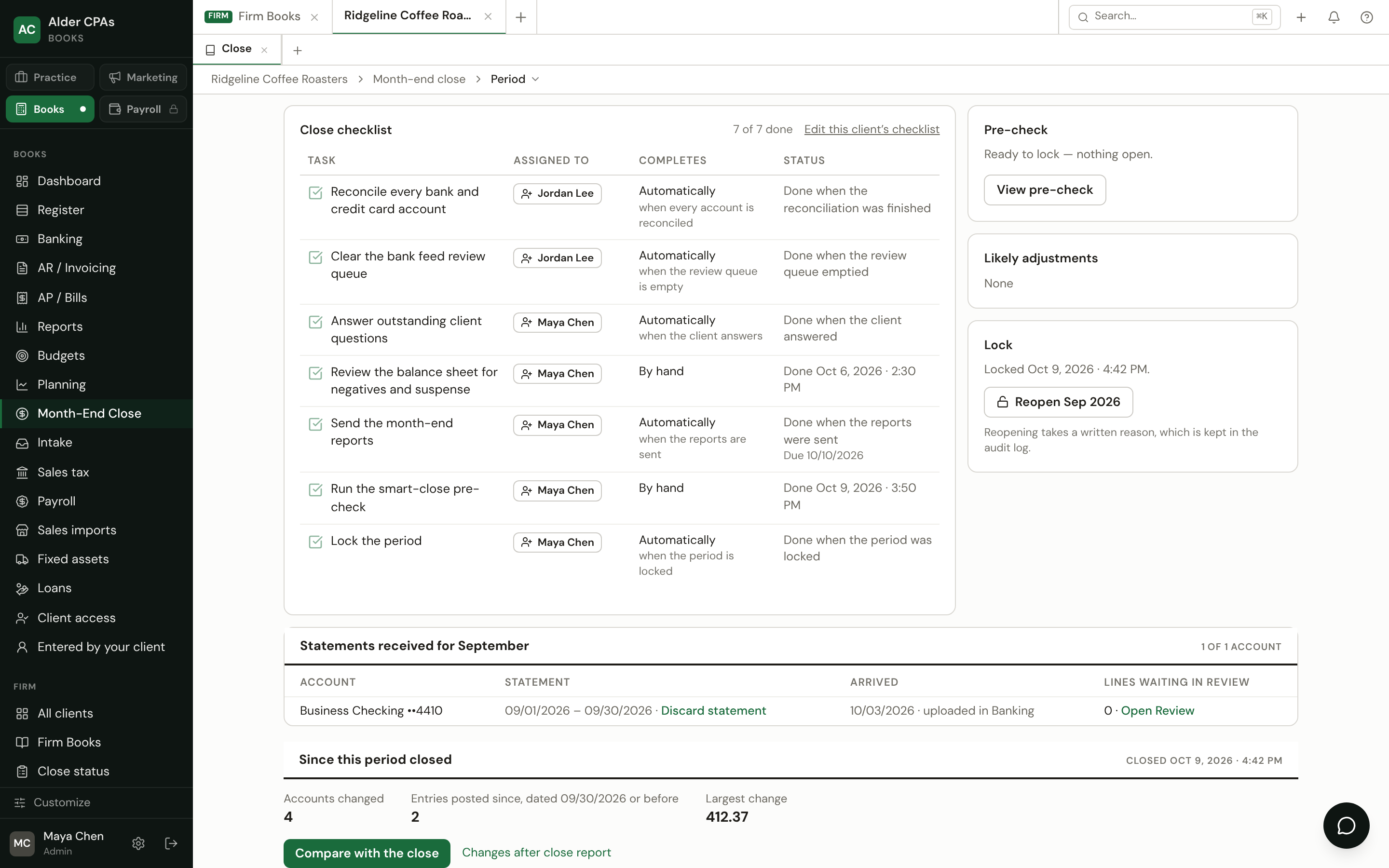 September is locked, with Reopen and the Since this period closed section
Click Compare with the close to open the full comparison. It compares the month-end trial balance as it stood when the month closed with the same trial balance today.
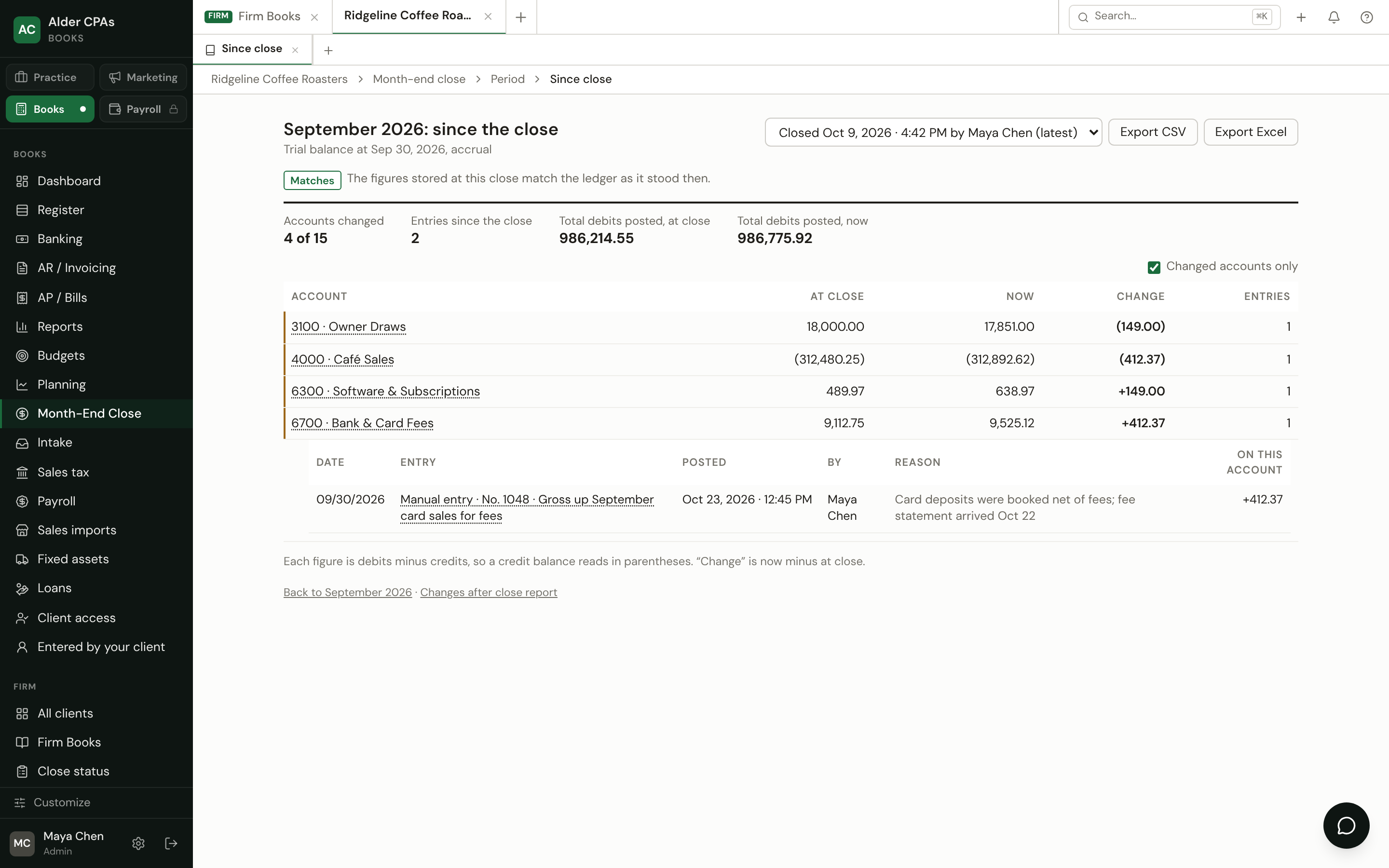 September since the close, with the card-fee entry opened under 6700 Bank & Card Fees
-
At close, Now and Change for each account. Each figure is debits minus credits, so credit balances show in parentheses. Change is now minus at close.
-
A badge at the top checks the figures Books stored when the month was locked against the ledger as it stood at that moment. Matches means they agree: The figures stored at this close match the ledger as it stood then. Does not match means an entry posted before the close was changed afterward without a new entry being posted.
An entry edited in place since the close is read as it stood then, so an edit alone doesn't cause it; click Show the account (or Show the 2 accounts) to see each one, with its stored and ledger figures. The comparison always uses the ledger. An older close you pick from the list shows Not kept, because a later close replaced its stored figures.
-
Changed accounts only is on to start. Turn it off to see every account.
-
Click an account to see the entries that moved it, with the Date, the Entry, when it was Posted, By whom, the Reason given, and the amount On this account. Click a journal entry to open it.
-
The figures for At close come from each entry as it stood at the close. An entry posted before the close and changed afterward is listed with edited since the close, so in-place edits, account changes and date moves are visible even though the entry kept its original posted date.
-
An account that moved and came back to the same balance isn't counted as changed. A note under the table names it, and its entries show when you turn off Changed accounts only.
-
If the month has been closed more than once, choose which close to compare against from the list at the top.
-
Export CSV and Export Excel download the comparison.
You need the P&L, balance sheet, cash flow, trial balance permission to open this comparison. Seeing who posted each entry, and the reason, also takes the View — Audit permission. Without it, the By column explains that it's hidden.
For every closed month at once, use the Changes after close report, linked from the same section.
Ask the client from the close
Ask the client at the top of a month's close sends your client one message about every transaction that month that is on an uncategorized, suspense or "Ask my accountant" account. (It isn't shown when a business keeps its own books.) If there are none, the button is grayed out, and the reason is shown next to it.
If you also use Practice
With Practice, each month's close is also a card on your firm's Pipeline in Practice, titled Month-end close and the month, with the same checklist items. Books ticks the automatic items from what happens in the books, such as a reconciliation finished or a month locked.
On the Books close page, the checklist count reads 3 of 7 done · read from Practice. Open in Pipeline takes you to the card.
The checklist items are edited in Practice, so Add an item isn't offered in Books, and a note under the list explains: Items are edited in Practice. Books completes the ones it can prove, and says which. You can still tick and assign items from Books, so you don't need to switch apps right after finishing a reconciliation.
Shortcuts and tips
| Where | Key | What it does |
|---|---|---|
| Add an item | Enter | Adds the item |
| Lock confirmation | Enter | Locks |
| Closing password | Enter | Unlocks |
| Any dialog | Esc | Closes it without changing anything |
- Work the close from the month, not the list. Fixing a pre-check item through Fix and coming back re-reads the month, and automatic items tick themselves as you go.
- Lock each month as it finishes. If you skip a month, Books locks the earlier ones along with the later one, and they all show the same day under Closed by.
- Look at Since this period closed before you report. If a late entry slipped into a month you already sent, it shows up there with who posted it and why.
- To finish a single entry, see Journal Entries. To clear bank lines before the close, see Reviewing Bank Transactions.