
Entity Groups and Consolidated Statements
Join related clients into an entity group, record intercompany entries that post both sides at once, save the eliminations, and read a consolidated balance sheet and profit and loss that add up company by company.
On this page
When one owner runs several companies (a roastery and the café it supplies, say, or a holding company and its operating LLCs), you keep each company's books separately and still need to see them as one business. An entity group joins those clients.
Books then posts both sides of every intercompany entry at once, proposes the eliminations, and builds a consolidated balance sheet and profit and loss with a column for each company, the eliminations, and the consolidated total.
Nothing in an entity group changes a member's own books except the intercompany entries you post. Eliminations live in the group, not in any company's ledger, so each company's own statements stay exactly as they are.
Entity groups are part of Premium, on the group's parent company. Without it, everything a group already holds stays readable: the Overview tie, Intercompany entries, the Eliminations tab with its proposal and saved sets, both Consolidated statements and their Export, Members and pair accounts and the Account map.
You can still end and remove memberships, archive or remove the group, and void intercompany entries and saved eliminations. Creating a group, renaming it or naming another parent, adding members, setting pair accounts, mapping accounts, posting entries and saving eliminations ask for Premium.
How a group fits together
| Tab | What it's for |
|---|---|
| Overview | The intercompany tie: Open due-from, Open due-to and Untied, and the members. |
| Intercompany entries | Every entry between two members, posted or voided. |
| Eliminations | The proposed eliminations for a period, and the sets you have saved. |
| Consolidated statements | The consolidated balance sheet and profit and loss. |
| Members and pair accounts | Who is in the group and when, and the due-from and due-to account each company uses for each other. |
| Account map | Which consolidated line each member account sits on. |
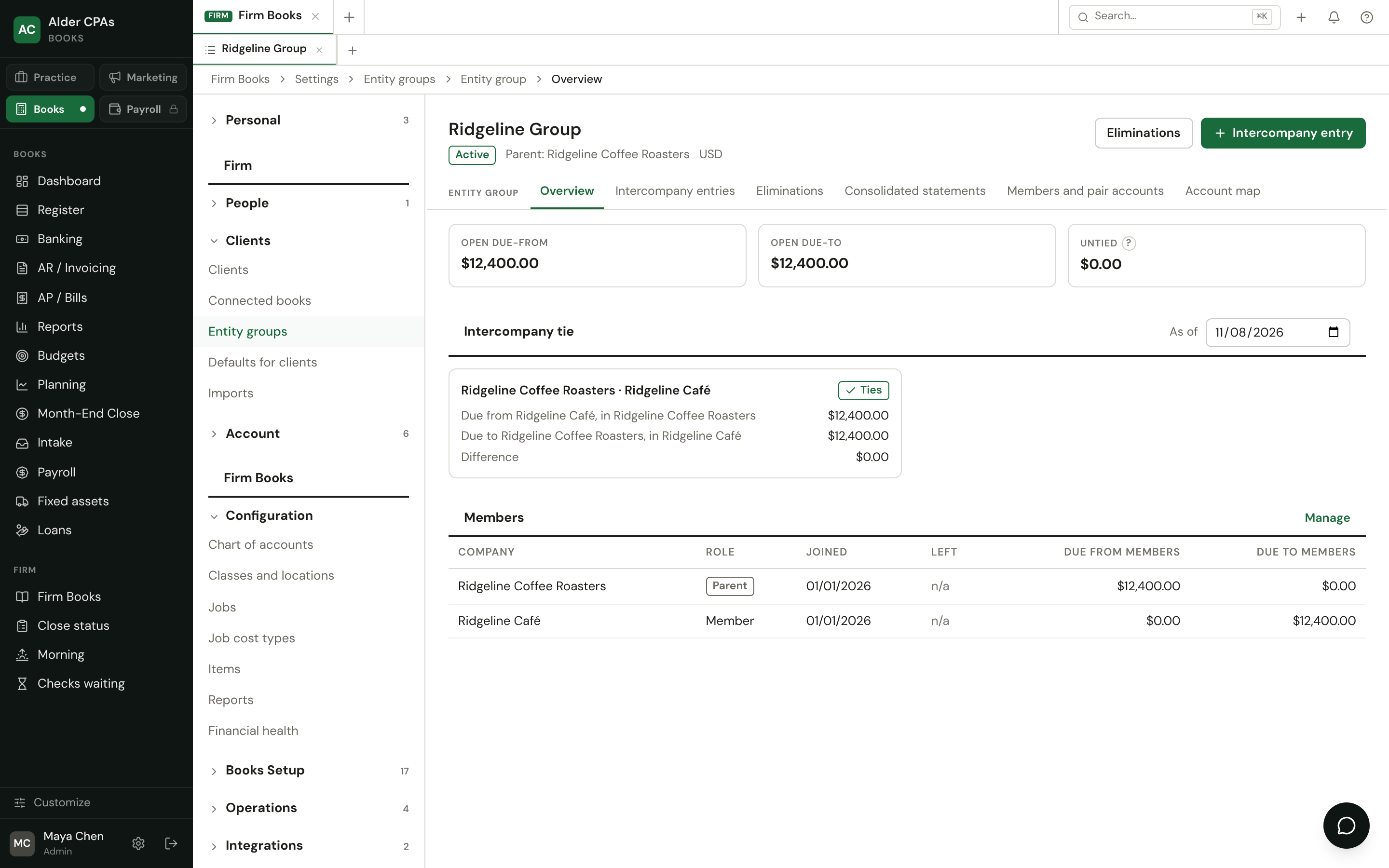 Ridgeline Group's Overview: Open due-from and Open due-to of $12,400.00 each, nothing untied, and the roastery and café pair marked Ties
Set up a group
- In Settings → Clients → Entity groups, click New group.
- Give it a Name, a Starts date, and choose the Parent. A group is one currency (USD) for its life.
- Under Members, add each company and the date it Joins. The parent is always a member. A company can be in only one group at a time.
- Click Create group.
A group needs at least two of your firm's clients, and you need the Books writer role on every company in it.
Set the pair accounts
Each company records what the others owe it in a due-from account (an asset) and what it owes them in a due-to account (a liability). In Members and pair accounts, set both for each company and counterparty, then click Save. The row's status changes to Set.
Each counterparty needs its own due-from and due-to account, so Books doesn't offer an account another counterparty already uses. Under the row it says which, for example: Not offered as the due-from account, because each counterparty needs its own or neither pair can tie: Due from Café (Ridgeline Retail). (A shared "due from affiliates" account can never tie to any one company.)
Map the accounts to consolidated lines
The consolidated statements line up the companies' accounts through the Account map.
- Click Pre-fill by account number. Books proposes a line for each account by its number, named after the parent's account with that number, or after the account itself when the parent has none. An account whose number matches but whose name and type don't is listed under Not proposed for you to map yourself.
- Check the proposals, then click Confirm on a row, or Confirm N proposed for all of them.
- Use Map on an unmapped account to put it on a line, or Line to start a new consolidated line (it needs a number and a name).
A proposed match is never used in a statement until a person confirms it. An account with no confirmed line still appears in the statements, as its own row marked Unmapped, so nothing drops out of the totals. Two accounts of the same company can share a line; the line shows their combined balance.
Record an intercompany entry
An intercompany entry is one transaction between two members, posted to both companies' books together.
- Open Intercompany entries and click Intercompany entry.
- Choose From (the company giving or paying) and To (the company receiving), the Date, an optional Reference and a Description.
- Enter each company's own lines on its side. The giving company's lines net to a credit (for example, its checking account), and the receiving company's net to a debit.
- Leave the due lines alone. The due line on each side is Added by the entry: a debit to the giver's due-from account and a credit to the receiver's due-to account, for the same amount.
- Click Save and post.
As you type, Books checks the entry exactly as it would post it, without posting anything, and shows the entry's number and amount, or the reason it can't post, before you click. For example: The two sides don't match: Ridgeline Coffee Roasters gives $5,000.00 and Ridgeline Café receives $4,800.00. Make both sides the same amount, the giving company's lines netting to a credit.
If either side falls in a closed month, a person who can close months is asked for a Reason for posting into the closed month (at least 10 characters), and for the closing password if that company has one.
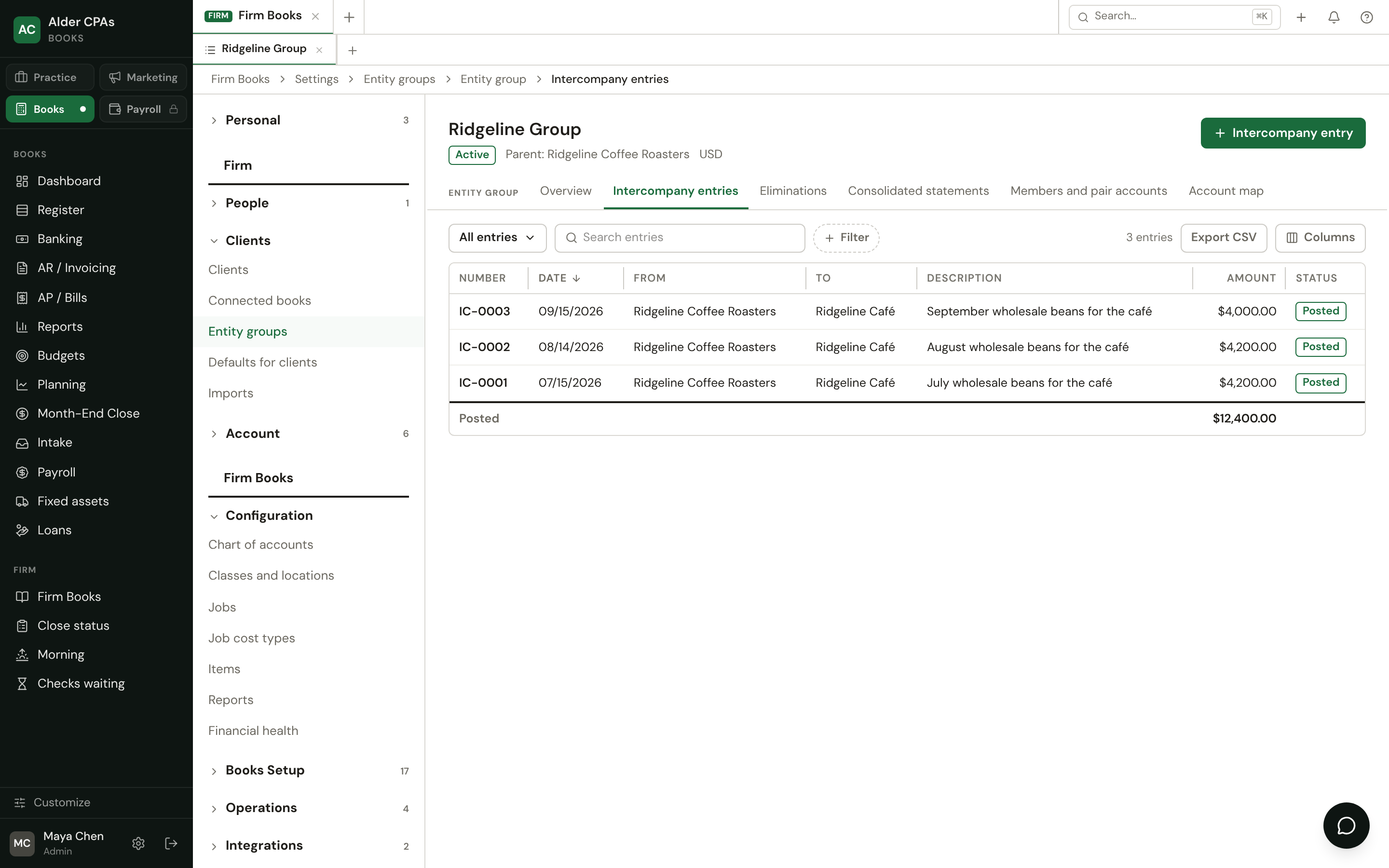 The Intercompany entries tab: three wholesale sales from Ridgeline Coffee Roasters to Ridgeline Café, $12,400.00 posted in all
To undo one, open it and click Void both sides. Voiding needs a reason of at least 10 characters, and it reverses the entry in both companies' books at once, so one side can never be voided alone.
Eliminate intercompany amounts
What the companies owe each other, and what they sold each other, is real in each company's books but not to the group. Eliminations take it out of the consolidated figures.
- Open Eliminations and set the From and Period end dates.
- Books proposes two kinds of line:
- Balance lines: for each pair, the due-from in one company against the matching due-to in the other at the period end. Only a pair that ties is eliminated. An untied pair is never eliminated. It stays gross in the consolidated balance sheet until the books are corrected.
- Revenue and expense lines: from the period's intercompany entries, where both sides carry income or expense and the amounts match, such as one company selling to the other. Costs one company paid on another's behalf are a real expense of the group and are not eliminated.
- Click Save eliminations. The status changes from Proposed, not saved to Saved.
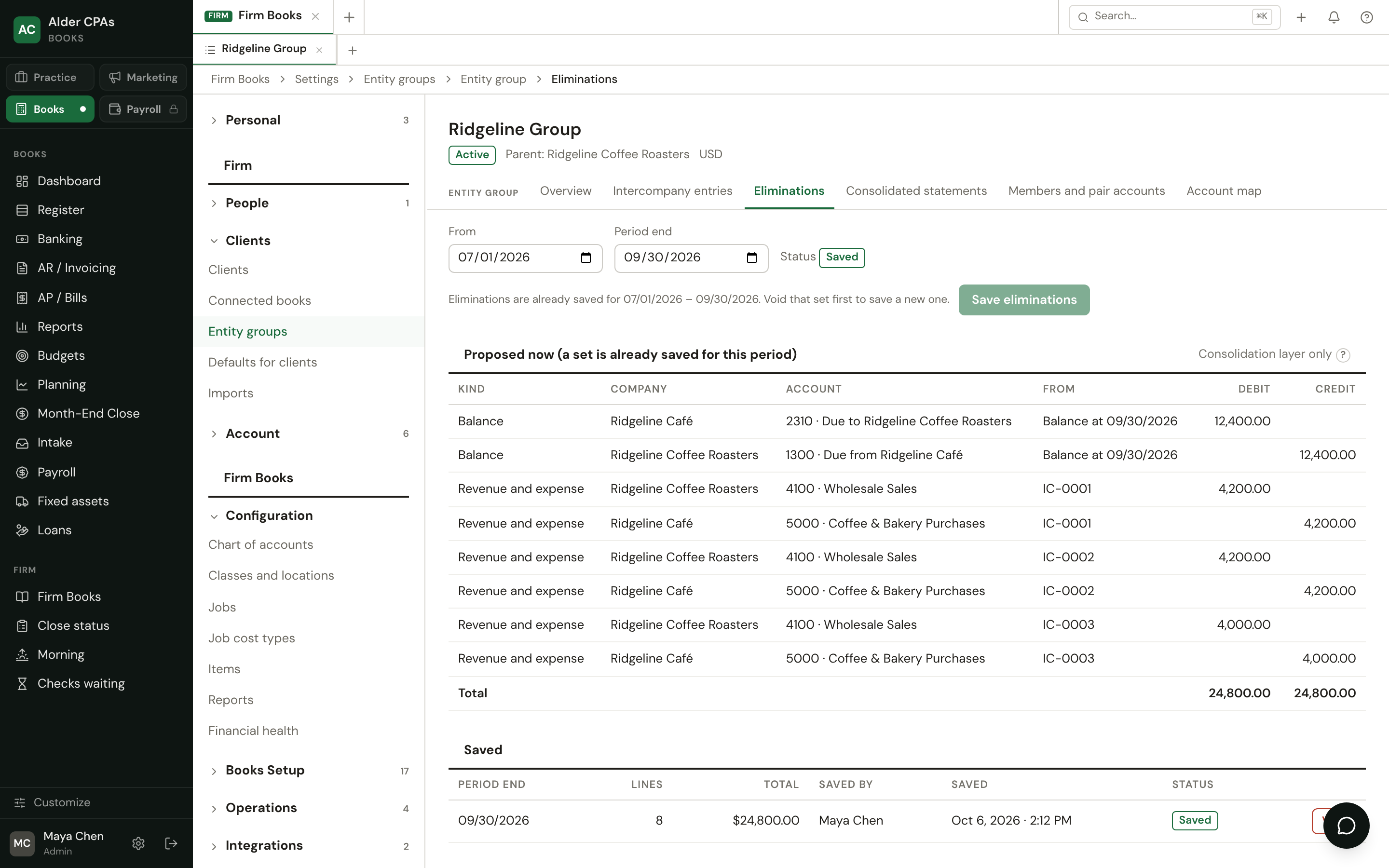 Eliminations for 07/01/2026 to 09/30/2026: the pair balance and each wholesale sale against the café's purchase, $24,800.00 a side, saved by Maya Chen
One set is saved per period. To change it, Void the saved set (with a reason of at least 10 characters) and save a new one. The void prompt tells you what will happen: The consolidated statements for 09/30/2026 lose $24,800.00 of eliminations and show intercompany balances gross until a new set is saved. No member's books change.
Read the consolidated statements
Open Consolidated statements and choose Balance sheet or Profit and loss. Each statement has a column per company (that company's own statement from its books), then Eliminations, then Consolidated.
The balance sheet is As of a date; the profit and loss covers From and Through dates on an Accrual or Cash basis. Click a company's figure on an account line to see the entries behind it. Export downloads the statement as a CSV.
A saved set applies to a statement whose dates match it: the balance sheet As of the set's period end, the profit and loss From and Through the set's own period.
-
With a saved set for the dates, the header says Eliminations saved, when and by whom, with View set.
-
With no saved set for the dates, the Eliminations column is empty and marked No eliminations saved for these dates. Under it Books lists the saved sets you can apply, latest first (up to four): Saved as of 09/30/2026 on the balance sheet, Saved for 07/01/2026 – 09/30/2026 on the profit and loss.
Click one and the statement moves to that set's dates. Propose opens Eliminations on the statement's own period (for a balance sheet, the first of its month through its date). An unsaved proposal never enters a statement.
-
If the books have moved since a set was saved, for example an intercompany entry was voided or a new one posted, Books does not apply the out-of-date set. The column reads Out of date · not applied, and the statement says what changed and how to fix it: void the set and save it again to eliminate what the books show now.
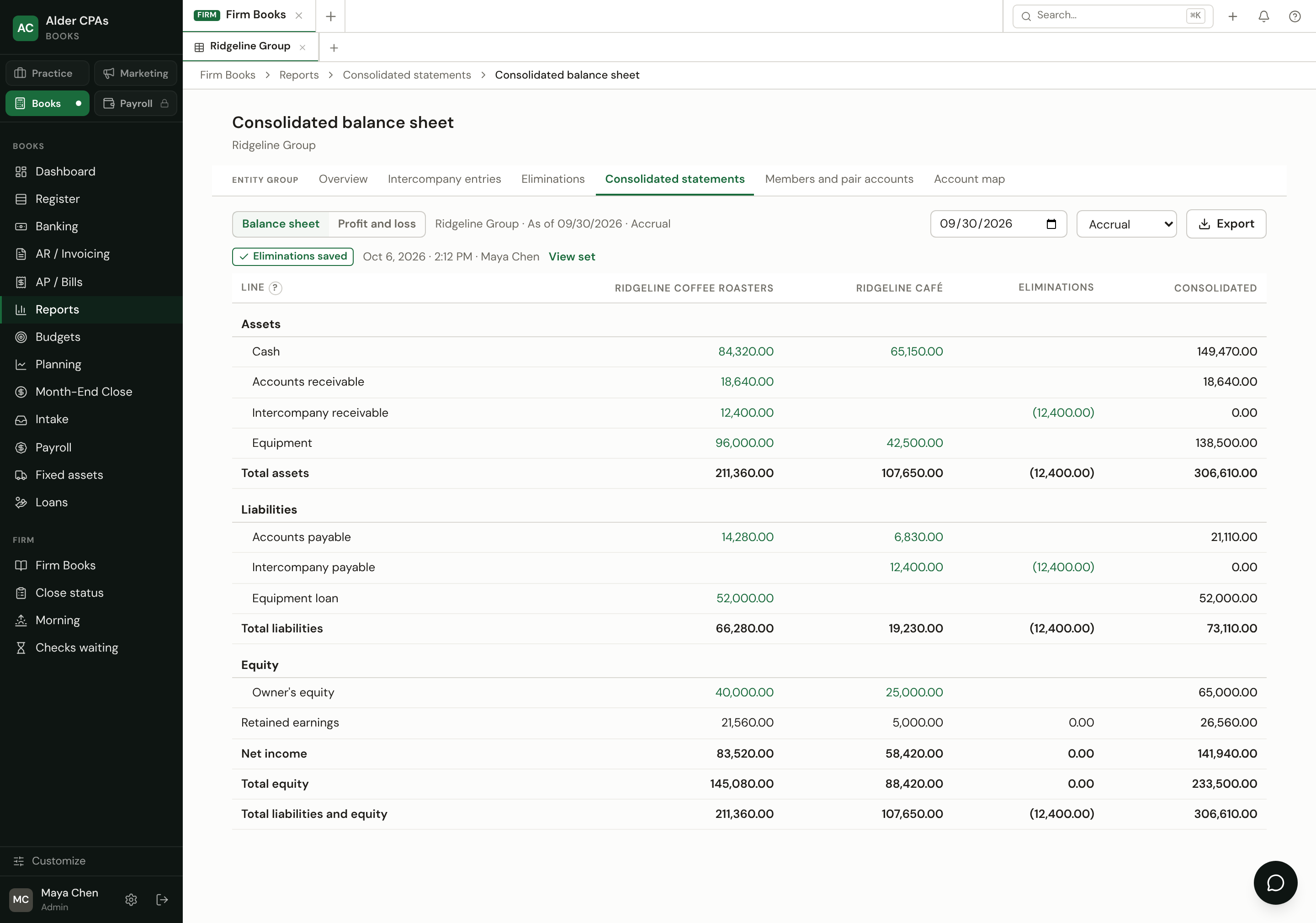 The consolidated balance sheet as of 09/30/2026 with the Q3 set applied: the intercompany receivable and payable eliminate to 0.00, and total assets of $306,610.00 equal total liabilities and equity
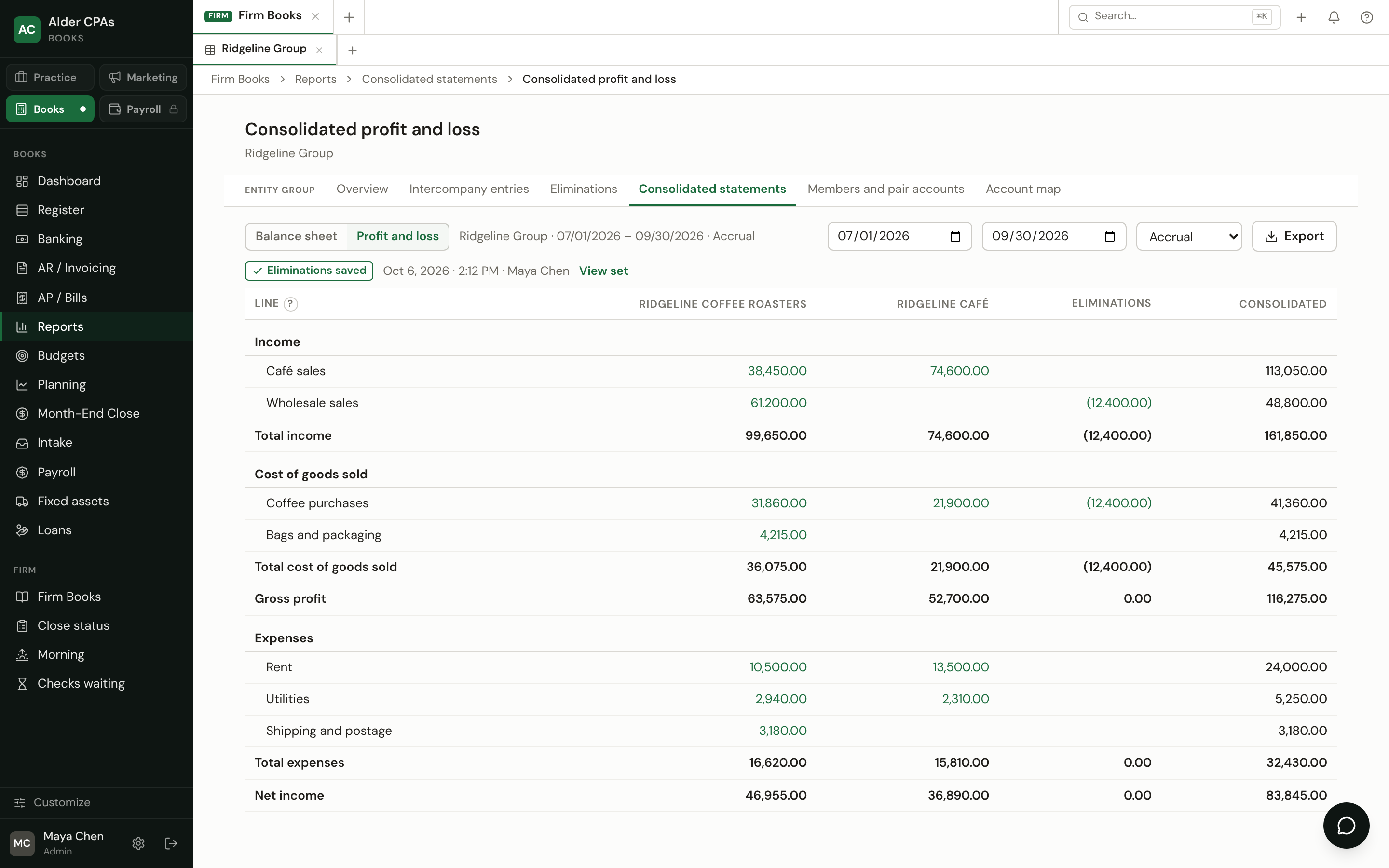 The consolidated profit and loss for 07/01/2026 to 09/30/2026: $12,400.00 of wholesale sales eliminated against the café's coffee purchases, so gross profit and net income are unchanged
The balance sheet opens as of today and the profit and loss on the last full month, so a set saved for a quarter usually doesn't match at first. The column then offers it:
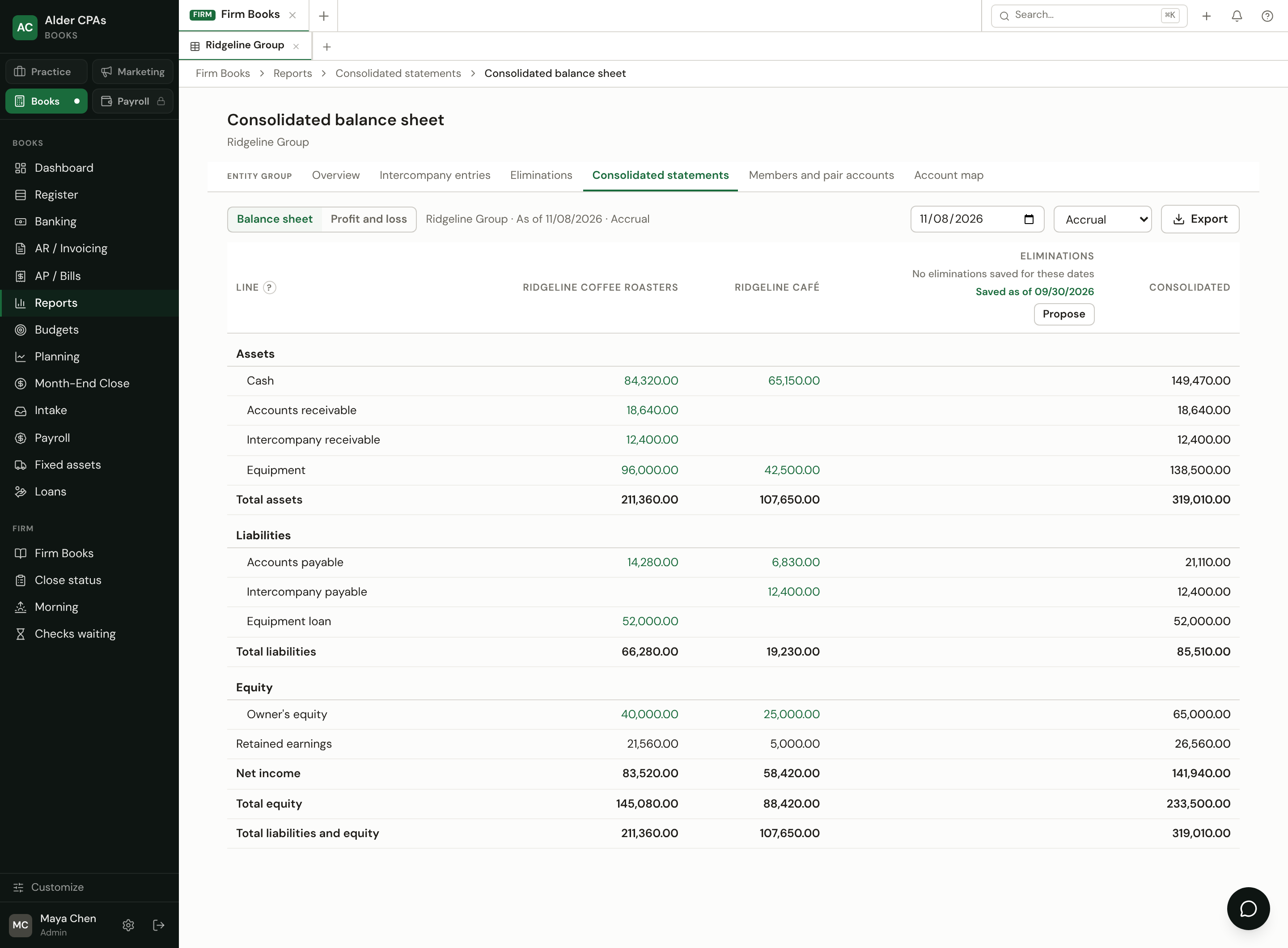 The balance sheet opened as of today: No eliminations saved for these dates, with Saved as of 09/30/2026 one click away above Propose
Accounts with no balance on any column are left out, and the statement says how many.
Change members, archive or remove a group
- End membership sets a Last day. Consolidated statements after that date leave the company out; its intercompany entries stay posted in both books. Books won't end a membership while the company still owes, or is owed by, another member on that last day; settle the balance first. The parent can't leave while the group is active; name another parent first.
- Remove takes a member out as if it had never joined. Books allows it only while no intercompany entry or elimination, voided ones included, names the company; otherwise it tells you how many there are and to end the membership instead.
- Archive group stops new intercompany entries, eliminations, members and changes to pair accounts and the account map. Everything the group holds stays, and past consolidated statements still open.
- Remove group deletes a group that never had an intercompany entry or a saved elimination. A group with either is archived, never removed.
Ending a membership and both kinds of removal check first, so you see before you confirm whether Books will allow it. Whatever is removed is recorded in full.
Why can't I…
| What you see | Why, and what to do |
|---|---|
| A group needs at least two companies in this firm. This firm has one. | Add the other company as a client first. |
| Your role is read-only. Creating or changing a group needs the Books writer role on every member. | Ask your firm's owner or an admin for writer access to each company in the group. |
| … is already in …; a company is in one group at a time. End that membership first. | End the company's membership in its other group, then add it here. |
| … has no due-from (or due-to) account for …. Set the pair's accounts first. | Set the pair accounts in Members and pair accounts (the refusal links there). |
| … and … are not both in … on …. Use a date when both were members. | The entry's date falls outside one company's membership. Change the date. |
| Save eliminations is grayed out: Eliminations are already saved for …. Void that set first to save a new one. | One set per period. Void the saved set first. |
| Save eliminations is grayed out: There is nothing to eliminate for …. | Nothing in that period ties or matches. Check the Overview tie. |
| The consolidated balance sheet doesn't net intercompany balances out | No set is saved for that date, the saved set is out of date, or the pair doesn't tie. Check Overview → Untied. |
| … still owes (or is still owed by) … $… on …. Settle it before the membership ends. | The company has an open intercompany balance on its last day. Settle it with an intercompany entry, or choose a later Last day. |
| Consolidation is a premium feature. Turn on Premium for Ridgeline Coffee Roasters, the group's parent, to use it. | The parent company isn't on Premium. Turn it on for the parent. |
Why don't intercompany balances net out?
Start on Overview. Untied is the gap between each pair's due-from and the matching due-to, added up across pairs; it is zero when every pair ties. If it isn't, the Intercompany tie shows which pair is off and by how much, and lists the lines that explain the gap (or says when no single line does, so you can compare the two registers). Fix the books, then void the period's saved set, if any, and save it again.
Tips
- Post intercompany activity as intercompany entries, not as two separate journal entries. Only then can Books tie the pair and eliminate it.
- Give each relationship its own pair of accounts ("Due from Café", "Due to Roastery"). It is what makes the tie readable.
- Save the eliminations after you close the month, so the set matches books that won't move.