
Why Doesn't This Report Match My Bank?
The real reasons a statement's cash or income differs from the bank, from lines still in review to dates, Undeposited Funds, card payouts and the reporting basis, and how to find each one.
On this page
A report and a bank statement answer different questions. The bank shows what reached the account by the statement date. A Balance Sheet shows what the books say the account holds on a date, and a Profit & Loss shows what the business earned, which is not the same as what was deposited. This article lists every reason the two can differ, roughly in the order they come up, and where to look for each.
Start with the bank account's line on the Balance Sheet, not the Profit & Loss. Set the Balance Sheet to the bank statement's ending date (As of that day) and compare the bank account's figure with the statement's ending balance. Income and expenses on a Profit & Loss are never meant to equal deposits and withdrawals.
Lines still waiting in the Review queue
A bank line is not in the books until someone posts it or matches it in the Review queue. Until then, the bank has it and the report doesn't. Pending lines, which the bank has not settled yet, wait there too and can't be posted until they clear.
The Profit & Loss and the Balance Sheet tell you when this is the case. If bank or card lines are still waiting (on a Profit & Loss, lines dated in the report's period; on a Balance Sheet, every line dated on or before the report's date, back to the day the books start), a Not caught up notice sits above the figures, such as 4 bank and card lines are not reviewed: $1,080.18 out and $2,340.00 in are not in these figures. (on a Balance Sheet, 4 bank and card lines on or before this date are not reviewed: $1,080.18 out and $2,340.00 in are not in this balance sheet.), with a Review 4 lines button that opens the Review queue.
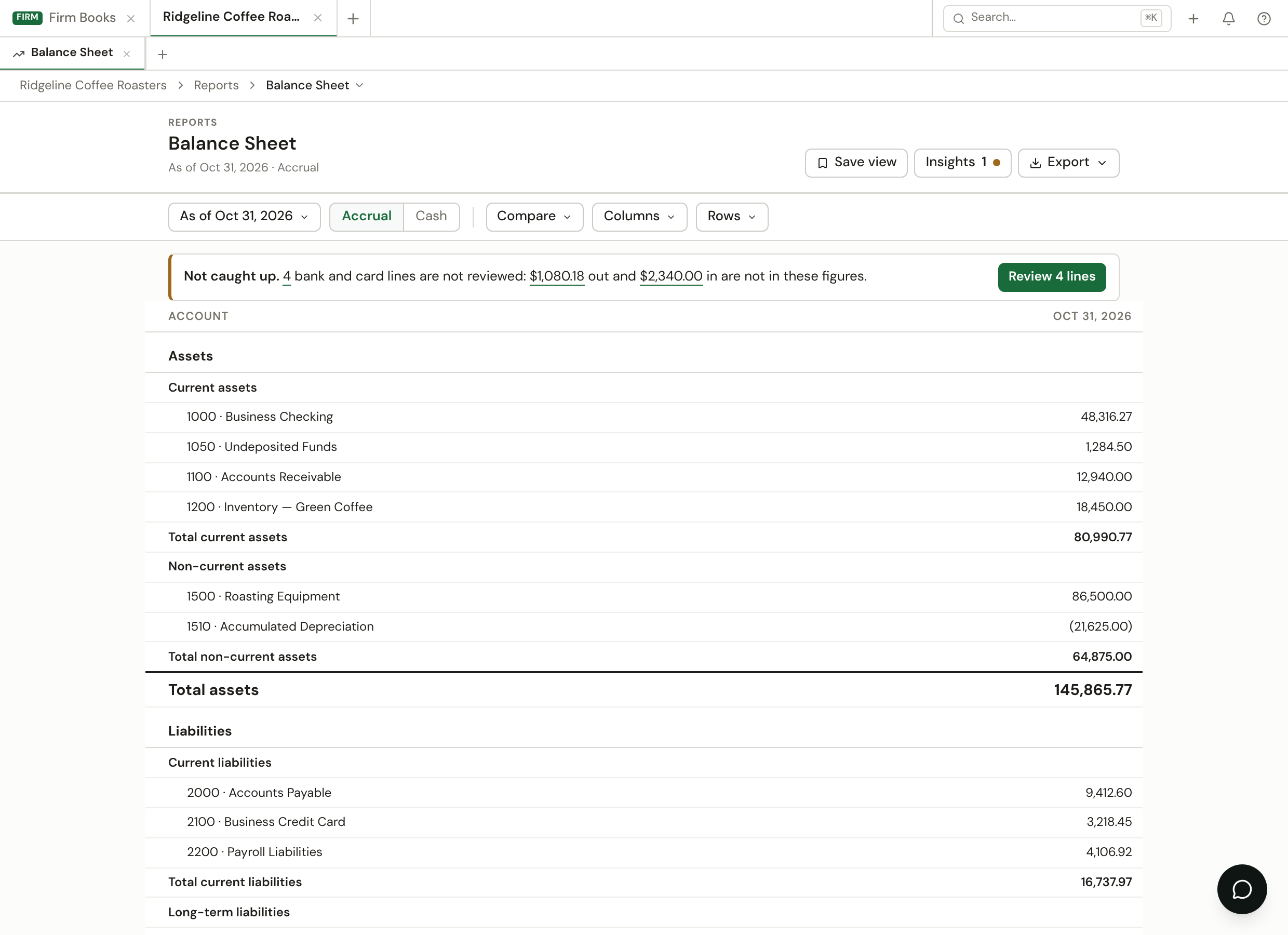 The Balance Sheet as of Oct 31, 2026, with lines still waiting in review
A waiting line that already matches an entry in the books is counted apart, because its money is already in the books: the notice then reads, for example on a Profit & Loss, 4 bank and card lines are not reviewed. 1 already matches an entry in the books; the other 3 ($1,080.18 out, $2,340.00 in) are not in these figures.
What to do: work through Reviewing Bank Transactions, then run the report again. Lines you excluded (a personal charge, a duplicate) stay out of the books on purpose.
Checks and deposits the bank hasn't seen yet
The other direction: an entry is in the books and not yet at the bank. A check written on Oct 30 is in the October 31 balance, but if it clears on Nov 3 it is not on the October bank statement. A deposit recorded on the last day of the month may reach the bank the next business day.
What to do: reconcile the account. The reconciliation lists exactly these items as outstanding checks and deposits in transit, and its adjusted bank balance should equal the books. See Reconcile an Account. For checks alone, Outstanding checks in the library lists every check issued and not yet cleared, by age (see Check Reports).
The dates don't line up
- The report's date is not the statement's date. A Balance Sheet opens on Fiscal year to date, which is as of today, not as of the statement's last day. Pick Custom date… and enter the statement's ending date.
- An entry's date is not the day the bank moved the money. A bank line you post is dated the day the bank reported it. A payment, a bill payment or a check you record yourself carries the date you gave it, which can be days from when the bank shows it.
- The register shows today. The balance on the Register page is as of today, and entries dated after the statement date are in it.
Money waiting in Undeposited Funds
A customer payment recorded to Undeposited Funds has not reached the bank account in the books yet. It sits in Undeposited Funds until you group it into a deposit, and the deposit is what moves it to the bank account.
Card payments wait there until their payout's deposit is posted. A payment goes to Undeposited Funds when the payment itself, the customer and the client's Default bank account setting name no other account.
What to do: look at Undeposited Funds on the Balance Sheet. If money the bank has already received is still there, record the deposit, and it moves to the bank account on the deposit's date.
Card payouts arrive net of fees
A card processor pays out a batch of payments less its fees, as one deposit. The books record the payments at their full amount, the fees as an expense, and the payout as the net amount reaching the bank. So the bank line matches the payout's deposit, not any one payment, and for those payments, income on the Profit & Loss is larger than what was deposited by exactly the fees.
What to do: if you are on the firm's staff, open Payout reconciliation in the library (it is not offered to the client's own users). It lists the period's card payouts with their gross, fees and net, whether each deposit was posted, and the deposited total against the bank account in the books.
Accrual and cash measure different things
On the Accrual basis, the Profit & Loss counts income when you invoice and expenses when you are billed. An October invoice paid in November is October income, and November cash.
The Cash basis is closer to the bank, but still not the same thing as deposits and withdrawals:
- Money in that is not income never appears on a Profit & Loss: a loan, an owner's contribution, a transfer from savings, sales tax collected.
- Money out that is not an expense doesn't either: loan principal, owner draws, equipment, a transfer to savings.
- Card fees come off before the money arrives, as above.
Switching between Accrual and Cash does not move the bank account's own balance. The entries the cash basis leaves out (invoices, bills, credit memos, vendor credits, late fees and write-offs) never touch the bank account.
What to do: on the Profit & Loss, open Compare and tick the other basis. Books adds the same period on the other basis and a Difference column. Click a figure in Difference to see the documents that make it: invoices, bills, the payments on them, and credit memos. See The Reports Library and the Core Statements.
On the cash basis, history imported from another accounting system is shown as it came in. When the figures include some (on a Balance Sheet, any dated on or before its date), the report says so above the figures: This period includes 412 entries of imported history, shown as it came in from the books you moved from. On the cash basis those entries are not re-figured by the day money arrived.
Something changed after the month was closed
A report for a past month changes if an entry dated in that month is edited, voided or posted later. A month that was closed can be reopened, and an owner or admin can post into a closed month with an override.
What to do: if you are on the firm's staff with access to the audit log, open Changes after close in the library's Review group. It lists entries posted, voided or edited in a month after that month was closed, and months that were reopened. A finished reconciliation that no longer ties is covered in Reconcile an Account.
A line is missing from the bank feed
If the bank shows a transaction that never reached the Review queue at all, the cause is the connection, not the report: a connection that needs reconnecting, an account that isn't mapped, a line older than the account's history or dated before the books start. Bank Connections: Syncing, Reconnecting, Missing Transactions goes through each one.
Prove it line by line
Every account's figure on a statement opens the entries behind it. On the Balance Sheet, click the bank account's balance to list the entries that make it up, through the report's date. On a Profit & Loss, click an income or expense figure to see what made it. Compare that list with the bank statement and the difference is usually a handful of lines you can name.
A quick checklist
- Set the Balance Sheet As of the bank statement's ending date.
- Review every waiting line in the Review queue. On the Balance Sheet, the Not caught up notice counts every waiting line dated on or before its date, back to the day the books start, so when it goes away nothing in that span is left to review. Lines dated after the As of date can still be waiting.
- Look at Undeposited Funds, and post the deposits the bank has already received.
- Reconcile the account. What is left over are the outstanding checks and deposits in transit.
- If a Profit & Loss is the question, compare it on the other basis and open the Difference.