
Payment Reports: Fees, Payouts and Unapplied Credits
Tie each card and bank payout to its deposit, see every payment inside one payout, read what processing cost by month and by invoice, and find the customer and vendor credits nobody has applied yet.
On this page
When customers pay invoices by card or bank transfer, the money reaches the bank in payouts: several payments at once, less the processing fees. The Payments reports in the library follow that money from the invoice to the bank: which payouts arrived and whether each one is in the books, what was inside a payout, what processing cost, and which payments are still sitting unapplied.
Payout reconciliation, Payment fees and Unapplied credits each tie to the books and show the tie. Payout reconciliation compares the payouts with the deposits posted to the bank account. Payment fees (By period) compares the fees with the processing-fee account. Unapplied credits compares its total with the credit lines in the aging report on the same date. A figure Books doesn't have, such as a fee the processor never reported, is shown as missing with the reason. It is never estimated.
The Payments group has five reports:
| Report | What it answers |
|---|---|
| Payout reconciliation | Every payout in a period, tied or not, and what stops the untied ones. |
| Deposit detail | One payout: every payment in it, gross, fee and net, and its deposit entry. |
| Payment fees | What processing cost by month and method, and per invoice, with the effective rate. |
| Unapplied credits | Payments and credits not yet applied, aged from their date. |
| Payment surcharges | Card surcharges customers paid, and what processing cost, for a period. |
Payout reconciliation
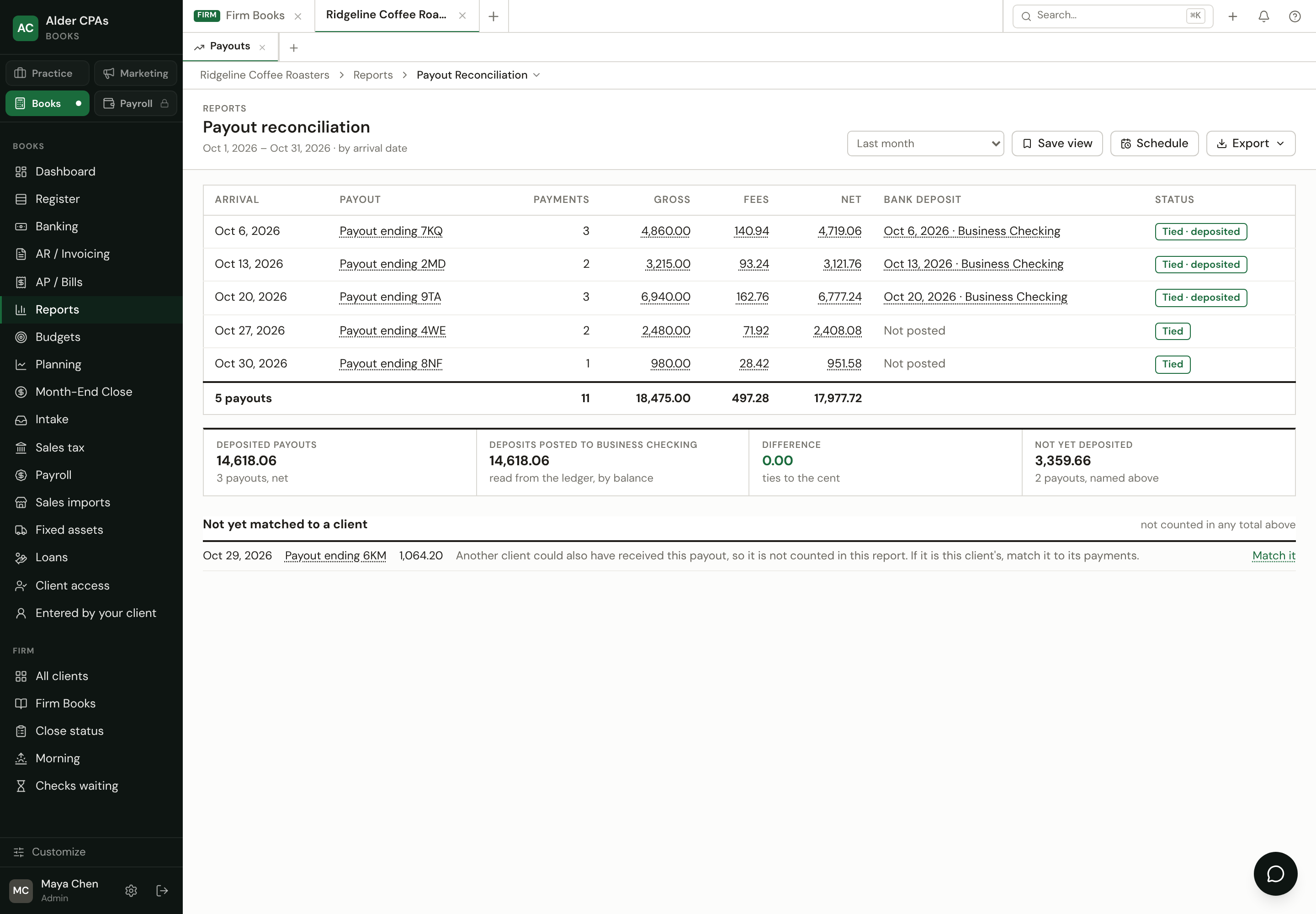 Payout reconciliation for October 2026
Pick the period at the top right: Last month (where it opens, but never before the books start), any of the other periods, or Custom dates with a start and an end date. Payouts are listed by the day they arrived, oldest first, with these columns:
- Arrival — the day the payout arrived.
- Payout — named by the last characters of the processor's reference, such as Payout ending 9TA. Click it to open the payout in Deposit detail.
- Payments — how many of the client's payments it carried.
- Gross, Fees, Net — what the payments came to, what processing took, and what reached the bank.
- Bank deposit — the date and bank account of the deposit entry, or Not posted. Click it to open the payout's page under Banking → Deposits.
- Status — Tied · deposited, Tied, Not tied or Composition not reported.
The strip under the table is the tie to the books:
- Deposited payouts — the net of every payout whose deposit is posted.
- Deposits posted to Business Checking — the same deposits, read from the bank account in the books.
- Difference — ties to the cent when the two agree.
- Not yet deposited — the net of every payout with no deposit posted, which are the ones marked Not posted above, including any that are not tied or that the bank returned. A payout listed under Not yet matched to a client is not counted here.
Why is this payout not reconciled?
A payout is Tied when everything inside it is accounted for in Books and its pieces add up to what arrived. Tied · deposited means its deposit entry is posted too. A row that is not tied is marked, and the reason is written under its status. The reasons are:
- A payment inside it isn't in Books yet. The processor reported a charge that has no payment in Books, which usually means the payment notice has not arrived yet.
- A payment in Books says it's in this payout, but the processor didn't report it.
- A payment inside it was voided in Books, but its card charge was not refunded. Posting the deposit would take money out of Undeposited Funds that is no longer there, so the deposit can't be posted.
- The processor didn't report a fee. The deposit can't be posted until the fee is known; it is not assumed to be zero.
- It nets against an earlier payout that has not been deposited yet, or that the bank returned. Post that payout's deposit first.
- Money from an earlier payout appears in it again, and this payout does not take back the same amount.
- The pieces don't add up to what the payout reports, and the reason names both amounts and the difference.
- The bank returned the payout. Nothing arrived, so there is nothing to deposit.
- Books hasn't received what is inside it yet. The reason reads The payout's composition has not been retrieved yet.
Composition not reported is a payout that was sent by hand, so it arrived as one amount with no list of its payments. Until someone matches its payments, it is listed in the table for a client only when that client is the only one in your firm with card or bank payments from the same processor still waiting for a payout.
When more than one client has such payments, it is listed under Not yet matched to a client instead (below). Its net is known, and the reason under its status reads This payout was sent by hand, so it arrived as one sum with no list of its payments. Match its payments to post the deposit. Once you group its payments on the payout's page, it is checked and tied like any other payout.
Payouts marked Composition not reported have no Gross or Fees. When a period includes one, the totals row says so: Gross and fees cover the 3 payouts that report them
Not yet matched to a client
A payout sent by hand that more than one of your clients could have received belongs to none of them until someone matches it. It is not counted for any client, but it doesn't disappear: it is listed on the Payout reconciliation of every client that could have received it, in a Not yet matched to a client section under the table, marked not counted in any total above.
Each line shows the day it arrived, the payout's name, its net and the sentence Another client could also have received this payout, so it is not counted in this report. If it is this client's, match it to its payments. Its net is in no total, in neither the tie strip nor the export.
- Click the payout's name to open it in Deposit detail.
- Click Match it to open the payout's page under Banking → Deposits, where you match its payments to the client it belongs to.
If the period's only payout is one of these, the page says No payouts arrived between Oct 1, 2026 and Oct 31, 2026 that are matched to this client. and lists the payout under it.
Deposit detail
Deposit detail is one payout, opened from the reports library, from Payout reconciliation, or picked from the list at the top right. Each payout is listed by its name and arrival date, newest first, such as Payout ending 9TA · 10/20/2026, and the report opens on the newest.
Payouts waiting to be matched to a client come after them, each starting with Not yet matched, such as Not yet matched · Payout ending 6KM · 10/29/2026. When the client has no payouts of its own yet, only ones waiting to be matched, the report opens on the first of those.
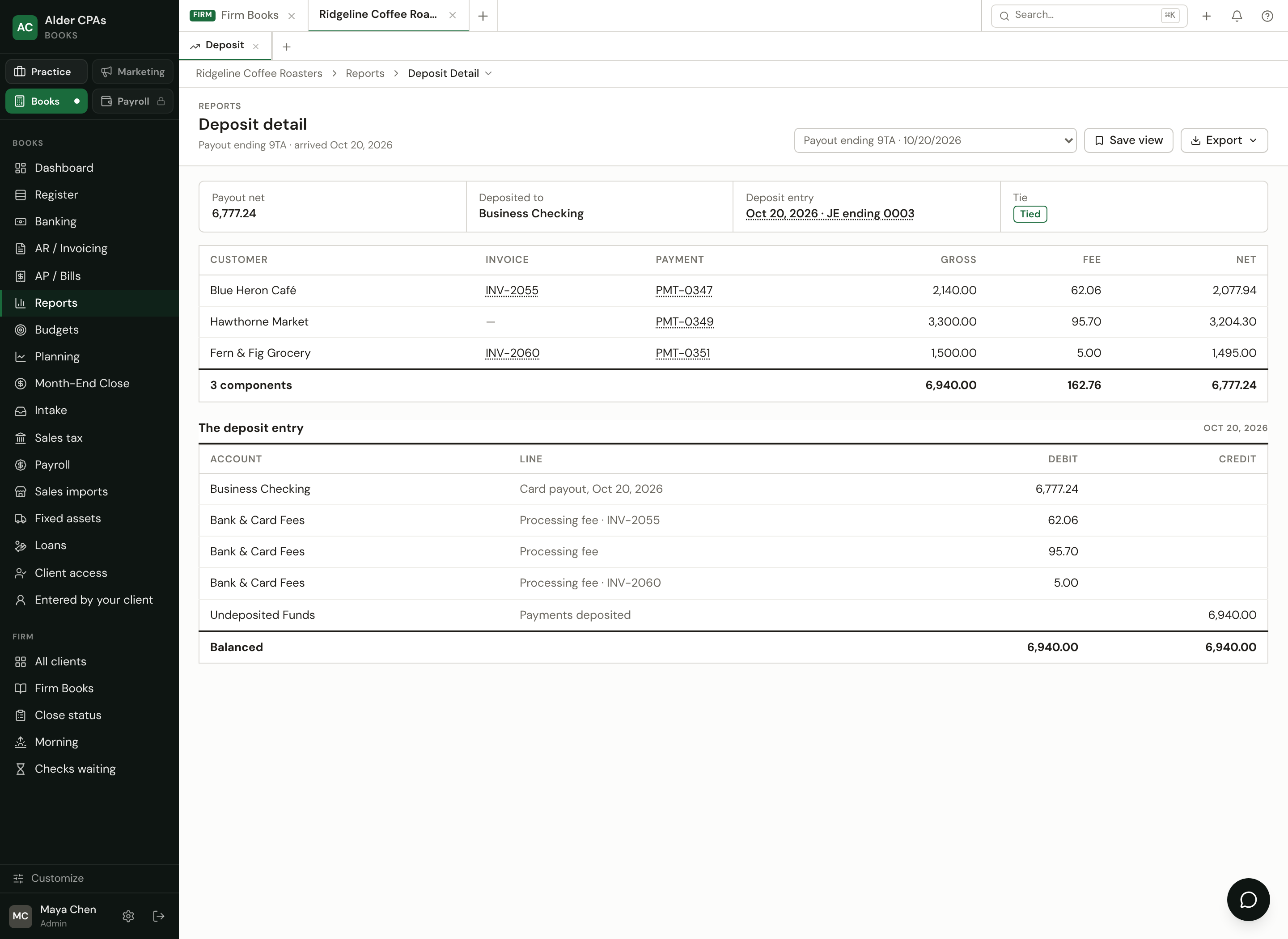 Deposit detail for the payout of Oct 20, 2026
-
At the top: Payout net, Deposited to (the bank account), Deposit entry (its date, linking to the payout's page), and Tie (Tied, or Not tied with the reason).
-
The table lists every piece of the payout: Customer, Invoice, Payment, Gross, Fee and Net, with a total. Besides payments, a payout can carry a Refund, Dispute, Adjustment, Fee or Payout fee, and each is named in the Customer column.
-
The deposit entry, under the table, is the entry exactly as it posted: Account, Line, Debit and Credit. In the usual case the bank account gets the net, on a line named for the payout and its date (Card payout, Oct 20, 2026).
The processing-fee account gets each fee not already recorded when the payment came in, one line for each piece of the payout that carries a fee, named for the invoice it paid (Processing fee · INV-2055, or just Processing fee when the payment has no single invoice), split between jobs when the invoices it paid carry them.
Undeposited Funds gives up the payments (Payments deposited). Its last line reads Balanced when debits equal credits.
For a payout sent by hand whose payments nobody has grouped yet, the page says Composition not reported. in place of the table, with its net and a Group payments button that opens the payout's page, where you group its payments. Its Components box reads None reported and its Tie reads Waiting on grouping.
Choose a payout marked Not yet matched, or click its name on Payout reconciliation, and the page says it is waiting, in place of the report:
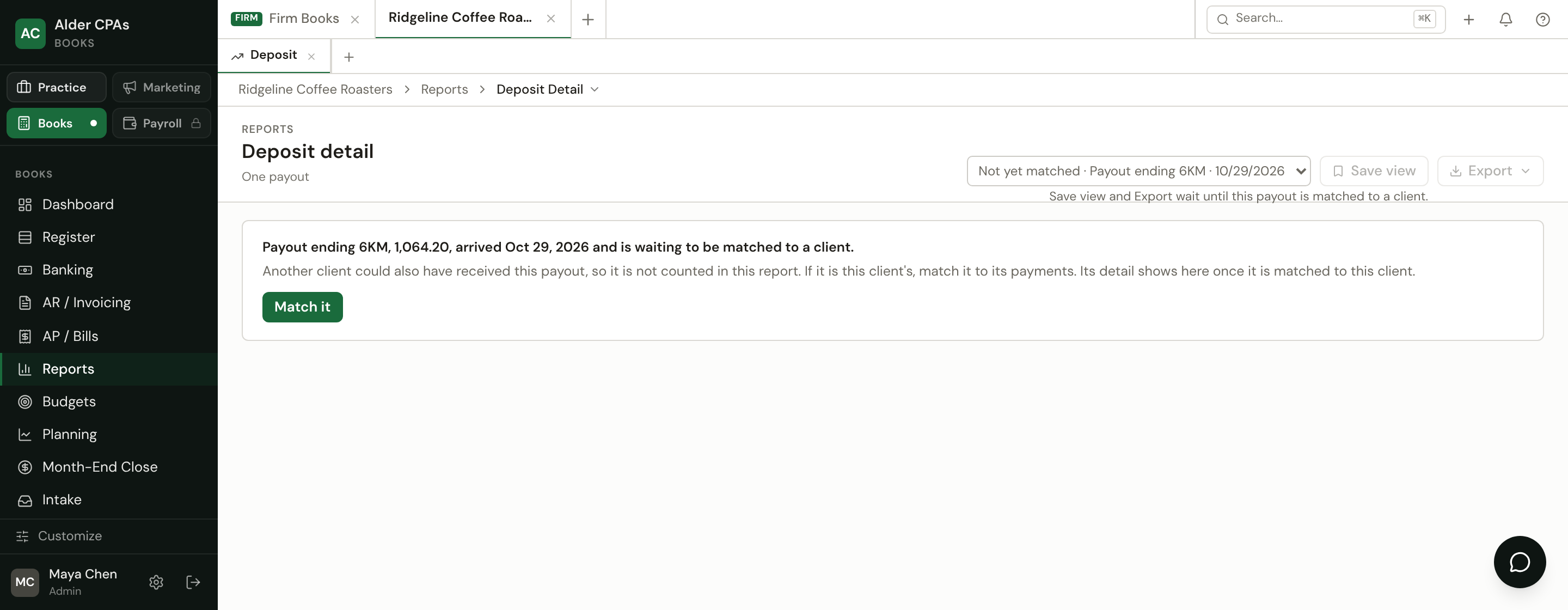 Deposit detail for a payout waiting to be matched to a client
It reads Payout ending 6KM, 1,064.20, arrived Oct 29, 2026 and is waiting to be matched to a client., then the same sentence as on Payout reconciliation and Its detail shows here once it is matched to this client. Match it opens the payout's page under Banking → Deposits. Save view and Export are off, and say why: Save view and Export wait until this payout is matched to a client.
Payment fees
Payment fees has two tabs.
By period
By period covers the payouts whose deposit entries are dated in the period, by month and payment method.
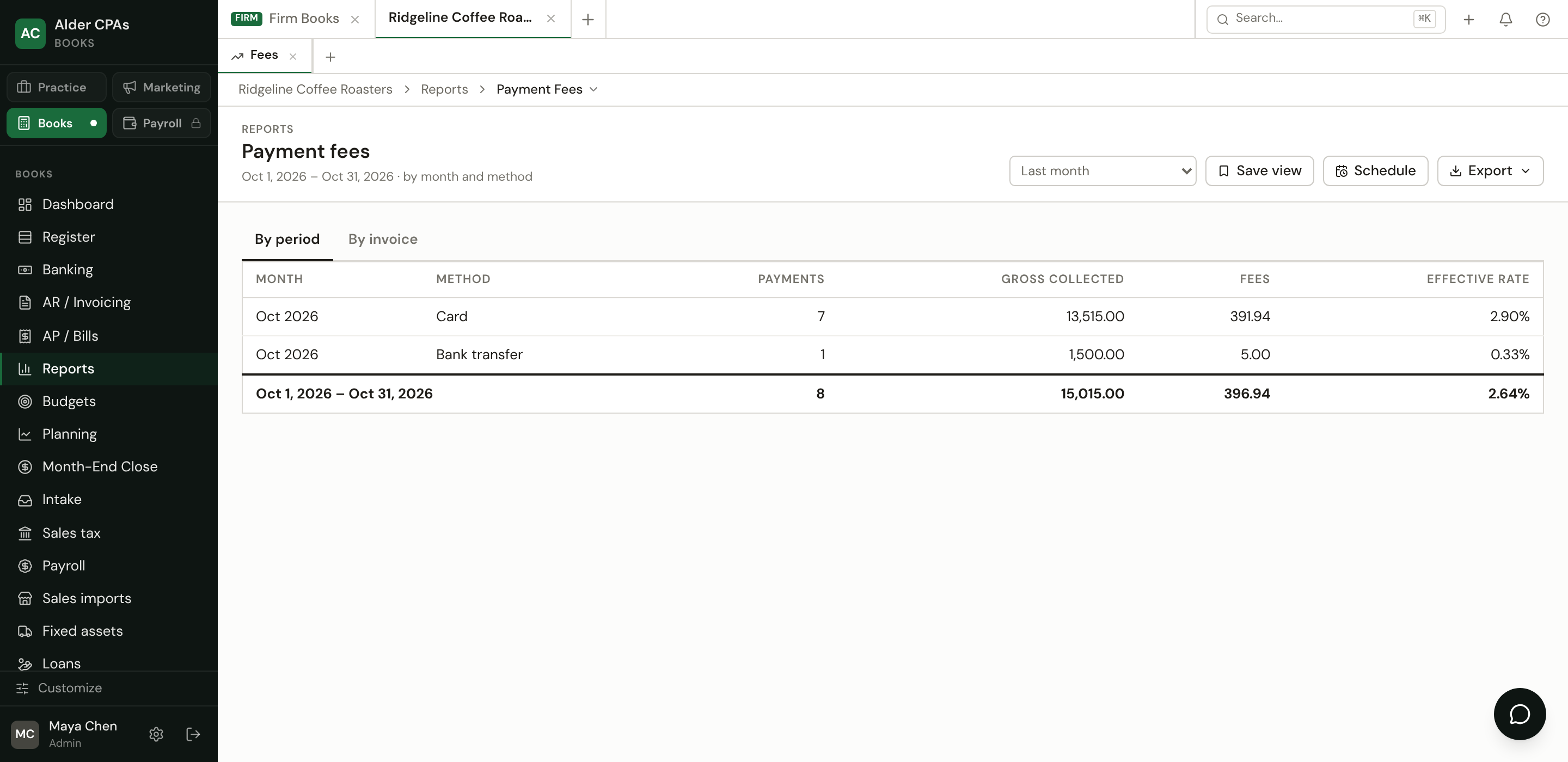 Payment fees by period for October 2026
The columns are Month, Method (Card, Bank transfer, and when a payout carried them, Refunds, Disputes, Fees and so on), Payments, Gross collected, Fees and Effective rate (fees divided by gross). The last row totals the period.
Hover the Fees total to see the tie: Ties to the Processing fees account for the period, to the cent, or by how much it differs. If the client has no processing-fee account set, it says No processing-fee account is mapped, so these fees are not tied to the ledger.
If a payment in the period had no fee reported, a line under the table says so, for example 1 payment had no fee reported, and is left out of the fees and the rate. Books never counts a missing fee as zero.
By invoice
By invoice lists each invoice paid in the period by card or bank transfer and already paid out: Invoice, Customer, Date paid, Collected, Fees, Net collected and Effective rate. The invoice number opens the invoice.
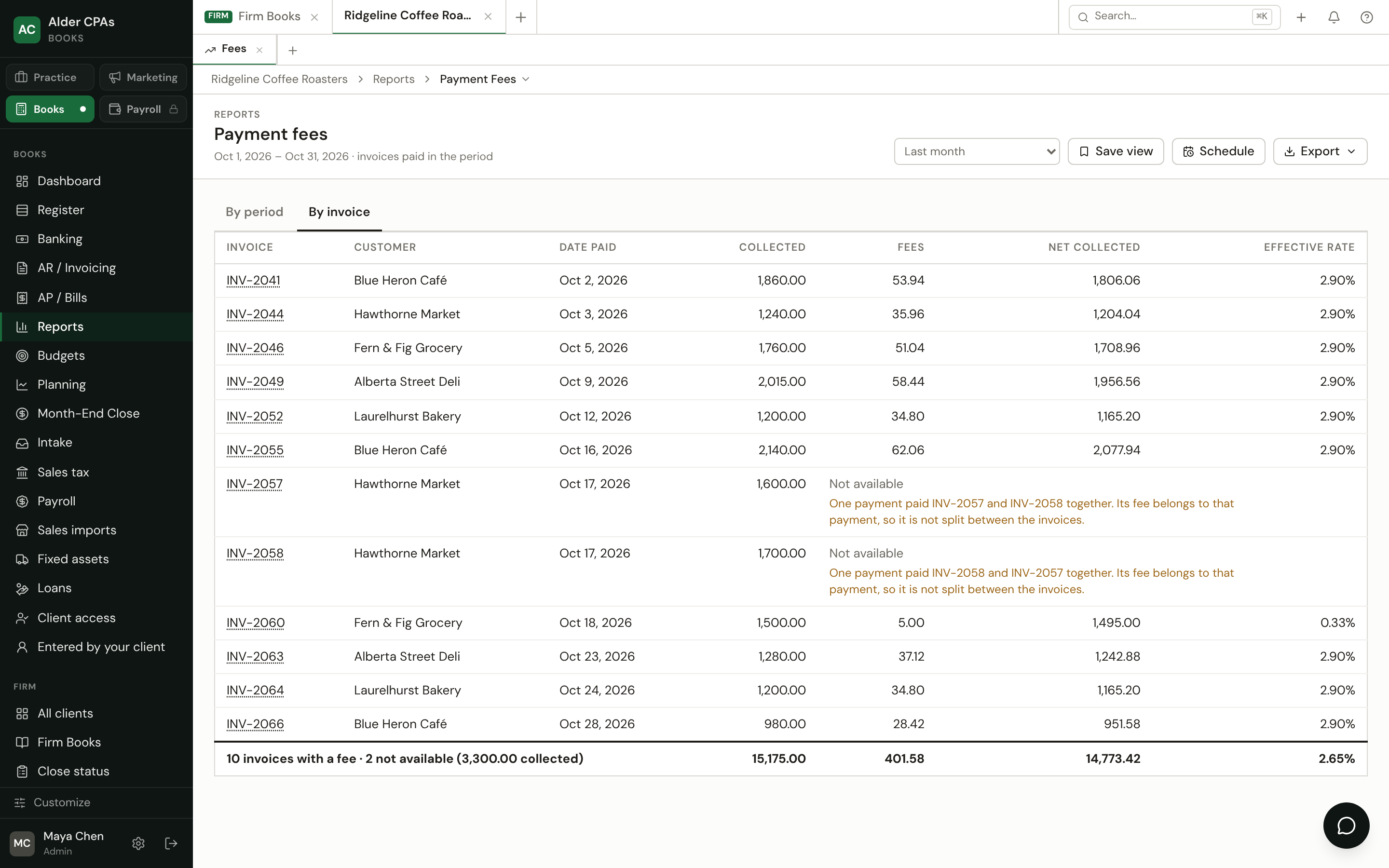 Payment fees by invoice for October 2026
Two cases read Not available, each with its reason:
- One payment paid several invoices. The fee belongs to the payment, and Books does not split it: One payment paid INV-2057 and INV-2058 together. Its fee belongs to that payment, so it is not split between the invoices.
- The processor never reported the fee: The fee for this payment was not reported, so it is not estimated.
The totals row counts only the invoices with a fee, and says how many were left out and what they collected, such as 10 invoices with a fee · 2 not available (3,300.00 collected).
What are these fees?
They are what the card or bank-transfer processor kept from each payment before paying out the rest. Books records each fee as its own line on the processing-fee account, so the Profit & Loss shows sales at their full amount and the fees as an expense. The effective rate is the fee as a share of what was collected. A bank transfer usually costs far less than a card, which is why the two are counted apart.
Unapplied credits
Unapplied credits lists money a customer or vendor has on account that has not been applied to an invoice or bill yet, aged from its date.
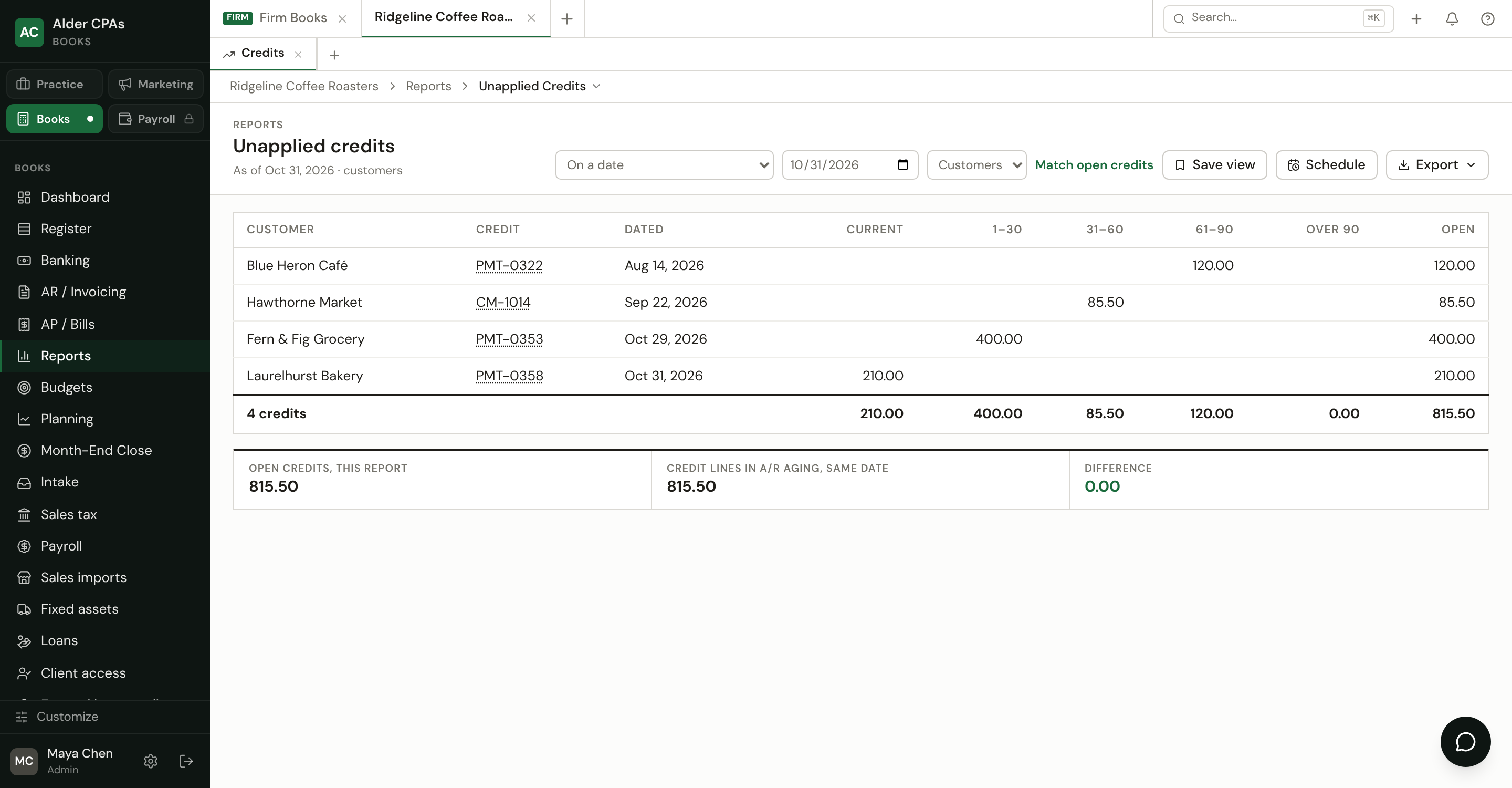 Unapplied customer credits as of Oct 31, 2026
- As of: On a date, with the date beside it (it opens on today), or the end of a period, such as End of last month.
- Customers or Vendors. For customers, the credits are payments with money left over after what was applied to invoices and refunded, and credit memos not fully applied. For vendors, they are bill payments not fully applied and vendor credits.
- The columns are Customer (or Vendor), Credit, Dated, the age (Current, 1–30, 31–60, 61–90, Over 90 days) and Open.
Click a payment's number to open the payment, or a credit memo's number to open it on the Credit memos list. Vendor rows (bill payments and vendor credits) are listed without a link.
The report rebuilds each credit as it stood on the date. A payment applied, refunded or voided after that date still counts as open on it. The strip underneath compares the total with Credit lines in A/R aging, same date (or A/P for vendors), with the Difference.
In a client's books, Match open credits, beside the pickers, opens the page for applying open credits to open invoices and bills.
Payment surcharges
Payment surcharges covers the card surcharges customers paid on invoices between two dates (From and To), by the date each payment was received. It shows three figures: Surcharges collected, Payments with a surcharge, and Processing fees on every payment received in those dates, which reads Not reported for this period when any of those fees was not reported, or none has been reported yet.
When no payment carried a surcharge, the page says so, such as No payment received from 10/01/2026 to 10/31/2026 carried a surcharge.
Save and export
Every payment report except Payment surcharges has Save view and Export (on Deposit detail, not for a payout waiting to be matched):
- Save view takes a Name, a Period (These dates, or a period such as Last month that moves with the calendar), and Just me or Whole firm. Deposit detail saves the payout itself, so it has no period.
- Export offers CSV, Excel and PDF. CSV and Excel are the rows on screen with the totals row, then the tie lines under them. The PDF is the report as printed, with the period and the tie.
Why can't I …
- …see the payment reports? They need the Aging, invoice and bill lists, payment history permission on this client. Without it, each of the other four reports says You do not have access to payment reports for this client. and The operational reports permission is needed. A firm admin can grant it in Team settings.
- …find Payout reconciliation when I sign in as the client? It is a firm report, and isn't offered to the client's own users.
- …see a payout in Deposit detail? A payout belongs to a client through its payments. When the client has no payouts at all, not even one waiting to be matched, the picker reads No payouts yet and the page says No payouts have reached these books yet.
- …see what is inside a payout marked Not yet matched? Another client could also have received it, so Books shows none of it until it is matched. Click Match it and match its payments on the payout's page.
- …see a fee for an invoice? See By invoice: a payment shared across invoices, or a fee the processor never reported, reads Not available.
- …see anything at all? If one of the other four reports can't be read, it says why, offers to try again, and adds Nothing is shown rather than a figure that may be wrong.
Tips
- Start the month with Payout reconciliation. Every payout should be Tied · deposited and the Difference should be 0.00 before you reconcile the bank account. A payout still Not posted is money in Undeposited Funds that the bank already has.
- Click a payout's name, or its Gross, Fees or Net, to open that payout in Deposit detail.
- Payout reconciliation is by arrival date and the By period tab of Payment fees by deposit date, so a payout that arrived on Oct 31 after October was closed posts its deposit on the first open day in November: it is October on the first and November on the second.
- For the bank side of the same money, see Why Doesn't This Report Match My Bank?.