
Your Plan and Billing
What your firm pays for in Books, line by line: the free core, Premium per client, the monthly allowance each Premium client gets, mailed checks, your card and your invoices.
On this page
Books is free at its core, for as many clients as you have. What your firm pays for is Premium, client by client, and a few things you use, such as checks Books mails for you. Billing shows all of it on one page, line by line, so you can see what each charge is for, who is on Premium, how much of this month's allowance each client has used, and whether a card is on file.
Premium is chosen per client, and only Premium clients are billed. The free core (the register, reports, invoicing, payments, reconciliation and statements) never costs anything and is never switched off, not even when a payment fails.
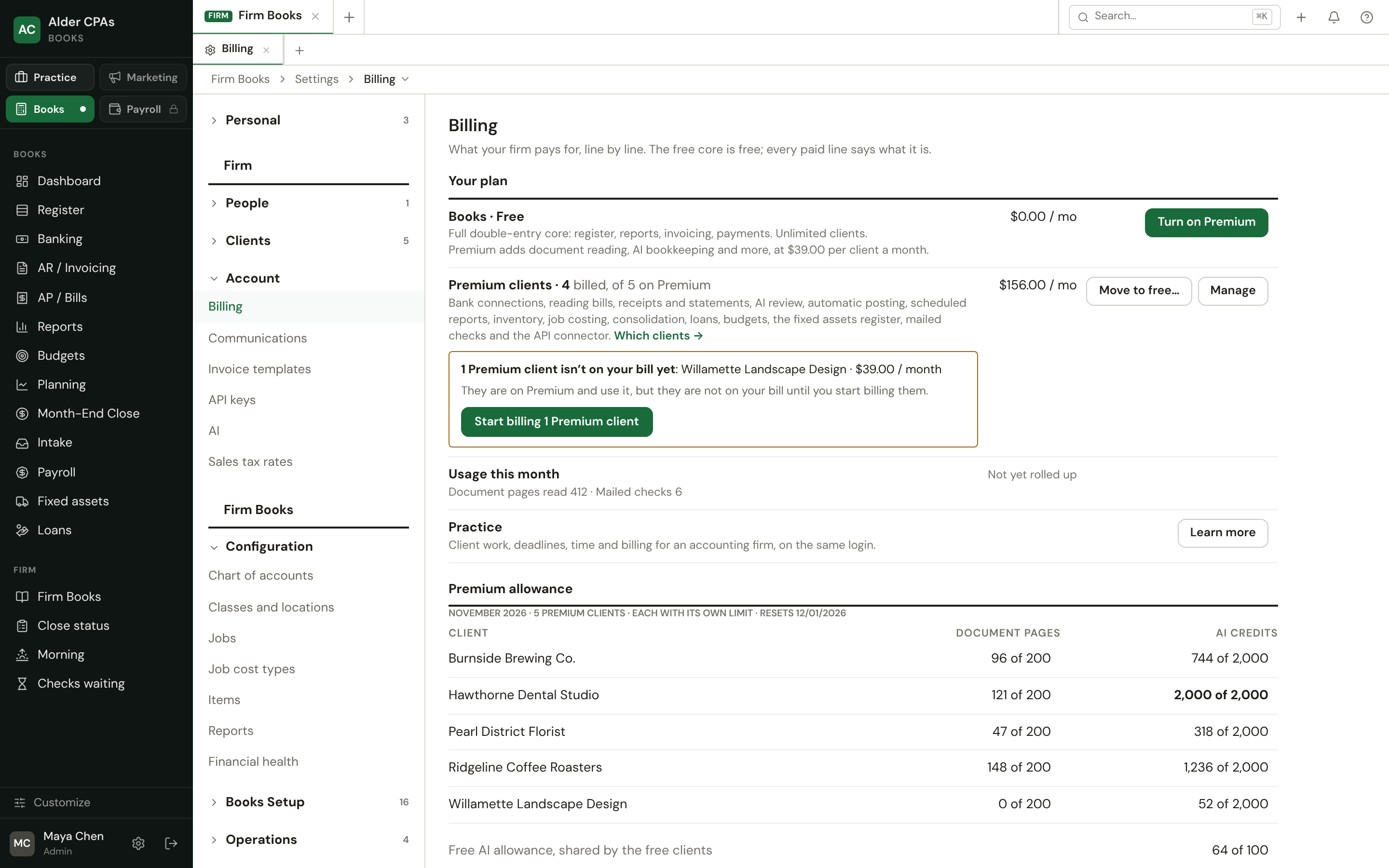 Settings → Billing for Alder CPAs: the free core, four billed Premium clients, one waiting to be billed, usage, and the allowance
Understand the page
The page opens with one line: What your firm pays for, line by line. The free core is free; every paid line says what it is. Below it, in order:
Your plan
-
Books · Free, at $0.00 / mo: Full double-entry core: register, reports, invoicing, payments. Unlimited clients. Under it, the price of Premium for your firm: Premium adds document reading, AI bookkeeping and more, at $39.00 per client a month. Turn on Premium is beside it.
-
Premium clients · 4, with what that line costs a month ($156.00 / mo for four clients at $39.00). When some clients are on Premium but not yet billed, the line says so: 4 billed, of 5 on Premium.
Under it is everything Premium adds: Bank connections, reading bills, receipts and statements, AI review, automatic posting, scheduled reports, inventory, job costing, consolidation, loans, budgets, the fixed assets register, mailed checks and the API connector. Which clients → and Manage open your client list filtered to Premium; Move to free… takes clients off.
-
Usage this month: what your firm used this calendar month, by kind, for example Document pages read 412 · Mailed checks 6. On the right, the usage charges once they are added up for the month, or Not yet rolled up before then.
-
An accounting firm that doesn't use Practice sees a last line offering it: Practice, Client work, deadlines, time and billing for an accounting firm, on the same login., with Learn more.
A business keeping its own books sees the same page in its own words: Premium for your books · on (or off), and at $39.00 a month.
Premium allowance
Each Premium client gets its own monthly allowance of Document pages (bills, receipts and statements Books reads) and AI credits, shown as used of allowance, for example 121 of 200 and 2,000 of 2,000. The heading names the month, how many clients are on Premium, and when it resets: November 2026 · 5 Premium clients · each with its own limit · resets 12/01/2026. A figure at its limit is in bold.
One client's allowance is never shared with another or borrowed from next month, and going over is never charged. When a client reaches its limit, A client at its limit waits until it resets., with Contact us about Enterprise pricing for firms that need more.
Below the Premium clients, Free AI allowance, shared by the free clients shows the small monthly allowance your free clients share, for example 64 of 100.
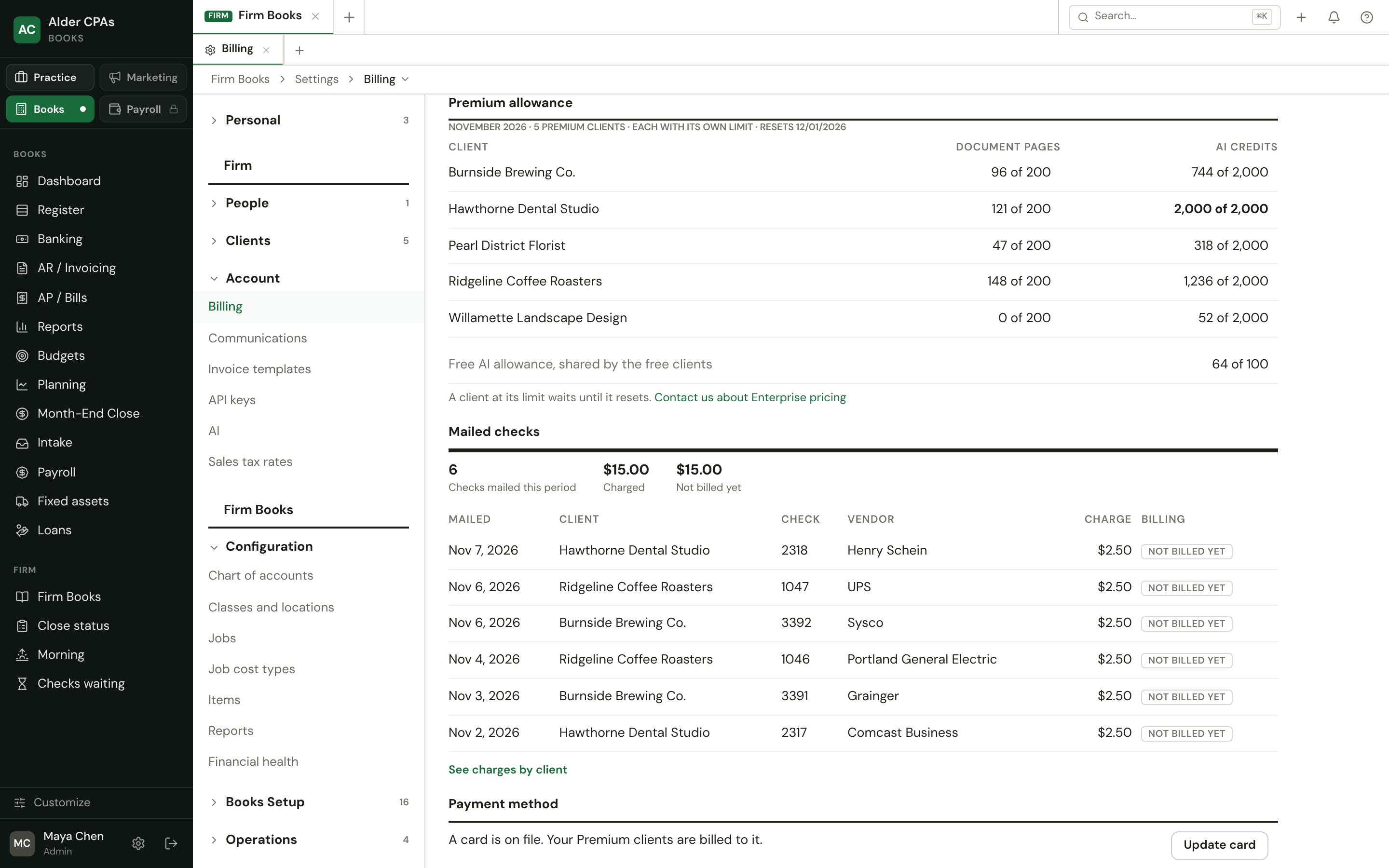 The allowance with one client at its AI limit, this period's mailed checks, and the card on file
Mailed checks
Every check Books mails for a client is a charge on your bill. This section shows this billing period: Checks mailed this period, Charged, and Not billed yet (hover it: Billed on the firm's next invoice from LedgerOS.), then one row per check with Mailed, Client, Check, Vendor, Charge and Billing.
Billing reads Billed, Not billed yet, Not billed (hover it for why), or No charge. See charges by client opens the same charges grouped by client. A period with none says No checks mailed this period.
Payment method
One sentence tells you where Premium is paid from, with the button that fits:
| What it says | Button |
|---|---|
| No card on file. A card is needed before any client moves to Premium. | Add a card |
| A card is on file. Your Premium clients are billed to it. | Update card |
| Your last Premium payment failed on Nov 3, 2026. Premium stays on while the payment is retried; update the card so it isn’t paused. (while a failed payment is being retried) | Update card |
| Premium is paused until the firm's payment goes through. Update the card to turn it back on. | Update card |
| Premium is included in your trial, which ends Nov 30, 2026. Add a card before then to keep it on. | Add a card |
| Your firm is not billed for Premium, so no card is needed. | none |
Invoices
The invoices LedgerOS has issued to your firm, newest first: Issued, For (Books Premium, or your subscription), Invoice, Amount, Status (Paid, Due, Void or Not collected), and View to open the invoice itself. Only the firm owner sees the list; anyone else sees Only the firm owner can see the firm’s invoices. Before your first paid line: No invoices yet. Your first one arrives when you have a paid line — premium clients.
If your firm also uses Practice, the Practice subscription is listed here too, with its status, seats and the end of the current period, and Open Practice billing ↗.
Turn on Premium for clients
- Click Turn on Premium.
- Check the clients you want. The list holds your active clients that aren't on Premium yet; search it, or check All free clients. You can choose up to 500 at a time. Archived clients are left out: restore a client before it can move to Premium.
- Click Review the charge. Books works out exactly what the change costs, with every check the real change runs, and shows it before anything happens.
- Read the rows: the clients, Added to your bill, For the rest of this billing period, Charged on, and Your Premium line after.
- Click Make Premium — adds $39.00 / month (the amount is yours). The page says 1 client is on Premium.
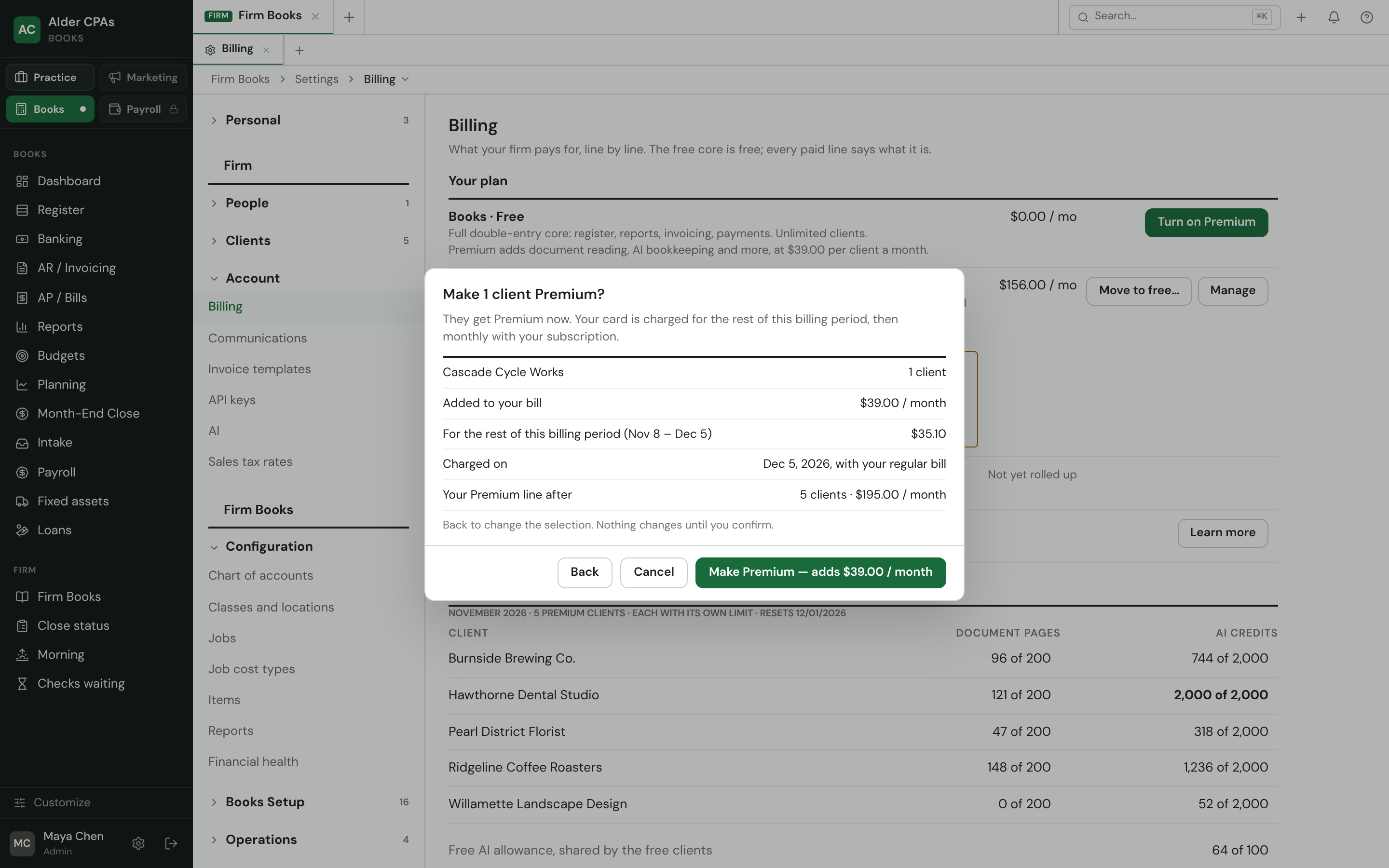 Make 1 client Premium? with what it adds now and each month
Premium starts for those clients at once. Back returns to the list to change your selection; nothing changes until you confirm.
If your firm has no card yet, the dialog says Premium is $39.00 a month per client, charged to a card. and offers Add a card instead (see below).
You can also change one client at a time from your client list (Manage), where each client's row has its own Premium choice.
Start billing clients that are on Premium but not on your bill
A client can be on Premium before anyone has agreed to pay for it. The Premium line then shows a box such as 1 Premium client isn't on your bill yet: Willamette Landscape Design · $39.00 / month, with They are on Premium and use it, but they are not on your bill until you start billing them.
- Click Start billing 1 Premium client.
- Read what it adds. The dialog names the clients (Willamette Landscape Design joins your Premium line.), then Added to your bill, For the rest of this billing period, and Charged on.
- Click Start billing — adds $39.00 / month.
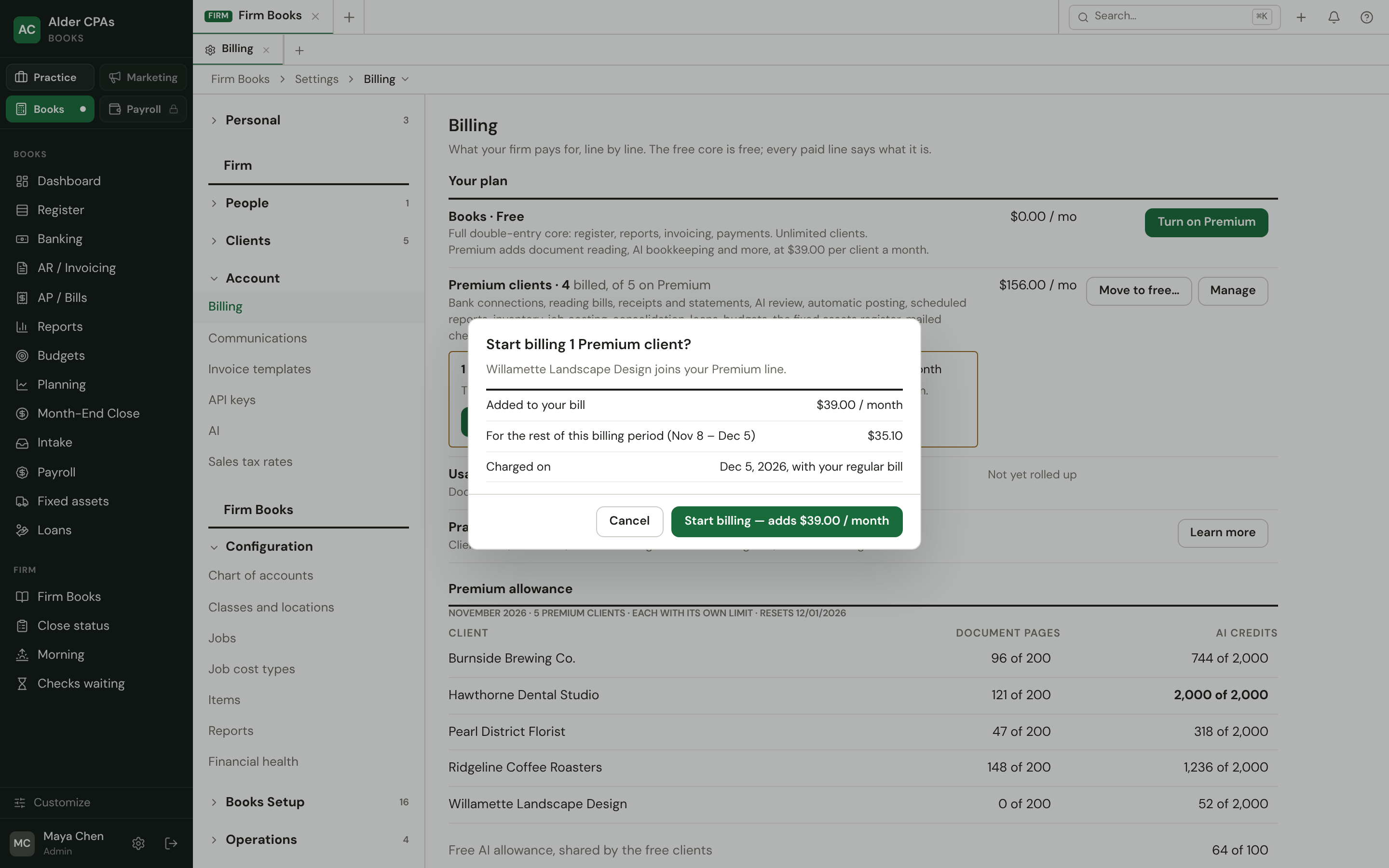 Start billing 1 Premium client? with the amount for the rest of this period
Move clients back to free
- Click Move to free… on the Premium line.
- Check the clients, or All Premium clients, and click Review.
- Read what happens: Premium features stop for these clients now. Their books, documents and history stay. Paid through is the end of the period you've already paid for, and Comes off your bill says from Dec 5, 2026 — no partial refund.
- Click Move to free.
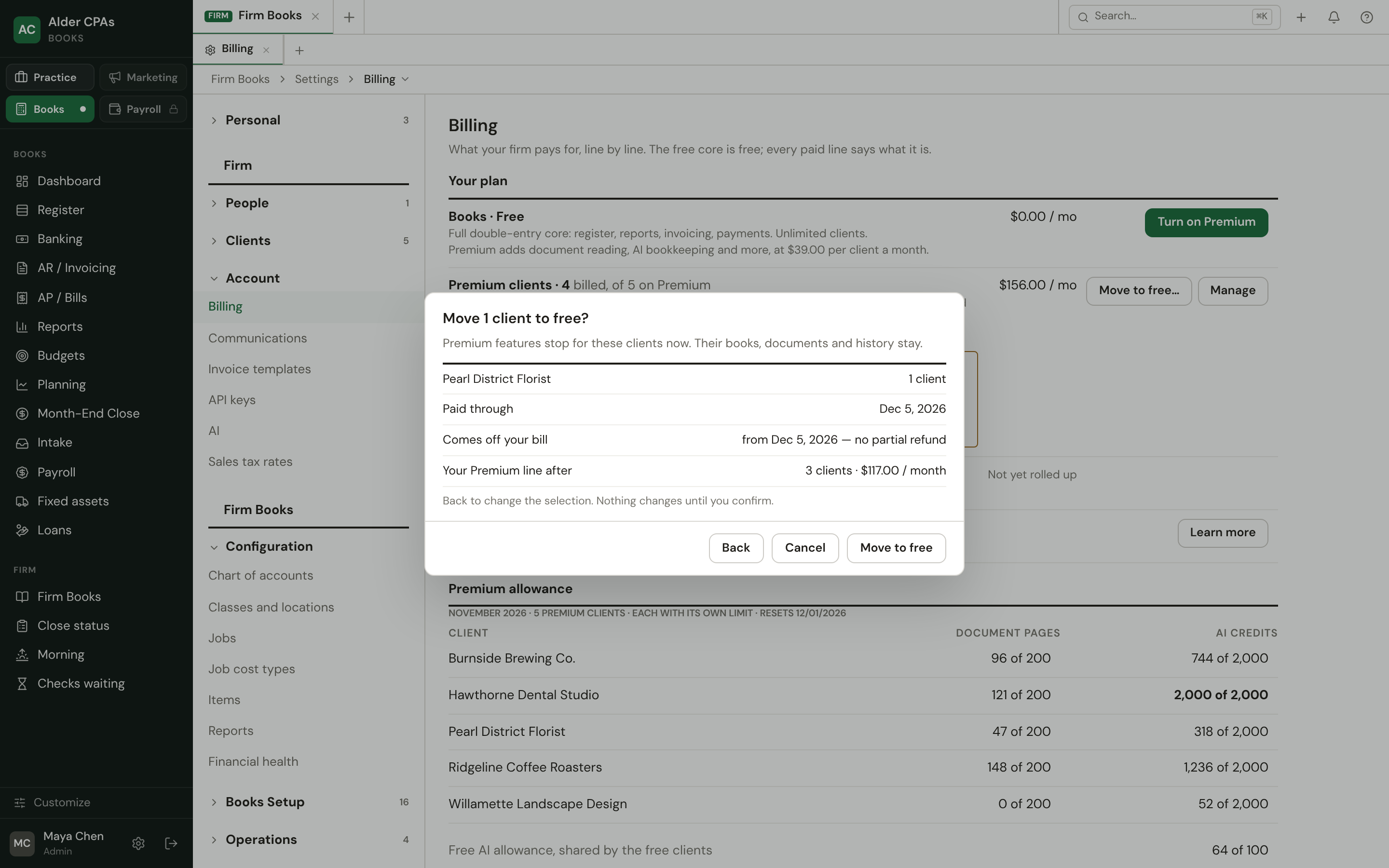 Move 1 client to free? with when it comes off the bill
Nothing in the client's books is deleted, and the free core carries on as before.
Add or update your card
Add a card asks which client to move to Premium first, because your card is taken with it: Your card is taken with the first client you move to Premium: choose it here, add the card on the next page, and that client turns on Premium as soon as the card is in. Nothing is charged if you cancel there.
- Choose the client and click Continue with this client.
- On Add a card for Premium, read the charge line (Charged today, then monthly on this date. The next page, where you enter the card, shows the exact amount before you pay.) and click Continue to add a card.
- Enter the card on the card page.
- You come back to Books: Your card was added. Turning on Premium…, then Ridgeline Coffee Roasters is on Premium. Your card is on file and is charged monthly.
If you leave the card page without finishing: You left the card step before the card was added. Nothing was charged.
Update card opens Update your card: Change the card your Premium clients are billed to. You’ll come back here when you’re done. Click Continue to update the card. When you return: You’re back from updating your card. Any change you saved there is on file now. If your firm uses Practice, Update card opens your firm's billing in Practice instead.
If a Premium payment fails
-
Premium keeps working while the payment is retried. Nothing changes for your clients during that time. Payment method on this page says so, with the day the payment failed: Your last Premium payment failed on Nov 3, 2026. Premium stays on while the payment is retried; update the card so it isn’t paused. Click Update card to fix it before the retries run out.
-
If the retries end without a payment, Premium pauses for your Premium clients. They stay on Premium, and nothing is switched off for good: a Premium page reads Paused with Premium is paused until the firm's payment goes through. and Bank connections stay connected and resume when it does., with Update card for owners and admins.
The payment method line reads Premium is paused until the firm's payment goes through. Update the card to turn it back on.
-
While Premium is paused, no other client can be moved onto it: Premium is paused until the firm's payment goes through. Update the card on the billing page, then turn Premium on.
-
When the payment goes through, Premium is back on for every client that had it.
-
The free core is never blocked. The register, reports, invoicing, payments and reconciliation keep working for every client throughout.
Who can do what
-
Reading the Premium line and payment method needs the Settings — Firm permission. Without it they say: You need the "Settings — Firm" permission to read this firm's billing. Ask an admin to grant it.
-
Turn on Premium, Move to free… and Add a card need Change a client's Books plan. Without it the buttons are off, and the reason is beside them: You need the "Change a client's Books plan" permission for this. Ask an admin to grant it.
Start billing needs it too; its button stays on, and the dialog says: You need the "Change a client's Books plan" permission to start billing for Premium clients. Ask an admin to grant it.
-
Owners and admins hold both. Only the owner sees the Invoices list.
Questions people ask
What am I billed for? Each Premium client at $39.00 a month (the Premium line shows the total), each check Books mails ($2.50, under Mailed checks), and any usage charges added up for the month. The core is $0.00.
Why isn't this client on our bill? It may be on the free plan (it isn't in Which clients →), waiting for someone to start billing it (the box on the Premium line), archived (an archived client is never billed, and loses Premium until it is restored), or it is the sample company, which has every Premium feature and is never billed. A client you moved to free this period stays on the bill until Paid through.
How do I update our card? Update card under Payment method.
Tips
- Check the allowance before month-end close. A client at its limit waits for the reset date, so a heavy month of statements is worth spreading out, or worth a word with us about Enterprise pricing.
- Review the charge costs nothing to look at. Use it to answer "what would this cost?" before you decide.
- Moving a client to free never deletes its books, documents or history.