
A Bank Connection Stopped Syncing
What you see when a client's bank connection stops bringing in transactions, why it happened, and how to get it syncing again, for each reason Books stops.
On this page
A connected bank normally brings in new transactions on its own. When one stops, Books says so and says why: a red banner, a status on the connection, and a reason on the account. Find what you're seeing below, then follow the fix. For the Bank connections page itself, see Bank Connections: Syncing, Reconnecting, Missing Transactions.
Pausing, a reconnect, or a lapsed plan loses nothing the connection already brought in. Your mappings, rules and posted history stay as they were. When you reconnect, Books asks the bank for the whole history, brings in what it missed, and never brings in a line twice; after a pause, the next sync picks up where it stopped. Unlinking is different: lines still waiting in Review are removed, and an account that never posted gives up its mapping.
Find your symptom
| What you see | Why | Fix |
|---|---|---|
| Red banner … needs to be reconnected — the bank ended the session.; the connection reads Reconnect needed and its accounts Stalled | The bank ended the connection's sign-in. | Reconnect. |
| Red banner … was disconnected by the bank, so signing in again can’t repair it.; the connection reads Disconnected and its accounts Stalled | The bank ended the connection itself. | Connect it again. |
| Paused beside the bank's name | Someone at your firm paused syncing for the connection. | Turn sync back on. |
| Unlinked, with Connect again | Someone at your firm unlinked the connection. | Connect it again. |
| Banking shows Bank feeds are a premium feature instead of the connections | The client is no longer on Premium. | Turn Premium back on. |
| Last sync failed on the account page, but the connection still reads Connected | One sync didn't finish. | Check the reason. |
| Nothing looks wrong, but lines are missing | Usually not a stopped connection. | See Why are transactions missing? |
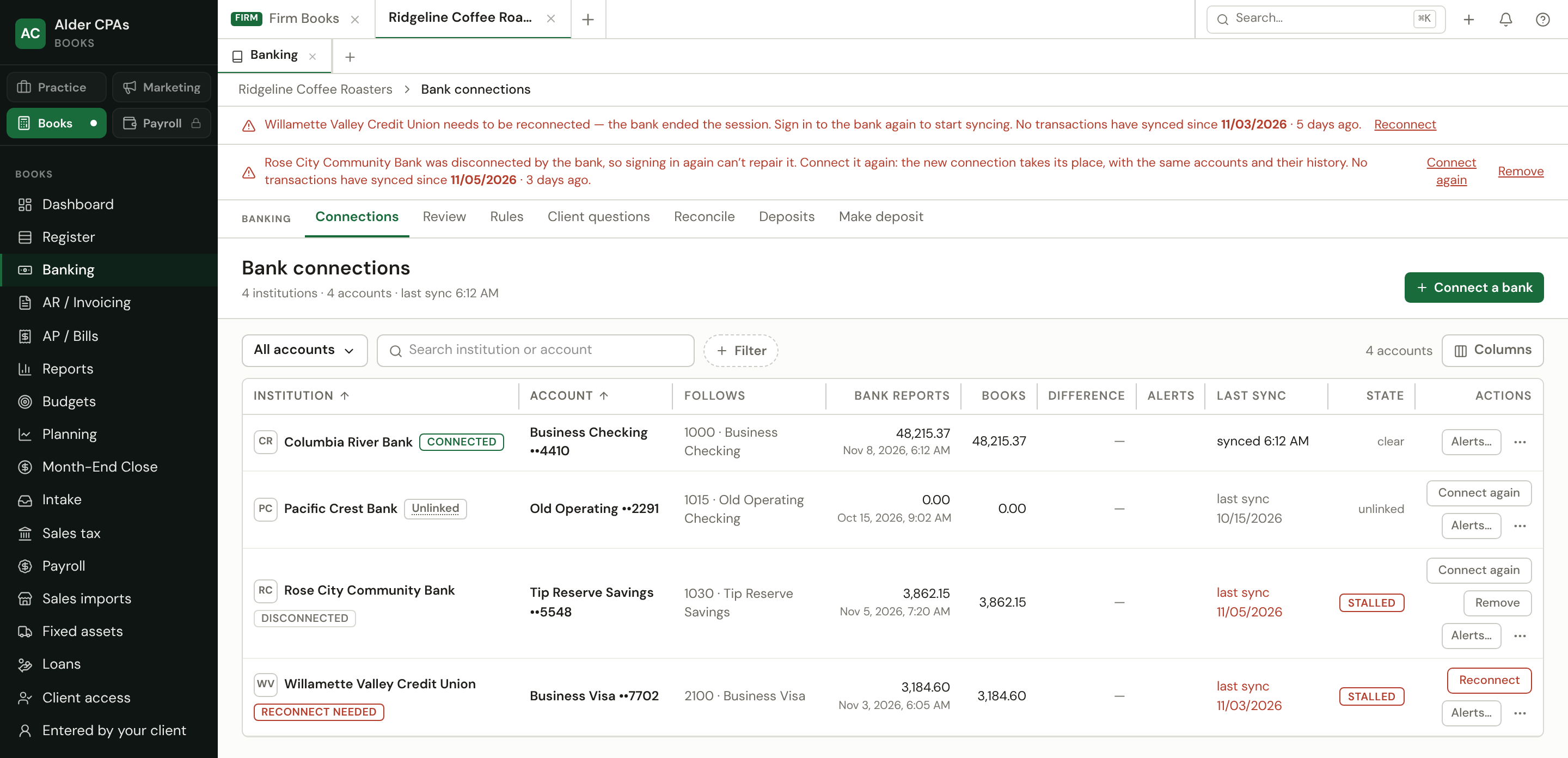 Two banners: Willamette Valley Credit Union needs reconnecting, and Rose City Community Bank was disconnected by the bank; Pacific Crest Bank, unlinked, raises no banner
Reconnect needed
What you see. A red banner across the top of Banking, and of the Review page too, so you see it while you work through lines:
Willamette Valley Credit Union needs to be reconnected — the bank ended the session. Sign in to the bank again to start syncing. No transactions have synced since 11/03/2026 · 5 days ago.
The connection reads Reconnect needed. Each of its accounts shows Stalled under State, and its Last sync date turns red.
On the account's own page, the Sync row says Stopped · the bank ended the session, so nothing syncs until it is reconnected, and its switch is held with the reason beside it (Nothing syncs from this connection until it is reconnected, so there is nothing to pause. Reconnect it from the Banking page.), which Settings → Bank feeds shows in place of On and Paused. If a sync failed, Last sync failed gives the bank's reason, and when the last good sync was:
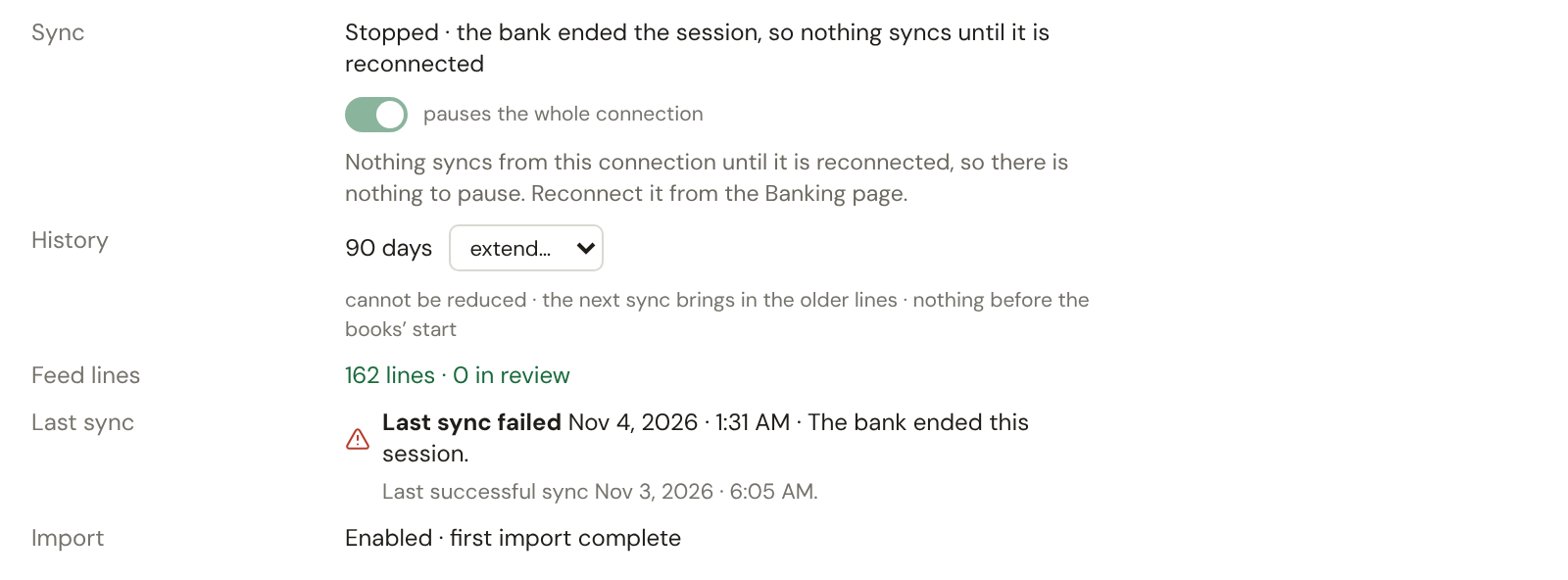 The account page for the Business Visa: Sync is stopped, and the last sync failed because the bank ended the session
Why. The bank ended the connection's sign-in. Until someone signs in again, Books can't bring anything in. Sync now is off, and hovering it says why:
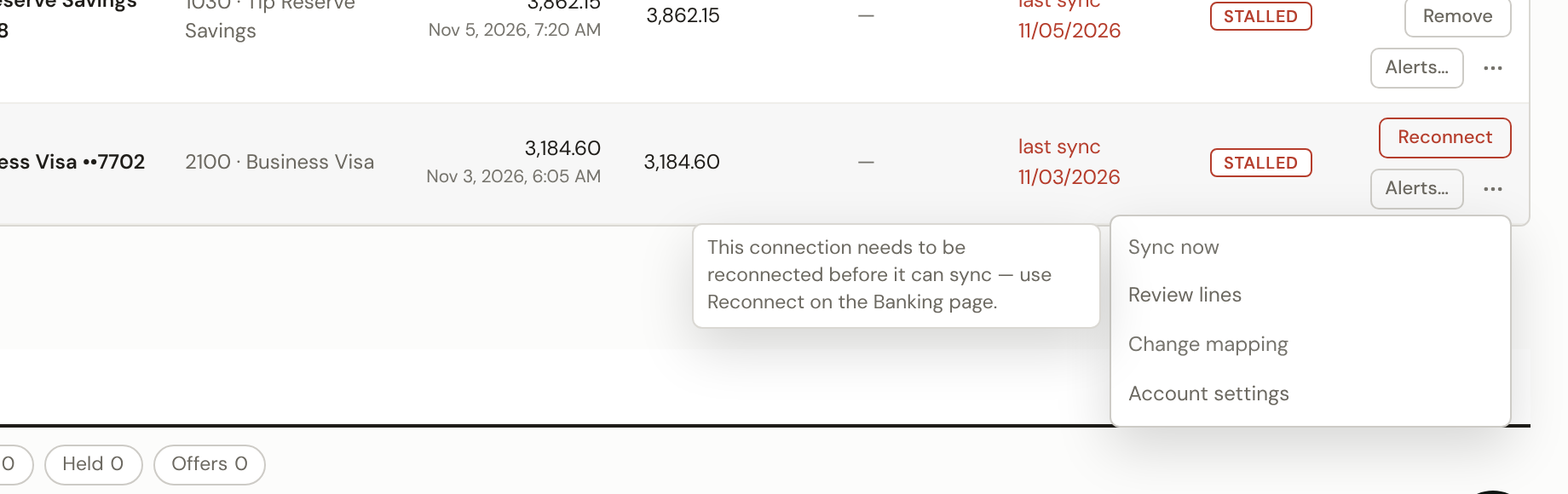 Sync now is off on a connection that needs reconnecting
Fix.
-
Click Reconnect in the banner, or on the connection's row.
-
Sign in to the bank in its window, the same way you connected it.
-
Books says Willamette Valley Credit Union reconnected · bringing in what it missed now. and syncs the connection, asking the bank for its full history. On Banking, a line under the header says how that sync went (Synced with what came in, or Sync failed with the bank's reason).
From the Review page the message is Willamette Valley Credit Union reconnected and synced., or, if the sync failed, Willamette Valley Credit Union reconnected, but the sync failed: followed by the reason. Lines it missed come into Review. Lines already in Books are not brought in twice, and lines you already posted are left as they are.
Reconnecting is the same connection signing in again. It doesn't ask you to map the accounts again, and it doesn't need anyone to accept the bank connection terms again. If the bank later tells Books the sign-in is working again on its own, the connection goes back to Connected without you doing anything.
Disconnected by the bank
What you see. A red banner on Banking:
Rose City Community Bank was disconnected by the bank, so signing in again can’t repair it. Connect it again: the new connection takes its place, with the same accounts and their history. No transactions have synced since 11/05/2026 · 3 days ago.
The banner and the row offer Connect again and Remove; there's no Reconnect. The connection reads Disconnected, and its accounts Stalled.
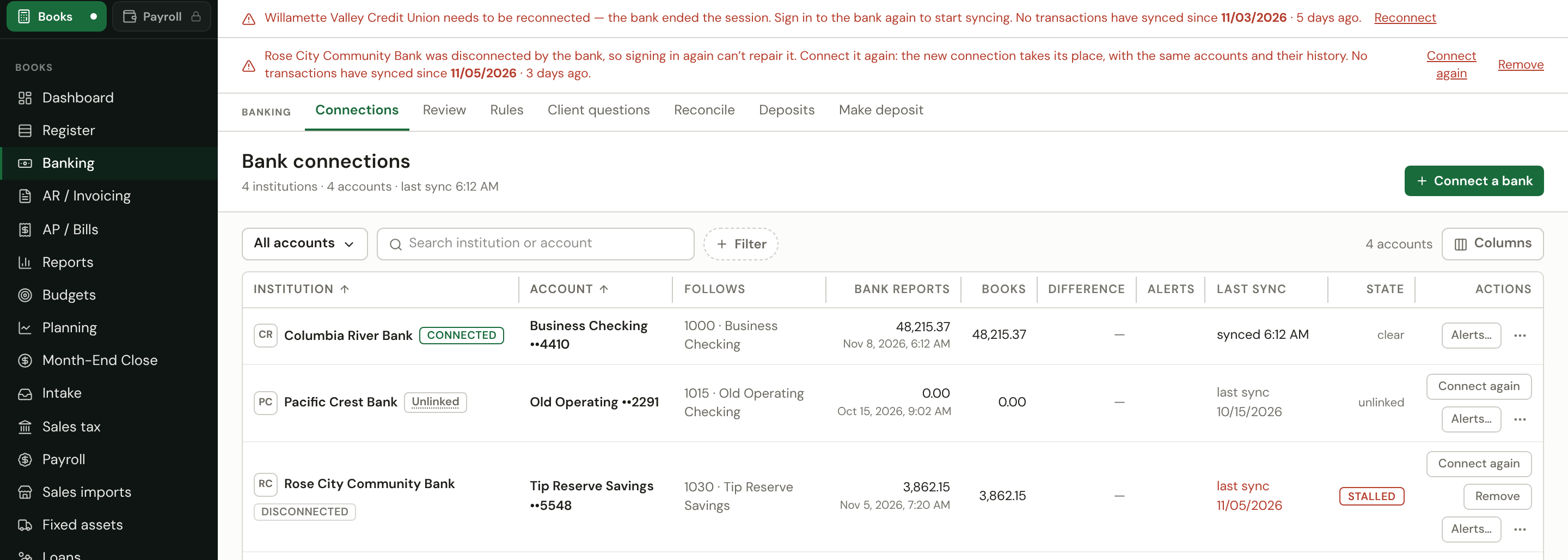 Rose City Community Bank, disconnected by the bank: Connect again and Remove in the banner and on its row
On the account's page, the badge reads Disconnected and the Sync row says Stopped · the bank disconnected it, so nothing syncs until it is connected again.
Its switch is held, with Nothing syncs from this connection until it is connected again, so there is nothing to pause. Use Connect again on the Banking page. beside it, and Sync now is off: hovering it says The bank disconnected this connection. Use Connect again on the Banking page before syncing. Settings → Bank feeds shows the same reason in place of On and Paused.
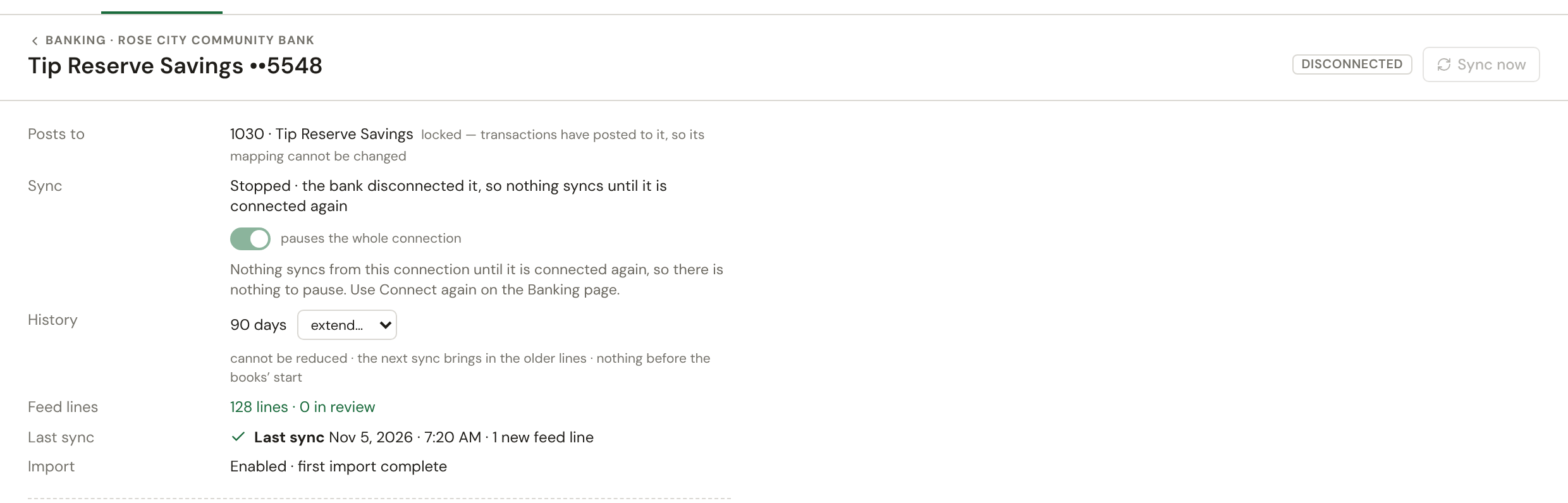 The account page for Tip Reserve Savings: Disconnected, and Sync stopped
Why. The bank ended the connection itself, rather than only its sign-in, so signing in again over it can't bring it back.
Fix.
-
Click Connect again in the banner or on the row, and connect the bank the way you'd connect a new one. Because it's a new connection, it needs what any new one needs: your firm's approval for bank connections and the current bank connection terms (see Connect a Bank or Card Account).
-
Books takes the new connection onto the old one's row and says Rose City Community Bank connected again · the same connection, with its accounts and their mappings · bringing in what it missed now.
Each account it recognizes by type and last four digits keeps its mapping, history and posted transactions, and the banner goes. Map accounts doesn't open; if the bank now shares an account Books didn't have before, its row reads Unmapped, so click Map on it.
If the bank signs you in on its own website, it sends you back to Books on a page titled Connecting your bank, which says the same Rose City Community Bank connected again · the same connection, with its accounts and their mappings · bringing in what it missed now., shows how the sync went under it, and offers Back to Banking.
 Connecting your bank after Connect again: Rose City Community Bank connected again, the same connection, synced, with Back to Banking
The Review page shows the same banner, ending Connect it again from the Banking page., because connecting a bank happens on Banking.
More than one disconnected connection at the same bank? Then Books can't tell which one the new connection replaces, so it adds the new one beside them.
Remove each old one: click Remove, read what it does (Removes the connection to Rose City Community Bank and its 1 account. No transactions are waiting for review, so none are removed; 128 transactions already in your books stay. Nothing syncs from it again.) and click Remove connection.
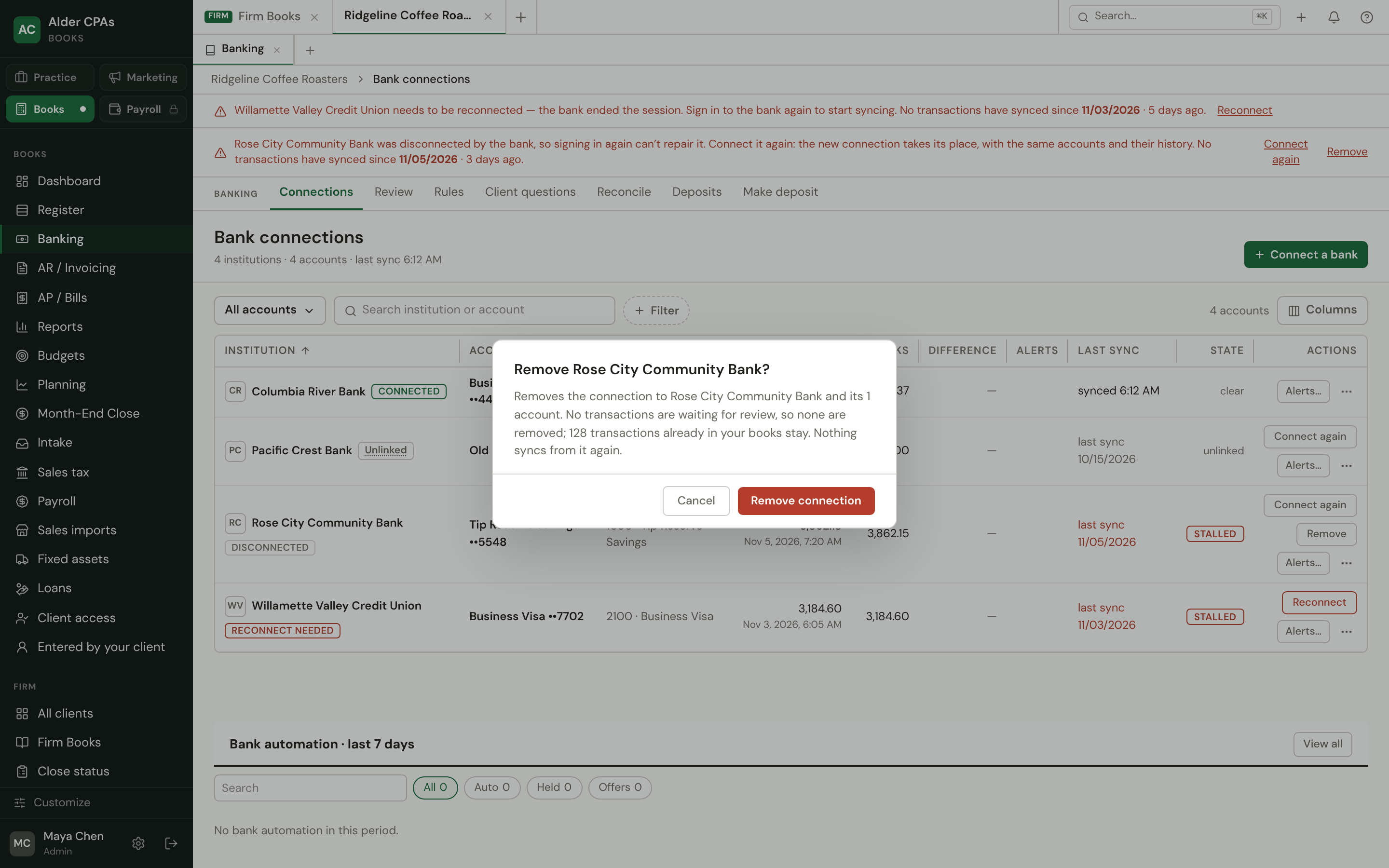 Remove Rose City Community Bank?
Paused
What you see. A Paused marker beside the bank's name. There's no banner, because nothing is wrong with the connection. Sync now says Syncing is paused for this connection. Turn sync back on to import transactions.
Why. Someone turned off the Sync switch on one of the connection's accounts, or chose Paused under Settings → Bank feeds. Pausing stops the whole connection, every account at that bank.
Fix. Open any account at that bank and turn the Sync switch back on, or choose On under Settings → Bank feeds. The next sync picks up where it stopped.
Unlinked
What you see. The connection reads Unlinked, its accounts unlinked, and its row offers Connect again. There's no banner: someone at your firm unlinked it on purpose. Its account page says This connection was unlinked, so nothing syncs from it. Connect the bank again to start syncing; its history stays.
Why. Unlinking ends the connection's sign-in at the bank and stops syncing for every account at that bank. Posted transactions stayed in the books.
Fix. Click Connect again and connect the bank the way you'd connect a new one. When it's the only unlinked connection at that bank (and none there was disconnected by the bank), Books brings the new connection back onto the same row, matching accounts by type and last four digits, and, as the unlink prompt said, Connecting it again later re-imports without duplicates.
Books says … connected again · the same connection, with its accounts and their mappings · bringing in what it missed now., and Map accounts doesn't open.
An account that had posted keeps its mapping; one that never posted gave its mapping back when it was unlinked, so its row reads Unmapped: click Map on it.
Because it's a new sign-in, it needs what any new connection needs: your firm's approval for bank connections and the current bank connection terms (see Connect a Bank or Card Account).
The client's plan no longer includes bank feeds
What you see. The Banking page shows Bank feeds are a premium feature, with what works on the free plan (uploading a statement, pasting from a spreadsheet), instead of the list of connections.
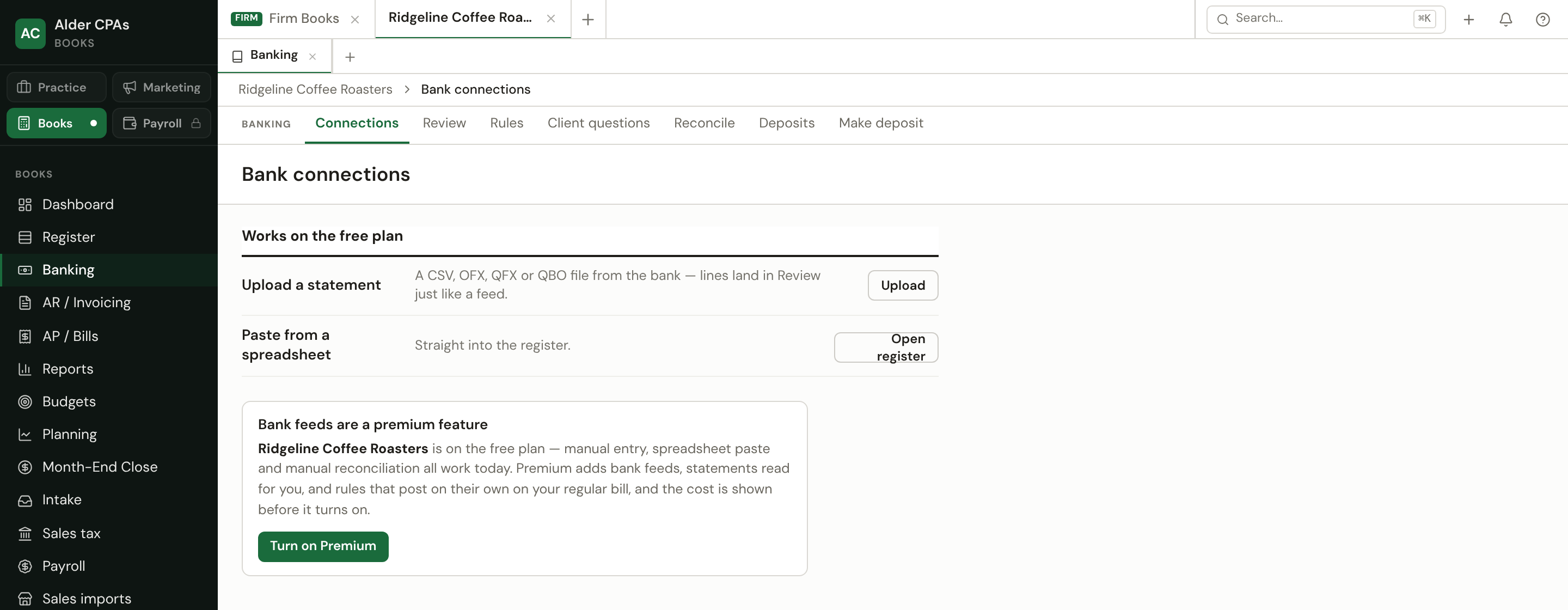 Banking for a client that isn't on Premium
Why. Live bank connections are part of Premium, for each client. While a client isn't on Premium, Books doesn't sync its connections. If the page instead says Premium is paused until the firm's payment goes through., the firm's payment is past due: Bank connections stay connected and resume when it does.
Fix. An owner or admin turns Premium back on for the client with Turn on Premium, or brings the firm's payment up to date. The connections are still there, and the next sync picks up where they stopped.
One sync failed
What you see. The connection still reads Connected, but the account page's Last sync row says Last sync failed, with a reason and the last successful sync.
Why. A single sync didn't finish, for example because the bank didn't answer. That doesn't stop the connection: Books tries again on its regular schedule, about every 15 minutes.
Fix. Usually nothing. To try right away, click Sync now at the top right of the account page, or choose Sync now from the row's ⋯ menu on Banking; either way Books says what the sync did. If the bank ends the session, the connection changes to Reconnect needed and you'll see the banner.
Every client's stopped connections at once
On the firm dashboard, the Feed health card's Needs attention line opens Bank connections needing attention: every client's connection that needs reconnecting or connecting again, with Client, Bank, Status (Reconnect needed or Disconnected), Since and Last sync.
Fix opens that client's Banking page with the connection highlighted. Connections someone unlinked on purpose aren't listed.
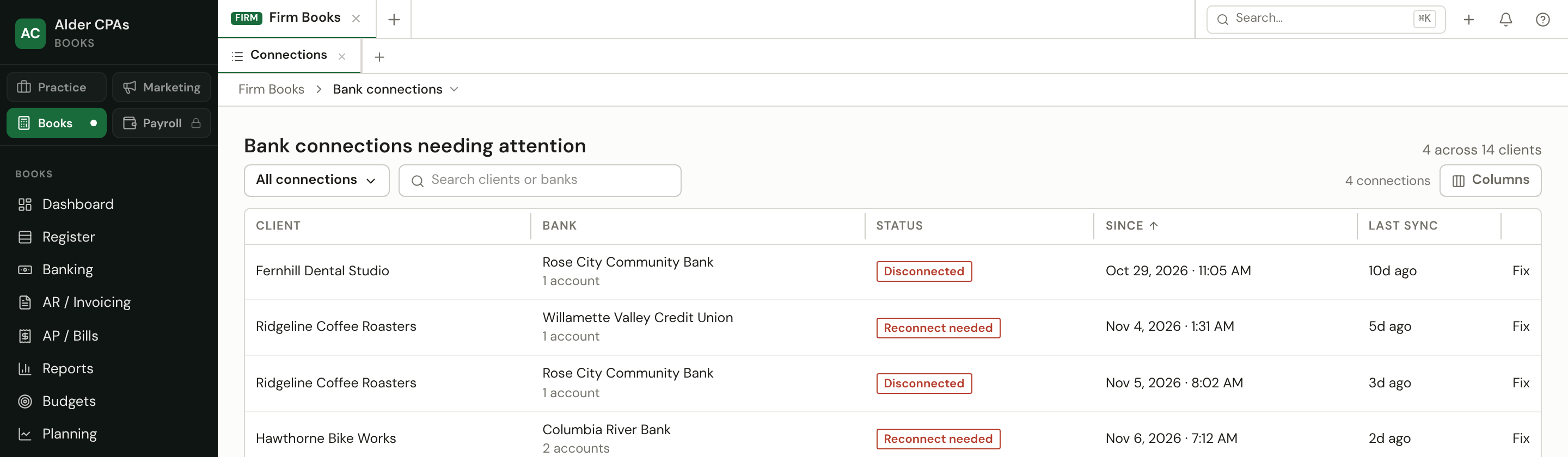 Bank connections needing attention across Alder CPAs' clients
Who can fix it
Reconnecting, connecting again, removing and syncing need the Connect and sync bank feeds permission (owners and admins have it by default). Without it, those buttons are off, hovering one says why, and Banking says: You need the "Connect and sync bank feeds" permission for this. Ask an admin to grant it. Turning Premium back on is for an owner or admin.
If your firm also uses Practice
A stopped connection becomes work on your board, so nobody has to notice the banner first. When a client's bank needs reconnecting, Practice gets a task on that client, Reconnect Willamette Valley Credit Union bank connection, linked to that connection in Books. That goes for a connection the bank disconnected, too.
There's only ever one open task per connection, however long it stays broken. The client's page in Practice also shows, on its Books card under To review, how many of the client's bank connections haven't synced in the last 3 days.
Tips
- Reconnect from wherever you are. The banner and its Reconnect button are on the Review page too, and reconnecting there syncs right away. Connecting a bank again happens on Banking.
- Check Needs attention weekly. One list covers every client; sort it on Since to see which has been stopped longest.
- Pause, don't unlink, for a short break. A paused connection resumes with one switch; an unlinked one needs a new sign-in.