
My Balance Doesn't Match the Bank
Read the Bank reports, Books and Difference figures, see which waiting lines and uncleared entries explain the gap to the cent, and find what's left when they don't.
On this page
The bank's balance and the books' balance are rarely the same number, and that is usually fine. On any day the bank has charges the books haven't caught up with, and the books have checks and deposits the bank hasn't seen yet. Books works out those differences for every connected account, so you can see at a glance whether a gap is explained or something is really wrong.
Compare on the same day. The Books figure on the Connections page is the books' balance on the day the bank reported its balance, not today. That day is the client's own calendar day, the date Bank reports shows, so a balance the bank sends in the evening is compared with that day's books, not the next day's. The balance at the top of an account's register includes every entry posted to it, even ones dated after today. If you compare the register with your banking app, entries dated after the bank's figure can make up the whole gap.
Understand the figures
Every bank and card account on Banking → Connections has three figures side by side.
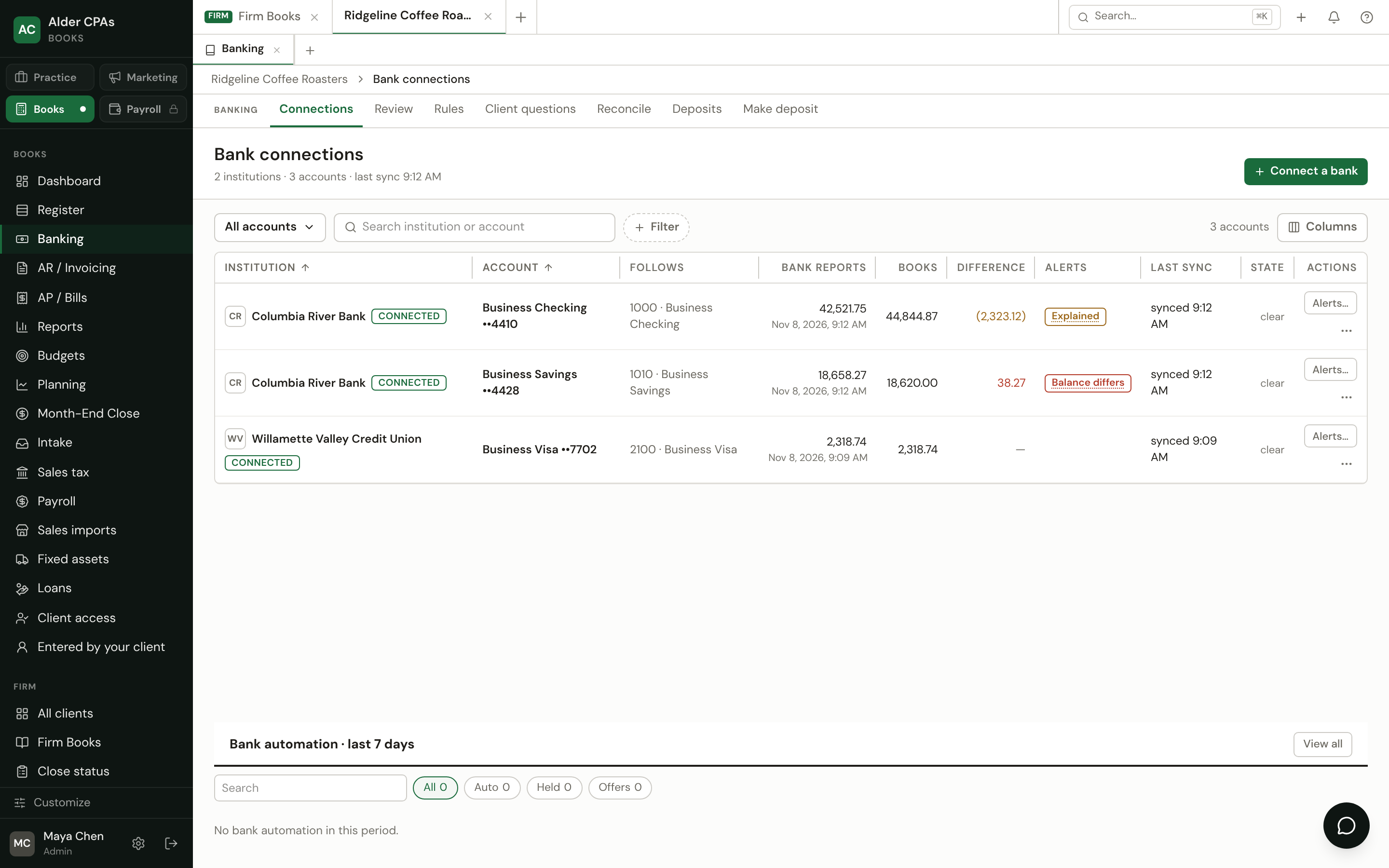 Ridgeline Coffee Roasters' bank connections: checking explained to the cent, savings 38.27 apart with an alert open, and the card tying
- Bank reports — the balance the bank sent with its last sync, with the date and time it is from. For an account fed by statement uploads, it is the latest statement's ending balance, as of that statement's date.
- Books — the balance of the ledger account the bank account follows, counting every posted entry dated on or before the day in Bank reports (the client's calendar day).
- Difference — Bank reports less Books. A dash means they agree. In the picture, Business Checking shows (2,323.12): the bank is $2,323.12 lower than the books.
- Alerts — the Explained chip (or Check matches, below), or an alert such as Balance differs. Hover a chip to read what it saw.
The color of the Difference says how much of it Books can account for:
| What you see | What it means |
|---|---|
| A dash | The bank and the books agree. A loan account that agrees shows Ties instead. |
| An amber figure, with Explained | Books can name items that account for the gap, to within the account's alert amount ($1.00 unless you change it). Nothing is wrong; the gap closes as those items clear. |
| A red figure | After those items, more than the alert amount is still unexplained. This is the one to look into. |
| A figure in plain type | A small gap, within the alert amount, with nothing waiting to explain it. |
A — in Books and Difference with a dotted underline means there is nothing to compare yet. Hover it for the reason, for example Map this account to a ledger account to compare its balance. or The bank has not reported a balance for this account yet.
What explains a difference
Books explains a gap the way a bank reconciliation does: with the items one side has and the other doesn't, each counted once. Hover Explained to see them, with how many there are and what they total. For Business Checking above:
4 bank lines the books do not have yet, totaling (881.72) and 2 entries in the books the bank does not show yet, totaling 1,441.40, explain the difference. Each clears when it is posted or matched, or when the bank shows it.
That ties to the cent: books 44,844.87, less 881.72 the bank has already paid out, less 1,441.40 the books hold and the bank doesn't yet, is 42,521.75, the bank's figure.
Bank lines the books don't have yet
These are the lines waiting on Banking → Review, plus lines still pending at the bank, dated on or before the bank's figure, less any line proposed as a match (below) and any line marked On file as a copy of another bank line. The bank has already counted them; the books haven't, because a bank line doesn't touch the ledger until someone posts it.
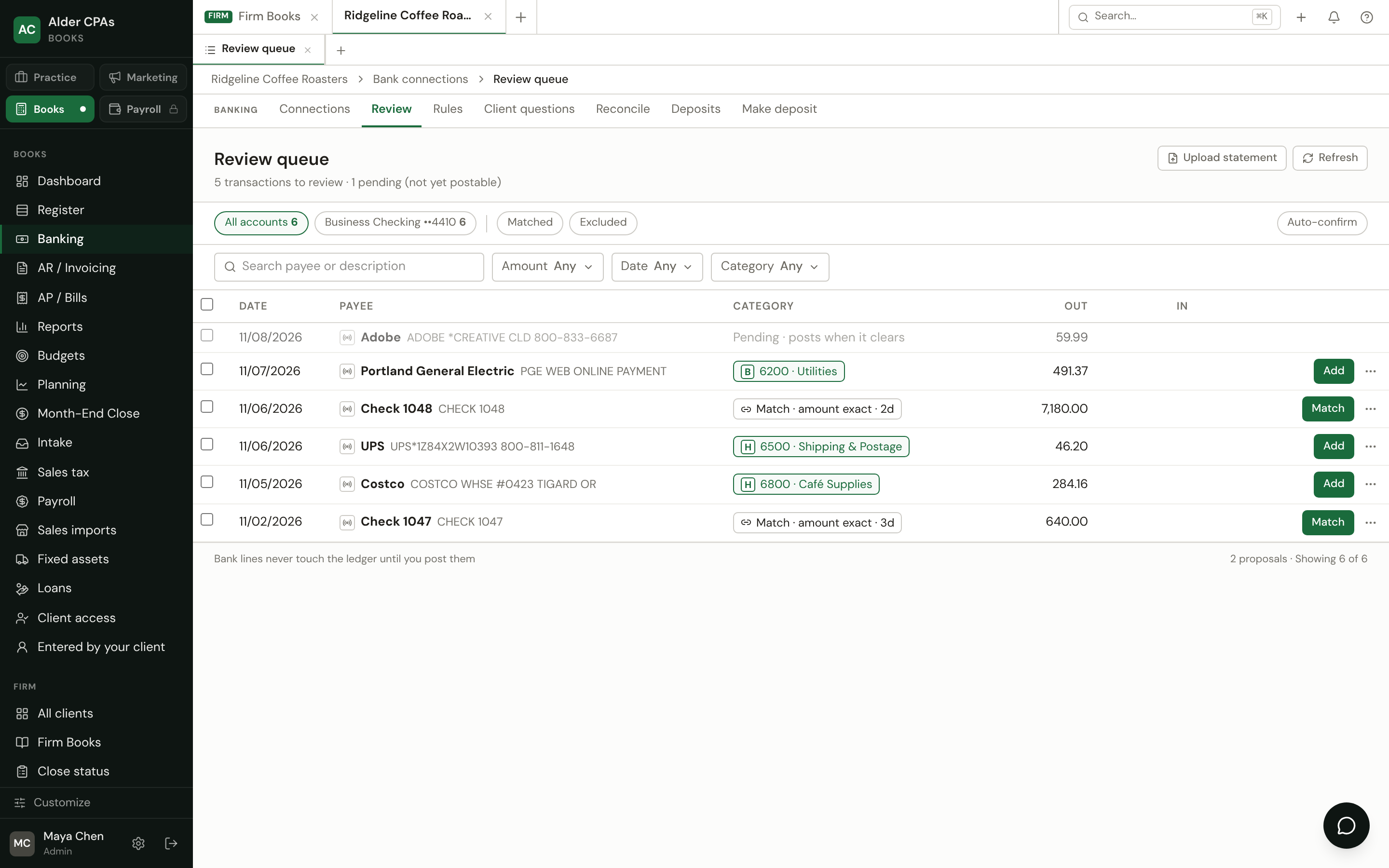 The Review queue: four lines the books don't have yet, and two checks proposed as matches
Here that is Costco ($284.16), UPS ($46.20), Portland General Electric ($491.37) and the Adobe charge still pending at the bank ($59.99): $881.72 in all. Post the three from the Review queue (see Reviewing Bank Transactions) and they leave this group. The pending line can't be posted until it clears; its category reads Pending · posts when it clears.
A line proposed as a match to an entry already in the books (dated on or before the bank's figure) is not counted. Checks 1047 and 1048 above show Match · amount exact · 2d and · 3d (the days between the check and the bank line). The checks are already in the books, and the bank has already paid them, so both figures include them and there is nothing to explain. Click Match to link each line to its check. Matching posts nothing, so it doesn't move the Books figure; it marks the check cleared in the register.
Entries in the books the bank doesn't show yet
These are your outstanding checks and deposits in transit: entries posted to the account that aren't marked cleared and that no bank line accounts for, dated from the account's first bank line through the bank's figure.
In the example, that is check 1049 to Willamette Valley Dairy ($418.60, written Nov 6) and the Fernwood Market payment recorded on Nov 7 ($1,860.00). The group's total is in the books' direction: money in less money out, so $1,860.00 less $418.60 is $1,441.40.
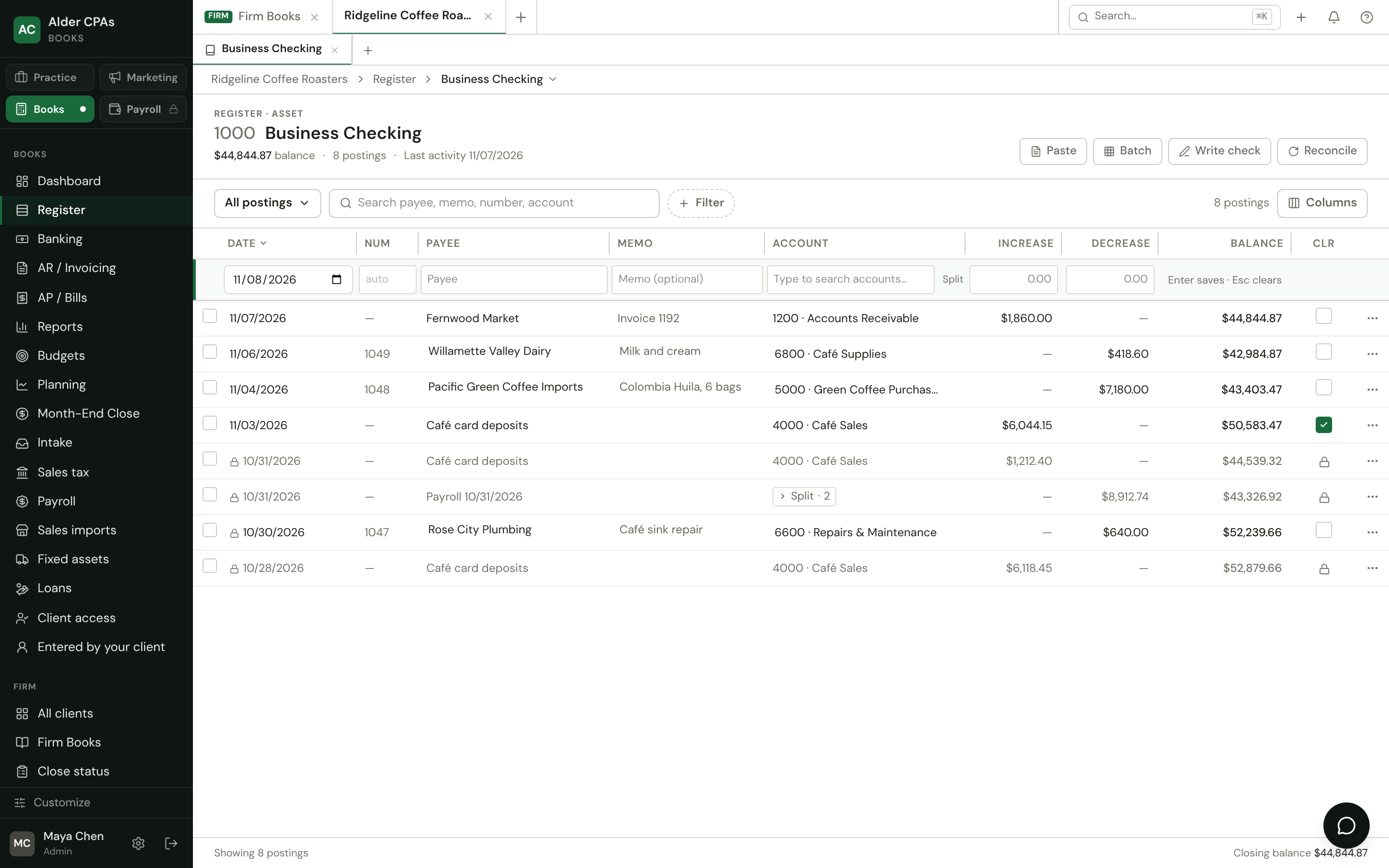 The Business Checking register, closing at $44,844.87, with check 1049 and the Fernwood Market deposit not yet cleared
Each leaves the group as soon as its bank line arrives and is proposed as its match, or you match it. Some entries are never counted here, because they aren't something a bank line will ever clear: opening balances, reconciliation adjustments, voided entries and the entries that reversed them, and anything dated before the account's first bank line.
An entry that sits in this group for weeks may never reach the bank. A check you voided on paper but not in Books, a payment keyed twice, or an entry posted to the wrong bank account all look like an outstanding item at first. If one is still waiting long after it should have cleared, open it in the register and check it.
Entries matched by amount to a duplicate
Sometimes a bank line is excluded as Duplicate of another line when it was really the bank's copy of an entry you keyed by hand. Books then finds an uncleared entry of the same amount, dated within the account's match window of that excluded line (3 days unless you change it), and treats the line as standing for it: the entry is counted in neither group. Because that match rests on the amount alone, Books asks you to look.
The Explained chip names it and ends Check it., for example … 1 entry matched by amount to a bank line marked as a duplicate, totaling 120.00. Check it. When those entries are the only reconciling items, the amber chip reads Check matches instead, with the same sentence.
An open Balance differs alert names them too, in brackets: (and 1 entry matched by amount to a bank line marked as a duplicate, totaling 120.00, to check).
To settle it, open Banking → Review, click the Excluded pill, click Restore to queue on that line, and then match it to the entry.
When the difference is red
A red Difference means the gap is bigger than the waiting lines and outstanding entries can explain, by more than the account's alert amount. Work through these:
- Lines you excluded. An excluded line is left out of the comparison, but if the money really left or reached this account, the books are short by it. Look under the Excluded pill. A personal charge paid from the business account still left the account: restore it and post it (to an owner's draw account, for example) rather than leaving it excluded.
- Entries marked cleared by hand. Ticking an entry's box in the register's CLR column tells Books the bank has it. If the bank hasn't paid it yet, it stops counting as an outstanding item and shows up as unexplained. Untick it.
- A possible duplicate still waiting. A line flagged as a possible duplicate counts as a line the books don't have until you decide on it. The Explained chip and the Balance differs alert both name it: …, including 1 flagged as a possible duplicate…, ending Check the line flagged as a possible duplicate. If it really is a duplicate, open it from ⋯ → View match and click Exclude as duplicate.
- The opening balance, and checks from before the bank was connected. Entries dated before the account's first bank line aren't counted as outstanding, so an opening balance entered wrong shows here, and so does a check written before that day until the bank pays it. Reconciling the account's first statement names a missing opening balance for you (see Reconcile an Account).
- An entry with the wrong amount or account. A deposit posted to savings that went into checking leaves one account long and the other short by the same amount. Compare the two red figures.
- A connection that is behind. If lines are missing from the Review queue entirely, see Bank Connections: Syncing, Reconnecting, Missing Transactions.
Then reconcile the account against the bank statement; see Reconcile an Account.
The Balance differs alert
Every mapped bank, card and loan account is watched by default. When the unexplained part of the difference is more than the alert amount ($1.00 unless you change it) on two syncs in a row, a red Balance differs chip opens in Alerts.
Hover it for what it saw, for example The bank reports 18,658.27; the books say 18,620.00, with nothing in review or pending to explain 38.27. Seen on 2 syncs in a row. Opened Nov 7, 2026, 9:05 AM. When the account has items that explain part of the gap, the sentence names them as the Explained note does. While the alert is open, the Explained chip isn't shown.
The alert closes on its own at the next sync where the unexplained part is back within the alert amount.
Change the alert amount, or turn it off
- Click the bell button (Alerts…) on the account's row.
- Under Balance differs from the books, enter a new amount, or switch the alert off with its toggle. An amount must be zero or more.
- Click Save.
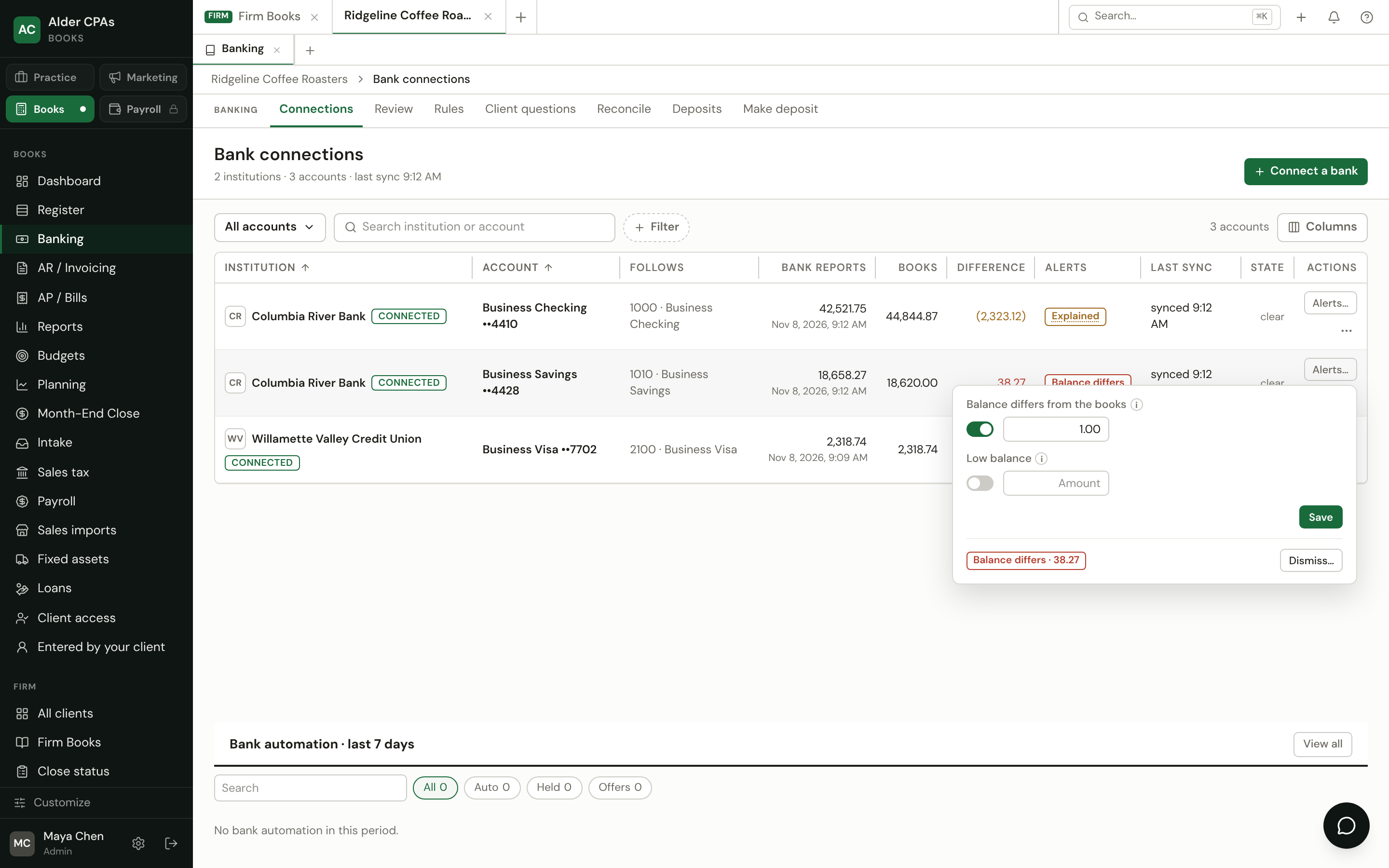 The Alerts popover for Business Savings: the $1.00 alert amount, and the open Balance differs alert with Dismiss…
Hover the small i beside Balance differs from the books for a summary: On by default for every account. Opens when the bank's balance and the books differ by more than this amount, after what explains the gap is allowed for (bank lines the books do not have yet, and outstanding checks and deposits the bank does not show yet), on two syncs in a row.
The rest of the popover depends on the kind of account. A checking or savings account also has Low balance, off until you enter an amount. A credit card or loan has Credit use instead: a percentage of the limit from 1 to 100, off until you set one (going over the limit always alerts when the bank reports a limit).
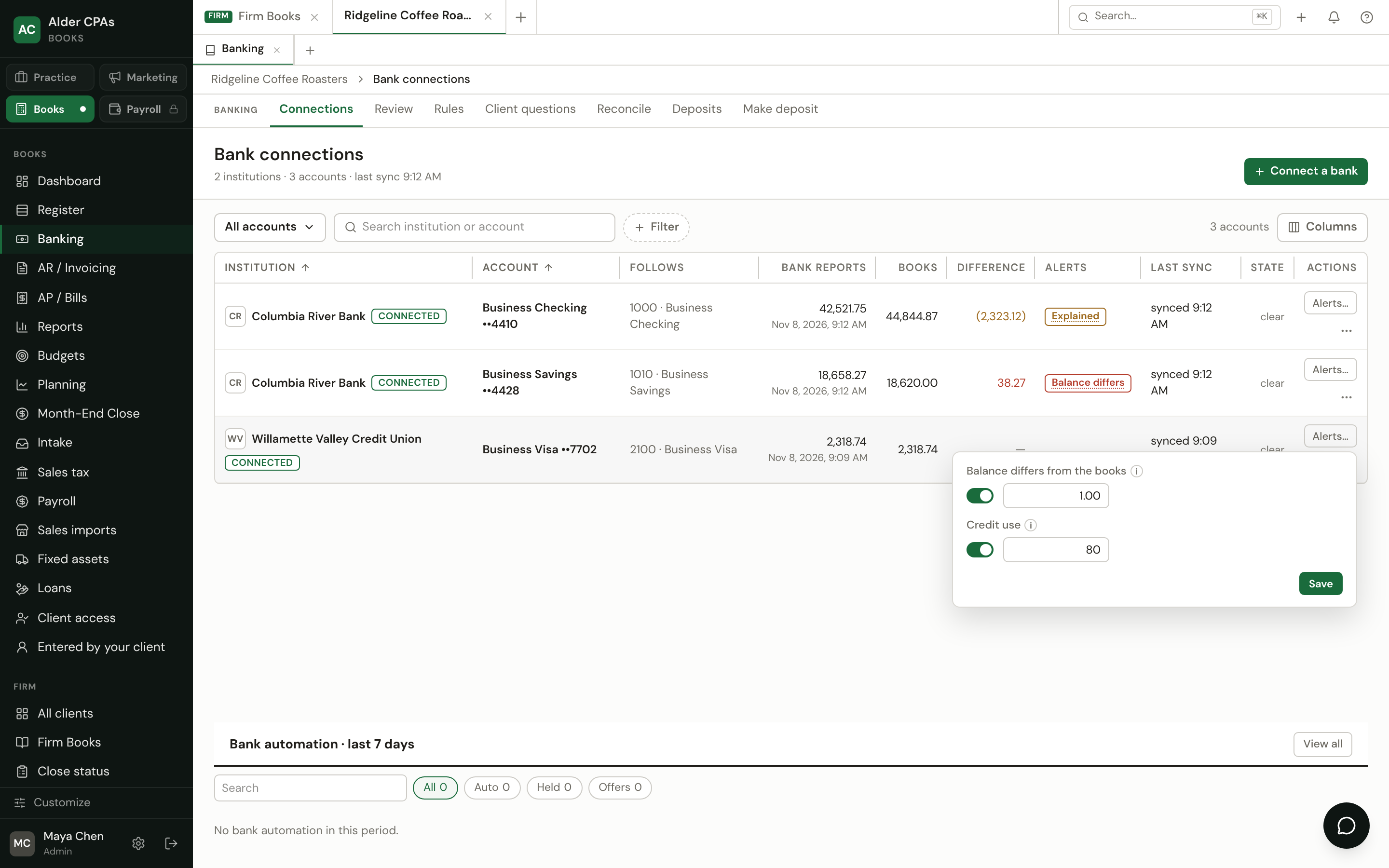 The Alerts popover for the Business Visa: Balance differs from the books and Credit use at 80%
Dismiss an alert
If you know why the difference is there and it can wait, dismiss the alert:
- Click the bell button (Alerts…), then Dismiss… beside the alert.
- Under Why is this being dismissed?, enter a reason. It is kept with the account's history, and Dismiss stays off until you write one.
- Click Dismiss.
A dismissed alert stays dismissed while the difference stays at the same figure. If the figure changes and stays over the alert amount, a new alert opens.
Why can't I …
- See Banking → Connections at all? Bank connections are on clients on Premium; without it the page shows what Premium adds instead.
- Change alerts or dismiss one? Changing alert settings and dismissing an alert need permission to connect and sync bank feeds for this client. Without it, the Alerts… popover still opens, but its controls are turned off and the reason is shown at the top.
- See a Difference at all? The account isn't mapped to a ledger account yet, or the bank hasn't sent a balance. Hover the — for which.
- Post the pending line? The bank hasn't settled it. It posts once it clears.
Fix or undo
- A wrong match. Open Banking → Review, click the Matched pill, and click Unmatch on the line. Unmatched. The bank line is back in the queue and the register side is uncleared again.
- A line excluded by mistake. Click the Excluded pill and Restore to queue.
- A reconciliation that needs redoing. See Undo or Redo a Reconciliation.
Your reconciliation won't balance?
The Connections page compares balances on the bank's latest day; a reconciliation compares them on the statement's last day, line by line.
When a reconciliation is off, Books names the line when exactly one explains it, and the steps to find the rest are in Reconcile an Account. That article also shows which accounts still need reconciling. If a balance sheet is the figure that disagrees, see Why Doesn't This Report Match My Bank?
A quick routine
- After each sync, glance at the Difference column. Amber with Explained needs nothing; red needs a look.
- Work the Review queue, and click Match on every proposed match. Each one posted or matched shrinks the explained amount.
- Look at what's in the outstanding group from time to time. A check that hasn't cleared in a month is worth a call.
- Reconcile each month. When nothing is waiting on either side, the Difference shows a dash.