
Why Can't I Edit or Post This?
Every reason Books stops an edit, a void or a new entry, what the message means, and the way forward: closed and hard-locked months, the closing password, permissions, entries that belong to a document or a bank line, reconciled lines and your plan.
On this page
When Books won't let you change something, it says why. A button that is off explains itself when you hover it (or tab to it), and a change Books refuses comes back with one sentence that names the problem and what to do next. This article lists those reasons, grouped by cause, so you can go from the message you see to the fix.
Nothing is ever locked without a reason on screen. If a button is off, its reason is in the tooltip. If you clicked and nothing changed, look under the form or in the notice at the corner of the screen. Books checks your change in full before it saves anything, so a refused change leaves the books exactly as they were.
Find the reason first
The quickest way to know what you are dealing with is to open the entry and look at its header:
- Period locked next to the payee means the entry's month is closed. See The month is closed.
- From Bill payment, From Invoice and the like mean another part of Books posted the entry. See The entry belongs to a document.
- A small lock in the CLR column means a finished reconciliation counted that line. See A reconciliation counted the entry.
- A lock before the date in the register list also means a closed month.
Then hover Edit or Void… for the exact reason.
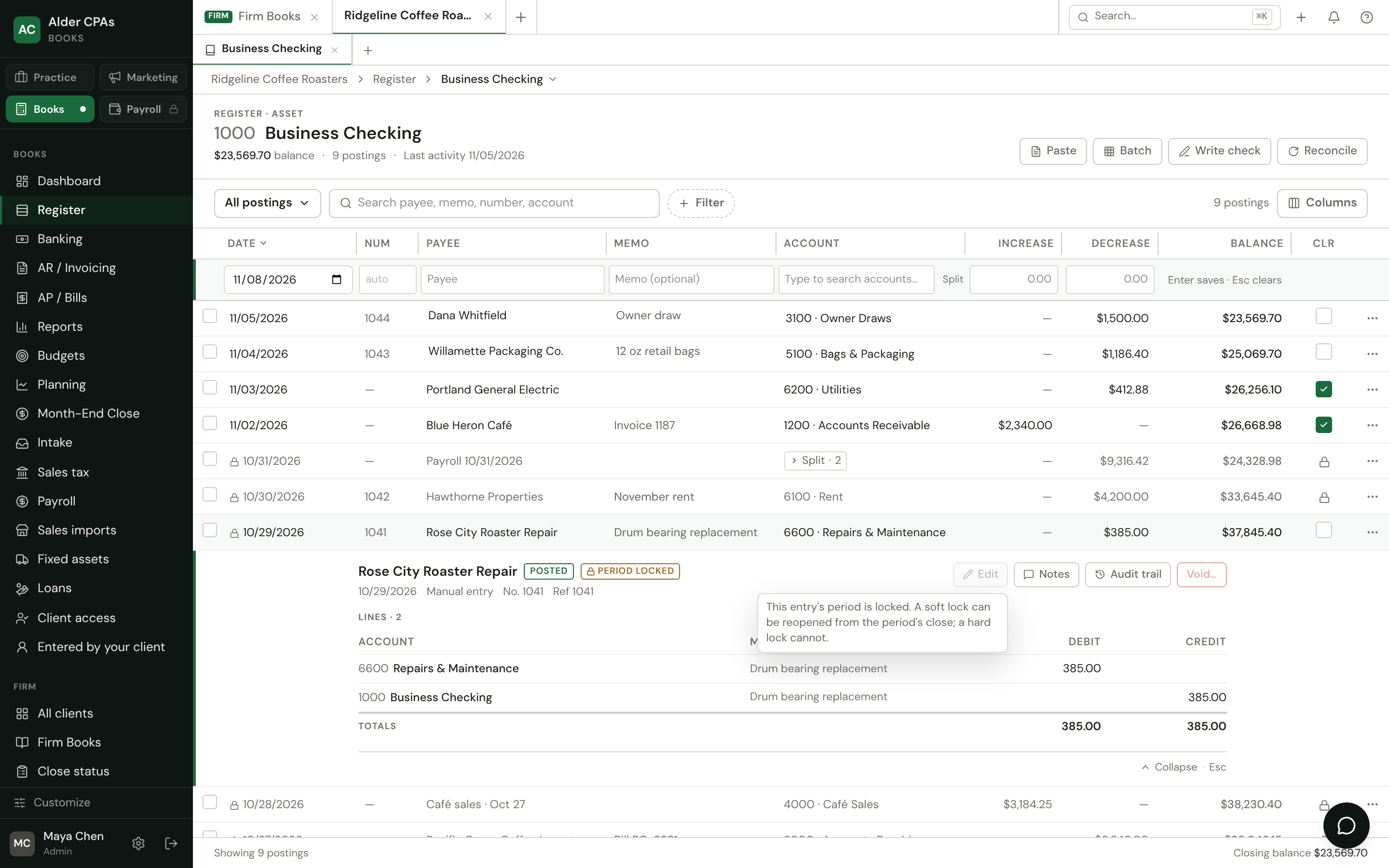 An entry dated in a closed October: Edit is off, and its reason says the period is locked
The month is closed
When a month is closed, its entries are protected. A month can be closed in one of two ways, and they behave very differently.
| Soft locked | Hard locked | |
|---|---|---|
| What it means | The month is closed, but a member allowed to close periods can still post, edit or void there, with a written reason. | Final. Nothing posts into the month again, password or not. |
| Can it be reopened? | Yes, by a member with the Reopen a locked period permission, with a written reason. | No. A correction goes in a later month. |
| Settings → Periods shows | Soft locked, with Open on the close page | Hard locked, with Final, cannot be reopened |
Which of the two a client's close applies is set under Settings → Periods, in When a period is locked. Changing it does not change months that are already locked.
Edit or void in a soft-locked month
If you do not have the Lock a period permission, Edit and Void… are off on entries in a closed month, and hovering them says:
This entry's period is locked. A soft lock can be reopened from the period's close; a hard lock cannot.
In the register row, the payee, memo and class cells say it more briefly: Oct 2026 is closed. A member who can close the books can change it with a reason.
If you do have Lock a period, Books lets you through, and makes you say why:
- Open the entry and click Edit. The form opens with a box that reads This entry is in a locked period. Saving uses your “Lock a period” permission: the change lands in a locked month, figures already reported for it can move, and your reason is kept in the audit log.
- Type a Reason for the change (at least 10 characters). Until it is long enough, Save changes stays off, with Give a reason of at least 10 characters to change an entry in a closed month.
- Make your change and click Save changes.
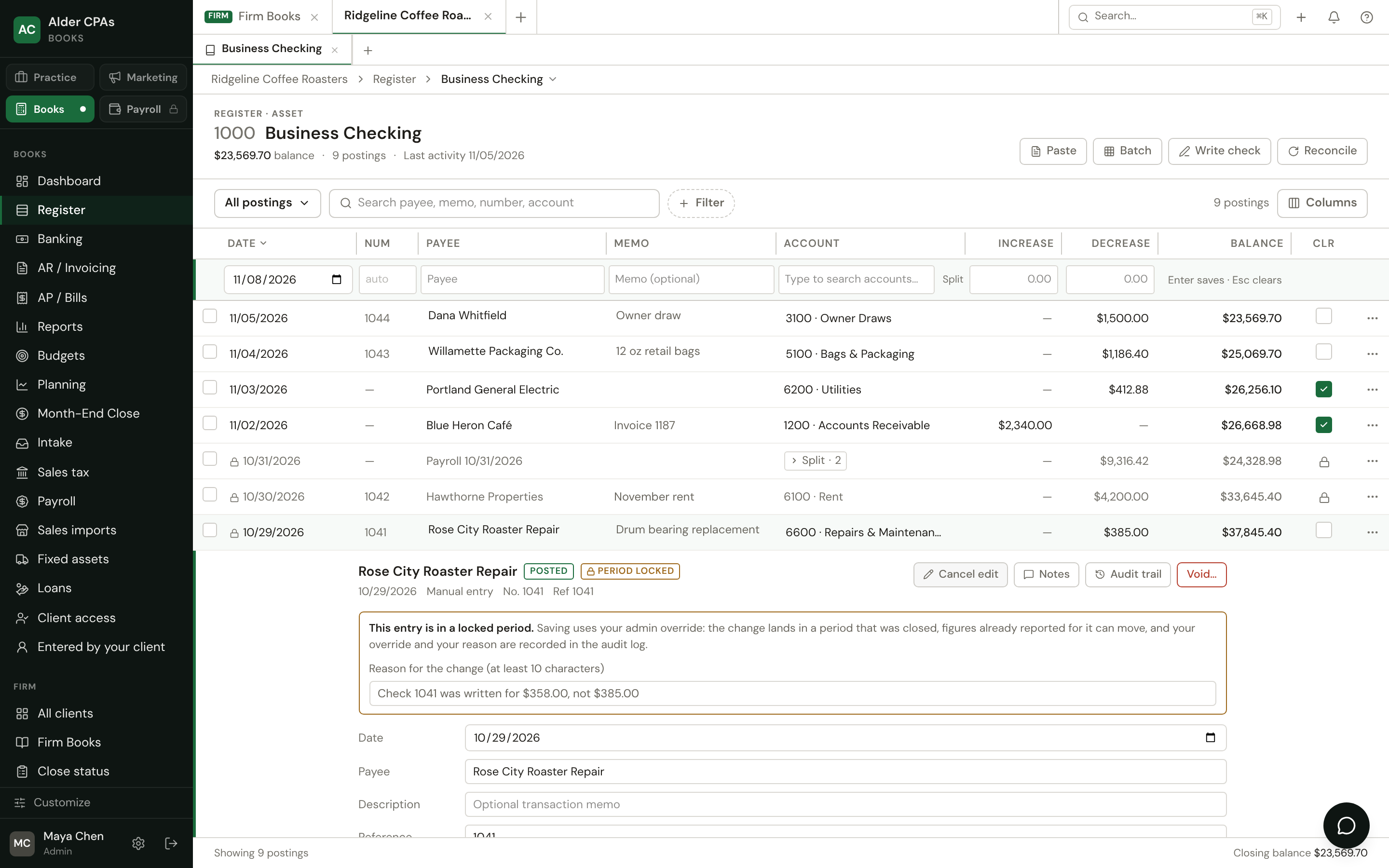 Editing an October entry with the Lock a period permission: the form asks for a reason first
Voiding an entry keyed in the register works the same way. Void… opens Void this entry in a closed month?, which says: This entry's month is closed. Voiding posts a reversing entry on the entry's own date, inside that closed month, so the month's figures change after they were closed. Your override and your reason are recorded in the audit log. The reason needs at least 10 characters.
If Books refuses an edit or void because the month is closed, the message names the month and the way forward, for example:
October 2026 is closed — a member with the Lock a period permission can override the close to edit this, or record a correction in November 2026.
A journal entry can be voided from its own page without reopening the month. On the journal entry's page (Journal → the entry), Void… on an entry in a closed month posts the counter-entry today, in an open month, and leaves the closed month as it was.
The dialog says so before you confirm, for example: October 2026 is closed, so the counter-entry is dated today, in an open month, and October 2026 itself is not changed. An entry with an automatic reversal is the exception: This entry and its automatic reversal can only be voided together while both of their months are open. Reopen the closed month to void the pair, or record a correcting entry in an open month. See Journal Entries.
A hard-locked month
Nothing in a hard-locked month can be edited or posted, by anyone, and its entries can't be voided from the register. A journal entry can still be voided from its own page; the counter-entry is dated today, in an open month.
In the register row, the reason reads Oct 2026 is locked for good, so this entry can't be changed. On an entry from a bank line it reads This entry's month is hard-locked, so its bank line cannot be changed. A hard-locked month cannot be reopened.
The fix is a correcting entry dated in an open month: for example, a journal entry dated November 3 that moves the amount to the right account.
Moving a date into a closed month
When you edit an entry and change its date to a day in another month, Books checks the new month too:
- Soft locked, and you have Lock a period. As soon as you pick the date, the form shows the override box, headed The new date is in a locked period., and asks for a Reason for the change (at least 10 characters). Give the reason and click Save changes (and enter the closing password, if one is set).
- Soft locked, without Lock a period. Saving is refused: October 2026 is closed — a member with the Lock a period permission can override the close to move this entry to Oct 29, 2026, or choose a date in an open month.
- Hard locked. Saving is refused for everyone: May 2026 is hard-locked, so this entry can't be moved to May 15, 2026 — a hard lock is final. Choose a date in an open month.
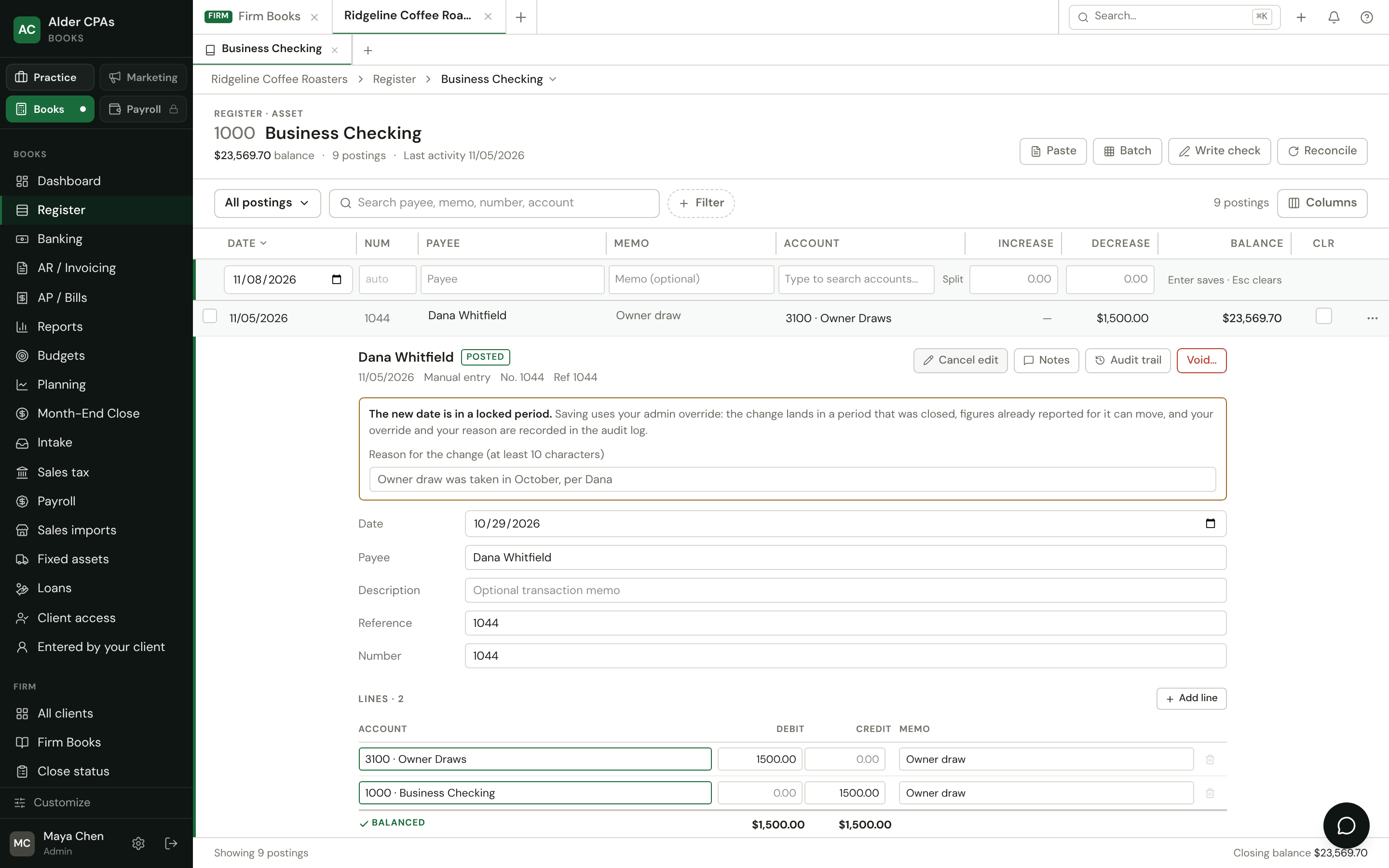 Moving a November entry to Oct 29, 2026 with the Lock a period permission: the form asks for a reason first
A new entry dated in a closed month
Most forms check the date as you type it, before you save. On a new check, a bill or a deposit dated October 29 in a closed October, the date field says one of these:
- With Lock a period: October 2026 is closed. You can still post this check into it, with a reason kept in the audit log. Give the reason and save.
- Without it: October 2026 is closed, so this check can’t be saved on Oct 29, 2026. A member with the "Reopen a locked period" permission can reopen it, or date it in an open month.
- In a hard-locked month: October 2026 is locked for good, so this check can’t be dated Oct 29, 2026. Date it in an open month.
An invoice and the quick journal entry window don't take the override. With Lock a period, an invoice says, for example, October 2026 is closed, so this invoice can’t be saved on Oct 29, 2026. Reopen October 2026 from Close, or date it in an open month. (Reopening needs the Reopen a locked period permission.)
In the register's new-entry row, a row dated in a closed month is not saved, and the row says why: That date is closed. Choose a date in an open month, or ask a member with the "Lock a period" permission to do this.
In a hard-locked month it reads That date is hard-locked, and a hard lock is final. Choose a date in an open month. The row has no override: to post into a soft-locked month, use New entry under Journal entries. See Journal Entries, "Why can't I post to this date?".
Who locked this period?
Open Settings → Periods. The Periods list shows each month of the fiscal year with its State (Open, Soft locked or Hard locked), when it was Locked, and By whom. When the books span more than one fiscal year, a picker at the top right of the list switches between them.
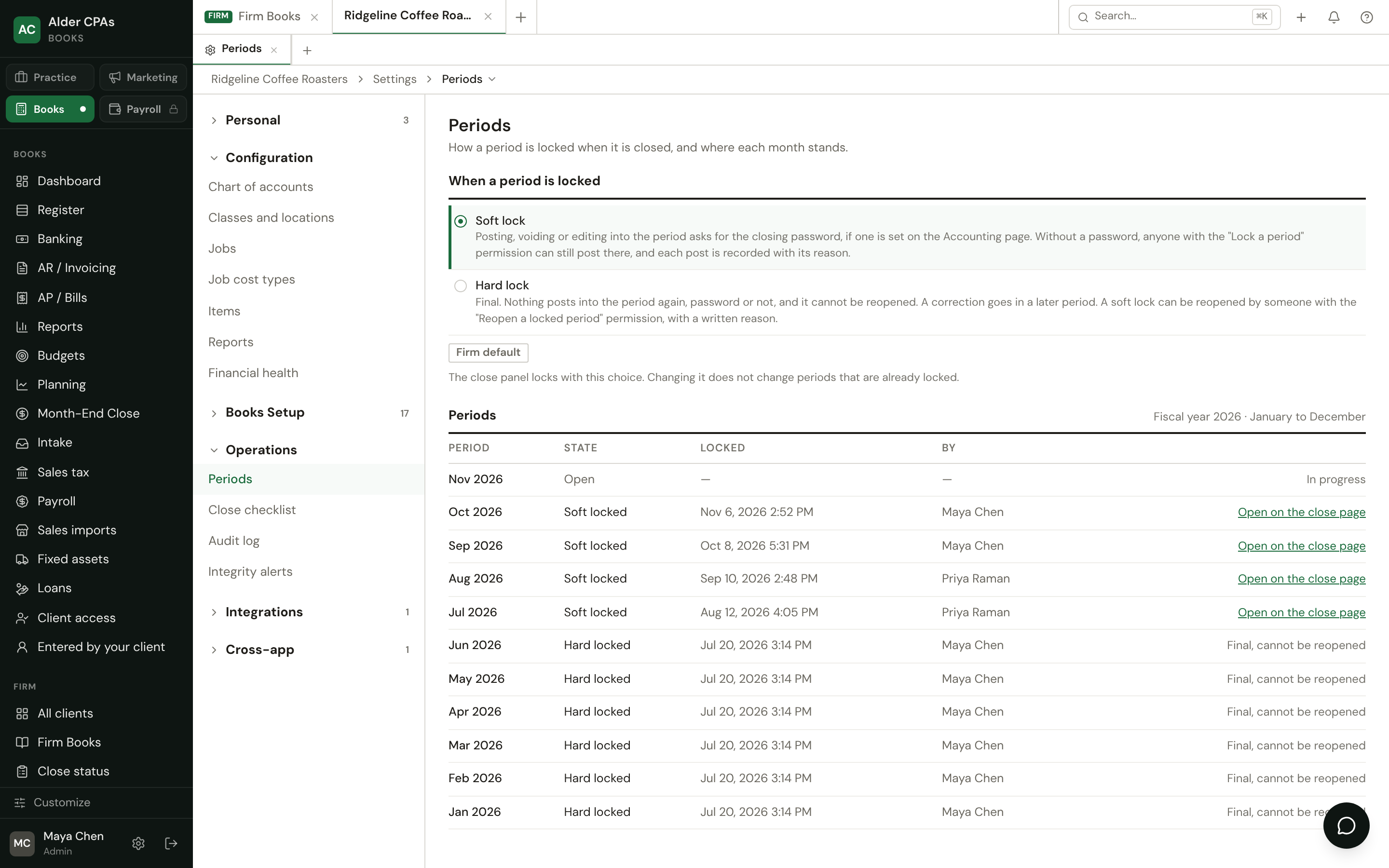 Settings → Periods: July to October soft locked, January to June hard locked, with when and by whom
How do I reopen a period?
Only a soft-locked month can be reopened. Click Open on the close page beside it under Settings → Periods. A member with the Reopen a locked period permission sees Reopen with the month's name, such as Reopen Oct 2026; reopening takes a written reason, which is kept in the audit log. Members without that permission are not offered the button at all.
If the client has a closing password, Books asks for it after you click Reopen period: Enter the closing password to reopen Oct 2026. Enter it and click Unlock for 15 minutes, and the month reopens. That password step needs only Reopen a locked period. See Closing and Locking Periods; Reopening One.
Before you reopen, consider the alternative the messages suggest: a correction dated in the current month. Reopening changes figures somebody may already have reported.
The closing password
A firm can protect a client's closed months with a closing password, set under Settings → Accounting. When one is set, posting, editing or voiding in a soft-locked month asks for it, even if you have Lock a period. Books shows a prompt titled with the month, such as Oct 2026 is closed:
Enter the closing password to unlock closed periods for 15 minutes, and what you were saving is sent again.
On a new journal entry the closed-month box asks for it instead, under Closing password; click Unlock. Elsewhere, type the password and click Unlock for 15 minutes. Books then saves your change. Closed periods stay unlocked for you, on this client, for 15 minutes, so you can make several changes without typing it again. Cancel leaves the entry as it was.
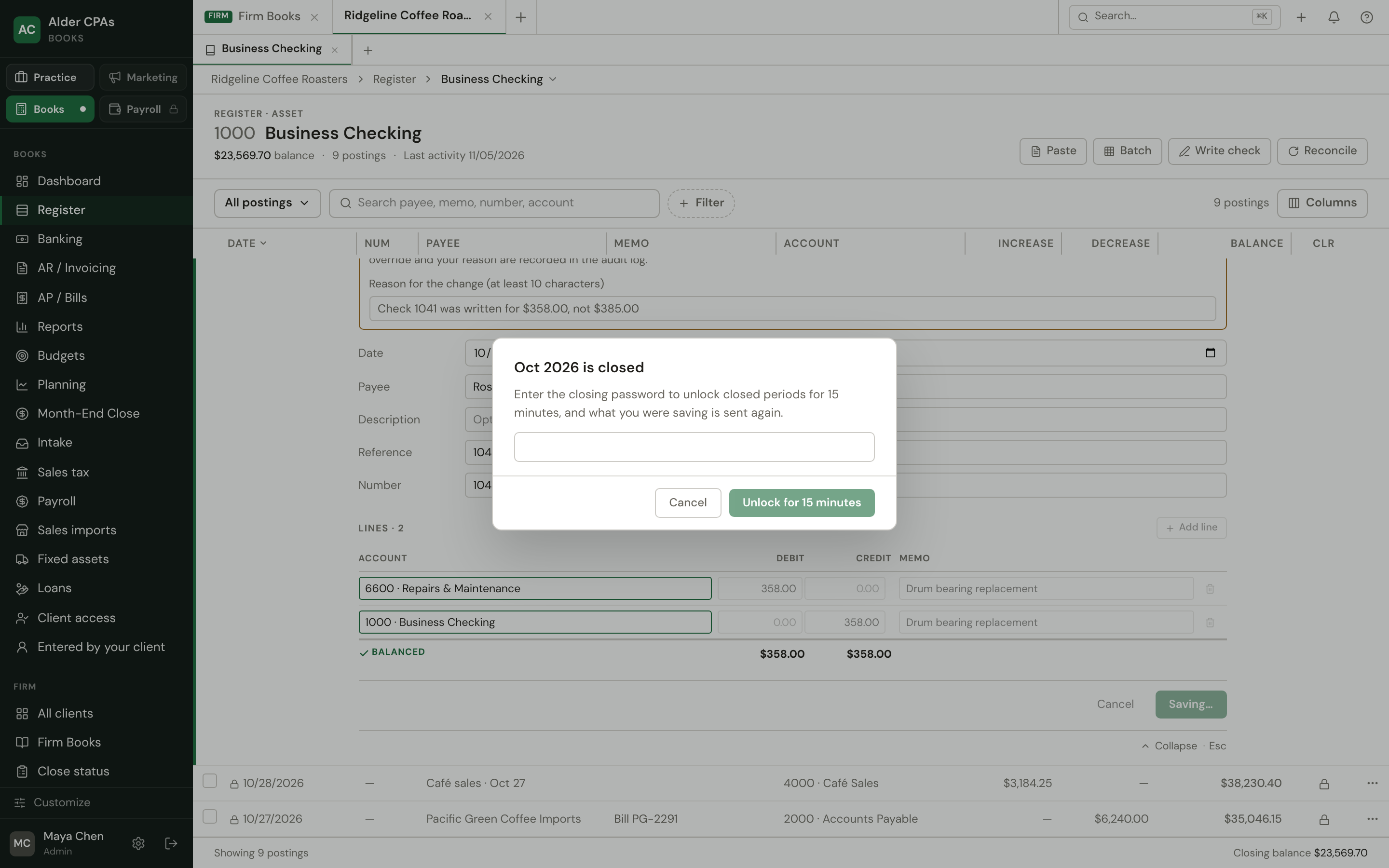 Saving an edit in October with a closing password set: Books asks for the password first
The password never opens a hard-locked month.
You don't have the permission
Books checks permissions on every change, and a refusal names the permission by its label. The usual message is:
You need the "Void or reverse a posted entry" permission for this. Ask an admin to grant it.
| To | You need |
|---|---|
| Post, edit or save a draft in the register or a journal entry | Post journal and register entries |
| Void or reverse a posted entry | Void or reverse a posted entry |
| Edit an entry that came from a bank line | Both of the above |
| Post, edit or void in a soft-locked month | Lock a period, plus a reason of at least 10 characters (and the closing password, if one is set) |
| Reopen a soft-locked month | Reopen a locked period |
| Reopen or undo a reconciliation | Lock a period and Run and finish a reconciliation |
Other messages you may see:
- Your access is read-only. Ask an admin to make this change. Your role on this client lets you look, not change. In the register, no cells offer an edit.
- Your firm hasn't set who can do what in Books yet. An owner or admin can set your access — nothing has been denied, nobody has decided yet. Nobody has given your role any Books permissions yet.
- You don't have access to this client's books. An owner or admin can give you access. Your role on this client is set to no Books access.
Ask your firm's owner or an admin to change your role or your access to this client.
If you are the client
When you, the business owner, use your own books, some actions are for your accountant only. The button stays on screen, off, with the reason beside it, such as Only your accountant at Alder CPAs can void an entry. A check, bill or deposit dated in a closed month tells you: Oct 2026 is closed in these books. Ask your accountant to post this entry, or date it in an open month. Nothing was saved.
The entry belongs to a document
An entry that an invoice, a bill, a payment, a check, a deposit or another part of Books posted is changed through that document, not in the register. That way the document and the ledger never disagree. Edit and Void… are off, and the reason names the document and links to it:
Posted from a bill payment — open it to void it.
Click the badge (From Bill payment) or the link under the title to open the document, then change or void it there. The ledger follows.
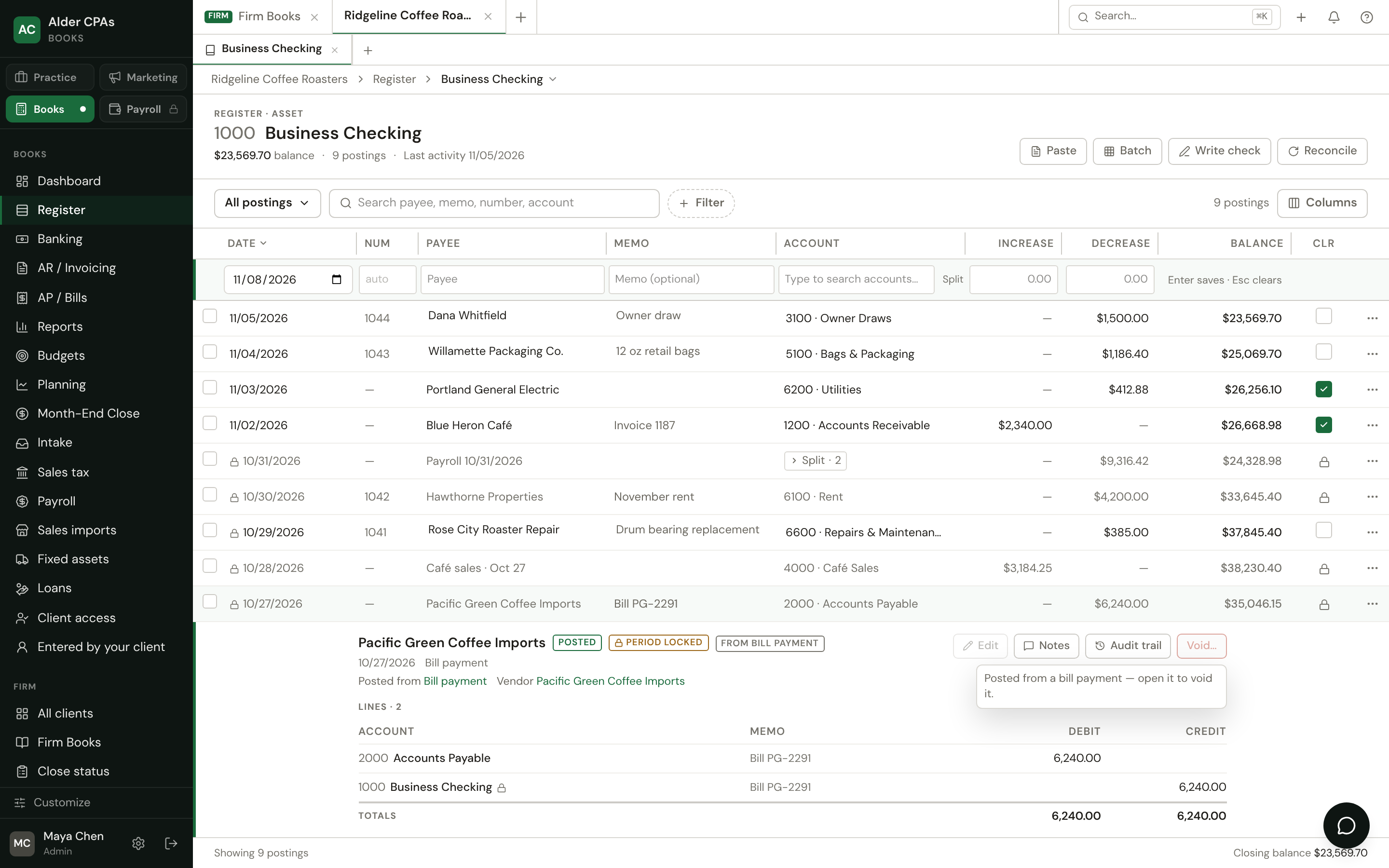 A bill payment's entry: Void is off, and its reason points to the bill payment
Where Books has no page to open, the reason says what to do instead. For the opening balances an import committed, for example: These balances were proved equal to the source trial balance at commit; correct them with a dated adjusting entry instead.
Entries from a bank line
An entry posted from the Review queue can be edited and voided from the register, with one rule: its bank side is the bank's. Edit opens the bank line's own editor, where you change the category, payee and memo.
The amount, the date and the bank account stay as the bank reported them. In the register row itself, the reason reads This entry came from a bank line. Use Edit on the entry to change it; the bank's amount and date stay.
Voiding a bank-line entry returns the line to the Review queue, unmatched. While its month is closed, a bank-line entry can't be voided, even with Lock a period; reopen the month first. See Using the Register.
Entries from an import
Entries brought in by a payroll import, a sales import or an import of another accounting system are journal entries, and Edit works on them, with two limits that protect the documents they carry:
- A receivable or payable line keeps its account and amount, and the entry keeps its date, because the imported invoice or bill still owes that balance. The edit form shows those fields as fixed, with the reason beside them.
- A payroll or sales import is voided in full; an entry from another accounting system voids the imported invoice or bill it belongs to. The confirmation says which before you click Void the import.
A reconciliation counted the entry
A finished reconciliation is a promise that the books matched the statement. Books treats changes to reconciled lines with care, but differently for edits and voids.
Editing warns. You can edit an entry with a reconciled line. If your change moves the amount, date or account of that line, Books stops before saving and tells you the cost:
This entry was cleared by the Oct 31, 2026 reconciliation of 1000 Business Checking. Saving changes the amount or account of a line it cleared — that reconciliation will be off by $27.00 until it is reopened and done again. Confirm to save anyway.
Click Save anyway to go ahead, or Keep editing. Changing only the payee or a memo doesn't warn. The quick edit in the register row does not offer this: it says A finished reconciliation cleared this line, so it can't be changed here. Open the entry and use Edit instead.
Voiding is refused. A void would take money out of a reconciliation that is finished, so Void… is off: A finished reconciliation cleared this entry. Reopen it (Banking · Reconcile · History) to void this. Reopen or undo the reconciliation first, then void the entry and reconcile again. See Undo or Redo a Reconciliation.
The entry has already been undone
- This entry has already been voided or reversed, so it can't be edited. Edit the entry that replaced it instead. The original stays in the ledger as history.
- This entry has already been voided or reversed, so there is nothing left to void.
- This entry records the void of another entry, so it can't be edited. If the original should stand, enter it again as a new transaction. This is the reversing half of a void. Undoing it would bring the original back with no record of why, so enter the entry again instead.
- Posted entries can't be deleted — the ledger keeps them. Void it instead, which posts a reversing entry. Only drafts can be deleted.
Other reasons a change is refused
- Out of balance. An edited entry still has to balance: Out of balance — debits $1,075.00 vs credits $1,000.00. Every line also needs an account.
- Before the books start. Nothing can be dated before the day a client's books start. The message names both dates. See Journal Entries.
- An account kept by another part of Books. Accounts such as Accounts Receivable and Accounts Payable are built from invoices, bills and payments, and can't be posted to by hand. The message names the account and where to record the change instead.
- An open integrity alert. Posting is paused for these books while an integrity alert is open. Clear the alert to post again. Open Settings → Integrity alerts.
- Tips on a customer payment. A payment with a tip needs tips turned on and an account chosen: Tips are off for these books. Turn them on in Settings › Tips to record one. or No account is chosen for tips. Choose one in Settings › Tips.
A question, not a refusal: an earlier fiscal year
Saving a change to an entry dated in a fiscal year that has ended asks first, for example Change an entry in fiscal year 2025?, and explains that saving changes that year's balance sheet, its profit and loss, and anything already reported or filed for it, such as a tax return. Click Save to fiscal year 2025 to go ahead. This is a warning only; nothing is locked. It can be turned off under Settings → Accounting.
Your plan
Some features work only for clients on Premium. On a client on the free plan, their screens show what the feature does, then Ridgeline Coffee Roasters is on the free plan., the price, and a Turn on Premium button. If the firm's payment for Premium didn't go through, the screen says Premium is paused until the firm's payment goes through. instead.
Leaving Premium doesn't strand fixed assets. A client whose Premium has ended still sees the assets it holds, can turn off scheduled depreciation, and can void depreciation runs and disposals; the Premium line shows above the register, and the Premium-only actions are off with their reason. See Fixed Assets and Depreciation.
Quick reference
| You see | Cause | What to do |
|---|---|---|
| This entry's period is locked… | Closed month, no Lock a period | Ask a member who has it, or record a correction in an open month |
| This entry is in a locked period. | Closed month, you have Lock a period | Give a reason of at least 10 characters and save |
| Oct 2026 is closed (password prompt) | A closing password is set | Enter it and click Unlock for 15 minutes |
| …is locked for good… or …a hard lock is final… | Hard-locked month | Record a correction in an open month, or choose a date in an open month |
| You need the "…" permission for this. | Missing permission | Ask an admin to grant it |
| Posted from … — open it to change it. | The entry belongs to a document | Open the document and change or void it there |
| …the bank's amount and date stay. | Bank-line entry | Use Edit for category, payee and memo |
| This entry was cleared by the … reconciliation… | A reconciled line would change | Save anyway, or keep the line as it is |
| A finished reconciliation cleared this entry. (on Void) | Reconciled entry | Reopen or undo the reconciliation first |
Related
- Using the Register: editing in place, the edit history, voiding.
- Journal Entries: posting into a closed month, reversing entries.
- Undo or Redo a Reconciliation: reopening a reconciliation so an entry can change.