
Undo or Redo a Reconciliation
Reopen a finished reconciliation to correct it, undo it so the next one picks its lines up, or void one that was wrong, and what each does to your cleared lines.
On this page
A finished reconciliation is not set in stone. If you ticked the wrong line, typed the wrong ending balance, or someone changed an entry the reconciliation counted, you can take it back from the account's reconciliation history.
Books gives you three ways to do that, and they are not interchangeable: Reopen puts the same reconciliation back in progress so you can fix it and finish it again, Undo takes it back and leaves its lines for the next reconciliation, and Void records that it was wrong.
To correct a reconciliation, reopen it. Undo and Void both use up the statement date: once a reconciliation dated Oct 31, 2026 is undone or voided, Books will not start another reconciliation of that account dated Oct 31, 2026. Its lines are picked up by the next reconciliation you start instead. None of the three posts, reverses or removes anything in your ledger.
For starting a reconciliation, ticking lines, adjustments and Finish, see Reconcile an account.
Understand the reconciliation history
The page lists every reconciliation of one account, newest statement first. Pick the account in the box at the top right (only bank, credit card and trust accounts are listed). Under the title, Last reconciled through 10/31/2026 · ending $58,440.26 names the most recent reconciliation that is still finished.
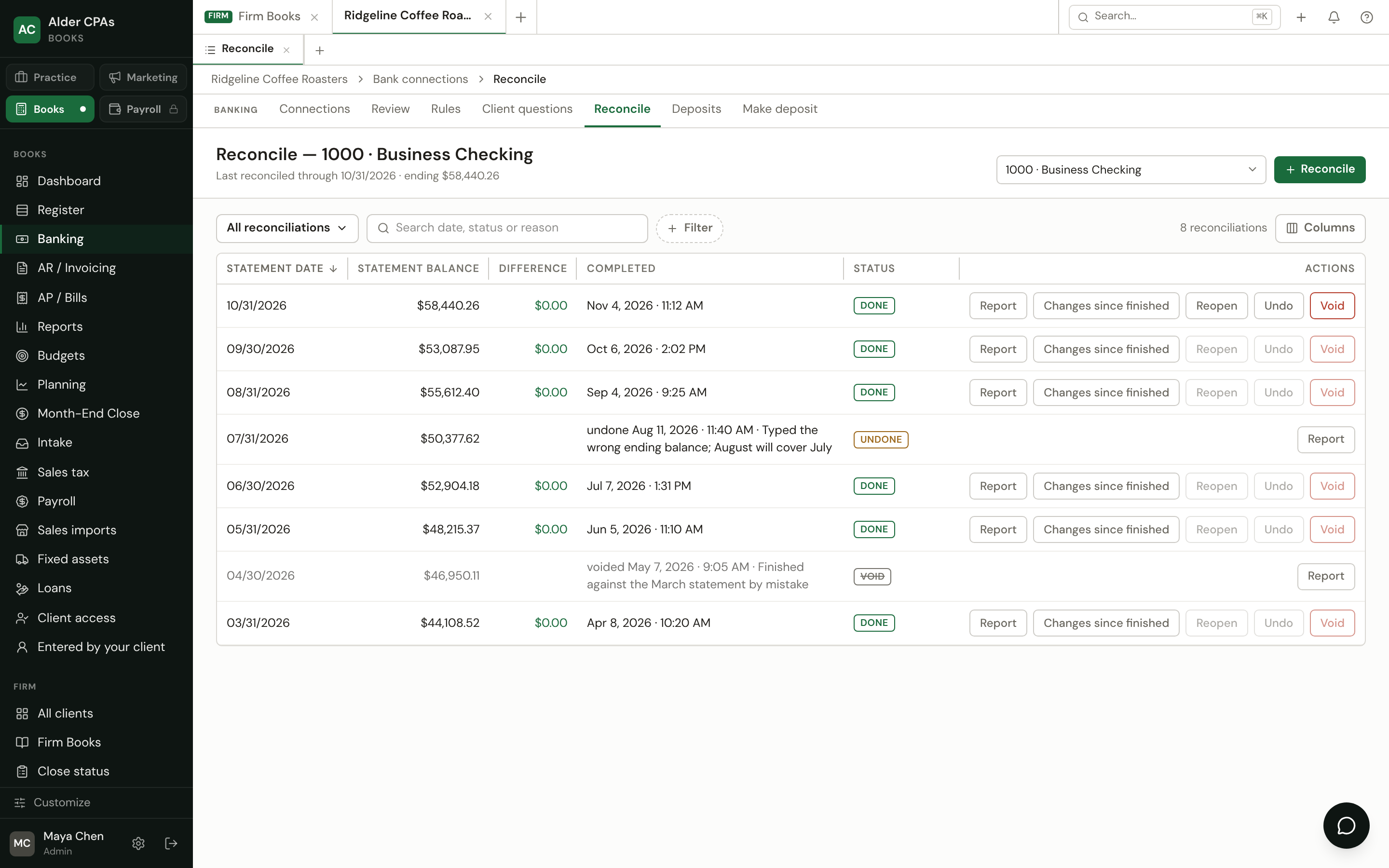 The reconciliation history for 1000 Business Checking, with a voided April and an undone July
The columns, in order:
- Statement date — the statement the reconciliation was for.
- Statement balance — the ending balance on that statement.
- Difference — for a finished reconciliation, the difference it finished with ($0.00 when it tied). If a line it counted has changed since, this shows how far off it is now, in red.
- Completed — when it was finished. For an undone or voided one, when that happened and the reason given: undone Aug 11, 2026 · 11:40 AM · Typed the wrong ending balance; August will cover July.
- Status — Done, Open (in progress), Undone, Void (struck through, and the row is dimmed), Canceled, or No longer ties with off by $40.00 under it.
- Actions — Report opens the finished reconciliation and its workpaper. A Done row also has Changes since finished, Reopen, Undo and Void. An undone or voided row keeps only Report.
An undone or voided reconciliation is never removed from this list: it keeps its statement date, balances and what it cleared, and the reason is written beside it. Use Search date, status or reason to find one by any of those (searching wrong statement finds every reconciliation undone or voided for that reason), or the Status filter to see only, say, the undone ones.
Reopen, Undo or Void?
| Reopen | Undo | Void | |
|---|---|---|---|
| Use it when | You want to fix this reconciliation and finish it again | You want to take it back and let the next reconciliation cover these lines | The reconciliation itself was wrong (the wrong statement, the wrong balance) |
| Its lines | Stay ticked in this same reconciliation | Become uncleared | Become uncleared |
| The reconciliation | Goes back to Open, and you are taken into it | Stays in the list as Undone | Stays in the list as Void |
| Its statement date | Is finished again when you click Finish | Can't be reconciled again for this account | Can't be reconciled again for this account |
| Permission it needs | Lock a period | Lock a period | Void or reverse a posted entry |
All three also need Run and finish a reconciliation, and all three need a reason of at least 10 characters.
Reopen a reconciliation to correct it
Reopening keeps your work. Every line the reconciliation counted goes back to ticked in the same reconciliation, and the finish you are reopening stays in the record beside the reopen.
- On the latest Done row, click Reopen.
- Check the dialog. Cleared shows what the reconciliation counted, split by direction, for example 47 items: deposits $38,412.90 · payments $33,060.59. They become reads Ticked in this reconciliation again — it goes back in progress, and Editing them reads No reconciled warning while it is in progress; once it is finished again, a change to an amount, date or account warns first.
- Under Why are you reopening it?, say what you are fixing. The reason is Recorded against the reconciliation with your name and the time.
- Click Reopen the reconciliation. Books takes you straight into the reconciliation, back in progress.
- Make your correction (tick or untick a line, fix the entry that moved), then finish it again. See Reconcile an account.
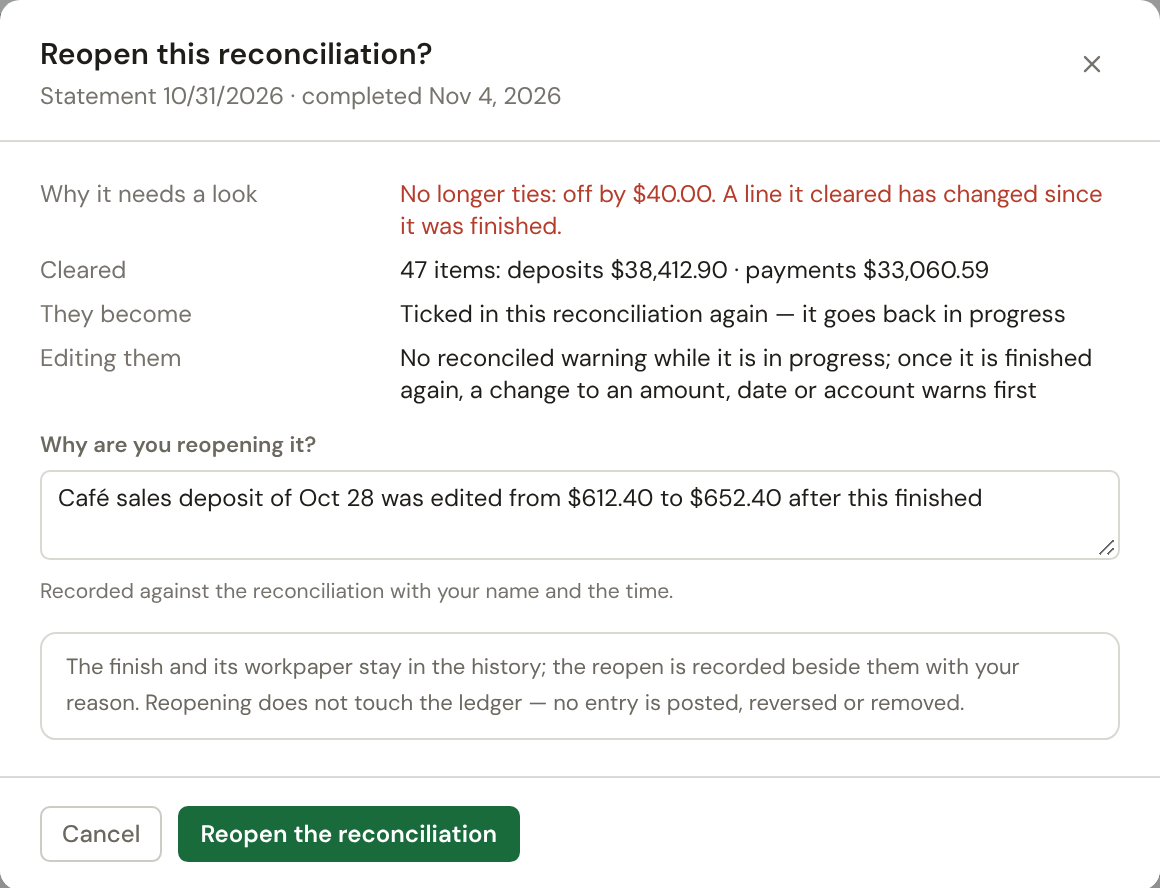 The Reopen dialog for the Oct 31, 2026 reconciliation: why it needs a look, what it cleared, what the lines become and the reason
Reopening does not touch the ledger: no entry is posted, reversed or removed. The finish you reopened, and its workpaper, stay in the history with your reason beside them.
Undo a reconciliation
Undo takes a finished reconciliation back for good. Its lines become uncleared, and they show up in the next reconciliation you start for that account.
- On the latest Done row, click Undo.
- Read the dialog. Cleared shows what it counted, They become reads Uncleared — free for the next reconciliation, Editing them reads No reconciled warning, and a later statement’s reconciliation can clear them, and This statement date warns: Cannot be reconciled again for this account. To correct it and finish it again, reopen it instead.
- Under Why are you undoing it?, give a reason of at least 10 characters. Undo the reconciliation stays gray until you do.
- Click Undo the reconciliation.
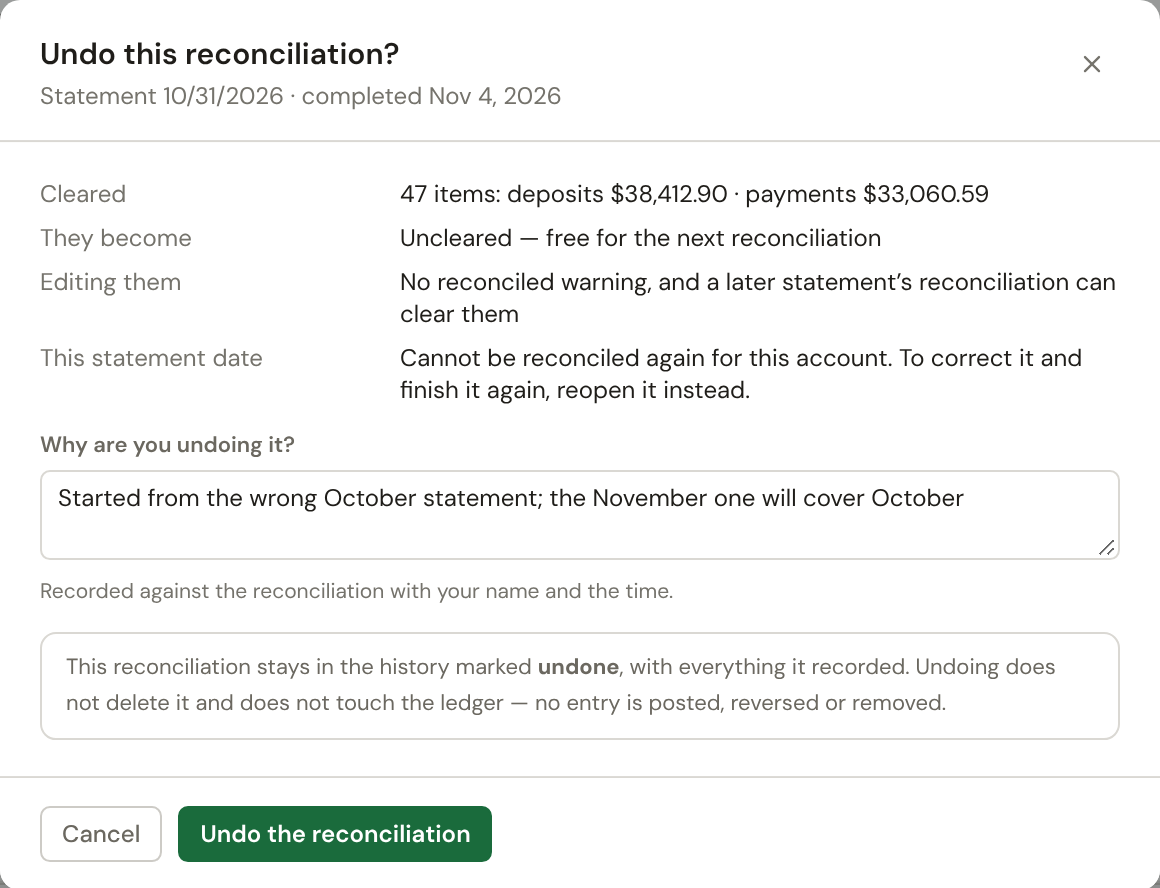 The Undo dialog for the Oct 31, 2026 reconciliation: what it cleared, what the lines become, the statement date warning and the reason
The row now reads Undone, with your reason in the Completed column, and the line under the title steps back to the last reconciliation that is still finished. The next one in the list, here Sep 30, 2026, becomes the one you can reopen, undo or void.
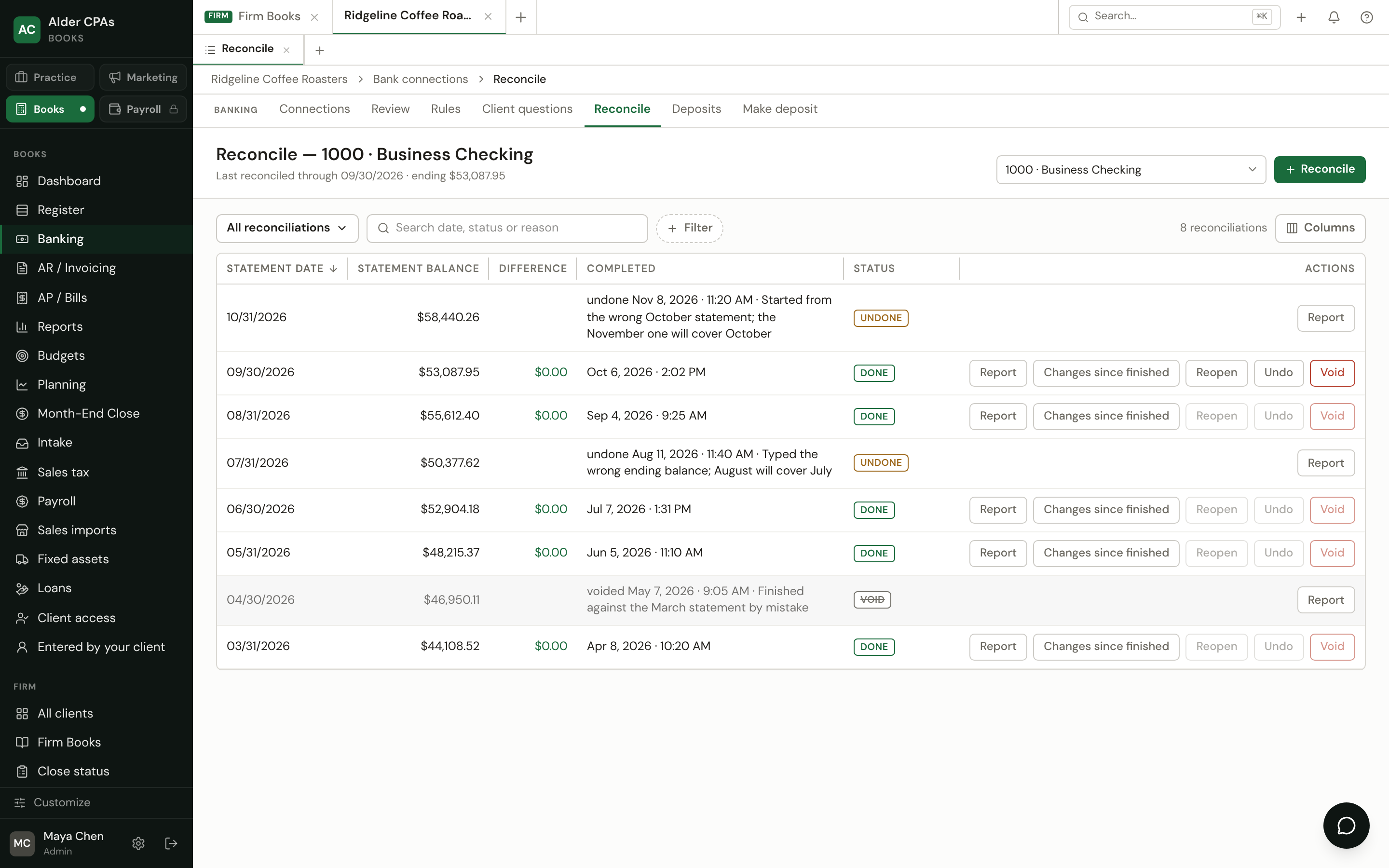 The history after the undo: October reads Undone and the page is last reconciled through 09/30/2026
What happens to the lines you released
- In the register, they show as uncleared. Changing their amount, date or account no longer warns that a reconciliation will stop tying, and you can void them like any other entry.
- The next reconciliation picks them up. It lists every line on the account that is dated on or before its statement date and not already reconciled, so the October lines appear in November's reconciliation. Lines the bank has already shown (a bank line dated on or before the statement date, matched or posted to the entry) start ticked.
- The next beginning balance chains past the undone one. It is the ending balance of the latest reconciliation that is still Done before the new statement date. Undone and voided reconciliations are skipped. In the example above, August's reconciliation began from June's ending balance of $52,904.18, because July was undone.
Undo does not let you redo the same statement. Books keeps one reconciliation per account and statement date, and the undone one keeps its date. Start another one dated Oct 31, 2026 and Books says This account already has an undone reconciliation for the statement dated 10/31/2026. Each statement date is reconciled once — choose the next statement's date. Its report stays in the history. If you meant to fix October and finish it again, click Reopen instead.
Void a reconciliation
Void does to the lines exactly what Undo does: they become uncleared and free for the next reconciliation, and the statement date can't be reconciled again for the account. The difference is what it says. A voided reconciliation is recorded as one that was wrong, and it is shown struck through.
- On the latest Done row, click Void.
- Under What was wrong with it?, give a reason of at least 10 characters, for example Finished against the March statement by mistake.
- Click Void the reconciliation.
The dialog says the difference in one line: Void says the reconciliation was wrong; undo says it should not have been finished. Neither lets this statement date be reconciled again.
Fix a reconciliation that no longer ties
A finished reconciliation can drift after the fact. If someone changes the amount or account of an entry it counted, the reconciliation no longer adds up to its statement. Books shows that in three places:
-
Before the edit is saved. In the register, the edit stops with a warning and the consequence: This entry was cleared by the Oct 31, 2026 reconciliation of 1000 Business Checking. Saving changes the amount or account of a line it cleared — that reconciliation will be off by $40.00 until it is reopened and done again. Confirm to save anyway. Click Save anyway to go ahead, or Keep editing.
Moving only an entry's date also warns, saying the reconciliation will no longer match its statement, but it doesn't change the reconciliation's status in the history. Changing the payee or a memo doesn't warn. See Using the Register.
-
In the history. The status changes from Done to No longer ties with off by $40.00, and Difference shows $40.00 in red.
-
On the finished reconciliation's report: No longer ties: off by $40.00. A line this reconciliation cleared has changed since it was finished. Reopen it to correct it, and finish it again., with a link, Reopen it from the history.
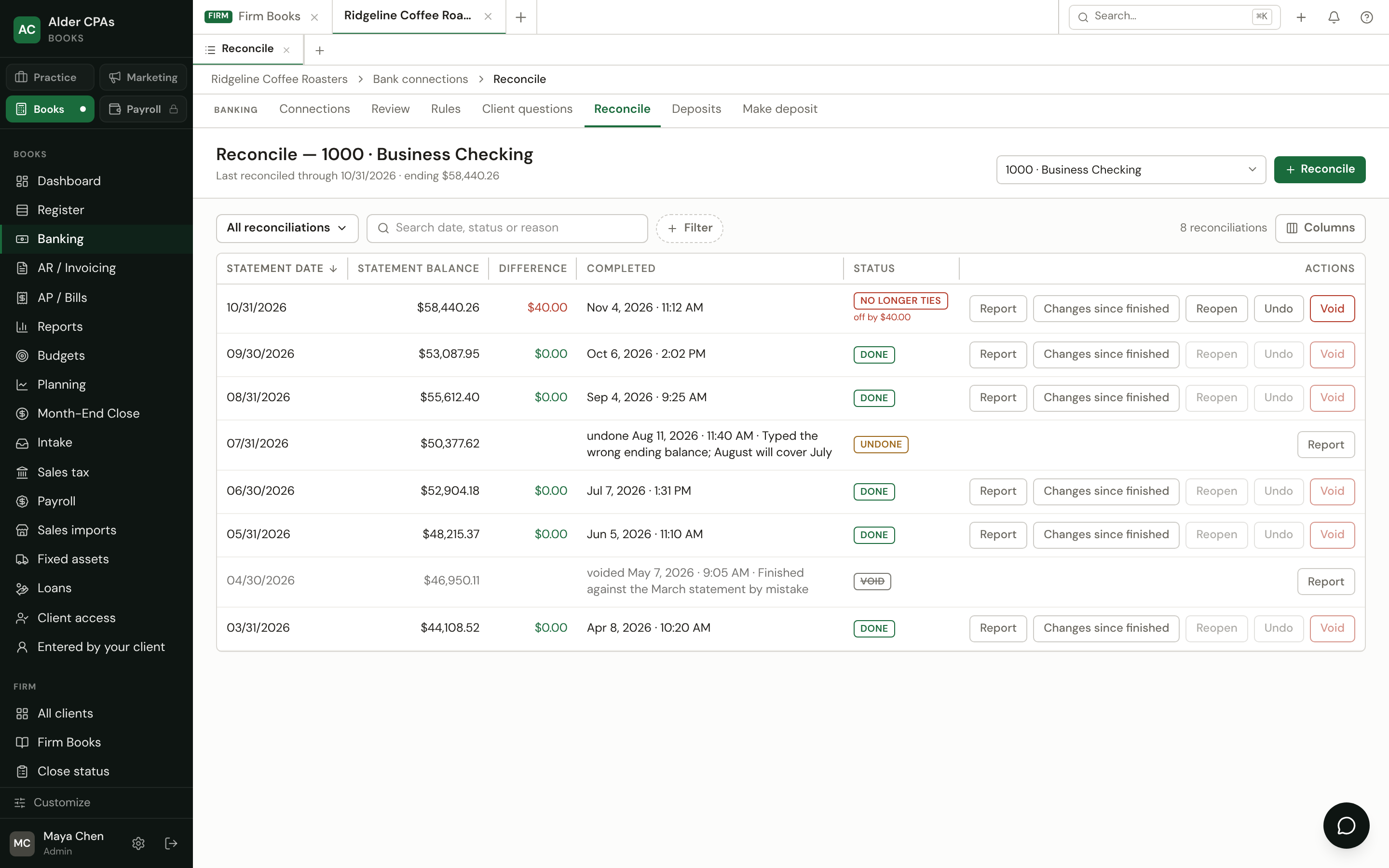 October now reads No longer ties, off by $40.00
To put it right, click Reopen on that row. The dialog leads with Why it needs a look and the amount it is off by. Reopen it, fix or untick the line, and finish it again. Changes since finished on the row shows what moved.
Why can't I undo, reopen or void this reconciliation?
The buttons are gray when Books will not allow the action. A hard-locked month is explained in a line under the row's buttons; for every other reason, hover over the gray button to see why. The ones you can hit:
-
Only the most recent one can be changed. Reconciliations unwind from the end, because each one's beginning balance is the previous one's ending.
If any finished or in-progress reconciliation of the account has a later statement date, hovering the button says A later reconciliation exists — deal with 10/31/2026 first. Deal with the later one first: undo or void a finished one, newest first, and cancel one that is still in progress. Reopening or finishing the later one doesn't clear the way.
-
The month is hard-locked. If the month of the statement date is hard-locked, the row says so under its buttons: The period containing Oct 31, 2026 is hard-locked, so this reconciliation cannot be reopened, undone or voided. Reopen the month first, then come back. A soft lock does not stop these three.
-
You don't have the permission. Hovering the button says, for example, You need the "Lock a period" permission for this. Ask an admin to grant it. Reopen and Undo need Lock a period; Void needs Void or reverse a posted entry; all three need Run and finish a reconciliation. Owners and admins have all three by default. Staff can run and finish a reconciliation but not reopen, undo or void one.
-
Only finished reconciliations have these buttons. An undone or voided reconciliation can't be brought back, and one in progress is still being worked on: open it with Continue.
-
The reason is too short. The dialog's button stays gray until the reason is at least 10 characters.
-
Something changed while the dialog was open. Books checks again when you click the button. If a later reconciliation now exists, or the month has been hard-locked since the page was read, the dialog says so in red and nothing changes.
For a later reconciliation, the sentence counts them and says what to do with each kind, for example 1 later reconciliation of this account is still in progress. Cancel it first., or 2 later reconciliations of this account exist: 1 finished and 1 in progress. Undo the finished one and cancel the one in progress, newest first. (in the Void dialog, Undo or void the finished one).
For a hard-locked month: The period containing Oct 31, 2026 is locked, so this reconciliation cannot be undone. Unlock the period first. Close the dialog and deal with that first.
-
Books is still checking. While the page reads the locked months, hovering a gray button says Checking whether this month is locked…. If that check fails, it says Whether this month is locked could not be read. Reload the page to try again.
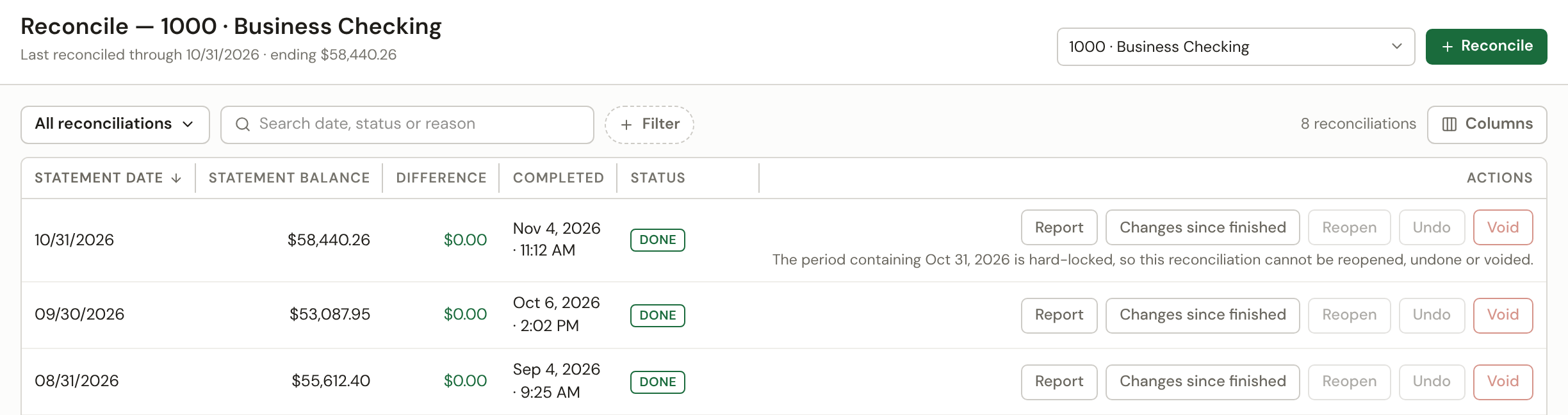 A reconciliation in a hard-locked month, with Reopen, Undo and Void held and the reason under them
Why can't I void an entry in the register?
An entry a finished reconciliation counted can be edited (with the warning above), but not voided. The register's Void is gray and says A finished reconciliation cleared this entry. Reopen it (Banking · Reconcile · History) to void this. Reopen the reconciliation, void the entry, then finish the reconciliation again.
If you also use Practice
When your firm also runs Practice, each client's month-end close can be a Practice task, one per month, titled for example Month-end close — October 2026, with a checklist Books keeps up to date. Its item Reconcile every bank and credit card account ticks itself once the client's bank and card accounts are reconciled through the month.
Undo, reopen or void a reconciliation, and Books checks that month's close task and every earlier one still open: where the accounts are no longer all reconciled through that month, the item is unticked again and the task's activity says why.
After an Undo, for example: Reopened "Reconcile every bank and credit card account": a reconciliation was undone in Books · 11/08/2026. So an open close task won't show the item done while a reconciliation it relied on has been taken back.
Tips
- Reach for Reopen first. It is the only one of the three that lets you finish the same statement again, and it keeps every tick you made.
- Write the reason for next year's reader. It sits on the row, it is searchable, and it is recorded with your name and the time.
- Esc closes the dialog without changing anything.
- Coming from the register? Its Reconcile button opens this page on the account you were looking at.