
Inventory
Track stock on hand and its cost, build finished goods from components, count and adjust, see when to reorder, and keep the inventory value tied to the balance sheet.
On this page
Inventory keeps a client's stock: how many of each item are on hand, what they cost, and how that cost leaves the balance sheet when something is sold or used.
Every unit that comes in, goes out or is counted is a movement with a date, a quantity and a cost, and the inventory asset accounts in the ledger move with it. Books checks the two against each other on every page, so you can see at a glance whether the stock and the books agree.
Stock moves only through documents that carry it: a bill that receives an item, an invoice, sales receipt or credit memo that sells or returns it, an adjustment, a build, or opening stock. Each one moves the quantity and the ledger together. A bank line can't be posted straight to an inventory account, because that would move the account with no stock behind it.
The Inventory row appears in the sidebar for a client that has at least one inventory item. Inventory is part of Premium: on a client that isn't on Premium, these pages show a card about Premium instead of the stock.
What makes an item stock
An item is tracked as stock when its type is Inventory product. It also needs an inventory asset account, the balance-sheet account its value is carried in. Without one, it can't be received on a bill, and the item is marked No asset account, so it cannot be received on the On hand page. You set both on the item itself (see Classes, locations, jobs and items).
Ridgeline Coffee Roasters tracks five items:
- Green coffee from two origins, by the pound, in 1300 · Green Coffee Inventory.
- 12 oz retail bags and 12 oz hot cups, each, in 1310 · Bags & Cups Inventory.
- A roasted 12 oz retail bag, built from green coffee and a bag, in 1320 · Roasted Coffee Inventory.
The costing method
Each client has one costing method. It decides what a sale costs, and so what is left on the shelf. You choose it in Settings → Items, under Inventory:
| Method | What it does |
|---|---|
| FIFO — first in, first out | A sale is costed from the oldest stock still on hand. |
| Average cost | A sale is costed at the average cost of everything on hand, recomputed on each receipt. |
| Specific identification | Each sale names the receipt its units came from, and is costed at that receipt's cost. |
| LIFO — last in, first out | A sale is costed from the newest stock still on hand. |
Until a method is saved, Books costs by FIFO, and the settings say No method has been saved for this client, so sales are costed by FIFO until one is. Books records the method you choose. It doesn't advise on which one to use, and next to LIFO it reminds you of the LIFO conformity rule and Form 970.
You can't change the method once any stock has gone out, whether sold, used in a build or adjusted down. Books refuses, because the change would restate cost of goods sold already posted: This client has already sold stock costed by first in, first out (FIFO). Changing to average cost would re-value everything already sold and restate prior cost of goods sold, so it is not a setting — it is a period-bounded decision the firm makes with its client.
The same section has Allow sales beyond stock on hand. Off (the default), a sale of more than is on hand is refused. On, the sale posts: what is on hand is costed by the method, the part beyond it at the last cost the item came in at, and the item is marked Sold beyond stock. An item that has never come in has no last cost, so even then it can't be sold beyond stock.
Understand the Inventory pages
Every inventory page shares a strip across the top: On hand, Adjustments, Valuation, Movement, Reorder, Builds and Opening stock.
On hand
On hand is the landing page: every inventory item with what is on hand today. Under the title, one line names the costing method and whether sales beyond stock are allowed, with Change in Settings → Items.
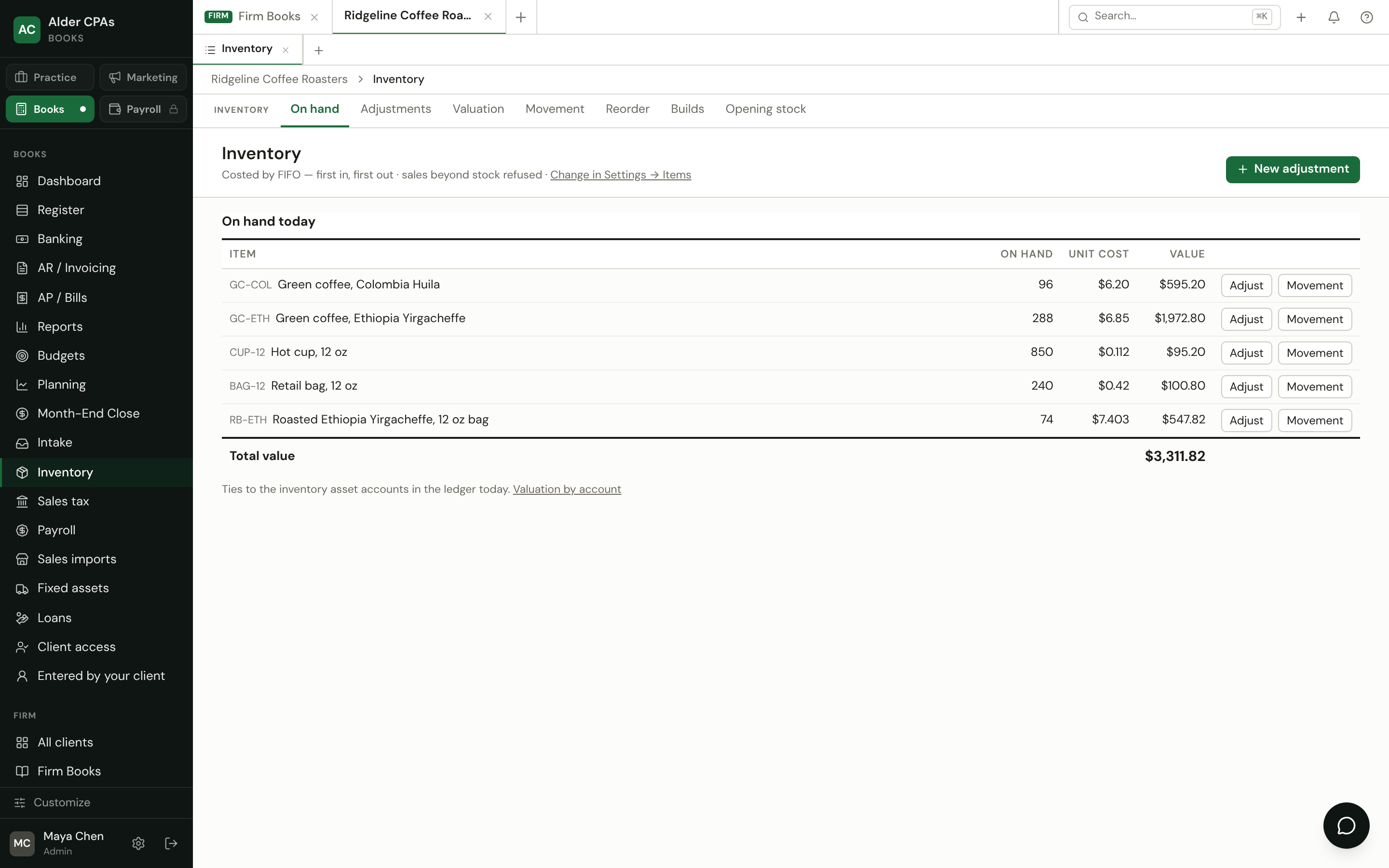 Stock on hand for Ridgeline Coffee Roasters, totaling $3,311.82 and tied to the ledger
The columns are Item (the item code in gray, then the name), On hand, Unit cost, Value, and two buttons: Adjust, which opens a new adjustment for that item, and Movement, which opens its movement report. Total value is at the bottom, and under it one sentence says whether the total Ties to the inventory asset accounts in the ledger today. or Does not tie…, with Valuation by account.
Unit cost here is the value on hand divided by the quantity, shown to as many as four decimals ($0.112 a cup), because a blended cost rarely comes out in whole cents. Value is always to the cent.
How stock moves
| What happens | What it does to stock | What it posts |
|---|---|---|
| A bill receives an inventory item | Adds a layer at the bill line's quantity and amount. A draft bill receives nothing. | The bill line goes to the item's inventory asset account. |
| An invoice or sales receipt sells one | Takes the quantity out, costed by the client's method at the moment of sale. | The cost of what was sold, with the sale. |
| A credit memo takes goods back | Returns them to stock: at the cost they were sold at when the memo names the invoice or sales receipt, otherwise at the average cost on hand (or the last cost, with none on hand). | In the credit memo's entry: debit the inventory asset account, credit cost of goods sold. |
| An adjustment | Adds or removes stock, with a reason. | The difference, to the account you choose. |
| A build | Takes the components out and adds the finished item. | One entry: debit the finished item's asset account, credit each component's account. |
| Opening stock | Adds dated layers for stock the books started with. | Nothing: the opening balance is already in the ledger. |
Voiding a document reverses its stock movement. Books won't let you void a bill, an adjustment that added stock, or a build once that stock has been sold or used, and won't void a credit memo whose returned goods have been sold since if that would leave the item below zero (see Why can't I…). A stock item can't go on a written check: receive it on a bill so its cost follows it.
Answer: Why is my inventory value off?
Open Valuation. It sets the value of stock, item by item, against the balance of each inventory asset account in the ledger on the As of date.
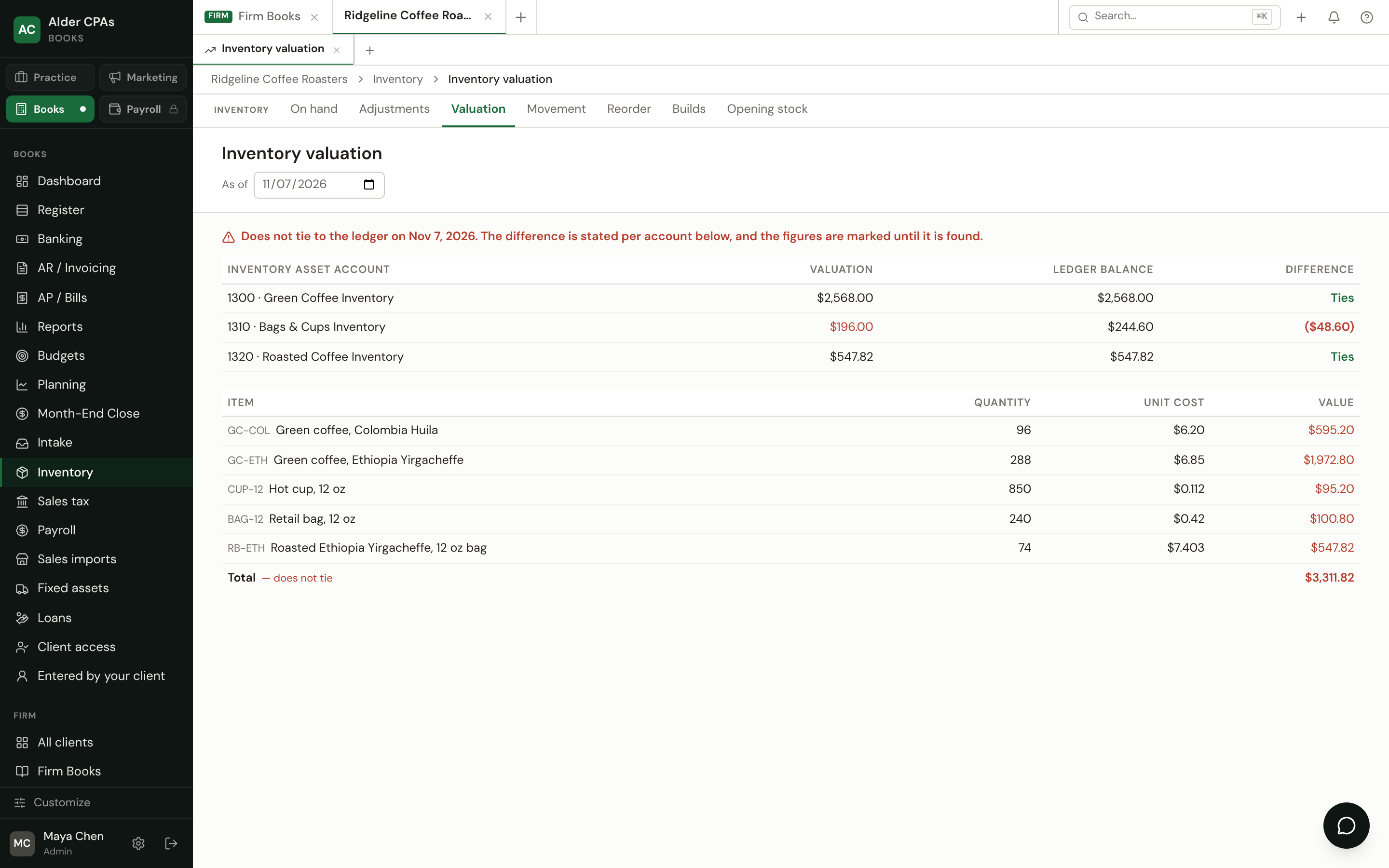 Inventory valuation that does not tie: 1310 Bags & Cups Inventory is $48.60 higher in the ledger than the stock behind it
The top table has one row per inventory asset account: Valuation, Ledger balance and Difference, which reads Ties when they agree.
When any account differs, a red line says so — Does not tie to the ledger on Nov 7, 2026. The difference is stated per account below, and the figures are marked until it is found. — and the valuation figures turn red: the differing account's valuation, every item's value and the total, which reads — does not tie.
The second table lists each item's Quantity, Unit cost and Value. Click an item's name to open its movement report.
In the example, 1310 · Bags & Cups Inventory holds $244.60 in the ledger, but the bags and cups on hand are worth $196.00: a difference of ($48.60). Something moved the account without moving stock. To find it:
- Change As of to earlier dates. The day the difference first appears narrows down when it happened. The date can be any day in the past, and a movement voided later still counts on the days before its void.
- Open the account in the register and look around that date for an entry that isn't a bill, sale, adjustment or build.
- Open Movement for each item carried in that account and check the quantities against what you counted.
Other things that make the value look wrong:
- No item names an asset account. The page then says No inventory item names its inventory asset account, so nothing here is tied to the ledger. Set each item's asset account. An item with stock but no account counts in the total and in no account's tie, and the page counts how many there are.
- Sold beyond stock. If the client allows it, an item can go below zero. The part sold beyond stock was costed at the last cost the item came in at, not at what the stock that arrives later actually costs, and the item is marked Sold beyond stock.
- Opening stock that was removed. Removing imported opening layers takes their value out of stock but leaves the ledger alone. The prompt names the amount the account will then differ by.
Follow one item: the movement report
Movement lists every movement of one item over a period, with the position going in and coming out. Choose the Item, then From and To (the start of the year to today, unless you change them).
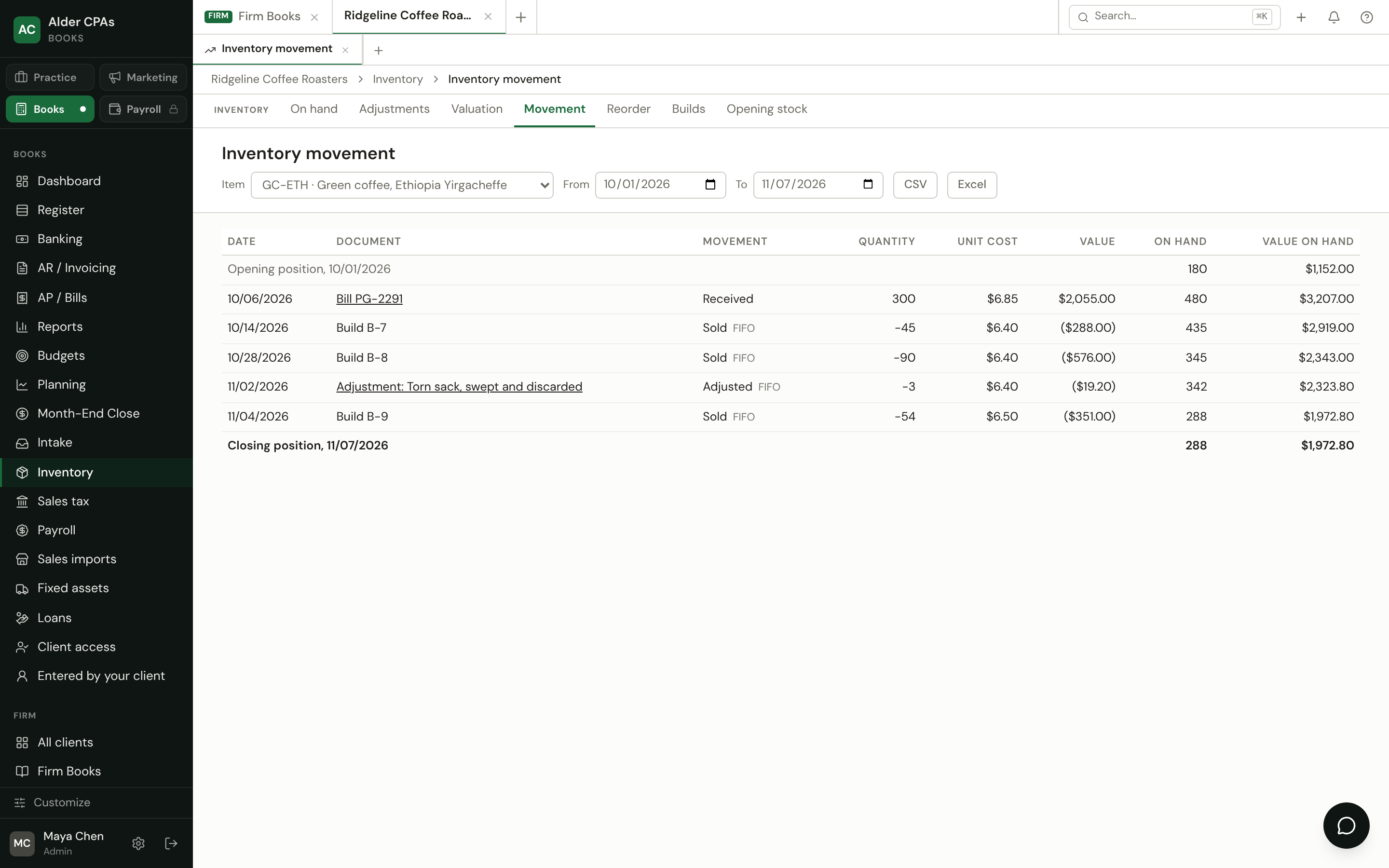 Movement of Ethiopia Yirgacheffe green coffee from Oct 1 to Nov 7, 2026
The columns are Date, Document, Movement, Quantity, Unit cost, Value, On hand and Value on hand. The first row is the Opening position and the last the Closing position. Bills and invoices are links to the document, sales receipts and credit memos to their lists, and adjustments (shown with their reason) to On hand.
Movement reads Received, Sold, Adjusted or Opening, with the costing method beside anything taken out. Components a build used also read Sold, with the build's number as the document (Build B-9): they went into that build, not to a customer. A voided movement stays in the list, struck through and marked Voided, and doesn't count in the running totals.
Here it is FIFO at work. Ridgeline started October with 180 lb at $6.40. Bill PG-2291 added 300 lb at $6.85. Builds B-7 and B-8 and a torn sack all came out of the older $6.40 layer. Build B-9 needed 54 lb with only 42 lb left at $6.40, so it took 12 lb at $6.85: $351.00, or $6.50 a pound. That leaves 288 lb, all at $6.85, worth $1,972.80, which is what On hand and Valuation show.
CSV and Excel download the report as shown.
Adjust stock: breakage, shrinkage and counts
An adjustment changes an item's quantity for a reason: a torn sack, a broken case, or a physical count that differs from the books. Click New adjustment on On hand or Adjustments, or Adjust on an item's row to start with that item chosen.
- Choose the Item and the Date (today, unless you change it).
- Under Give one of, choose how to give the quantity:
- Change in quantity: type how many to add or remove, for example -3.
- Counted quantity: type what you counted. Books works out the change from what is on hand on that date.
- With Change in quantity, an increase can take a Unit cost (an increase only, optional). Leave it blank, or count up with Counted quantity, and Books uses the average cost of what is on hand, or the last cost the item came in at when nothing is on hand. A decrease is always costed by the client's method.
- Choose the account in Difference posts to: a shrinkage expense, say, or the expense account for what was used.
- Type the Reason. It is required, and it stays with the adjustment, in the movement report and in the entry's description.
- Read the sentence above the buttons, which says what posting will do, and click Post adjustment.
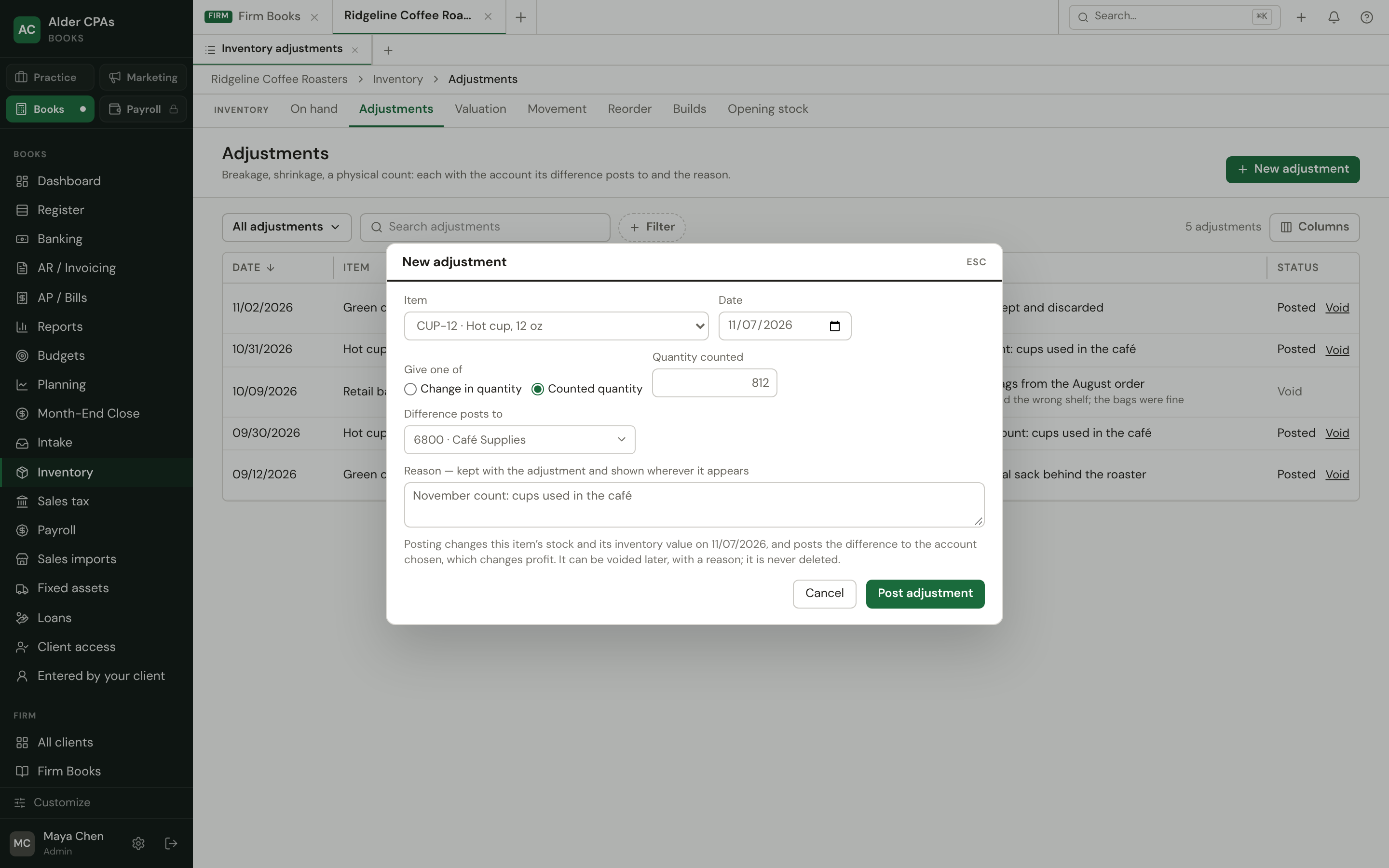 Counting café cups: 812 counted, the difference posting to 6800 Café Supplies
Counts are also how supplies you use get expensed. Ridgeline buys hot cups as stock and counts them at month end. A Counted quantity of 812 against 850 on hand posts the 38 cups used to 6800 · Café Supplies, at their cost.
The page then confirms it, for example Adjustment posted: -38 of Hot cup, 12 oz, ($4.26).
Adjustments lists every adjustment with its Date, Item, Change, Value, Posted to, Reason and Status. Search them, filter by Status or Date, and choose which columns show with Columns. Voided ones stay in the list, marked Void with the reason they were voided.
Answer: How do I record a build?
A build turns components into a finished item: green coffee and a bag into a roasted retail bag. The finished item is an inventory item whose Components are filled in on the item; that list (the bill of materials) says how much of each component one unit takes. Ridgeline's roasted 12 oz bag takes 0.9 lb of green coffee, one retail bag and one bag's worth of Roasting labor, a labor line costed at $1.15.
- Open Builds and click New build. (Or click Build under an item's components to start with that item.)
- Choose the Assembly and the Date, and type the Quantity to make. Add a Memo if you like, such as a lot number.
- Books fills Components used from the bill of materials and prices every line as you type, by the client's costing method: Quantity, Unit, Unit cost, Cost, and the Account each cost comes out of. The last row shows the finished goods' unit cost and total, and the account they go into.
- Change anything this build used differently: a quantity, a labor line's cost per unit, or Add line and the trash icon. The label above the table switches from from the bill of materials to edited, and only this build changes, not the item's components.
- Click Post build.
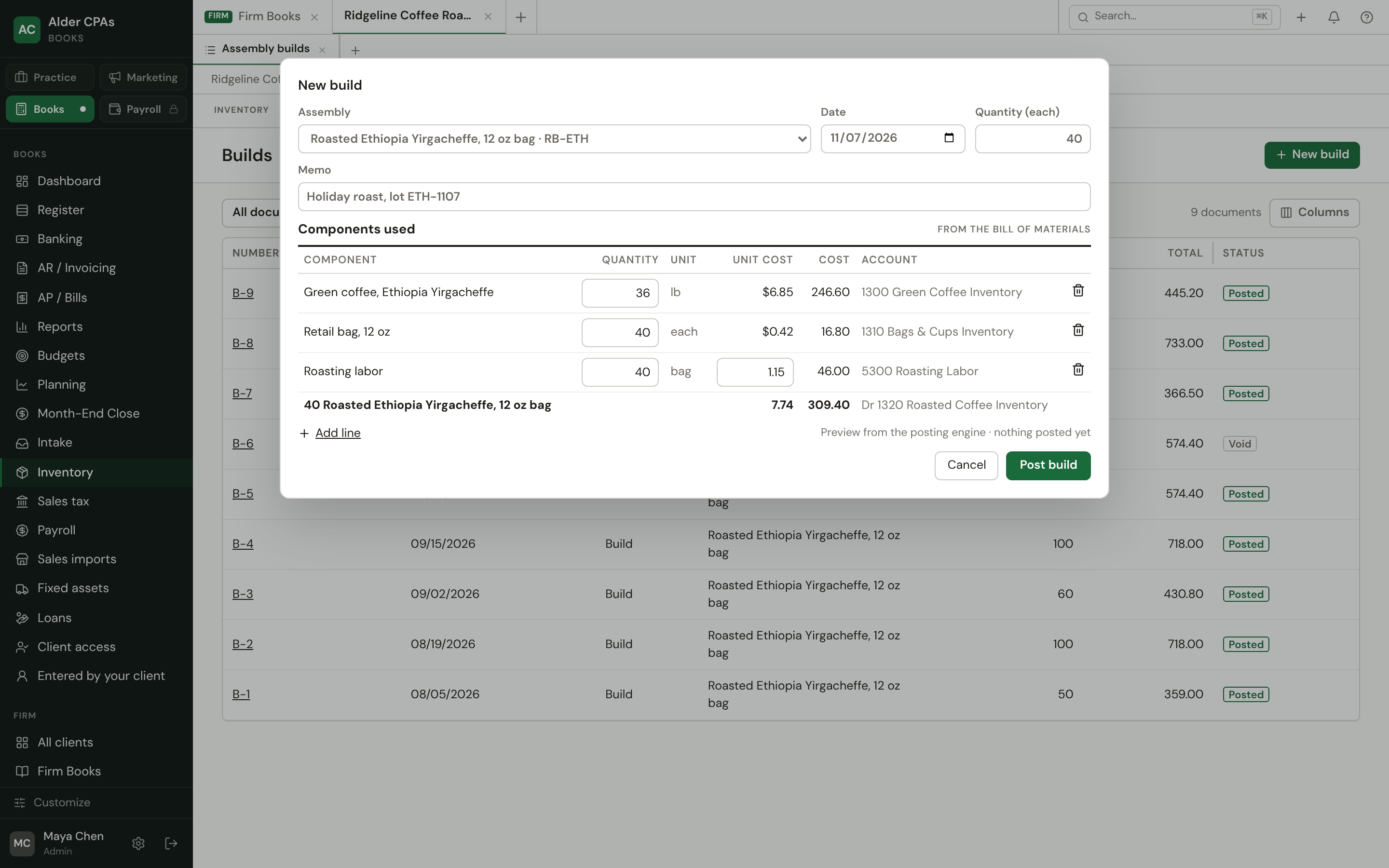 A new build of 40 roasted bags, priced at $309.40
Nothing is written until you post: Post build turns on only once Books has priced the build and found nothing to refuse. If a component is short, the window says so before you post, naming every short component at once, for example This needs more than is on hand: "Green coffee, Ethiopia Yirgacheffe" has 288 on Nov 7, 2026 and the build needs 360. Nothing was built.
Posting opens the build. It shows the Components used with the cost recorded at the build, the Entry (with Open in the register), and the Movements: each component taken out and the finished goods received, as a layer named after the build.
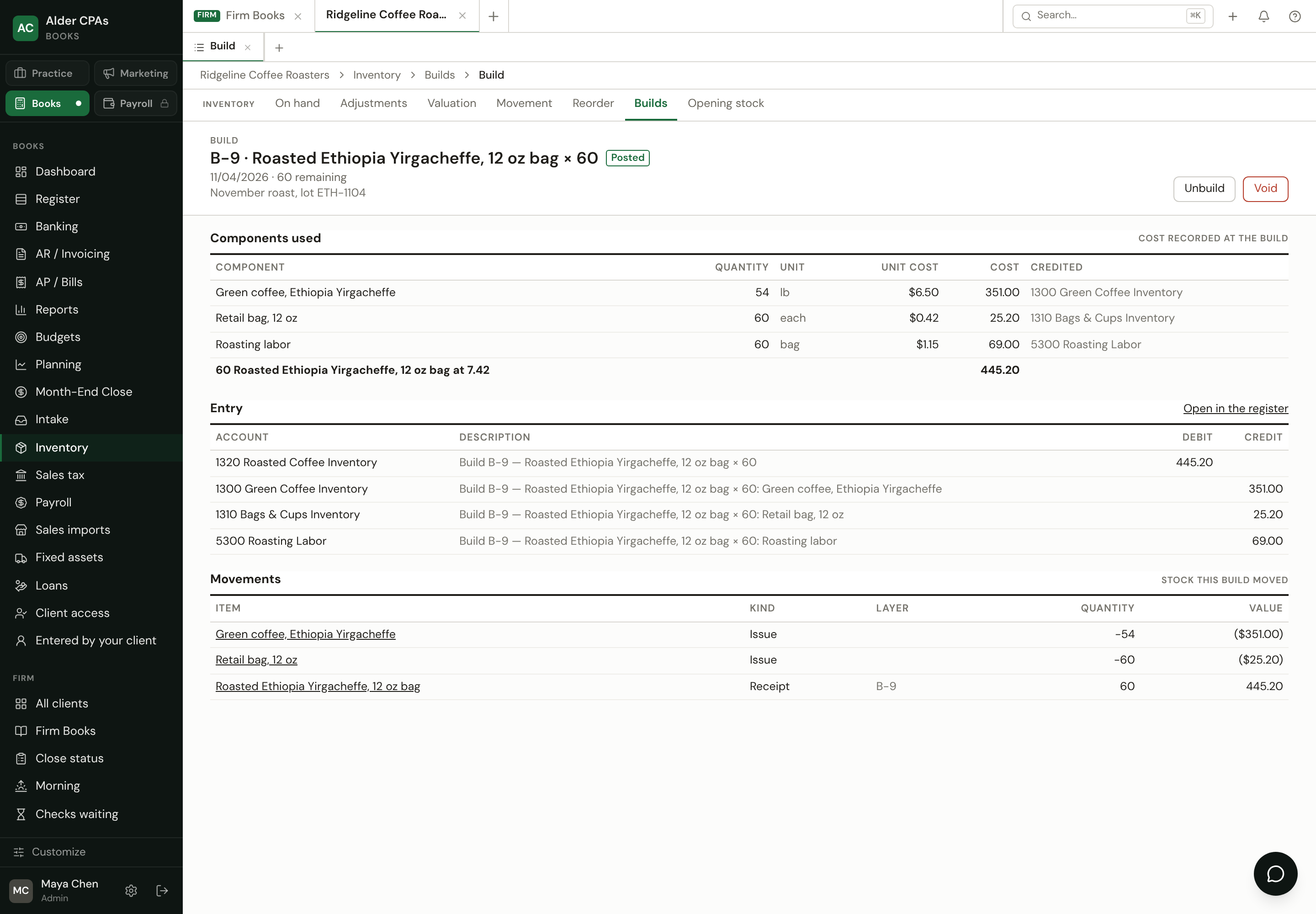 Build B-9: 60 roasted bags at $7.42 each, its entry and its stock movements
The labor line is credited to its own expense account (5300 · Roasting Labor here), so the labor becomes part of the finished goods' cost on the balance sheet instead of an expense this month.
Builds lists builds and unbuilds together under one numbering (B-1, B-2…), with Number, Date, Kind, Assembly, Quantity, Total and Status. Filter by Status or Kind.
When an invoice runs short
If an invoice can't be sent because an assembly is short, the refusal appears with a Build "…" button beside it. It opens a new build for exactly the shortfall, dated the invoice's date.
Answer: When should I reorder?
Give each item a reorder point, the quantity at which you want to buy more, on the item itself. Reorder then lists every active item at or below its reorder point on the As of date.
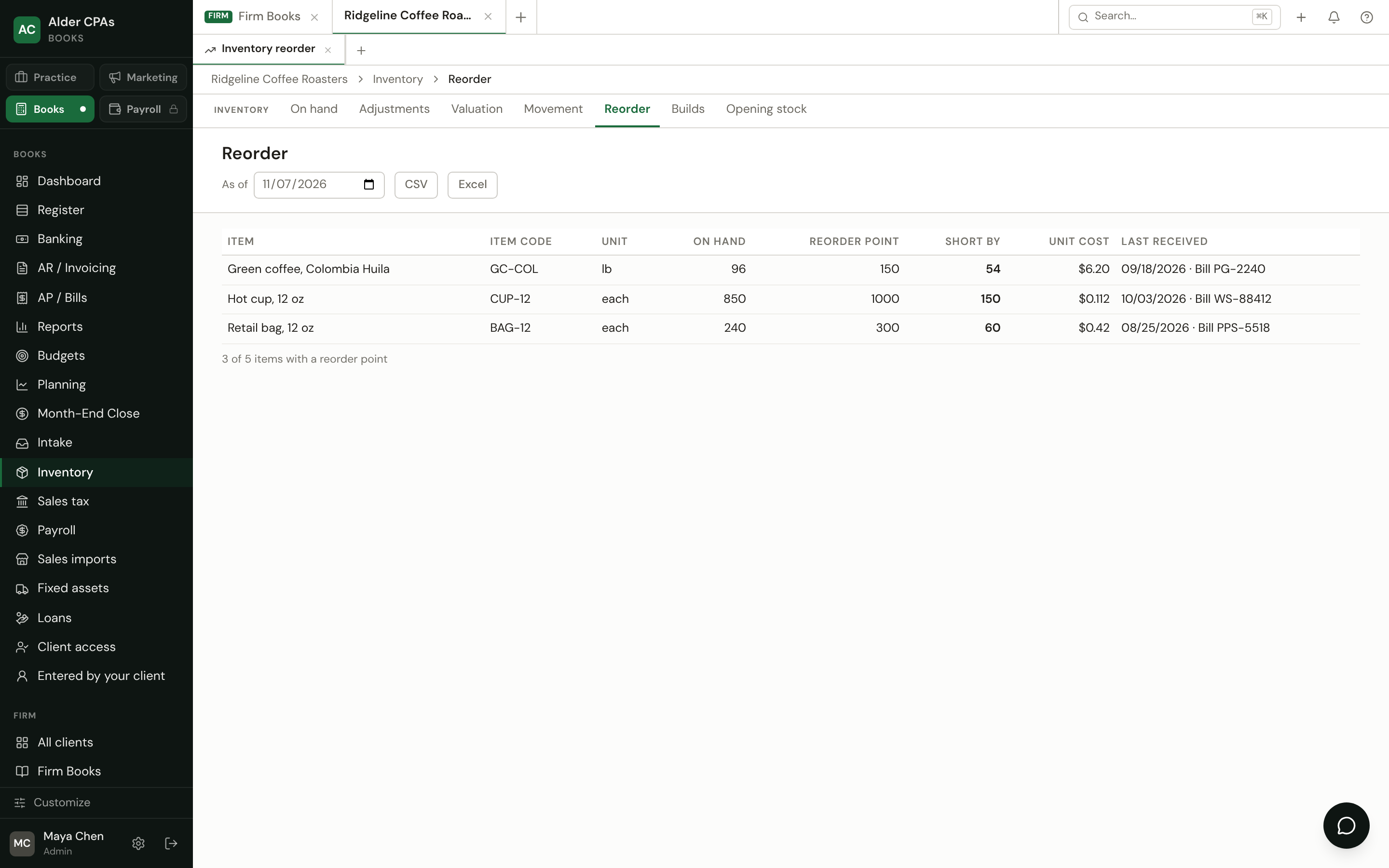 Three items at or below their reorder point
The columns are Item, Item code, Unit, On hand, Reorder point, Short by (how far below its reorder point it is), Unit cost and Last received, with the bill number when it came on a bill.
Click the on-hand figure for the item's movements, Last received to open the bill, or the item's name to open Settings → Items. Under the table, 3 of 5 items with a reorder point says how many items have one at all.
A good reorder point covers what you use between ordering and receiving. Ridgeline roasts about 150 lb of green coffee a month and its importer takes two to three weeks, so it reorders each origin at 150 lb. Today Colombia Huila is 54 lb short, and cups and bags are due too.
CSV and Excel download the list to send to a supplier or to plan the next order.
Opening stock
Opening stock is for books that start with stock already on hand. It records the dated layers of that stock, so the first sale is costed correctly, without posting anything: the opening balance is already in the ledger.
-
Paste the client's stock list into the box, or drop a CSV or Excel (.xlsx) file on it. Any column order works.
-
Check How Books read it. Each column has the role Books recognized from its heading and contents, and you can change any of them. A list needs Item, Quantity and a cost, either Unit cost or Total cost. Acquired, Reference and Quantity on hand are optional; with no acquired date, each layer is dated the opening date, and a layer acquired after the opening date is refused as a purchase.
Books checks each item's layers against a claimed quantity on hand, so with no Quantity on hand column, tick Quantity on hand = the sum of this list's layers for each item., or each item is refused for having no claimed quantity.
-
Match any item Books couldn't find in the client's item list, or leave it for Books to refuse by name.
-
Set the Opening date and click Check and import.
The import is all or nothing. Books checks every line and every item, and nothing is written unless every item reconciles and every inventory asset account's layers add up to its ledger balance on the opening date. Opening layers come first: an item that already has stock movements is refused.
The report shows, per item, Layers given, Quantity in layers, Claimed on hand, Difference, Value and Result, and per asset account, the Layers' value against the Ledger balance. Each refused line is shown on the line of your list it came from, so you can fix the list once.
When an accounting-system import brought stock quantities in, the page can open filled in from it. Then the button reads Check against the books first, and nothing is written until you click Import N layers.
The layers already recorded are listed at the top. Remove imported opening stock takes them back out, with a prompt that names the layers, units and value that leave each account. It is refused for an item that has any movement after its opening layers.
Shortcuts and tips
| Where | Key or trick | What it does |
|---|---|---|
| Any window (New adjustment, New build, Void, Unbuild) | Esc | Closes it without posting. |
| Difference posts to, Difference to | Type a number or name, ↓ / ↑, Enter | Filters the accounts, moves through them and picks one. Esc closes the list. |
| Search on Adjustments and Builds | Enter / Esc | Enter searches now (it also searches on its own when you stop typing); Esc clears the search. |
| List column headers on Adjustments and Builds | Alt+← / Alt+→ | Moves the column's right edge, trading width with the column beside it. Double-click the edge to put both back. |
| Unit cost on an adjustment, and a labor line's cost in New build | Arithmetic | Type a sum and it is worked out when you leave the field or press Enter: 2055/300 becomes 6.85. Use + − * x / and parentheses; a leading =, $ and commas are ignored. The result is rounded to the cent once, at the end. |
More details worth knowing:
- A count does the subtraction. Choose Counted quantity and type what is on the shelf; Books works out the change from what is on hand on the adjustment's date, not today.
- Quantities take decimals. Pounds, gallons and partial cases work, up to four decimal places in an adjustment.
- Every number leads somewhere. On On hand, Movement opens that item's report; on Valuation, an item's name does; on Reorder, the on-hand figure does, and Last received opens the bill.
- Look back in time. Valuation and Reorder take any As of date, so you can see what was on hand at a month end you already closed.
- A build is priced before you post it. Every figure in New build comes from Books running the build itself as you type and writing nothing, so the window refuses what posting would refuse.
- Nothing is deleted. Adjustments and builds are voided with a reason and stay on record, with the reason they were voided.
Why can't I…
-
…sell more than is on hand? The invoice is refused: "Hot cup, 12 oz" has 850 on hand on this date and this needs 1000 — a sale beyond stock has no honest cost, so it is refused. The client's inventory settings can allow it. Receive the stock first, build it if it is an assembly, or turn on Allow sales beyond stock on hand.
-
…backdate a sale or build? If it would take the item below zero after a movement already recorded on a later date, Books refuses and names the date.
A sale says "Green coffee, Ethiopia Yirgacheffe" would go to -12 on Nov 4, 2026, after a movement already recorded on that date — a sale beyond stock has no honest cost, so it is refused. Date this on or after that movement, or record the stock it needs first.
A build's window names every component that would go below zero, and on which date, before you post. A client that allows sales beyond stock isn't refused this way for a sale.
-
…receive or adjust an item? It needs an inventory asset account: "Hot cup, 12 oz" has no inventory asset account — set one on the item before stock moves.
-
…post an adjustment? Books says why under the form. It needs a reason, an active account other than the item's own inventory account, and a quantity that changes something. An increase of an item that has never been received needs a unit cost. A decrease takes no unit cost, because the client's method costs it.
-
…post a bank line to an inventory account? Review doesn't offer inventory asset accounts as a category. An account that holds inventory for another reason is refused when you post: 1200 Inventory Asset holds inventory, so a bank line cannot post to it directly: that would move the account without the stock behind it. Record the stock through a bill or an inventory adjustment, then match this line to the bill's payment.
Enter the purchase as a bill, then match the bank line to the bill's payment. See Reviewing Bank Transactions.
-
…void a bill, adjustment or build? Not once the stock it added has been sold or used, because that sale's cost came from it: Stock of "Green coffee, Colombia Huila" received on this bill has already been sold, and that sale's cost was taken from it. Void or adjust the sale first, then this bill. Under average cost, any later sale or use of the item counts, because every one drew on the average.
An adjustment that removed stock can always be voided. A build that has been partly unbuilt needs the unbuild voided first.
-
…put a discount on a bill that receives stock? A bill-level discount is refused on a bill with an inventory line: A bill that receives inventory cannot carry a bill discount; take the discount off the item's rate instead.
-
…unbuild more? You can unbuild at most what the build made, less what has already been unbuilt, not before the build's date, and only units still on hand on that date and every later one.
-
…date it before the books start? The date field says so, for example These books start on Jan 1, 2026, so this adjustment can't be dated Dec 15, 2025. Date it on or after Jan 1, 2026.
-
…choose a layer, or why must I? Under specific identification, a sale or a decrease names the layer its units come from. Under any other method, it can't.
-
…use the buttons? Adjusting, building and unbuilding need permission to post. Voiding a build or an adjustment needs permission to void. Opening stock, components and the costing method need permission to manage the chart of accounts. A button you can't use says why when you point to it.
Fix or undo
-
An adjustment: on Adjustments, click Void on its row and give a reason of at least 10 characters. Books reverses its entry and takes its stock movement back out. The reversal is dated the adjustment's own date while that period is open, and today once it is closed. The adjustment stays on the list, marked Void. Then post the right one.
-
A build: open it and click Void. The window says what goes back to stock and what leaves, and asks for a Reason. The entry is reversed, on the build's own date while that period is open and today once it is closed. If Books would refuse, the window says why instead.
-
Some of what a build made: open the build and click Unbuild. Give the Date, the Quantity (of what remains), the account in Difference to and a Reason.
The finished goods leave at their cost by the client's method and the components return at the cost the build used them at; labor can't go back on the shelf, so the difference posts to the account you chose. The unbuild gets its own number and links back to its build.
-
Opening stock: Remove imported opening stock, as long as the item has no movement besides its opening layers.
-
A bill, invoice or other document: void it through the document. Its stock movement is reversed with it.
Recommended routine
- Weekly, check Reorder and place orders for anything short.
- At month end, count the shelf and post a Counted quantity adjustment for each item that differs, with the reason.
- Then open Valuation as of the last day of the month, and find any difference before you close the month.
- Build finished goods on the day you make them, so their cost leaves the components when it really did.