
Check Reports: Outstanding, Voided, Number Gaps and Positive Pay
See which checks haven't cleared the bank as of any date, find skipped, spoiled and duplicate check numbers, review voided and mailed checks, and download a positive pay file in your bank's own format.
On this page
Books keeps six check reports and a positive pay file for every client. Together they answer the questions a bookkeeper asks about a checkbook: which checks are still out, which numbers are missing or used twice, what was voided and why, where a mailed check is, and what is waiting to print. The positive pay file turns the same list into the file your bank uses to refuse a forged or altered check.
These reports cover checks written in Books: checks from Write check, and bill payments made by check or mailed check from a bank account. A check typed only as a register line, with a number on it, is not a check document and does not appear here. Each report says so at the bottom.
Understand the check reports
Open Reports in the sidebar. The Checks group lists six reports, and Positive pay file for people who can also post entries:
| Report | What it shows | Dates it uses |
|---|---|---|
| Check detail | Every check drawn on a bank account, with its number, payee, memo, amount and whether it cleared | Checks dated in the period |
| Checks to print | Checks waiting to print, in print order | None: everything waiting now |
| Mailed check status | Every mailed check, and when it was queued, printed, mailed, delivered or returned | Checks dated in the period |
| Voided checks | Checks voided in a period, with the reason and who voided them | The day each check was voided |
| Check number gaps and duplicates | Numbers skipped, spoiled or used twice on an account | None: the whole series |
| Outstanding checks | Checks issued and not yet cleared by the bank, by age | Everything up to one As of date |
| Positive pay file | The issued and voided checks for your bank's positive pay service | Checks issued or voided in the period |
Every report has the same controls along the top:
- All bank accounts, or one bank account. Credit cards are never listed.
- The dates: a start and an end date for a period, As of for Outstanding checks, and none at all for Checks to print and Number gaps. The line under the title repeats what you are looking at, such as As of 11/08/2026 · All bank accounts.
- Export, which downloads the rows on screen as a CSV file.
A report for a period opens on the last full month. Outstanding checks opens on today. Neither opens on a day before the client's books start.
In Check detail, Mailed check status, Voided checks and Outstanding checks, each check number is a link: click it to open the check, or the bill payment it came from (in Checks to print, the payee is the link).
A check that hasn't printed yet shows No number in place of one. The Type column says how the check was made or sent: Written check, Bill payment, or Mailed check for any check Books mailed, including a bill payment.
To move from one report to another, click the arrow beside the report's name in the breadcrumb at the top of the page. It lists every report, so you don't have to go back to the Reports page.
See which checks are outstanding
Outstanding checks lists every check that had not cleared the bank on the As of date, grouped by age.
- Go to Reports → Checks → Outstanding checks.
- Choose a bank account, or leave All bank accounts.
- Set As of. It starts on today.
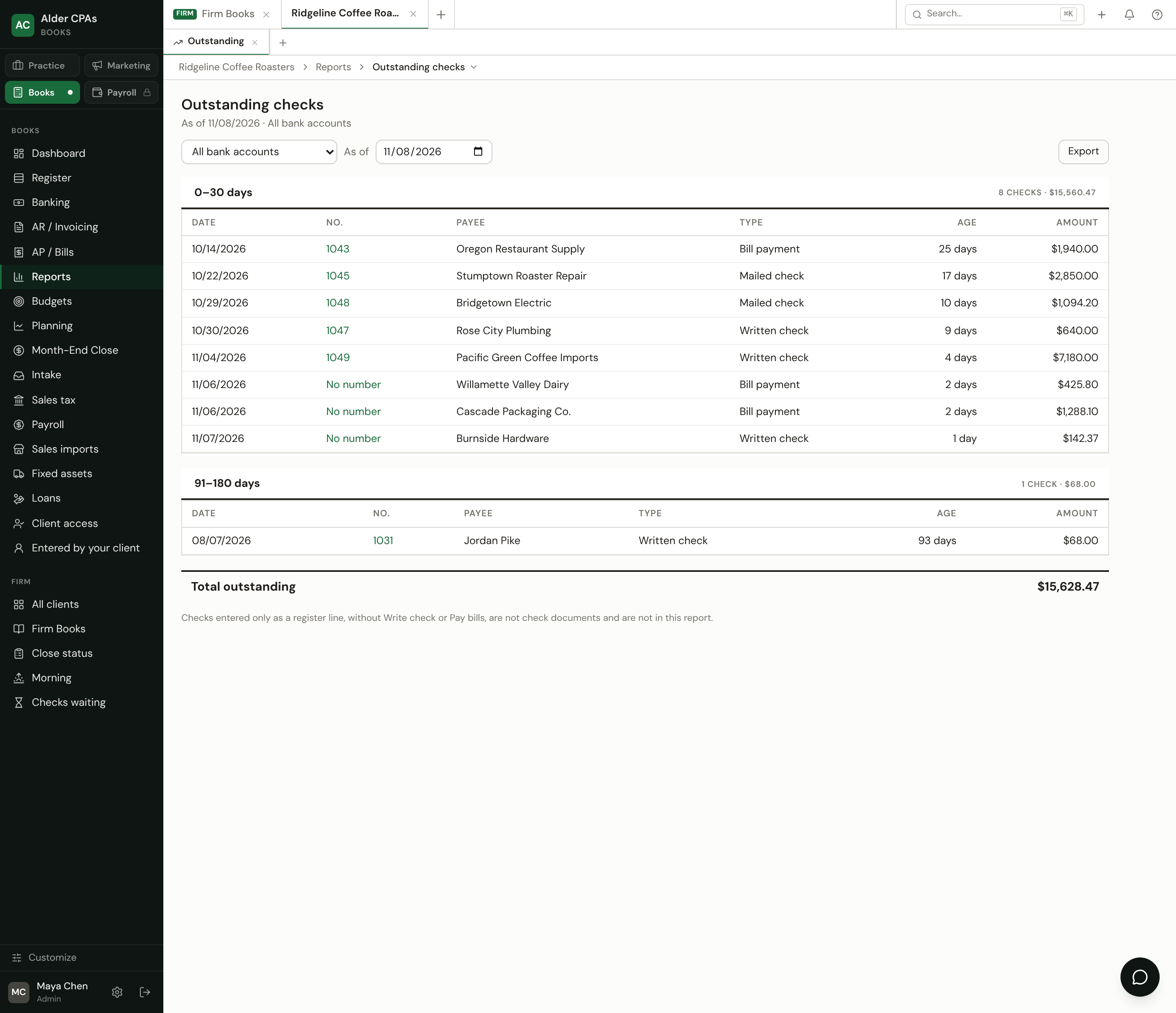 Outstanding checks as of Nov 8, 2026, grouped by age, totaling $15,628.47
Checks are grouped into 0–30 days, 31–60 days, 61–90 days, 91–180 days and Over 180 days, counted from the check's date to the As of date. A group with no checks is left out. Each group's heading shows its count and total, and Total outstanding at the bottom is the sum of every check listed.
The columns are Date, No., Payee, Type, Age and Amount.
What counts as outstanding
A check is outstanding on the As of date when all three are true:
- It is dated on or before that day.
- It had not been voided by that day.
- It had not cleared the bank by that day.
Books uses the day it recorded the check clearing: the statement date of the finished reconciliation that included it, or the date of the bank line matched to it, whichever is earlier. For a mailed check, Books also keeps the date of the bank line that cleared it.
A check you mark cleared by hand, or tick in a reconciliation you haven't finished, has no recorded clear date. Books counts it as cleared from today: it isn't on the report as of today, but on any earlier As of date it is listed, with Marked cleared — date not recorded under the payee.
Books knows it cleared, but not on what day. Match it to its bank line, or finish that reconciliation, and Books has its date. In the exported file, the same words appear in a Note column at the end of the row.
So the report answers for the day you pick, not for today. A check that cleared or was voided after the As of date still shows, because it was still out on that day.
Set As of to a statement's ending date to see the checks outstanding on that statement, once that statement's reconciliation is finished or the checks are matched to bank lines. That is the list you need when you Reconcile an Account.
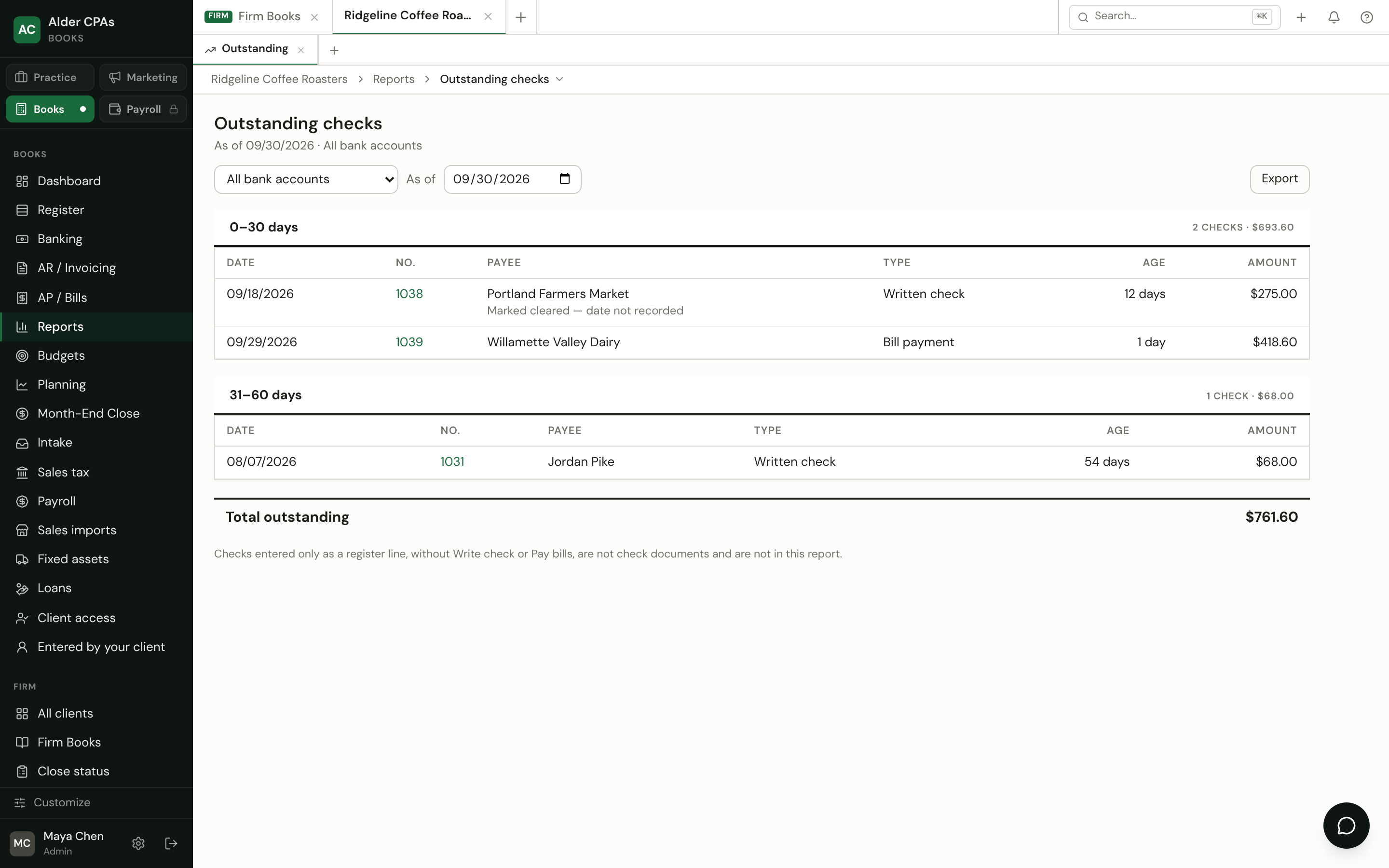 The same report as of Sep 30, 2026: 1039, which cleared in October, is back on the list, and 1038, marked cleared with no date recorded, says so under the payee
Checks that haven't printed yet are outstanding too. They show No number until they print.
When nothing is outstanding, the report tells you which of two things is true:
- No checks were written by this date.
- No outstanding checks: every check written by this date has cleared the bank or was voided.
A check in 91–180 days or Over 180 days is worth a call to the payee. It may have been lost, or never deposited.
Review every check written in a period
Check detail lists every check dated in the period, grouped by bank account, with a count beside each account.
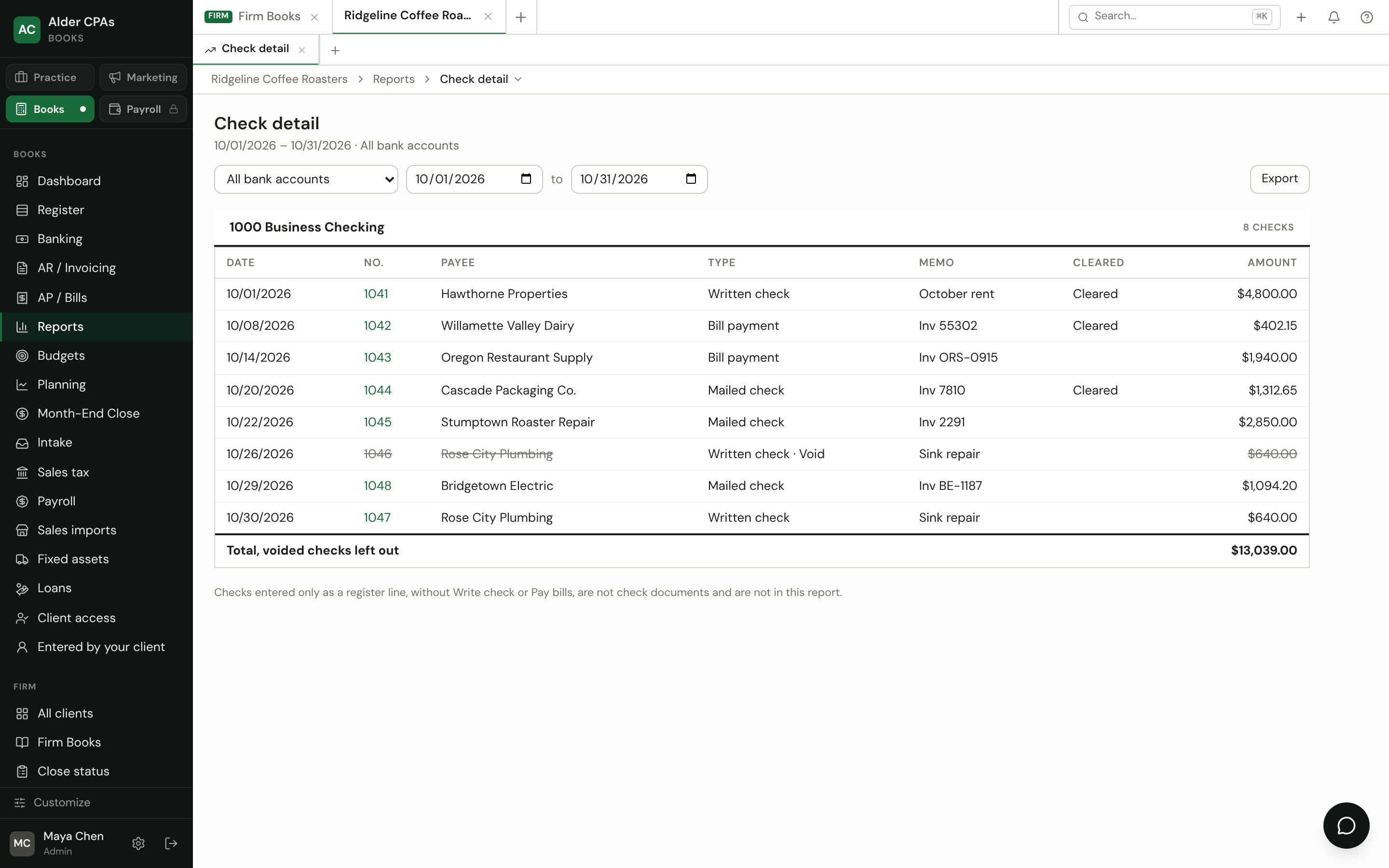 Check detail for October 2026, with voided check 1046 struck through
The columns are Date, No., Payee, Type, Memo, Cleared and Amount. Cleared reads Cleared or Reconciled, and is blank while the check is still out.
A voided check stays on the list, struck through, with · Void after its type, so the number series reads without holes. It is not counted in the total: the last line reads Total, voided checks left out.
Find skipped, spoiled and duplicate numbers
Check number gaps and duplicates walks each bank account's check numbers from the lowest number used or spoiled to the highest, and lists anything that is not exactly one check. An account whose only numbers are spoiled ones is still listed.
On the account set up for checks under Settings → Check mailing, the walk starts at its Starting check number instead when that number is lower than the lowest number used or spoiled (and not above the highest), so numbers skipped at the start of the checkbook show as a gap.
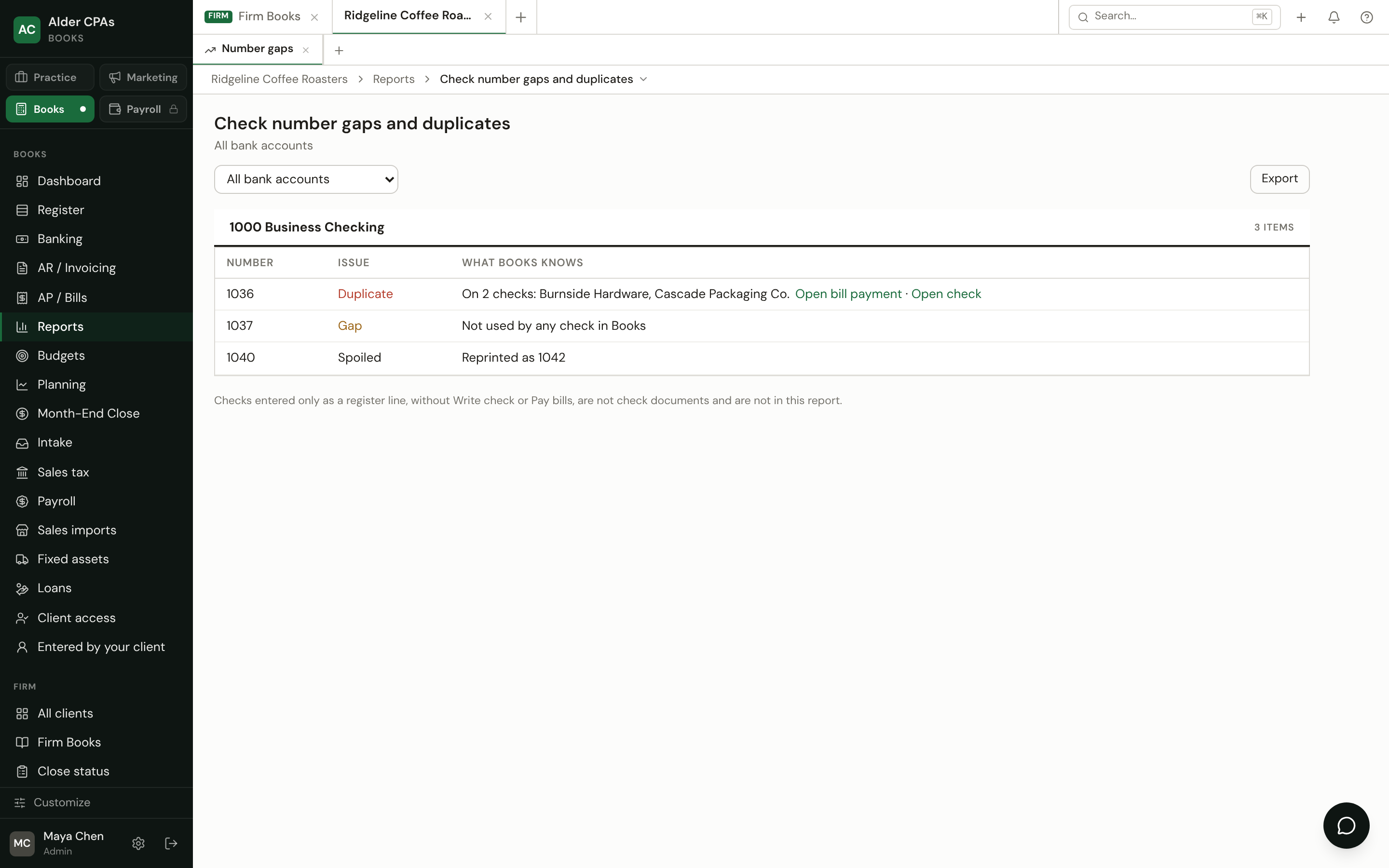 Check number gaps and duplicates for 1000 Business Checking: a duplicate, a gap and a spoiled check
The Issue column says what Books found:
| Issue | What it means | What What Books knows shows |
|---|---|---|
| Gap | No check in Books uses this number, and it wasn't recorded as spoiled. Numbers in a row are shown together, such as 1037–1039. | Not used by any check in Books, or 3 numbers not used by any check in Books |
| Spoiled | A check sheet with this number was ruined while printing, or the check was reprinted on a new number. | Spoiled while printing, or Reprinted as 1042 |
| Duplicate | Two or more checks that aren't voided carry the same number. | On 2 checks: Burnside Hardware, Cascade Packaging Co., with Open check or Open bill payment for each |
| Not checked | The account's numbers span more than 100,000. Books checks the first stretch of 100,000 numbers and lists the range past it as not checked. | Not checked: the used range on this account is wider than 100,000 numbers |
Some things to know:
- A voided check still uses its number. Voiding a check does not open a gap.
- Only numbers made of digits are checked. A check numbered "EFT" or "1042A" isn't part of the series.
- A gap is often a check that was entered only as a register line, or never entered at all. Find the paper check to see which.
- For a duplicate, open each check from its link to see which number is wrong.
When the series is clean, the report reads No gaps, spoiled numbers or duplicates: every number in the used range is on one check.
See what was voided
Voided checks lists the checks voided in the period, newest first. The period is matched against the day each check was voided, not its date, so a September check voided in October is in October's report.
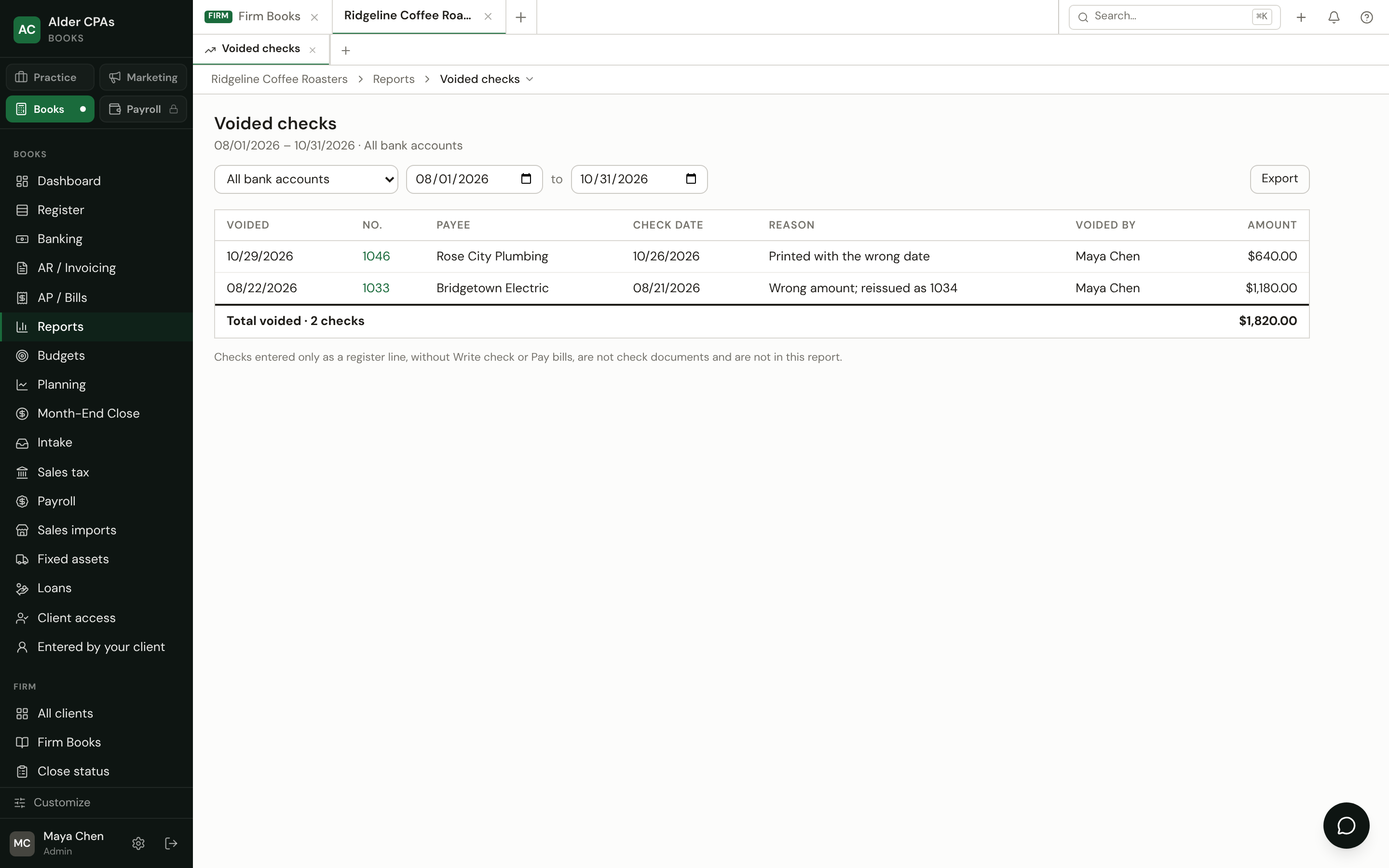 Voided checks from August through October 2026, with the reason and who voided each one
The columns are Voided, No., Payee, Check date, Reason, Voided by and Amount. The total line counts them, for example Total voided · 2 checks.
To void a check, open it from its number and void it from the page it opens: the check, or the bill payment it came from.
Track mailed checks
If the client's checks are mailed through Books, Mailed check status shows where each one is. It lists the mailed checks dated in the period, newest first.
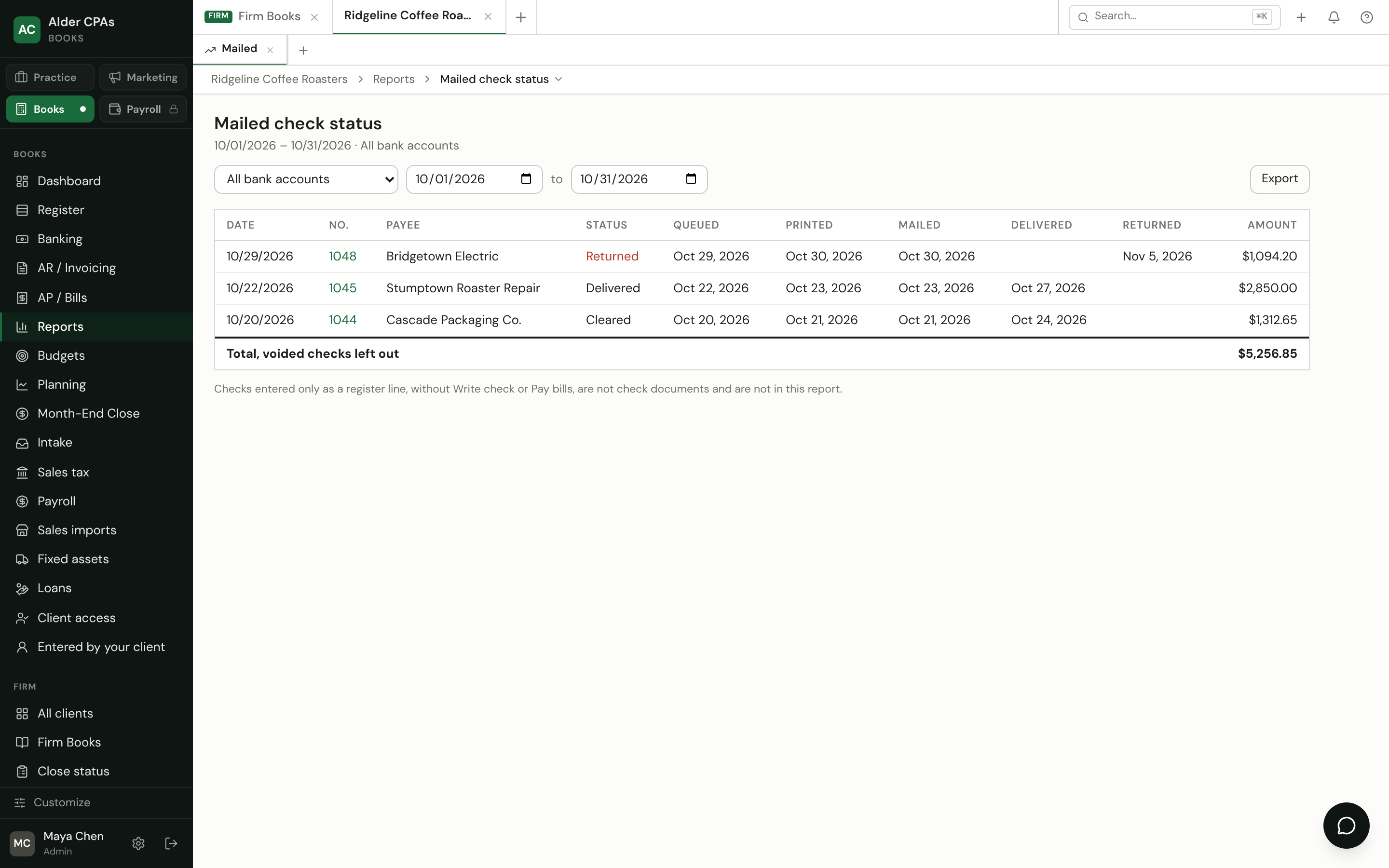 Mailed check status for October 2026: one returned, one delivered, one cleared
Status is one of Queued, Printed, In the mail, Delivered, Returned, Cleared, Failed or Canceled. Returned and Failed are shown in red. A voided check reads Void.
Queued, Printed, Mailed, Delivered and Returned each show the day that step happened. A step the check hasn't reached is left blank.
The total line reads Total, voided checks left out.
A returned check is still outstanding until you void it. To void a mailed check, open it from its number and void it from the page it opens: the check, or the bill payment it came from.
See what is waiting to print
Checks to print lists every check waiting to print, by bank account, in the order it will print. The columns are Order, Date, Payee, Type and Amount, with a Total for each account. A check sent back to print again says so in its type, for example Written check · reprint of 1040. Voided checks are never on it.
Print them, under the list, opens the page where you print them. Until a check prints it has No number, because Books gives each check the next number when the print run is confirmed. When nothing is waiting, the report reads No checks are waiting to print.
Make a positive pay file
Positive pay is a fraud check that many banks offer. You send the bank the list of checks you issued, and the bank pays only a check that is on the list with the same number and amount. A forged check, or one whose amount was changed, is refused. Books builds that list as a CSV file in the layout your bank asks for.
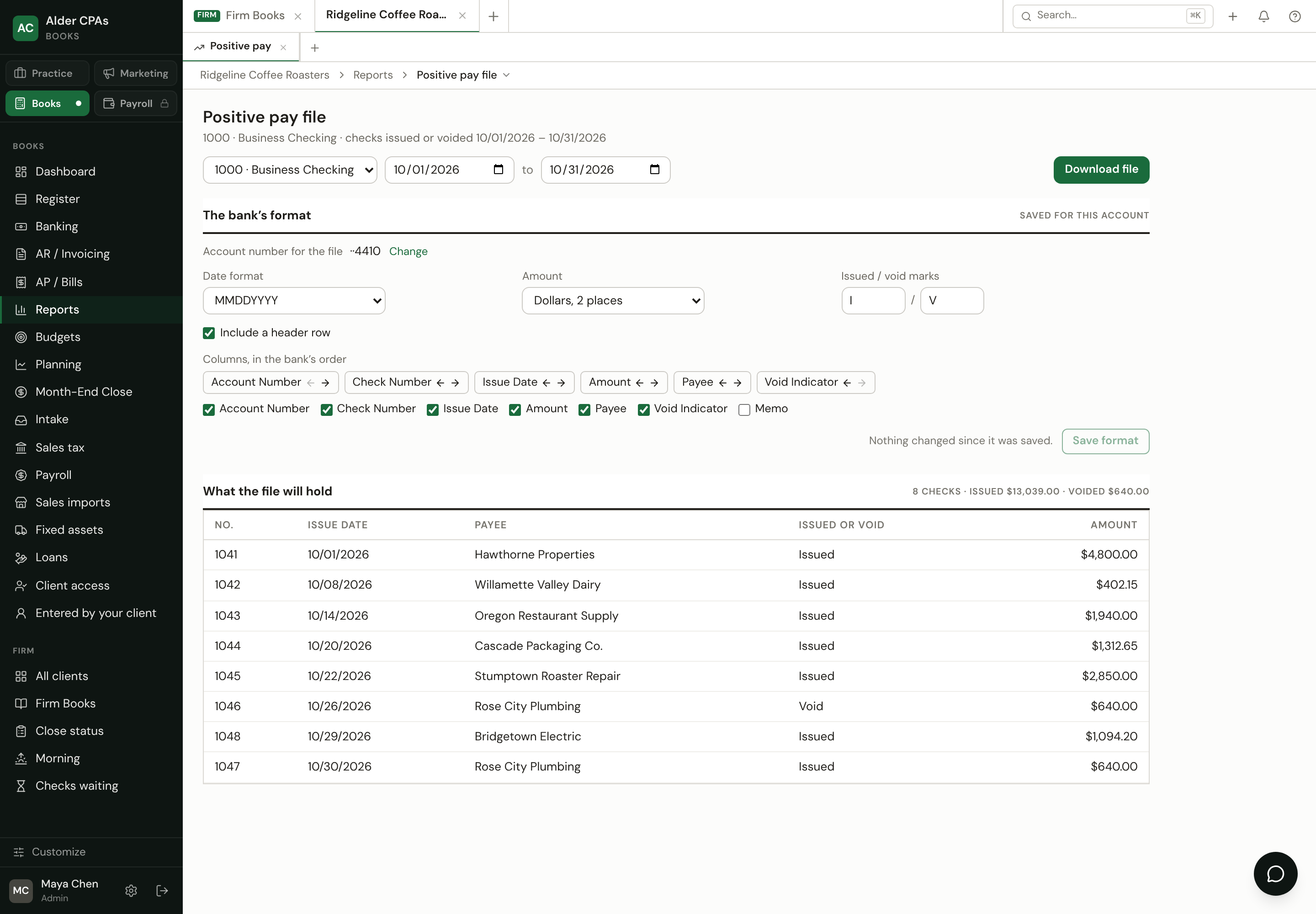 The positive pay file for 1000 Business Checking, October 2026: the saved format and the eight checks the file will hold
Set up the bank's format once
Your bank's positive pay instructions say which columns it wants, in what order, and how dates and amounts are written. Set the format once for each bank account, and Books uses it for every file from then on.
- Go to Reports → Checks → Positive pay file.
- Choose the bank account. The page opens on the client's first bank account.
- Under The bank’s format:
- Date format: MMDDYYYY, MM/DD/YYYY or YYYYMMDD.
- Amount: Dollars, 2 places (for example, 4800.00, with no commas or dollar sign) or Cents, a whole number (480000).
- Issued / void marks: what the bank wants in the Void Indicator column, up to 10 characters each. They start as I and V.
- Include a header row: a first line with the column names.
- Columns, in the bank’s order: tick the columns the bank wants, from Account Number, Check Number, Issue Date, Amount, Payee, Void Indicator and Memo. Use the arrows on each column to move it earlier or later.
- Click Save this format (it reads Save format once a format is saved). The heading's tag changes from Not saved yet to Saved for this account.
The format starts with every column except Memo, in the order listed above, dates as MMDDYYYY, amounts in dollars and a header row. If that's what your bank asks for, save it as it is.
Account number for the file shows the last four digits of the account number the file will carry, or Not held for this account. Books keeps the full account number only for the bank account set up for checks under Settings → Check mailing, and the Change link takes you there. The full number goes into the downloaded file and is never shown on screen.
Download the file
- Set From and to to the days since the last file you sent. The page opens on the last full month.
- Check What the file will hold. Its heading counts the checks and totals them, for example 8 checks · issued $13,039.00 · voided $640.00. The table shows No., Issue date, Payee, Issued or void and Amount.
- Click Download file, then upload the file to your bank the way the bank asks.
Which checks are in the file:
- Issued checks dated in the period that aren't voided when you download. A check voided after the period ends goes out only as a void in a later file.
- Void checks voided in the period, whenever they were written. A void carries the check's original issue date, so the bank can match it to the check it already knows about.
- A check written and voided in the same period appears once, as a void.
Each row in the October file above reads like this, with the whole account number in the first column:
Account Number,Check Number,Issue Date,Amount,Payee,Void Indicator
000123454410,1041,10012026,4800.00,Hawthorne Properties,I
000123454410,1046,10262026,640.00,Rose City Plumbing,V
A payee or memo that contains a comma or a quotation mark is put in quotation marks, the standard way for a CSV file.
Checks with no number are left out
A bank can't match a check without a number, so a check that hasn't printed yet is never put in the file. Books names it under the table:
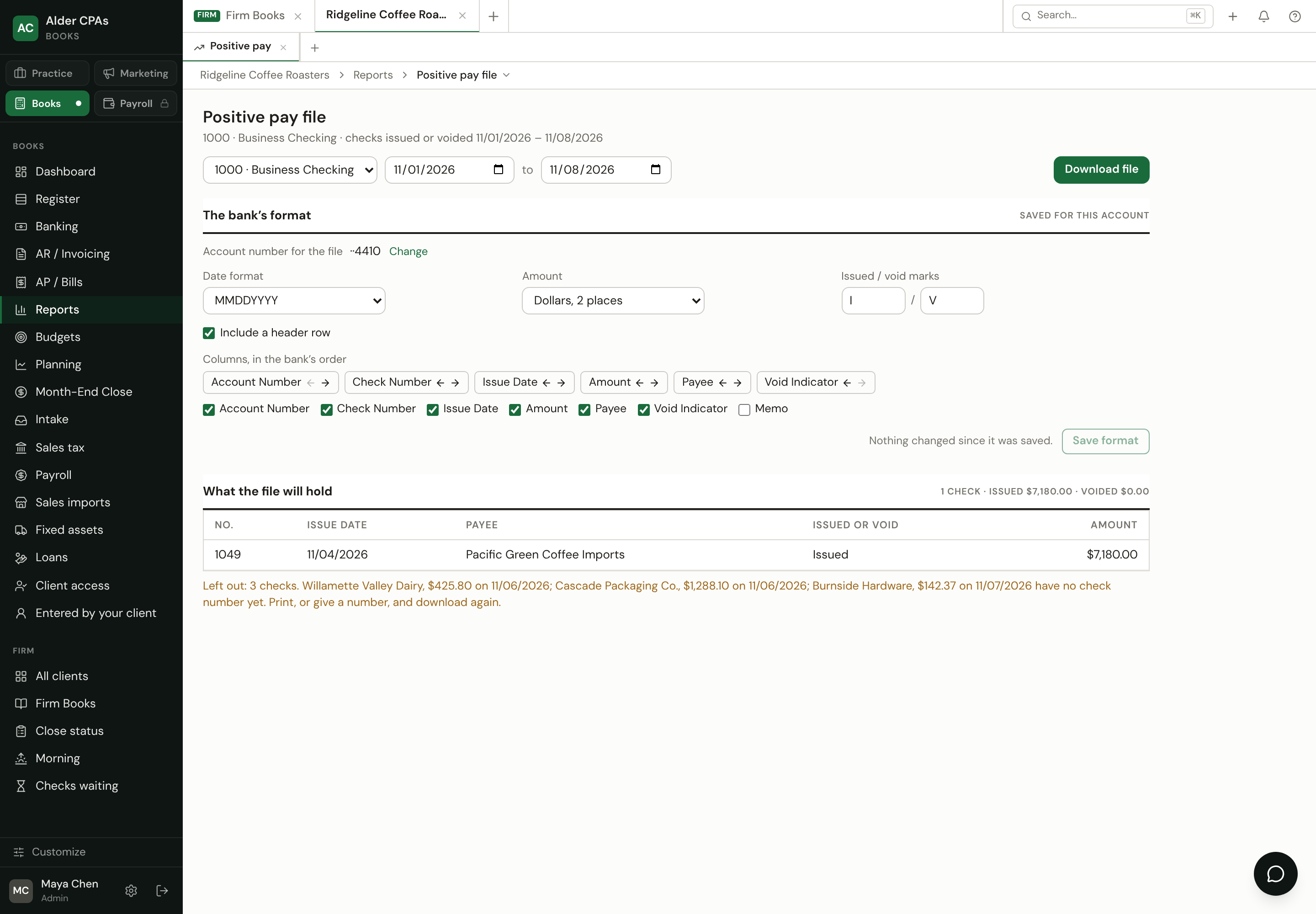 The positive pay file for November: one numbered check, and three left out because they have no number yet
Left out: 3 checks. Willamette Valley Dairy, $425.80 on 11/06/2026; Cascade Packaging Co., $1,288.10 on 11/06/2026; Burnside Hardware, $142.37 on 11/07/2026 have no check number yet. Print, or give a number, and download again.
Print them, then download the file again for the same days.
Questions people ask on these screens
How do I print checks? Use Print them under the Checks to print report, which opens the page where checks are printed.
Why does a check say it will be numbered when printed? Books gives a check its number when it prints. Until then it shows No number in these reports and is left out of the positive pay file.
How do I void a check that was mailed? Click its number in Mailed check status and void it from the page it opens: the check, or the bill payment it came from.
Why can't I see or download this?
-
A report shows a permission message. The check reports need the Aging, invoice and bill lists, payment history permission for the client. The message reads You need the "Aging, invoice and bill lists, payment history" permission for this. Ask an admin to grant it. The positive pay page needs Post journal and register entries to show the checks, and saving a format needs Pay bills.
A client's own user also needs Pay bills to open the page. Positive pay file is listed under Reports only for people who hold the reports permission above and can post journal and register entries.
-
Export is grayed out. Pointing at it says why: Nothing to export: the report has no rows. or Waiting for the report.
-
Download file is grayed out. The reason is shown under the button:
- Save the format first: the file is made from the saved one. You changed the format and haven't saved it, or no format is saved for this account yet.
- Books holds the account number only for the account set up for checks, under Settings, Check mailing. Use that account, or take the Account Number column out of this file's format.
- No numbered checks were issued or voided in this period. Either nothing was written, or every check is still waiting to print.
- The client has no bank account in its chart. The page reads These books have no bank account yet and links to Add one in the chart of accounts.
-
Save format is grayed out. It says Nothing changed since it was saved., or Choose at least one column.
-
The file was not made. If the download fails, a message titled The file was not made says why. If Books can't read the account number, it reads The account number for this file could not be read. Check the account under Settings, Check mailing, and try again.
-
The dates are backward. On the positive pay page a start date after the end date shows Choose the dates the file covers: a start date on or before the end date.
-
A check you wrote isn't in any report. It was entered as a register line, is still a draft, or was paid from an account that isn't a bank account. See the note at the top.
Tips
- Reconcile with Outstanding checks open. Set As of to the statement's ending date, and Total outstanding is the outstanding-checks figure for that statement, once that statement's reconciliation is finished or the checks are matched to bank lines.
- Use Export for a working paper. The CSV from every check report adds a Bank account column first, so the file still makes sense with all accounts in it. In the Outstanding checks file, Age is a plain number of days, ready to sort or filter, and a Note column at the end flags a check marked cleared with no date recorded.
- Send positive pay on a rhythm. Download the file for the days since the last one, every time checks go out. A void you record afterward goes out in the next file, dated with the check's original issue date.
- Run the number gaps report before you close a month. A gap or duplicate is easiest to explain while the checkbook is still at hand.