
Vendor Credits
Record a credit a vendor gives your client for a return, a short shipment or an overcharge, apply it to that vendor's open bills, and convert a bill that should have been a credit.
On this page
A vendor credit records money a vendor owes back to your client: green coffee returned because the bags arrived torn, a short shipment, a price the vendor agreed to lower. Rather than a refund check, the vendor usually knocks it off the next bill. In Books the credit reduces what the client owes that vendor, and you apply it to one or more of the vendor's open bills when you are ready.
A credit posts once, when you save it; applying it posts nothing. Saving debits Accounts Payable and credits each line's account, so the cost comes off the books on the credit's date. Applying the credit to a bill only moves it from "open credit" to "paid against that bill": the payables total doesn't change, and no second entry is written.
Understand a vendor's credits
Open the vendor (AP / Bills → Vendors) and choose the Credits tab.
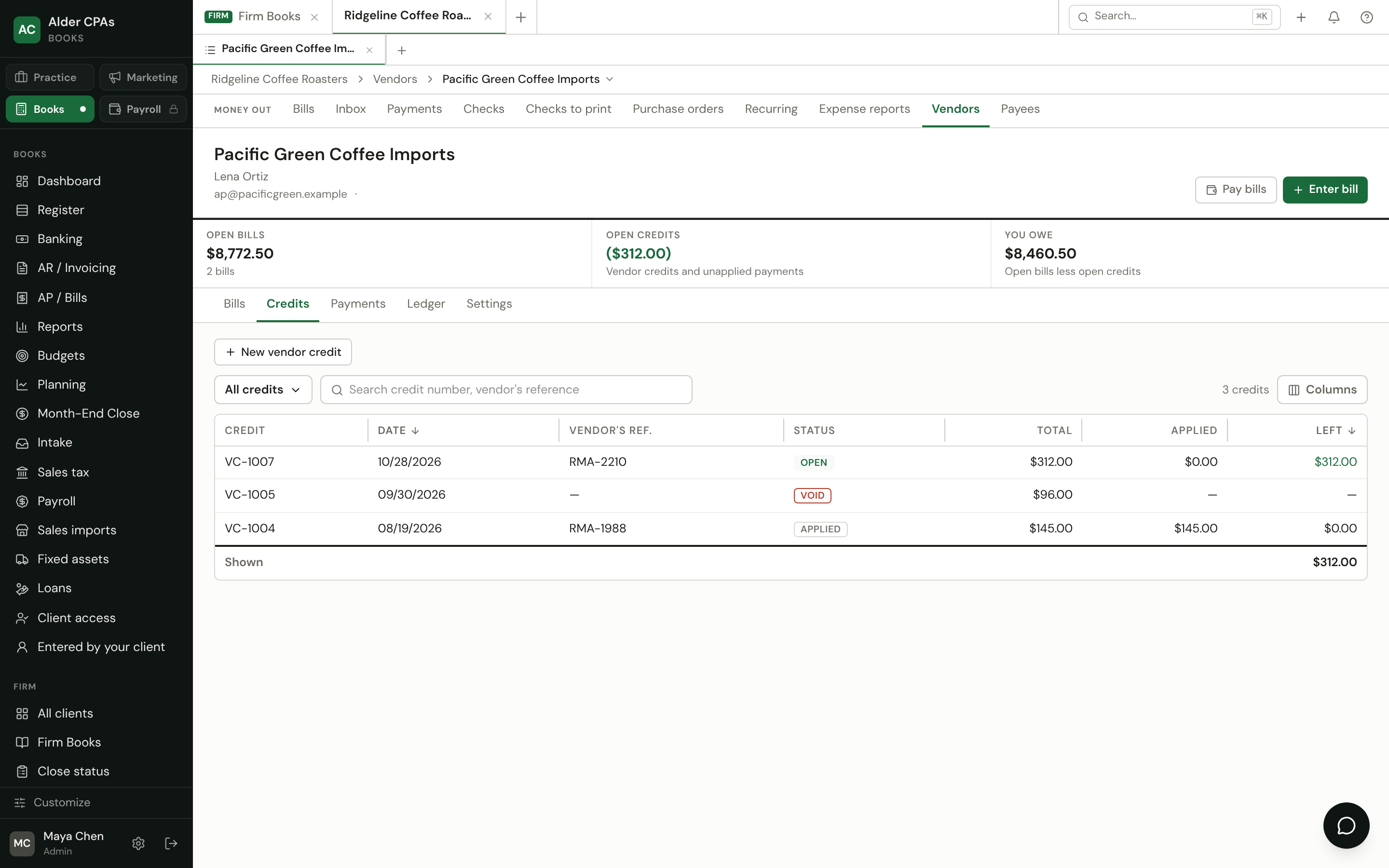 Pacific Green Coffee Imports' credits: VC-1007 open with $312.00 left, VC-1005 void and VC-1004 applied in full
The three figures at the top of the vendor's page always add up: Open bills, Open credits (vendor credits and unapplied payments, shown in parentheses because they reduce what is owed) and You owe, which is open bills less open credits.
The list shows each credit's Credit, Date, Vendor's ref., Status, Total, Applied and Left, the ones with the most left first. Status reads Draft, Open, Partly applied, Applied or Void. A void credit carries no money, so its Applied and Left read —. Search finds a credit by its number or the vendor's reference.
Enter a vendor credit
- On the vendor's Credits tab, click New vendor credit. The vendor is filled in.
- Set the Credit date: the date on the vendor's credit memo.
- Leave Credit number blank to take the next number in the client's VC- series, or type one.
- Type the number printed on the vendor's credit memo in Vendor's reference.
- Add a line for each thing credited: a Description, the Account the credit reduces, and the Amount. Use the account the original cost went to, such as 5000 Green Coffee Purchases for returned beans.
- Click Save credit to post it, or Save as draft to keep it off the books until you post it.
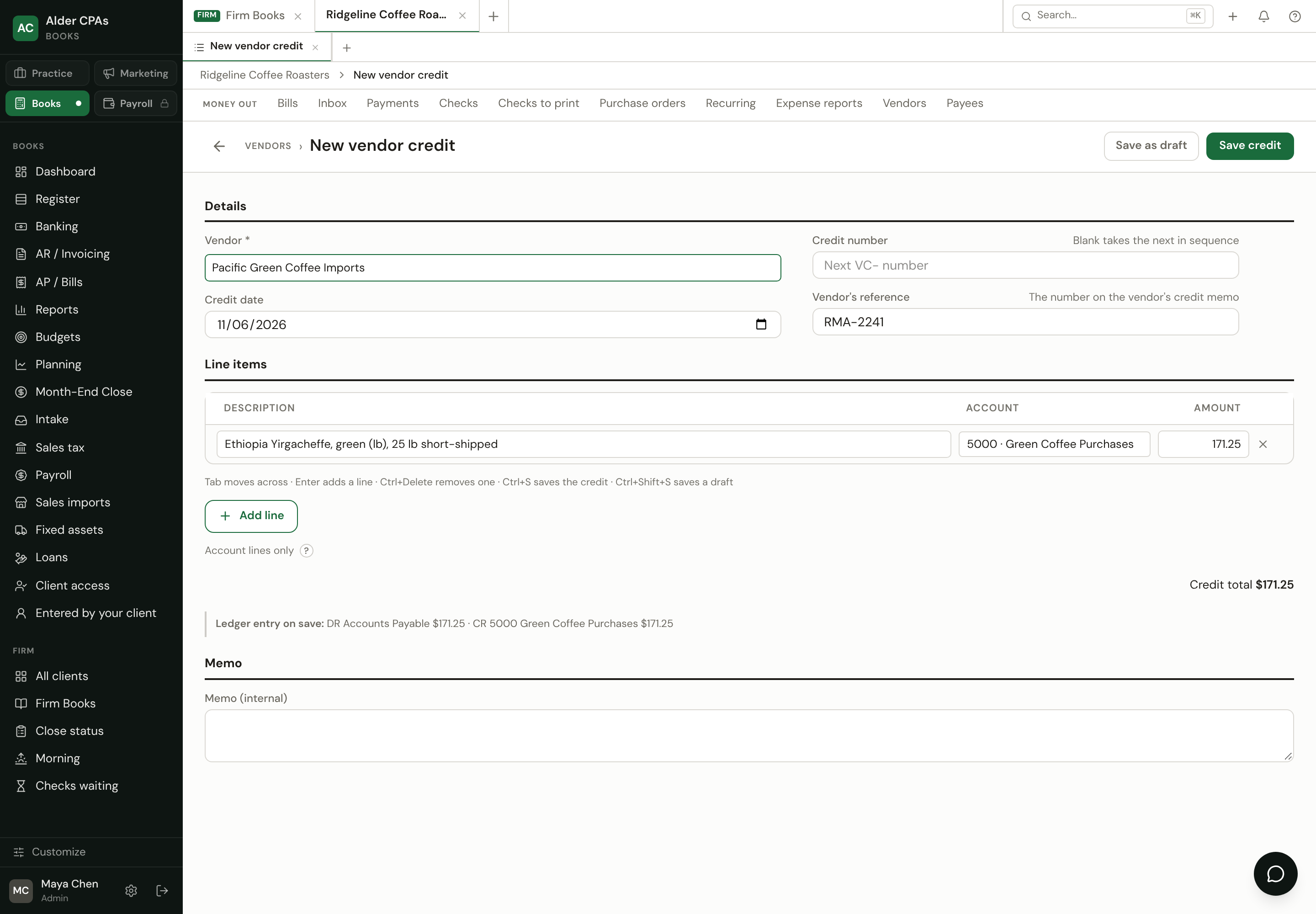 Entering a credit for 25 lb of short-shipped Ethiopia Yirgacheffe: 25*6.85 typed in the amount settles to 171.25
The form works like the bill form:
- Amounts take arithmetic.
25*6.85settles to 171.25 when you leave the field. - Tab moves across a line, Enter adds a line, Ctrl+Delete removes one (Cmd+fn+Delete on a Mac), Ctrl+S saves the credit and Ctrl+Shift+S saves a draft (Cmd for Ctrl on a Mac).
- Ledger entry on save: under the lines shows exactly what posts: DR Accounts Payable, CR each line's account.
- A credit has account lines only, no item lines. Returned stock moves inventory, which a credit doesn't record, so enter the credit against the account it reduces.
A draft's page has Delete draft, Edit draft and Post credit. Deleting a draft really deletes it; the confirmation says nothing in the books changes, and its contents stay in the activity log.
Date a credit in a closed month
A vendor's credit memo often arrives after the month it belongs to has been closed. If you have the Lock a period permission, you can still enter it in that month, with a reason:
- Enter the credit as above, with the Credit date in the closed month. Under the date, Books says so: September 2026 is closed. You can still post this vendor credit into it, with a reason kept in the audit log.
- In Reason for posting into a closed month (at least 10 characters), say why, for example September credit memo arrived Nov 6. Until it is long enough, Save credit stays off and says Say why this vendor credit belongs in a closed month, in at least 10 characters (see Credit date).
- Click Save credit. The credit posts in the closed month, and the reason is kept in the audit log with it.
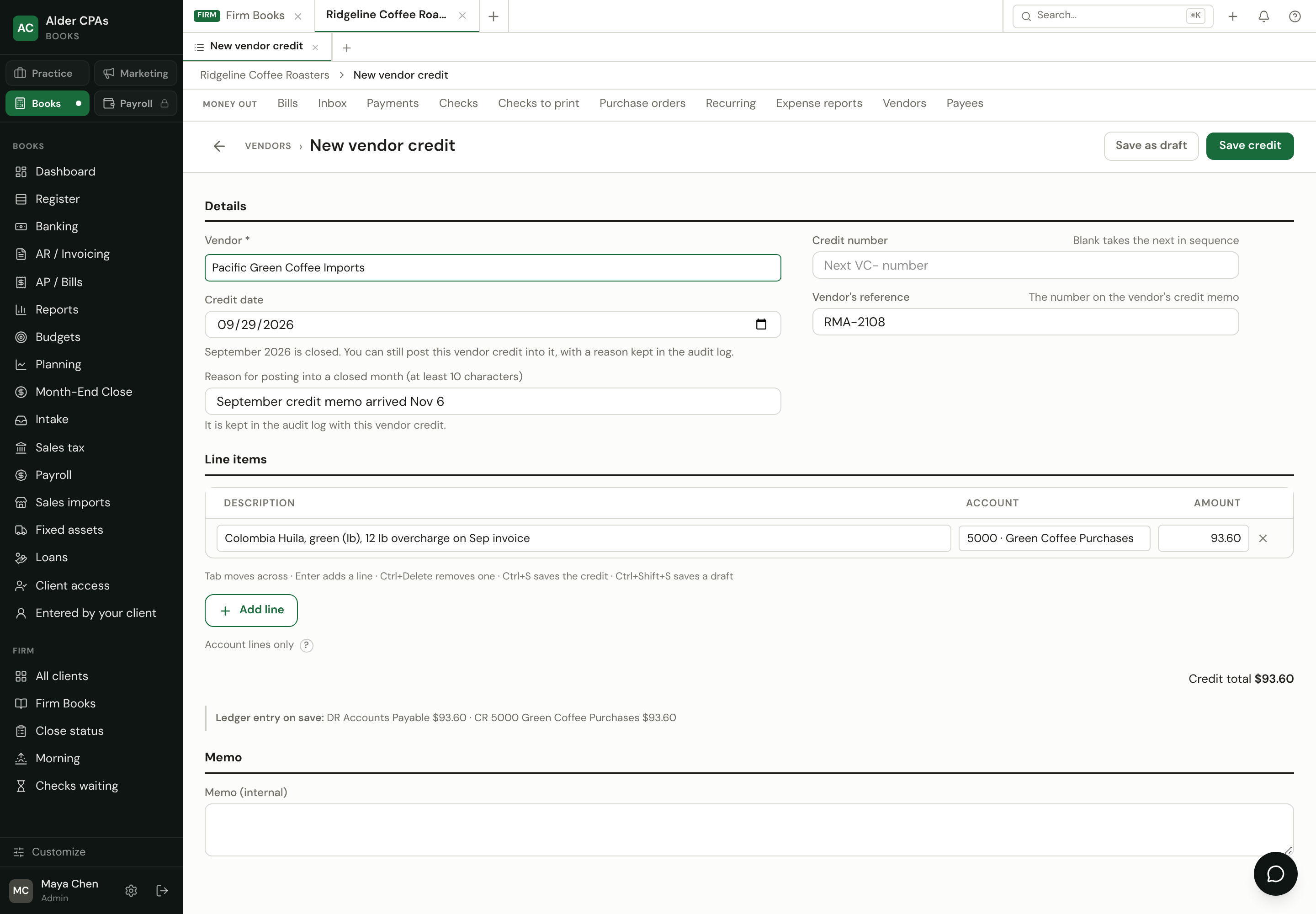 A credit dated Sep 29, 2026 in closed September: 12*7.80 settles to 93.60, with the reason for posting into the closed month filled in
Without that permission, the date shows September 2026 is closed, so this vendor credit can't be saved on Sep 29, 2026. An owner or admin can reopen it, or date it in an open month. Nothing posts into a month locked for good: date the credit in an open month. Save as draft is never held by a closed month.
Post a saved draft into a closed month. A draft dated in a closed month shows a Closed month. panel above its lines: September 2026 is closed. You can still post this credit into it, with a reason kept in the audit log. Type why in Reason for posting into a closed month (at least 10 characters).
Until the reason is long enough, Post credit stays off and says Say why this credit belongs in a closed month, in at least 10 characters (see Closed month, above the lines). Then click Post credit. If you open the draft with Edit draft instead, the same question is under Credit date, and Save credit posts it with the reason.
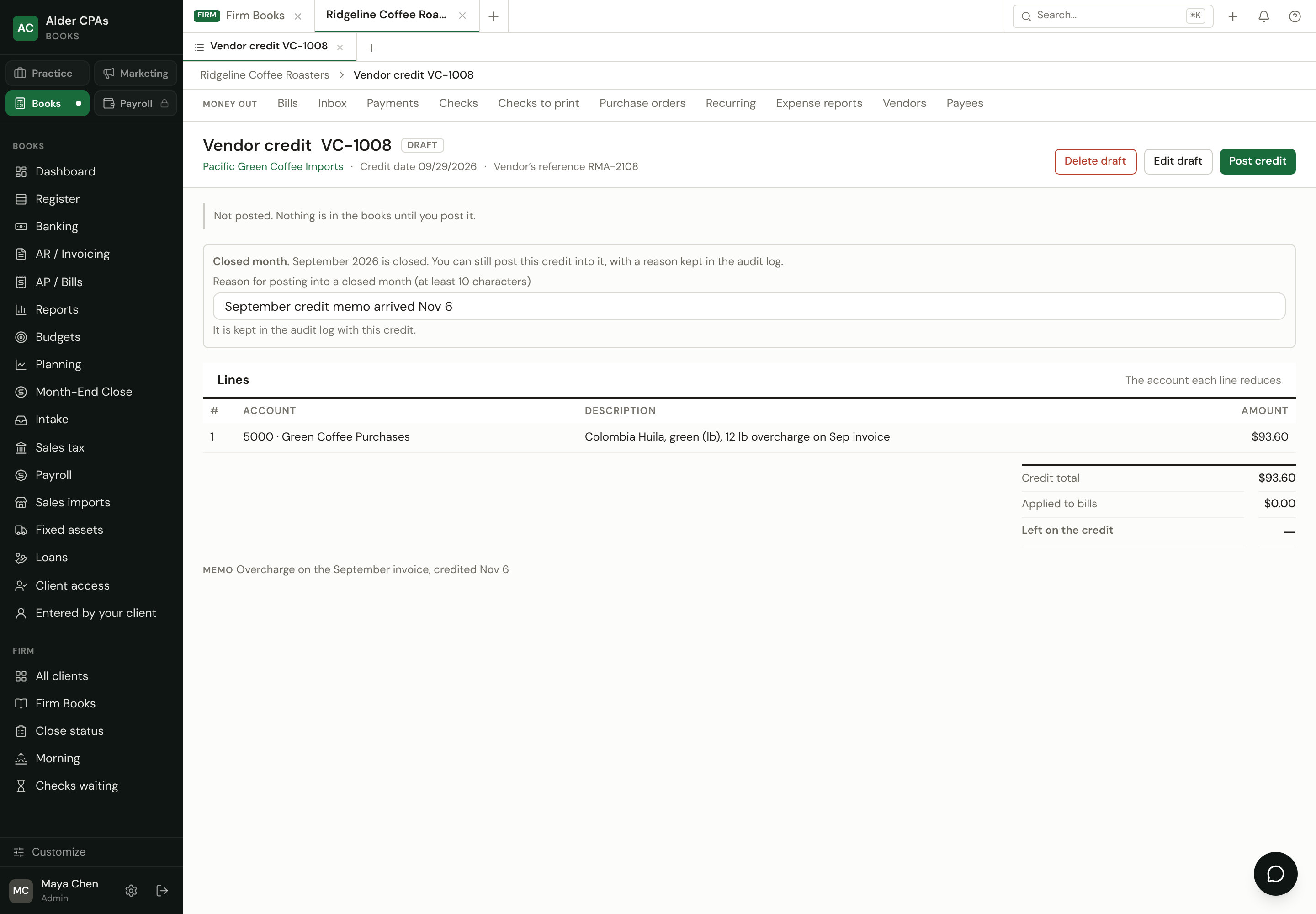 Draft VC-1008, dated Sep 29, 2026 in closed September, with the reason for posting into the closed month filled in and Post credit ready
A month with a closing password. If the client's closed months also have a closing password, posting asks for it (unless you unlocked closed periods to post in the last 15 minutes), from the new-credit form, a draft's page or Edit draft alike.
The window is titled with the month (Sep 2026 is closed) and says Enter the closing password to unlock closed periods for 15 minutes, and what you were saving is sent again. Type the password and click Unlock for 15 minutes: the credit posts, with your reason, without a second click.
Cancel posts nothing. From a draft's page Books says Vendor credit not posted; from the form, the credit is kept as a draft and Books says Saved as a draft, but it could not be posted.
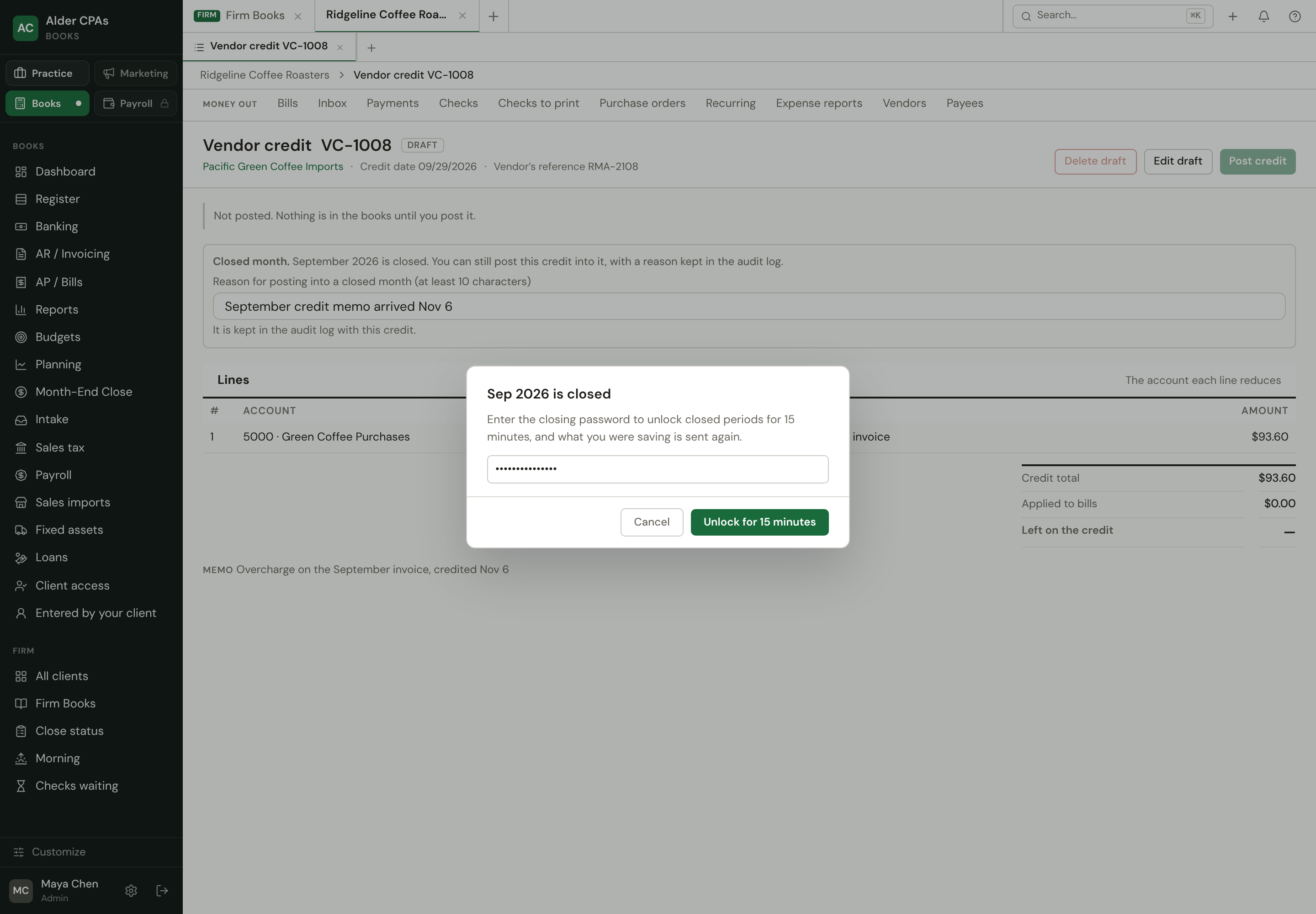 Posting VC-1008 into September, whose books have a closing password: the window asks for the password to unlock closed periods for 15 minutes
Apply a credit to the vendor's bills
Open the credit from the Credits tab. While it has money left, its page shows Apply to vendor's bills, listing the vendor's open bills oldest first.
- Type an amount in Apply beside each bill, or click Fill oldest first to spread the credit over the oldest bills until it runs out.
- Balance after shows what each bill will owe; Applied and Left on the credit show the totals as you type.
- Check Apply on. It starts on today (or the credit's date, if that is later) and can't be earlier than the credit's date.
- Click Apply $312.00 (the button names the amount).
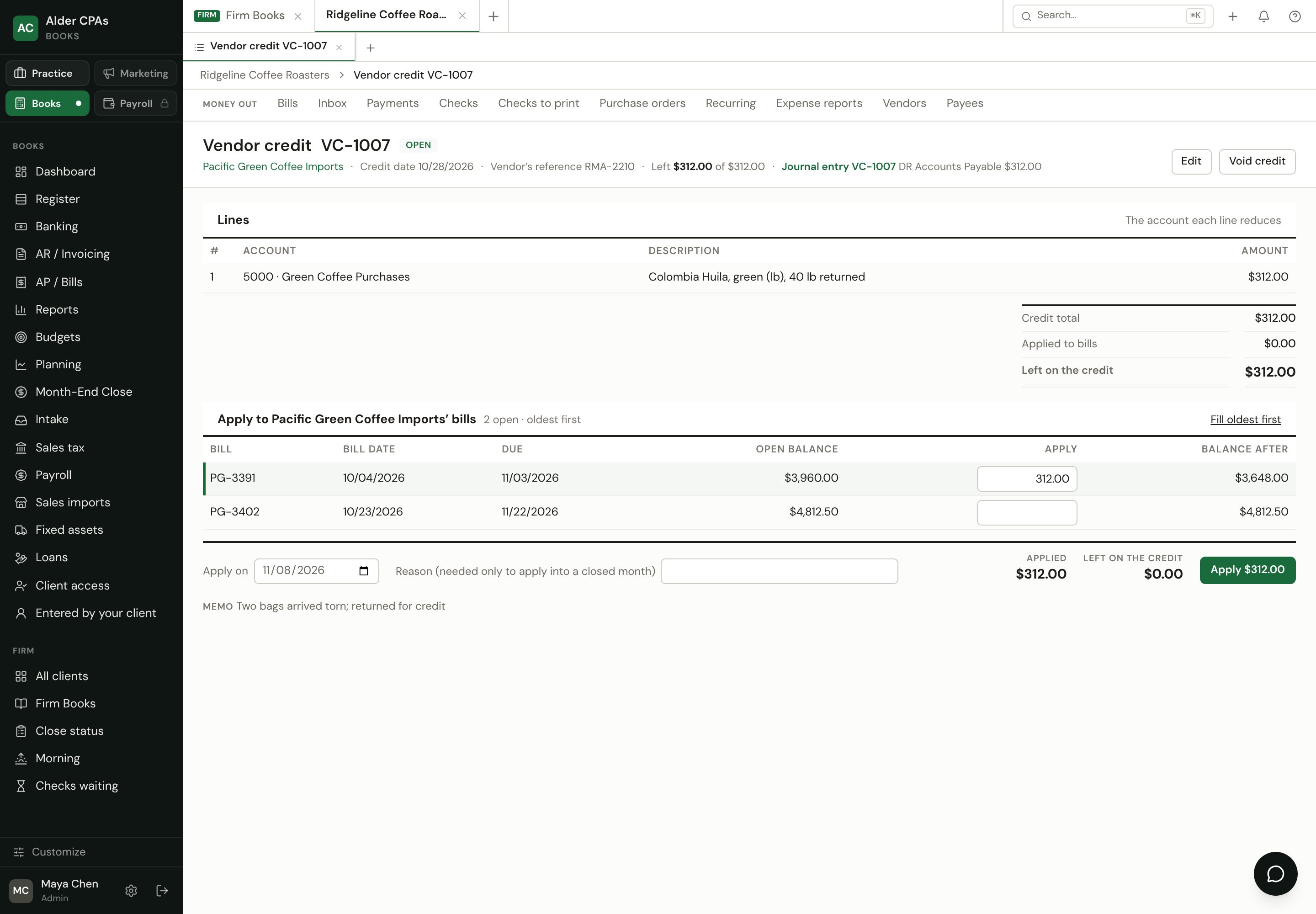 VC-1007 with Fill oldest first: all $312.00 goes on PG-3391, leaving $3,648.00 on that bill and nothing on the credit
You can also use open credits when you pay the vendor: Pay bills lists the vendor's open credits beside the bills and applies the ones you tick, so the payment covers only the rest.
Undo an application from the bill's page: its Vendor credits section lists each credit applied, with Unapply. The prompt names the amount going back onto the credit and the bill's balance and due date afterward, and says no ledger entry is written. Click Unapply $312.00 (or Keep it applied). The application stays in the bill's history, marked unapplied.
Turn a bill into a credit
Sometimes what came in as a bill is really a credit, or you want a credit for the whole of a bill. On the bill's page choose More → Convert to vendor credit…. A bill with an item line can't be converted: enter a vendor credit by hand for what you are returning, against the accounts it reduces, then apply it to the bill.
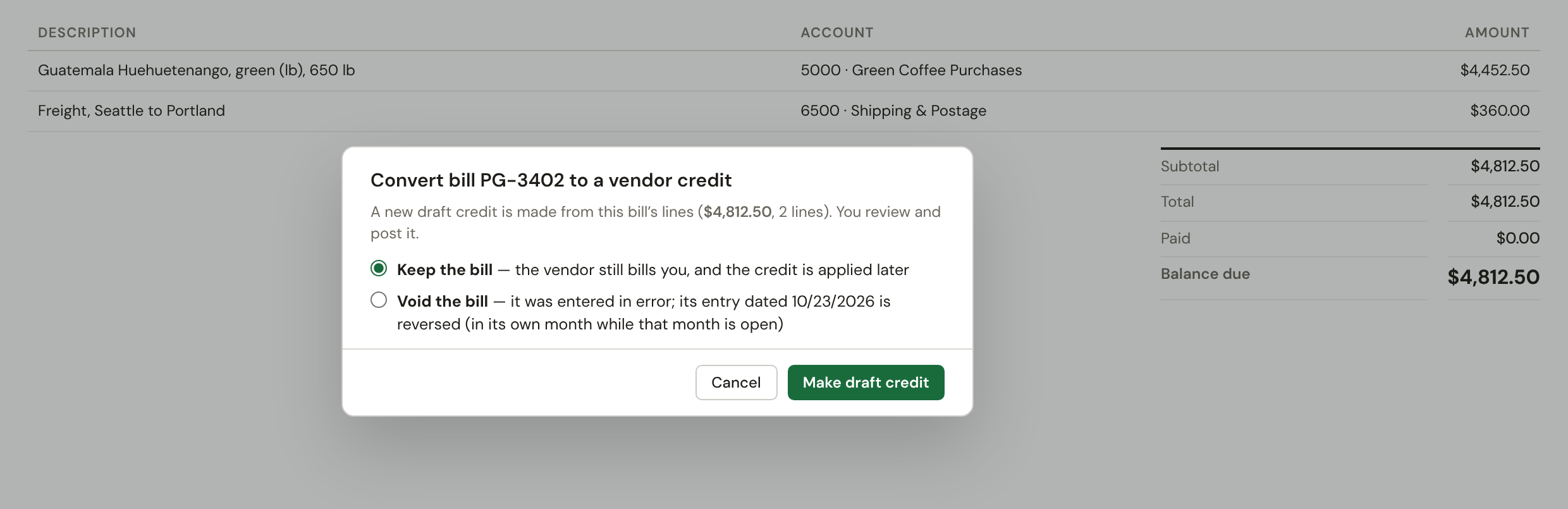 Converting bill PG-3402: keep the bill, or void it, and Books makes a draft credit from its lines
- Keep the bill (the default): the vendor still bills you, and the credit is applied later.
- Void the bill: it was entered in error. Give a reason of at least 10 characters; the bill's entry is reversed in its own month while that month is open. A bill with a payment or credit already applied can't be voided this way: keep it, or unapply the money first.
Click Make draft credit. Books makes a draft credit from the bill's lines and opens it, for you to review and post. The draft is dated today, with the bill's number as its vendor's reference: change the date before you post it if the credit belongs to another day.
Change or void a credit
Edit on a saved credit changes its date, number, reference, memo or lines; its ledger entry changes in place, with history. The vendor stays as it is: to move a credit to another vendor, void it and enter a new one.
Void credit reverses it. Give a reason of at least 10 characters. The dialog names what happens: the credit's entry is reversed on the credit's own date while that month is open, or today once it has closed, the vendor's balance goes back up by the credit's total, and the credit stays listed as Void.
Why can't I...
-
Void this credit? $312.00 of this credit is applied to bills. Unapply it from the bills first. Unapply it from each bill's page, then void it. A credit that came in when the client's books were imported changes only by undoing that import.
-
Apply this credit? Each amount has to be a dollar figure, at least one bill needs one, the total can't be more than is left on the credit, and no bill can take more than its open balance. A credit applies only to its own vendor's bills, and not before the credit's date or the bill's date.
Applying into a closed month needs the Lock a period permission and a Reason of at least 10 characters; a month closed with a password asks for it, and a month locked for good takes nothing.
-
Post this draft? Its date is in a closed month. With the Lock a period permission, give the reason in the Closed month. panel (above).
Without it, Post credit stays off and the panel says why, for example September 2026 is closed, so this credit can't be saved on Sep 29, 2026. An owner or admin can reopen it, or date it in an open month. A month locked for good takes nothing: change the date with Edit draft.
-
Convert this bill? A bill with an item line can't be converted: enter a vendor credit by hand for what you are returning, against the accounts it reduces, then apply it to the bill. To void the bill as you convert it, it can't have a payment or credit applied: keep it, or unapply the money first.
-
See the Apply section? It shows only on a posted credit with money left. A draft must be posted first, and an applied or void credit has nothing left to apply.
-
Do any of it? Entering, editing, posting and deleting credits needs the Bills and vendors permission. Applying and unapplying them needs Pay bills. Voiding needs Void or reverse a posted entry. Converting a bill needs Bills and vendors; voiding the bill as you convert it also needs Void or reverse a posted entry, and without it Void the bill is grayed out with the reason.
Tips
- Put the vendor's memo number in Vendor's reference. It is searchable and shows on the vendor's Credits tab, so a credit is easy to match to the paper.
- Credit the account the cost went to. The credit then reduces that cost, not some other line of the P&L.
- Apply oldest first unless the vendor's memo names the bill it is for.