
Bills Books Posted Automatically
How a vendor earns automatic posting for the bills that arrive in the bill inbox, what Books checks on every bill before it posts one, where to see what posted, and what makes a vendor start over.
On this page
A bill that arrives in the bill inbox can post itself, but only for a vendor that has earned it, and only after Books checks that bill.
A vendor earns it the plain way: five of its bills in a row reviewed and posted by a person exactly as Books read them. Then Books offers automatic posting on the vendor's page, and a person turns it on. From then on, each bill from that vendor posts itself if it passes every check, and waits for you with the reason if it doesn't.
It is the same idea as bank rules earning automatic posting, described in How Rules and Matches Earn Automatic Posting, with its own count and its own checks.
Nothing posts itself until a person turns it on, vendor by vendor. Earning the count only makes Books offer. Even with it on, Books checks every bill again before it posts, and a bill that fails a check waits in the bill inbox for you. Automatic posting of bills works on clients on Premium.
How a vendor earns it
Each vendor has a count of clean bills in a row. You can see it on the vendor's Settings tab, under Automatic posting: 3 of 5 bills in a row from the Bill inbox have come through exactly as read. A bill whose vendor, number, date, lines or total had to be changed restarts the count.
What counts. The count goes up by one when a person reviews a bill from the bill inbox and clicks Save → next without changing anything Books read. The notice adds Confirmed with no corrections. (it says that on a draft saved unchanged too, but only Save → next counts). Books compares what you saved with what it read:
- the vendor, the bill number and the bill date;
- the due date, if one was printed (a due date worked out from the terms is not compared);
- every line: how many there are, and each line's account and amount, and its description where Books read one (and item, quantity and rate, where a line has them);
- the total.
What doesn't count. Save as draft never counts, even with nothing changed: only a bill posted from the review counts. Bills that posted themselves never add to the count either; only people earn a vendor its trust.
What starts it over. The count goes back to zero, and automatic posting turns off if it was on, when:
- a person changes anything Books read before saving (a correction). If the person picked a different vendor, the vendor Books proposed starts over too. A bill whose vendor Books couldn't match exactly is a correction too: saving it starts the vendor you pick over;
- a bill a person saved from the inbox is voided after it posted, or its vendor or total is changed (changing only its date or memo does not count against the vendor);
- a bill that posted itself is voided, or its vendor, date or total is changed;
- a line on either kind of bill has its account or amount changed after it posted.
A correction you make while reviewing resets the count there and then, and the notice after you save says so: Your correction started UPS's clean run toward auto-post over (it had 3 in a row)., or, when the switch was on, Your correction turned off auto-post for UPS. It is earned again from zero.
Each reset is also listed on Posted automatically for the period you're viewing (the latest one for each vendor), whether it came from a correction or from a later void or change (see What a reset looks like). A vendor whose count was already zero has nothing to lose, so nothing is listed for it.
Turn on automatic posting for a vendor
- Open the vendor (AP / Bills → Vendors) and click the Settings tab.
- Under Automatic posting, a vendor that has earned it says UPS: the last 5 bills read from the Bill inbox came through exactly as read. Turn on auto-post?
- Click Turn on auto-post. The notice reads Auto-post enabled.
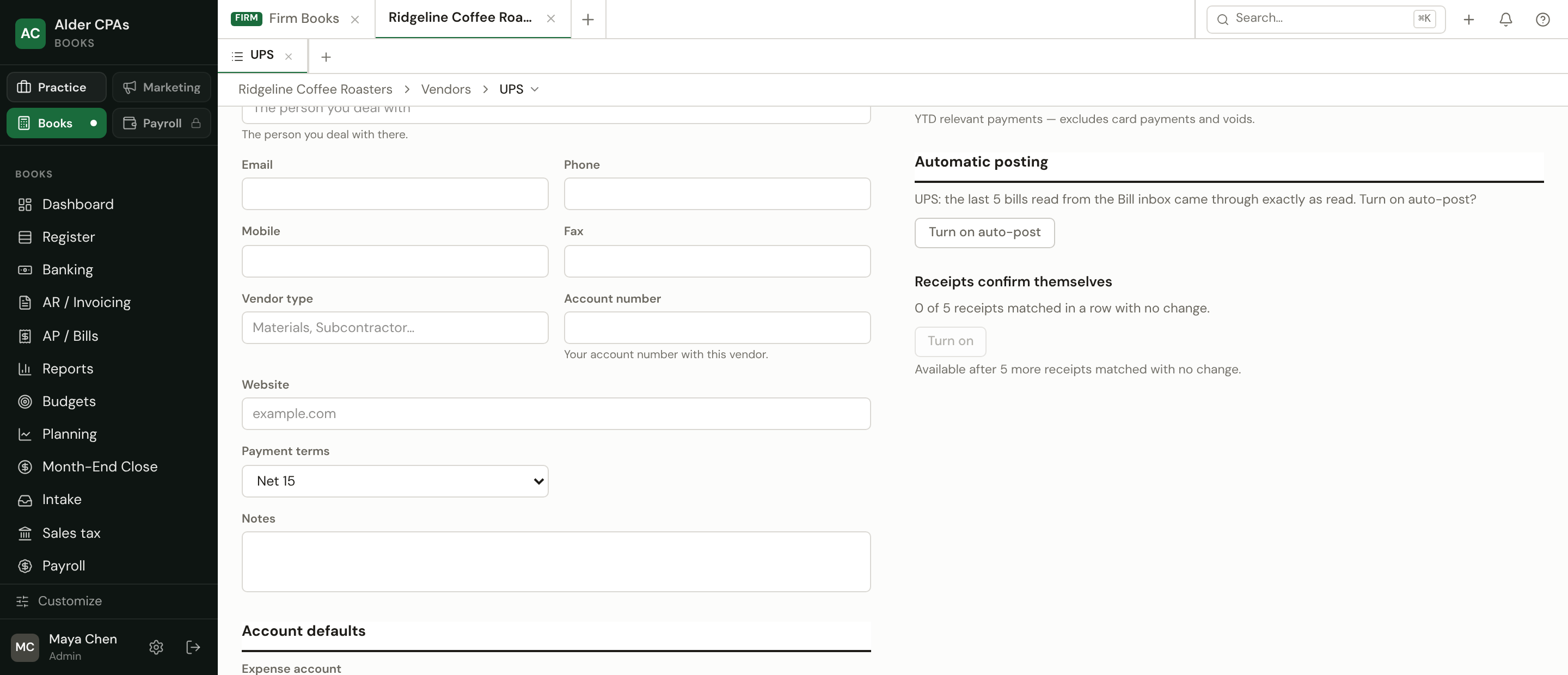 UPS has earned automatic posting: the offer on the vendor's Settings tab
Once it is on, the section reads Auto-post is on. A bill from UPS in the Bill inbox posts itself only when every check passes; anything else waits in review with the reason. 0 posted automatically so far. The button becomes Auto-post is on — turn off. Turning it off is never blocked, by your plan or anything else (Auto-post turned off).
Books checks the count again when you click, so a vendor that hasn't really earned it can't be turned on. Until it has, the button is off and says why, for example Auto-post becomes available after 2 more clean bills in a row.
If the vendor's automatic posting turned itself off, the section starts with what happened, for example Auto-post turned itself off on Nov 4, 2026: bill 7729915 needed a correction, so the count restarted from zero. Bills from Sysco Portland in the Bill inbox wait in review until the run is clean again.
When a void stopped it, it says was voided; for any other reason, including a later change to the bill, it says needed a correction. Posted automatically gives the exact reason. The bill number links to the bill.
What Books checks on every bill
Right after a bill is read, Books decides whether it can post itself. It runs its checks in order and stops at the first one that fails. The main ones are below. A bill that passes them all is posted as a bill from that vendor, with the bill number, date and lines it read, and the due date if one was printed.
| Check | Why a bill would wait |
|---|---|
| The read is complete. | The read is missing the date, the total or the lines, so a person has to finish it. |
| The vendor matches exactly an active vendor. | The vendor on this bill did not match one of your vendors exactly. |
| Auto-post is on for the vendor. | Auto-post is off for this vendor. |
| The vendor has earned it, right now. | This vendor has not yet had enough bills come through exactly as read. |
| The client's plan includes automatic posting. | Automatic posting is a premium feature. |
| It looks like this vendor's usual. | This bill does not look like this vendor's usual. (see below) |
| The split is clear. One bill in a multi-bill scan has a clear start and end. | It is not certain where this bill starts and ends in the upload. |
| The lines add up to the total printed on the bill. | The lines do not add up to the total. |
| It isn't a duplicate of a bill already entered. | A bill with this number is already entered for this vendor. or A bill like this one — same vendor, amount and date — is already entered. |
| No other copy is waiting in the inbox. | Another copy of this bill is already in the inbox. Enter that one, and dismiss this copy. |
| The month is open. | The bill date falls in a closed period. |
| The Accounts Payable account is usable. | The accounts payable account needs attention before anything posts to it. |
| Every line has a usable expense account. | A line has no usable expense account. |
| The bill posts. If posting itself is refused, the bill waits. | Posting was refused. |
A bill uploaded on the Enter bill form is never posted automatically, whatever the vendor has earned: This bill was uploaded on the Enter bill form, so a person saves it rather than auto-post.
Like this vendor's usual
A bill can pass everything else and still wait, because it doesn't look like the vendor's other posted bills:
- Amount — between half and double the middle total of the vendor's last six posted bills.
- Account — every line goes to an account one of this vendor's posted bills has used.
- Layout — the page count matches one of the vendor's earlier posted bills that Books read, and the number of lines is within two of their range.
A vendor with no posted bill yet has nothing to compare with, so its bills wait. A bill outside the usual waits with what differed, for example The amount is outside this vendor's usual range. That is the point of the check: Northwest Packaging Supply has earned automatic posting, but a holiday order of $2,140.00, against its usual $842.50, still waits for a person.
See why a bill waited
Open the bill in the bill inbox. The top of the review says Waiting for you: and the reason. Below it, the vendor, plan, read and usual-bill checks it reached are each marked Passed or Stopped:
- Vendor trusted · how many clean bills in a row, against the five needed, such as 3 of 5 clean in a row, followed by · auto-post off when the switch is off. A vendor past five reads 5 of 5.
- Plan · Includes automatic posting or Not included in this client's plan
- Read · Read once; held to its own printed totals
- Vendor's usual · Matches on amount, account, layout, or what differed
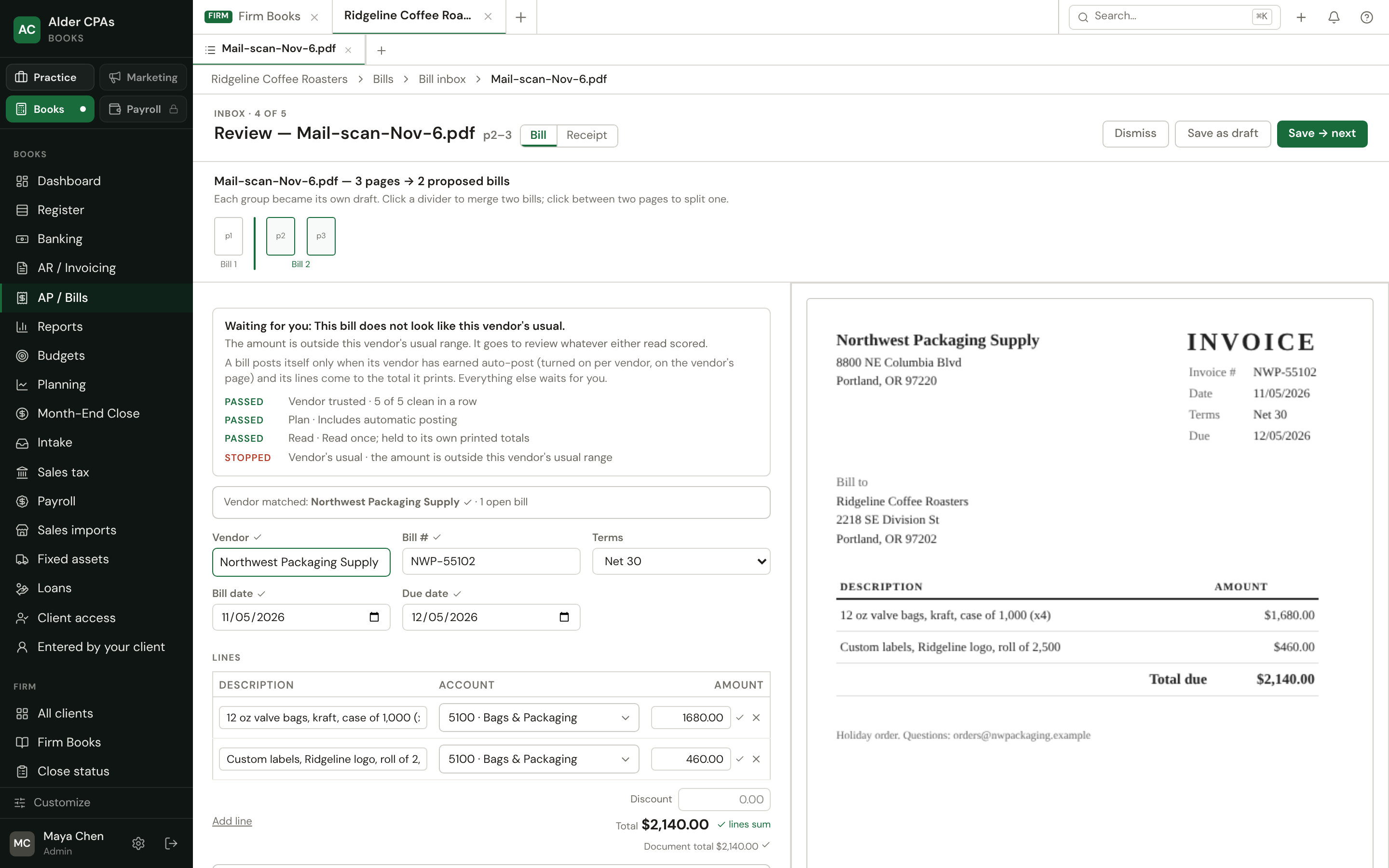 A bill from an auto-post vendor that waited: the checks it passed, and the one that stopped it
Review it as you would any bill (see The Bill Inbox). Saving it unchanged with Save → next counts as a clean bill.
See what posted itself
At the top of AP / Bills, a card says what happened since you last looked: 3 bills posted automatically since you last looked, the first few vendors and amounts, and review. If a vendor's automatic posting turned itself off, the card says so, with See why. The card doesn't appear when there is nothing to tell you.
In the bills list, a bill that posted itself carries an Auto badge beside its status.
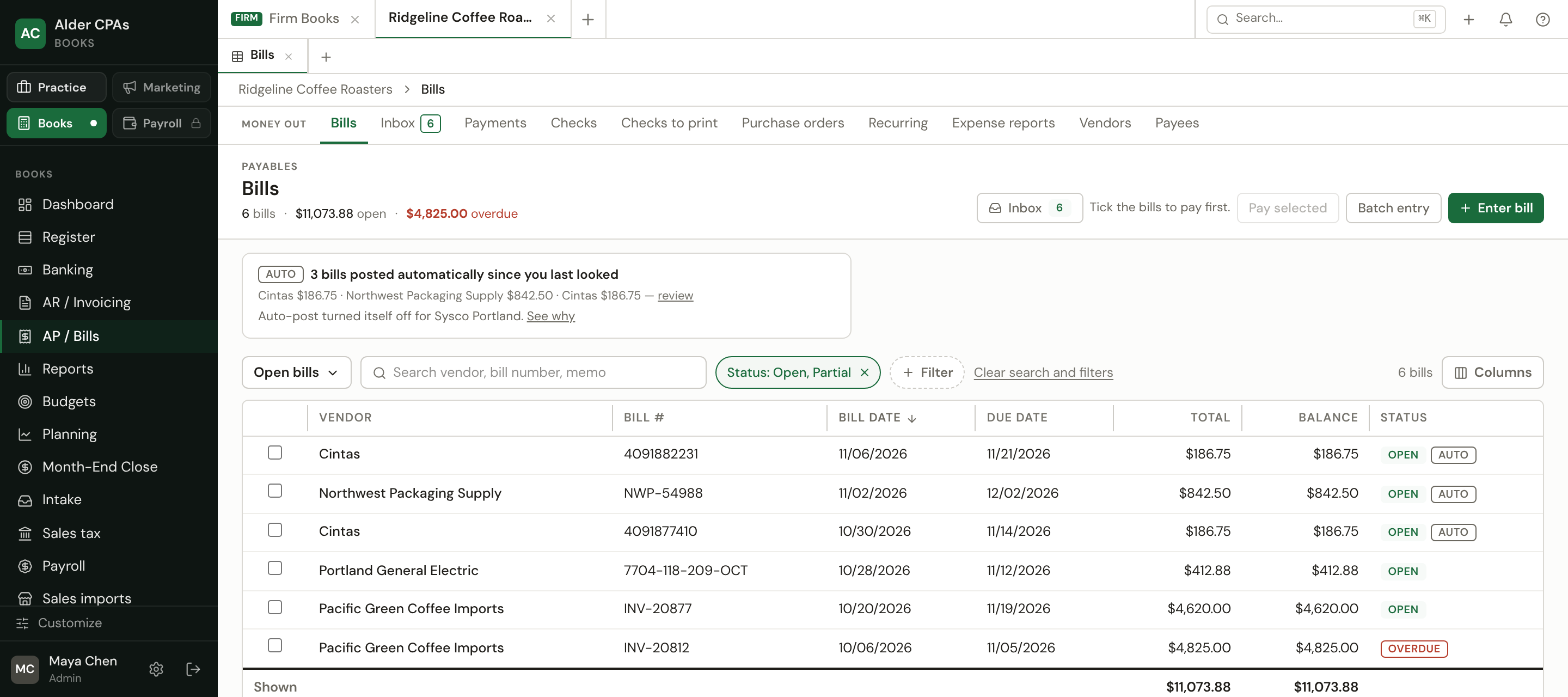 The Bills page: the card for what posted automatically, and the Auto badge on those bills
review opens Posted automatically. Choose Since I last looked, Last 7 days or Last 30 days. The first time you open it there is no last look, so it shows the last 7 days and says so. Opening it on Since I last looked moves your marker up to the newest bill it showed; looking up Last 30 days doesn't move it.
The page has these sections:
- 3 bills posted themselves (or Nothing posted itself) — each bill with its Bill # (click to open it), Vendor, Bill date and Total; Checks passed, which records what it passed and when it posted, for example vendor 7 clean bills in a row (5 needed) · read once, held to its own printed totals · usual amount, account, layout over Posted Nov 7, 2026 · 7:12 AM; and its Status. A bill voided since it posted is still listed, with Void in its Status.
- Auto-post turned itself off — each vendor whose switch turned itself off, when, why, and the bill that did it. Its bills wait in review until the run is clean again.
- Clean run toward auto-post started over — vendors whose count was reset while the switch was off: by a correction at review, or because a bill from the inbox was later voided or had its vendor, total, or a line's account or amount changed. Its count of clean bills starts again from zero.
- Lines Books filled in for you, when there are any, and Receipts confirmed automatically (with nothing to show, No receipts confirmed themselves since you last looked.).
- Waiting for a person — how many documents are in review (receipts included) and how many could not be read (5 bills from the Bill inbox in review and 1 that could not be read.), with Open the inbox, and, for bills Books tried to post, how many waited for each reason, so a reason that keeps coming back stands out. A receipt waiting for review has no reason, so the reason lines can add up to less than the review count.
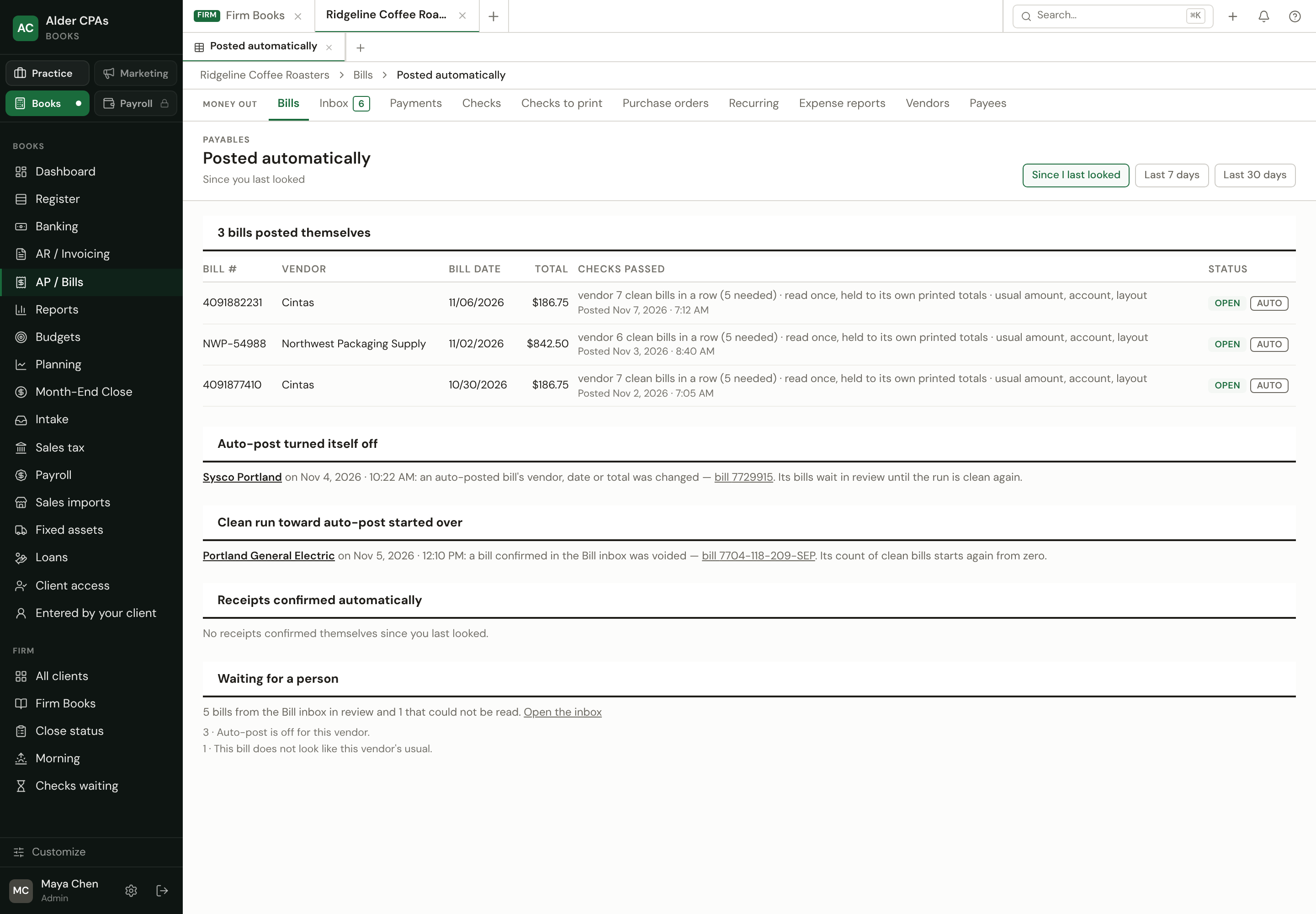 Posted automatically: three bills that posted themselves and the checks each passed, a vendor whose auto-post turned itself off, a reset, and what is waiting
The page is for your firm's staff.
What a reset looks like
On Posted automatically, a listed reset names the vendor, when, and why, linked to the bill:
- an auto-posted bill was voided
- an auto-posted bill's vendor, date or total was changed
- a bill confirmed in the Bill inbox was voided
- a bill confirmed in the Bill inbox had its vendor or total changed
- a line on a bill from the Bill inbox had its account or amount changed
- a bill from the Bill inbox needed a correction
When a vendor's switch turned itself off, the vendor's own page says so too, with the date and a link to the bill (see Turn on automatic posting for a vendor).
Fix or undo a bill that posted itself
A bill that posted itself is an ordinary posted bill. Open it from Posted automatically (or the bills list) and void or edit it the way you would any bill.
Fixing it tells Books the vendor got one wrong: voiding the bill, or changing its vendor, date or total, or a line's account or amount, turns the vendor's automatic posting off and starts its count over. The vendor's next bills wait for you until it earns the count again, and you turn it back on.
Why was this bill posted automatically?
Because its vendor had earned automatic posting, a person turned it on for that vendor, and the bill passed every check when it was read. Posted automatically shows, for each bill, the vendor's count and what was compared.
Why didn't this bill post itself?
Open it in the bill inbox: the top of the review says Waiting for you: and the reason. Some common ones:
- The vendor hasn't earned it, or it isn't on. Auto-post is off for this vendor. Post its bills unchanged with Save → next until the vendor's page offers Turn on auto-post.
- It isn't like this vendor's usual. An unusual amount, a new account, or a different layout. Review it and save it.
- The client is not on Premium. Automatic posting of bills needs Premium. The vendor keeps its count, and a vendor whose switch is on says on its page: On, but not posting: Posting bills from the Bill inbox on their own is part of Premium. Bills from the Bill inbox wait in review with the reason.
- The month is closed, or it may be a duplicate.
Why can't I turn on auto-post?
- The vendor hasn't earned it yet. The button is off: Auto-post becomes available after 2 more clean bills in a row.
- The client isn't on Premium. The button is off, and says Posting bills from the Bill inbox on their own is part of Premium. Turning it off always works.
- The vendor is archived. Restore this vendor before turning on auto-post.
- You don't have permission. Turning automatic posting on or off needs the Bills and vendors permission.
Tips
- Post clean bills with Save → next, not Save as draft. Only a bill posted from the review counts toward a vendor's five. Cmd+Enter (Mac) or Ctrl+Enter (Windows) does it from the keyboard.
- Watch the corrections. A vendor whose bills need the same fix every time never earns the count. If you keep changing one line's account, look at why Books proposes it before you post the next one.
- Read the Waiting for a person reasons each week. A reason with a big number next to it is usually one thing to fix once, such as a vendor that never matches exactly.
- Expect the first unusual bill to wait. A seasonal order or a price change waits once. After you post it, it becomes part of the vendor's usual.