
Owner Approval and Check Signing
Decide who signs a client's mailed checks, have the business owner authorize your firm once, and set the checks the owner approves on their phone before they mail.
On this page
When Books mails a check for a client, the check carries a signature. Check signing decides whose: the business owner's, or someone's at your firm.
When it is the owner's, the owner authorizes your firm once to mail checks with their signature, and can ask to approve some checks first: every check, or only the large ones and the ones to a new payee. The owner approves from their phone, in a page made for one thumb, and nothing mails until they do.
Approval is for mailed checks only. Checks the owner signs by hand at their office never wait for approval, and a check you print can always be printed. Approval decides when a check mails: until the owner approves, it waits, and once they approve, a person at your firm mails it with one click.
Choose who signs
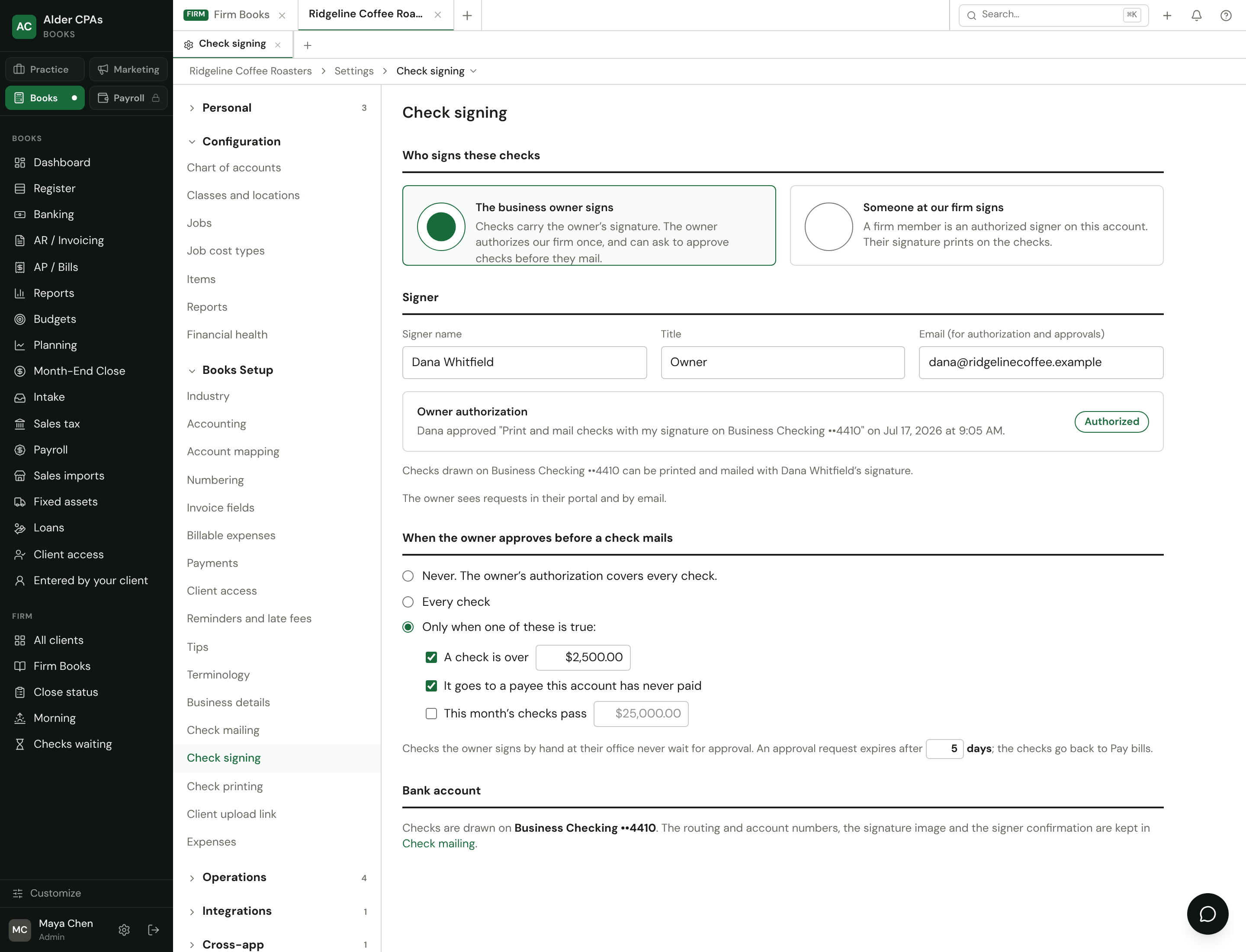 Check signing for Ridgeline Coffee Roasters: Dana Whitfield, the owner, signs; her authorization is on file; checks over $2,500.00 or to a new payee wait for her
Under Who signs these checks, choose one:
- The business owner signs: checks carry the owner's signature. The owner authorizes your firm once, and can ask to approve checks before they mail.
- Someone at our firm signs: a firm member is an authorized signer on the account, and their signature prints on the checks. The owner is never asked.
Then fill in the Signer: Signer name, Title and, when the owner signs, the Email (for authorization and approvals). A client that has never chosen shows neither option picked, and nothing saves until you choose. The page saves each change as you make it.
The routing and account numbers, the signature image and the signer's confirmation live under Settings → Check mailing; Bank account at the bottom of this page names the account (••4410 here) and links there. See Mail Checks for a Client.
Get the owner's authorization
When the owner signs, your firm needs their authorization once before it can mail checks with their signature. Until then, checks can be printed but not mailed.
- Fill in the signer above, then click Send the authorization request, under the Owner authorization box.
- The owner opens their approval page, sees the heading Allow Alder CPAs to mail your checks above the exact wording, for example "Print and mail checks with my signature on Business Checking ••4410", and taps I authorize this.
- The box then reads Authorized, with the owner's name, the wording and the date, as in the screenshot above.
The request expires after the number of days set on the page. Resend the authorization request sends it again.
Check mailing must be set up first; until it is, the request is refused.
The owner must be able to sign in to approve. If no client contact has the signer's email, Books says so and asks you to add it to a client contact first. If the owner has no client portal access with Books, Books says they can't sign in to approve and links Invite them to the client portal: see Give a Client Access to Their Books, and What They Can See.
Under the box, Books says how the owner hears of a request: The owner sees requests in their portal and by email, or in their portal only when they have no email.
An authorization ends on its own when the bank details it covered change, when the signer changes, or when the signature changes. The Owner authorization box then says what ended it and when, and checks can be printed but not mailed until the owner authorizes again.
Choose when the owner approves
Under When the owner approves before a check mails:
- Never. The owner's authorization covers every check.
- Every check: every mailed check waits for the owner.
- Only when one of these is true: tick any of
- A check is over an amount (it starts at $2,500.00): a check for more than that waits.
- It goes to a payee this account has never paid: a vendor with no earlier payment or check on the client's books, other than voided ones. Checks to customers, employees and other names are never counted as new.
- This month's checks pass an amount (it starts at $25,000.00): once this check would take the month's checks and check payments past it, counting from the first of the client's month.
An approval request expires after a number of days (5 unless you change it, from 1 to 30). An expired request's checks go back to Pay bills. An approval the owner gives holds for the same number of days.
Books decides which checks wait, every time, from these rules: when you record the payment, when the request is sent, and again just before the check mails.
Who should sign this client's checks? Whoever signs the bank's signature card. When the owner keeps signing authority, choose The business owner signs and decide how much they want to see before a check goes out.
Send checks for approval
You don't send a request yourself: Books does, when you mail a check that the rules say waits.
-
Paying bills: on Review payments (after Pay selected), each mailed check says what happens to it: Mails now, or Owner approves with the reason, such as Owner approves · over $2,500 or Owner approves · new payee.
The record button says how many go for approval, for example Send 2 for approval · mail 1 now. The owner gets one message listing the checks waiting. Nothing posts until a bill payment's check mails; a check the owner sends back returns to Pay bills with their note.
-
Writing a check: the Save and mail button reads Save and send for approval. A written check is on the books as soon as it is saved; only its mailing waits. If the owner sends it back, void it.
A check waiting for the owner can't apply vendor credits. Apply the credits on their own first, then send the check.
What the owner sees
The owner signs in and opens their approval page (in their client portal, under Approve checks). It is built for a phone.
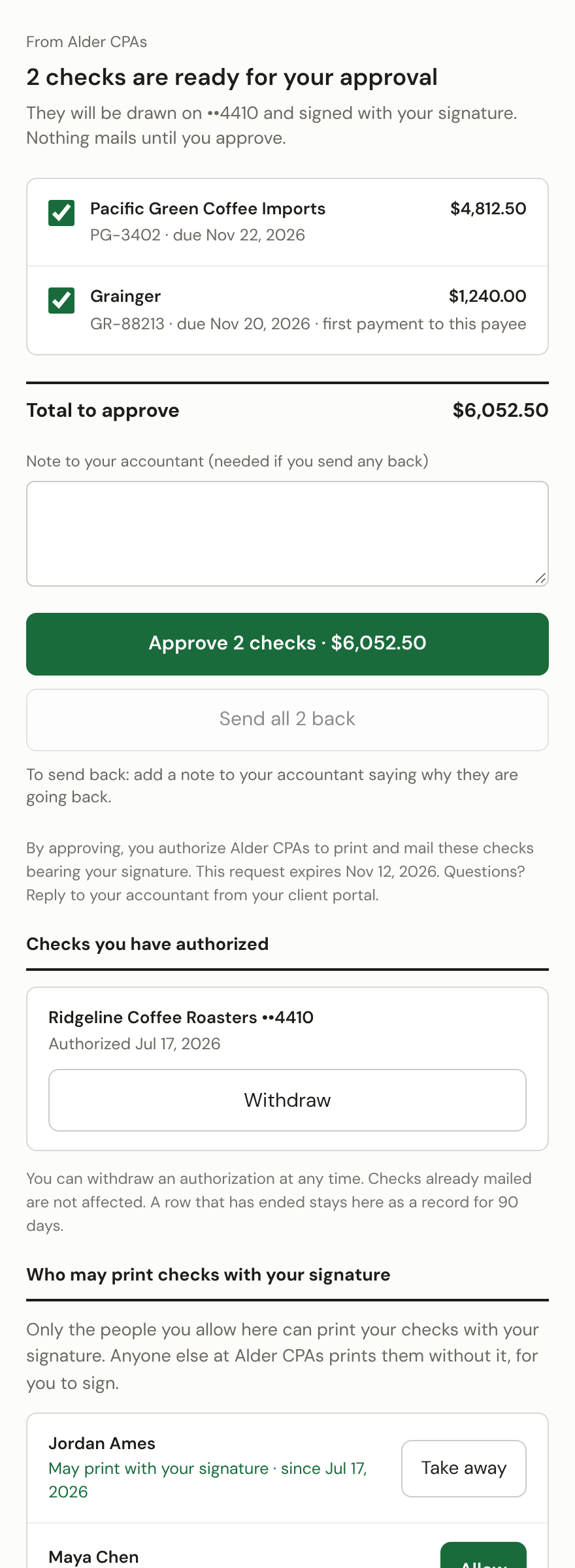 The owner's page: 2 checks are ready for your approval, Pacific Green Coffee Imports $4,812.50 and Grainger $1,240.00, the first payment to this payee
Each check shows the payee, the amount, the bill number and due date, and first payment to this payee when that is why it waits. Every check starts ticked, and the owner:
- taps Approve 2 checks · $6,052.50 to approve them all;
- unticks some, writes a Note to your accountant, and taps Approve 1 check, send 1 back · $4,812.50: one tap approves the ticked ones and sends the rest back;
- or writes a note and taps Send all 2 back, which sends every check back and approves none, whatever is ticked.
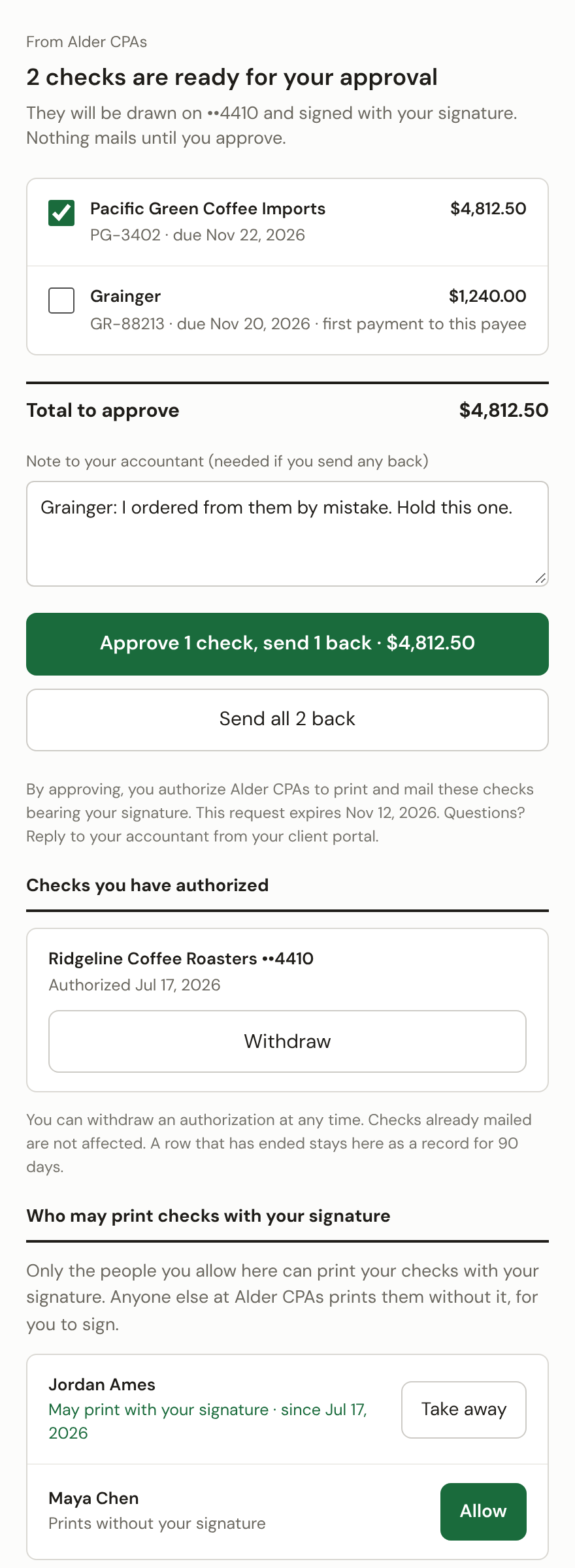 The owner unticks Grainger, writes why, and approves one check while sending the other back
A note is required to send anything back. By approving, the owner authorizes your firm to print and mail those checks bearing their signature; the page says when the request expires.
Further down the owner's page:
- Checks you have authorized lists their standing authorizations, each with Withdraw. Withdrawing first shows which approved or waiting checks haven't mailed and will go back to you unsigned; checks already mailed are not affected. An ended authorization stays listed as a record for 90 days.
- Who may print checks with your signature lists your firm's team, each with Allow or Take away. Only the people the owner allows can print the client's checks with the stored signature; anyone else at your firm prints them without it, for the owner to sign.
Follow the checks waiting on owners
Checks waiting on owners (in the firm section of the sidebar, Checks waiting) lists every approval request across your clients: the Client, the Owner, how many Checks, the Amount, when it was Sent, and its Status.
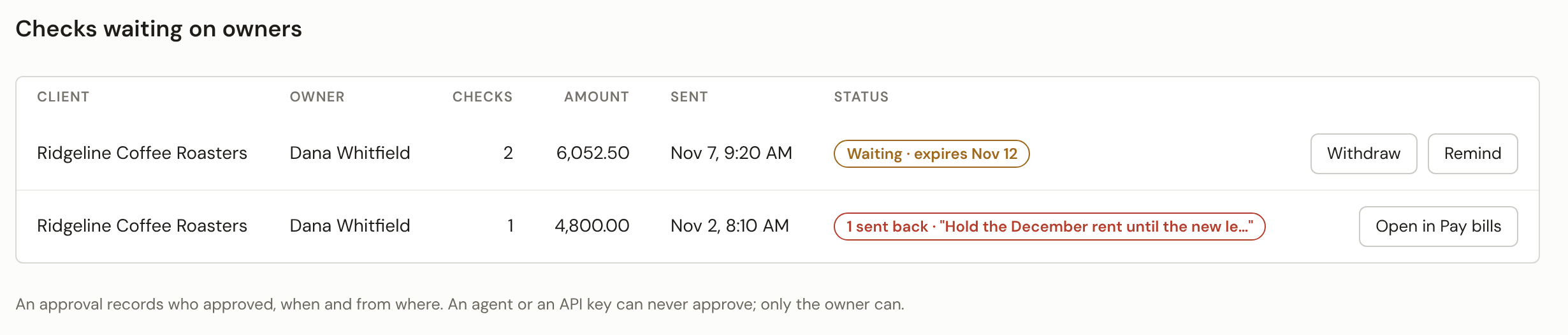 Two requests for Ridgeline Coffee Roasters: one waiting until Nov 12, and one rent check Dana sent back with her note
What to do at each status:
Waiting · expires Nov 12
Remind sends the owner a reminder. Withdraw cancels the request.
Approved · ready to mail
Open in Pay bills (for bill payments) and click the Mail button with the amount, for example Mail $4,812.50; or Open check (Open checks for several written checks). Nothing mails until someone does. Withdraw is still offered until it mails.
n sent back · with the owner's note
Open in Pay bills lands on the bills sent back, to pay another way or send again.
Expired · back in Pay bills
Pay the bills again, or send the checks for approval again.
Authorization withdrawn · back to Pay bills
The owner withdrew their authorization; ask them to authorize again before mailing.
Withdraw names what it does before you confirm: the owner can no longer approve the checks, nothing has posted for their bills so the bills go back to Pay bills, and a written check stays written, to send again or void from its own page.
Why is this check waiting on the owner? One of the client's rules applies to it: Every check, or the amount, new-payee or monthly rule. Review payments and the check's own page name the reason.
What happens when an owner sends a check back? It comes back with their note. A bill payment was never posted, so its bills are open again in Pay bills. A written check is already on the books: void it, or change it and send it again.
How do I remind an owner? Click Remind on Checks waiting on owners.
Why can't these checks be mailed?
Why can these checks be printed but not mailed? The owner signs and hasn't authorized your firm, or their authorization ended. Printing never waits for it; mailing does. Send the authorization request from Settings → Check signing.
Other reasons a check doesn't mail are in Mail Checks for a Client.
Who can change these settings? Changing Check signing and sending the authorization request need the Books settings and account mappings permission; anyone else can read the page but not change it.
Sending checks for approval, reminding and withdrawing need Pay bills. Approving is the owner's alone: an approval records who approved, when and from where, and no one at your firm, no agent and no API key can approve for them.
Tips
- Start with the amount rule. Most owners want to see large checks and new payees, not every utility bill.
- Keep the owner's email on a client contact, and give them portal access with Books, before you need their first approval.
- Mail approved checks promptly. An approval holds for as many days as a request does.