
Sales Tax: Rates, Exempt Sales and Filing the Return
Set up the sales tax rates your clients charge, decide what is taxable and who is exempt, see what is owed by jurisdiction, and use the return worksheet to file and record the payment.
On this page
Books works out the sales tax on every invoice and sales receipt, keeps track of what each jurisdiction is owed, and gives you a return worksheet with the figures a state's return asks for. Three things are yours: entering the rates, deciding where a client must collect, and filing the return with the state.
Books produces the figures; it does not file the return or pay the state, and it comes with no rates of its own. Your firm enters the rates. Where a client has to collect (nexus) is a judgment, not a calculation, so Books never decides it: it reports on the jurisdictions the client's invoices, sales receipts and imported sales reports were actually taxed in.
How sales tax is built
| Piece | What it is |
|---|---|
| Jurisdiction | One place that charges tax: a state, county, city, district or special district, with its rate by date. |
| Tax code | One or more jurisdictions in the same state, charged together. Its rate is their rates added up on the invoice's date. For example Vancouver WA = Washington 6.500% + Vancouver 2.200% = 8.700%. |
| Sales tax category | What an item is for tax: Standard goods, Services, Food, Shipping or Items marked exempt. |
| Category rules | Per jurisdiction: which categories are taxed there. |
| Exemption certificate | Held by a customer, so their purchases aren't taxed. |
A rate is never edited. A new rate takes over from a date, and invoices dated before it keep the old one.
Set up rates for the firm
Open Settings → Sales tax rates at firm level. The page lists each tax code with its jurisdictions, level, rate, the date the rate took effect and how many clients use it. All states narrows to one state; In effect today and Including superseded switch between current rates and the full history.
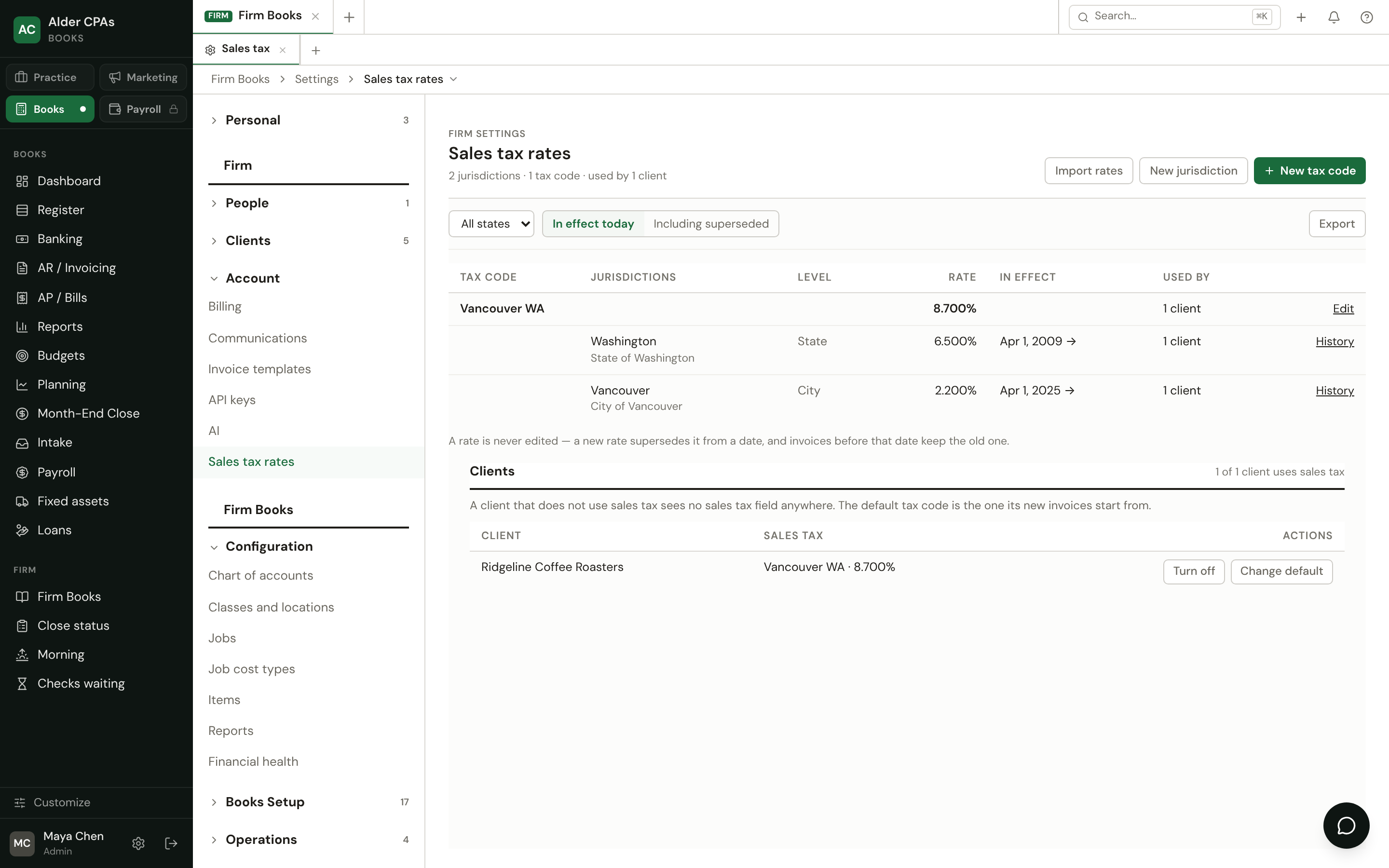 The firm's sales tax rates: the Vancouver WA tax code and the clients that use it
- New tax code — name it (for example Hartford CT) and tick its jurisdictions, all in one state. Without any jurisdictions yet, it walks you through adding each place and its rate first.
- New jurisdiction — its name, level, state, rate and the date it's in effect from. Put it in a tax code to offer it on invoices; until then it is listed under Not in a tax code.
- Import rates — paste a rate list, or choose a CSV or Excel (.xlsx) file, in any column order. Books shows How Books read it, asks for anything the list leaves out (such as how its dates and rates are written), then Preview shows what happens to each row. A rate already entered is skipped, so importing the same list twice changes nothing; one row that can't be imported stops the whole import.
- Export downloads the library.
Change a rate
Open the jurisdiction (History on its row), and under New rate enter the Rate, In effect from and Why (kept with the rate so a figure can be traced later). Before you save, What this changes and what it does not says which invoices keep the old rate, for example Invoices before Apr 1, 2027 keep 2.200%. Click Add the new rate.
A new rate must start after the jurisdiction's latest one. Books refuses an earlier date, because that would change the rate on invoices already dated: Vancouver's latest rate, 2.200%, is in effect from Apr 1, 2025. A new rate supersedes it from a later date… A rate that hasn't taken effect yet can be withdrawn, unless it is the jurisdiction's only rate.
Archive or delete
Archive on a tax code or jurisdiction stops it being offered; invoices already saved with it keep the tax they stored, and Restore brings it back. Delete is offered beside Archive (in a tax code's Edit dialog, or on a jurisdiction's own page); it works only while nothing uses it, and says why when it can't.
Turn sales tax on for a client
A client that doesn't use sales tax sees no sales tax field anywhere. To turn it on:
- Open the client's Sales tax page (under More in the sidebar while it's off) and click Turn on sales tax, or use Turn on beside the client under Clients on the firm's Sales tax rates page.
- Choose the tax code its new invoices start from. If the firm has no tax code yet, Books walks you through adding the places the client collects for and their rates.
- If the client has no sales tax payable account yet, Books asks you to pick an existing liability account or create one (A liability account, sales tax payable. The number and name are yours to change.).
From then on that account is kept by sales tax: invoices and sales receipts post to it, payments to the state pay it down, and it takes no hand entries while sales tax is on. If the account already had a balance from before Books, the Sales tax page offers to split it by jurisdiction and period, so it is owed and can be paid (Owed from before Books).
Change default changes the tax code new invoices start from. Turn off is allowed once nothing is owed: This client has $227.94 of sales tax collected and not remitted. Record what was paid to the state first; sales tax can be turned off once nothing is owed.
Decide what is taxable
- Items. Each item has a Sales tax category. An item with none set follows its Taxable box: taxable items count as standard goods, the rest as exempt (From the Taxable box).
- Category rules. Open a jurisdiction to see how each category is taxed there and change it (Taxed here or Not taxed here, with a reason kept in the audit log). Standard goods, services, food and shipping are taxed unless a rule says otherwise; exempt items are never taxed by default. A shipping line with no item is in the Shipping category.
- Customers. A customer can have their own Sales tax code, which their invoices start from instead of the client's default.
- On the invoice. The Sales tax field starts at the default (and says where it came from, for example Default — Vancouver WA); pick another code or No tax for one invoice. The invoice shows Total tax by jurisdiction.
Why is a sale marked exempt?
A sale is exempt in a jurisdiction for one of these reasons:
- Its category isn't taxed there — Food, not taxable in WA.
- The customer holds an exemption certificate — Exemption certificates · 1 customer.
- It was exempted on an expired certificate — Exempt anyway on an expired certificate.
- A category on an imported sales report was marked not taxable — Groceries on sales reports, marked not taxable.
- An imported sales report printed its own taxable-sales figure (a line such as Taxable sales) — Books takes that figure as the report's taxable sales, and the rest of its sales that no category explains is exempt: Exempt per the imported sales reports (their own printed taxable figure).
Exemption certificates
On the customer's page, under Sales tax exemption, add the Certificate number, what it covers, its State and when it Expires. The number is optional: an exemption saved without one reads No certificate number on file, and you can add the number later. To mark many customers exempt at once, or clear their exemptions, select them on the Customers list (see Customers: Add, Edit, Merge and Archive). Archiving a certificate stops it exempting new invoices; invoices already written keep the tax they show, and it can be restored.
When a customer's certificate has expired, the invoice flags it and starts at Charge tax — the certificate has expired, and offers Exempt anyway — a renewal is on its way (a reason is required). It shows What each gives side by side with the Difference, and links Update the certificate.
An exempt invoice appears on the exempt-sales report with its certificate number and expiry, which is the first thing an auditor asks for.
How much sales tax do I owe?
Open Sales tax in the client's sidebar. The line under the title says it in one sentence, for example $227.94 owed across 2 jurisdictions as of Nov 8, 2026 — $710.27 collected, $482.33 remitted.
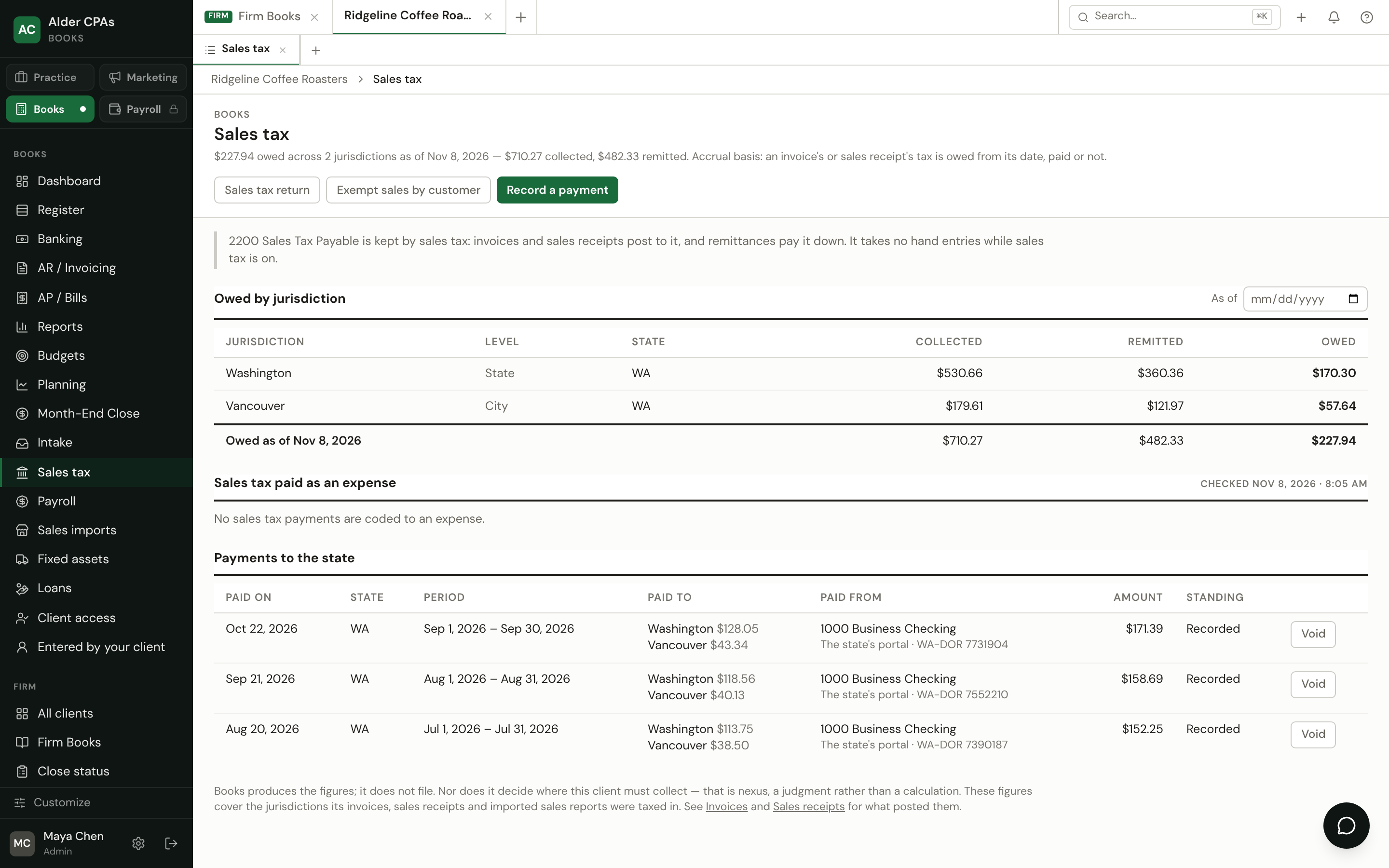 Ridgeline Coffee Roasters' Sales tax page: owed by jurisdiction, and the payments made to Washington
- Owed by jurisdiction — Collected, Remitted and Owed for each jurisdiction, with From before Books when an opening balance was split. Change As of to see what was owed on any day.
- Sales tax paid as an expense — payments to the state that were coded to an expense instead of the payable account. Review them opens a page where you move them onto the liability account, one reclassifying entry each (the payment and the bank are not touched, and each entry can be voided to put it back), or mark a line Not sales tax.
- Payments to the state — every payment recorded, with the period, how much went to each jurisdiction, the account it came from and its Standing.
Sales tax is on the accrual basis: an invoice's or sales receipt's tax is owed from its date, paid or not. Cash basis is not supported. Books doesn't split each customer payment's share of the tax, so it shows no cash-basis figure rather than an accrual figure under a cash-basis heading.
How do I file the return?
- On the Sales tax page, click Sales tax return.
- Choose the period (each of the last 12 months, or each of the last 4 quarters) and the state.
- Copy the figures onto the state's return, or click Export for a CSV. File and pay with the state.
- Come back and click Record a payment (see below).
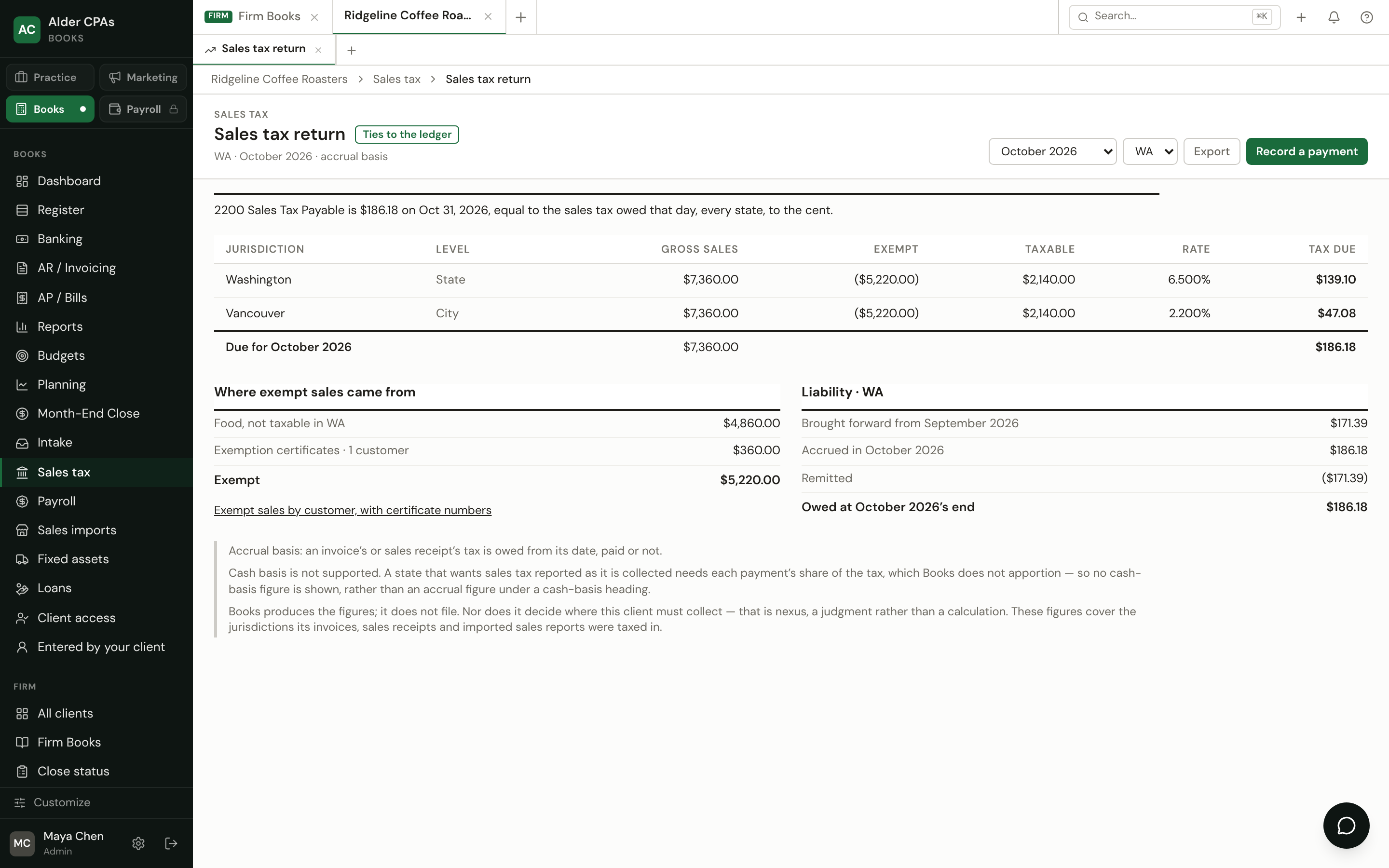 The October 2026 return for Washington, tied to the ledger
The worksheet has one row per jurisdiction: Gross sales, Exempt, Taxable, Rate and Tax due, with Due for October 2026 at the bottom. In the example, $7,360.00 of sales less $5,220.00 exempt leaves $2,140.00 taxable: 6.500% of it is $139.10 for Washington and 2.200% is $47.08 for Vancouver, $186.18 in all. When a jurisdiction's rate changed within the period, Rate reads varies.
Below it:
- Where exempt sales came from — the exempt amount by reason, with a link to Exempt sales by customer, with certificate numbers.
- Liability — Brought forward from the previous period, Accrued in this one, any Earlier sales voided this period, Owed from before Books and Remitted, adding up to Owed at the period's end.
The badge beside the title checks the worksheet against the books: Ties to the ledger when the sales tax payable account equals what is owed in every state, not only the return's, to the cent, on the period's last day. Does not tie to the ledger gives both figures and the difference, and the likely cause: a balance brought in from before Books that hasn't been split, or an entry made by hand while sales tax was off.
Exempt sales by customer
Exempt sales by customer lists each customer with exempt sales in the period and state, their certificates, and every invoice, sales receipt and credit memo behind the figure. It's the list an auditor asks for.
Record a payment to the state
- Click Record a payment (on the Sales tax page or the return).
- Check State, Period from and Period to (from the Sales tax page they start at last month; from the return, at the return's state and period), and enter Paid on.
- Choose How it was paid (ACH, Check, Card, The state's portal or Other) and Paid from.
- Under Paid, enter what went to each jurisdiction. The amounts start at everything owed to each one now, which can include tax from the current month; change them to what you actually paid.
- Add a Reference (a confirmation or check number) if you have one.
- Read the check under the form, then click Record payment.
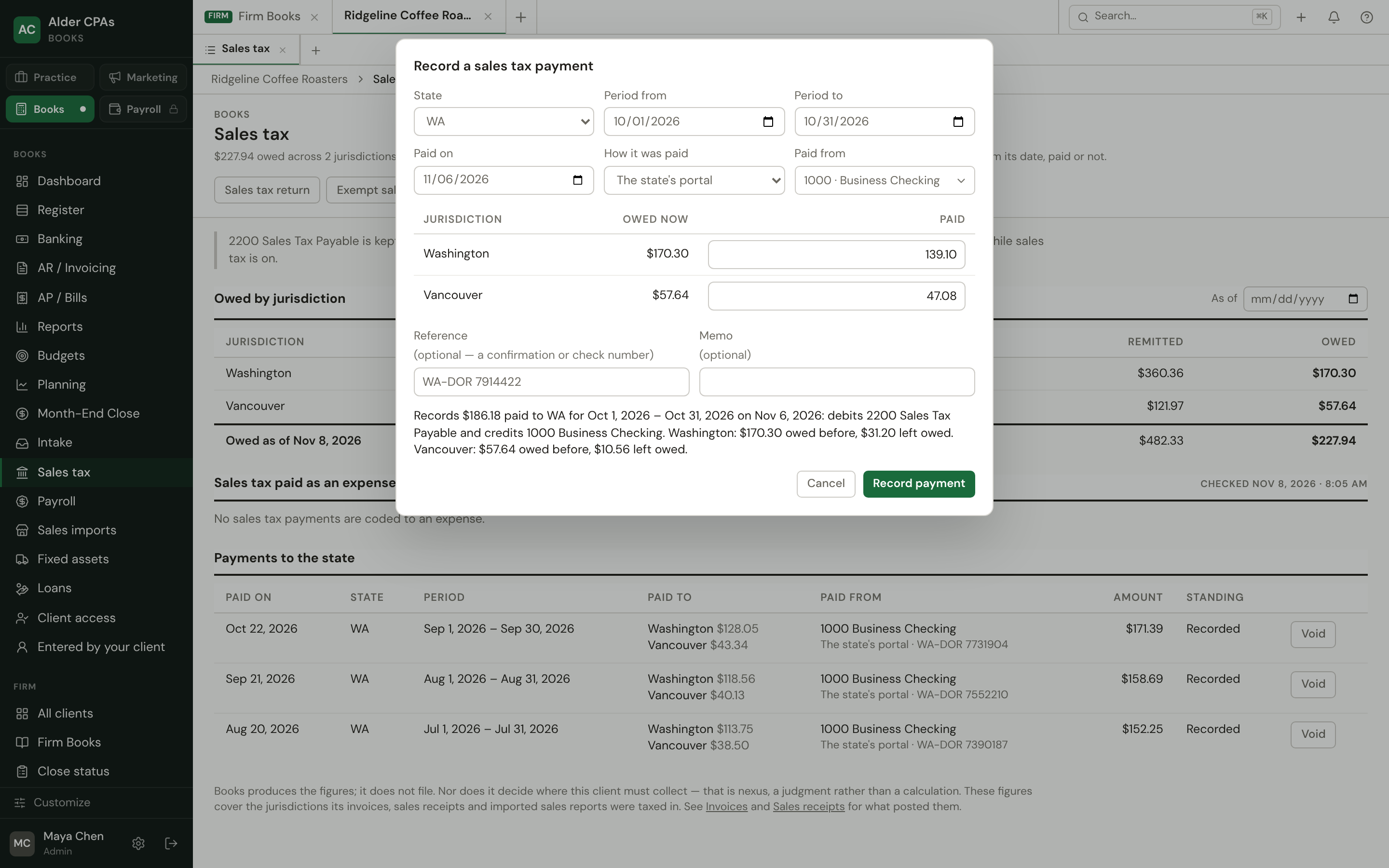 Recording the October payment to Washington: $139.10 to the state and $47.08 to Vancouver
Books says exactly what it will post before you record: Records $186.18 paid to WA for Oct 1, 2026 – Oct 31, 2026 on Nov 6, 2026: debits 2200 Sales Tax Payable and credits 1000 Business Checking. Washington: $170.30 owed before, $31.20 left owed. Vancouver: $57.64 owed before, $10.56 left owed. Paying more than is owed is allowed; the extra is shown as paid ahead, a credit with the state.
Void a payment to the state
Click Void on the payment, give a reason of at least 10 characters, and confirm. Its entry is reversed, dated on the payment's own date while that month is open, and on today's date once it is closed. What it paid is owed to the state again, and the payment stays on the page marked voided.
Why can't I…
-
…change rates or tax codes? It needs the permission Sales tax rates. The buttons say so.
-
…turn sales tax on or off for a client? It needs Books settings and account mappings on that client. Turning off also needs nothing owed.
-
…record a payment to the state? It needs Pay bills. It is also off while nothing has been collected: on the Sales tax page it says Nothing has been collected yet — a sent invoice with sales tax is what a payment pays., and on the return No sales tax has been collected yet, so there is nothing to pay. A payment is recorded once tax is owed to a state.
It is off, too, when the client has no sales tax payable account. A payment into a hard-locked month is refused.
-
…void a payment? It needs Void or reverse a posted entry, and a month with a closing password asks for it.
-
…add a certificate or a customer's tax code? It needs Invoices, estimates and customers. An item's category needs Chart of accounts.
-
…see a state on the return? Nothing has been taxed in that state yet. The return lists only states with sales or something owed.
Tips
- Tie before you file. If the badge reads Does not tie to the ledger, fix that first; the return is only as good as the books.
- Pay what you file, not what's owed today. The payment form starts at everything owed now; for a monthly return, enter the month's Tax due from the worksheet instead, so this month's tax stays owed.
- Renew certificates before they expire. An expired certificate flags every invoice and charges tax unless you choose Exempt anyway.