
Credit Memos
Record what a customer is owed back, bring returned goods back into stock, then apply the credit to their open invoices or refund it from a bank account.
On this page
A credit memo records what a customer is owed back: goods they returned, an allowance for a damaged shipment, or a billing mistake. Once it is saved, the credit sits on the customer's account until you use it. You can apply it to their open invoices, pay it back to them from a bank account, or do some of each.
A draft changes nothing on the books. Saving does. When you click Save, Books posts one entry dated on the credit memo's date: it reduces income on the accounts you chose and reduces what the customer owes (Accounts Receivable). Where they apply, the same entry also gives back the sales tax charged and returns the goods' cost to inventory. Applying the credit to an invoice posts no new entry. It only settles the invoice against the credit that is already on the books. A refund posts its own entry, out of a bank account.
Understand the Credit memos page
The page opens on the view Left to apply: the credit memos that still have something left to use, newest first. The Status: Open, Partly applied chip is what narrows it. Click the × on the chip, or Clear search and filters, to see every credit memo, including drafts, fully applied ones and void ones.
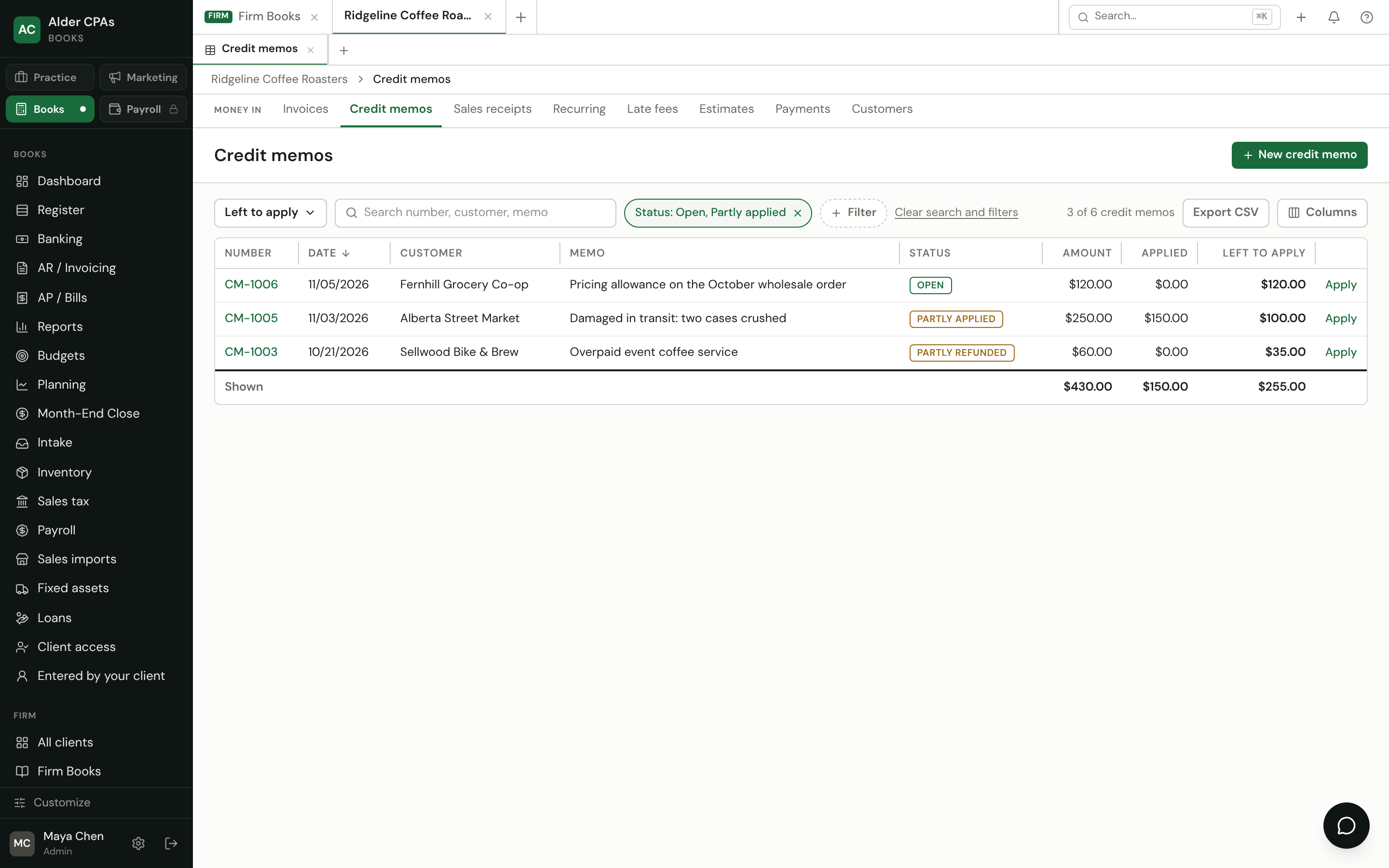 The Credit memos page for Ridgeline Coffee Roasters, showing the three credits that still have money left
The columns, in order:
- Number — click it, or anywhere on the row, to open the credit memo.
- Date — the credit memo's date. This is the date its entry posts on.
- Customer and Memo (your internal note).
- Status — one of the labels below.
- Amount — the credit's total.
- Applied — how much of it has been applied to invoices.
- Left to apply — what is still available. A draft shows its full amount until it is saved; a void credit memo shows $0.00.
- Apply — a shortcut to apply the credit, shown only while something is left.
A Reference column is available too; turn it on under Columns. The Shown row at the bottom totals Amount, Applied and Left to apply for the rows on screen.
Money refunded to the customer counts in neither Applied nor Left to apply. In the picture, CM-1003 is a $60.00 credit with $25.00 refunded: it shows $0.00 applied and $35.00 left to apply.
| Status | What it means |
|---|---|
| Draft | Not on the books yet. You can change it freely, or remove it. |
| Open | Saved, and nothing has been used yet. |
| Partly applied | Saved, and part of it is used. |
| Applied | Nothing is left: it has all been applied, or applied and refunded. |
| Refunded | The whole credit was paid back to the customer. |
| Partly refunded | Part of it was paid back, and none of it has been applied. |
| Void | Canceled. Its entry was reversed. |
Search number, customer, memo finds a credit memo by its number, customer, memo or reference. + Filter narrows by Status, Customer, Date, Total or Left to apply. Export CSV downloads the rows the search and filters keep, in the columns shown.
Create a credit memo
-
Click New credit memo. You can also press Q anywhere in Books to open Quick add, then choose Credit Memo (it is offered on the AR / Invoicing pages, such as Invoices, Customers and Credit memos).
-
Choose the Customer.
-
Check the Date. It starts on today's date for the client.
-
Leave Number blank to take the client's next credit memo number, or type your own. Books refuses a number the client already used.
-
Add a Reference if you have one, such as a return or authorization number.
-
If the credit is for a particular sale, pick it under Against invoice or For sales receipt (one or the other, not both). The invoice list shows the customer's saved invoices, each with its number, its date and what is still open on it, or, if it is paid in full, its total marked paid ($648.00 paid).
Naming a document matters most for returned goods (see Returned goods go back into stock). An invoice whose billing has moved to Practice is listed but grayed out, and can't be chosen; it reads Billed in Practice — credit its Practice invoice instead (see If you also use Practice).
-
Add a Memo (internal, for your team) and a Customer message if you like.
-
Fill in the Lines. Each line needs a Description, a Revenue account and an Amount. If the client uses items, start the line with an Item, which fills in the description, rate and account (you can still change each).
-
Click Save to post it, or Save as draft to keep it off the books for now.
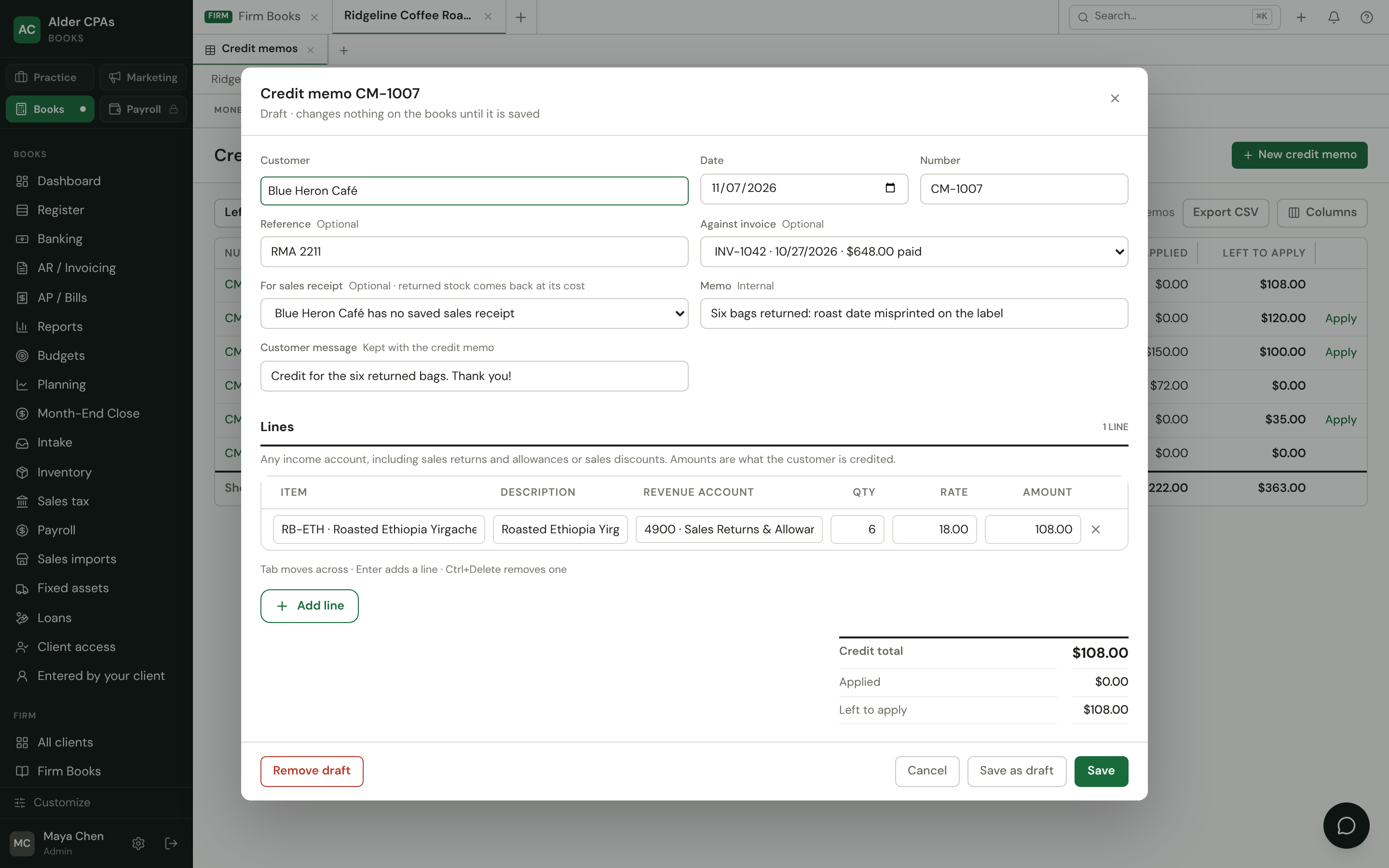 A draft credit memo for six returned bags of coffee, against invoice INV-1042
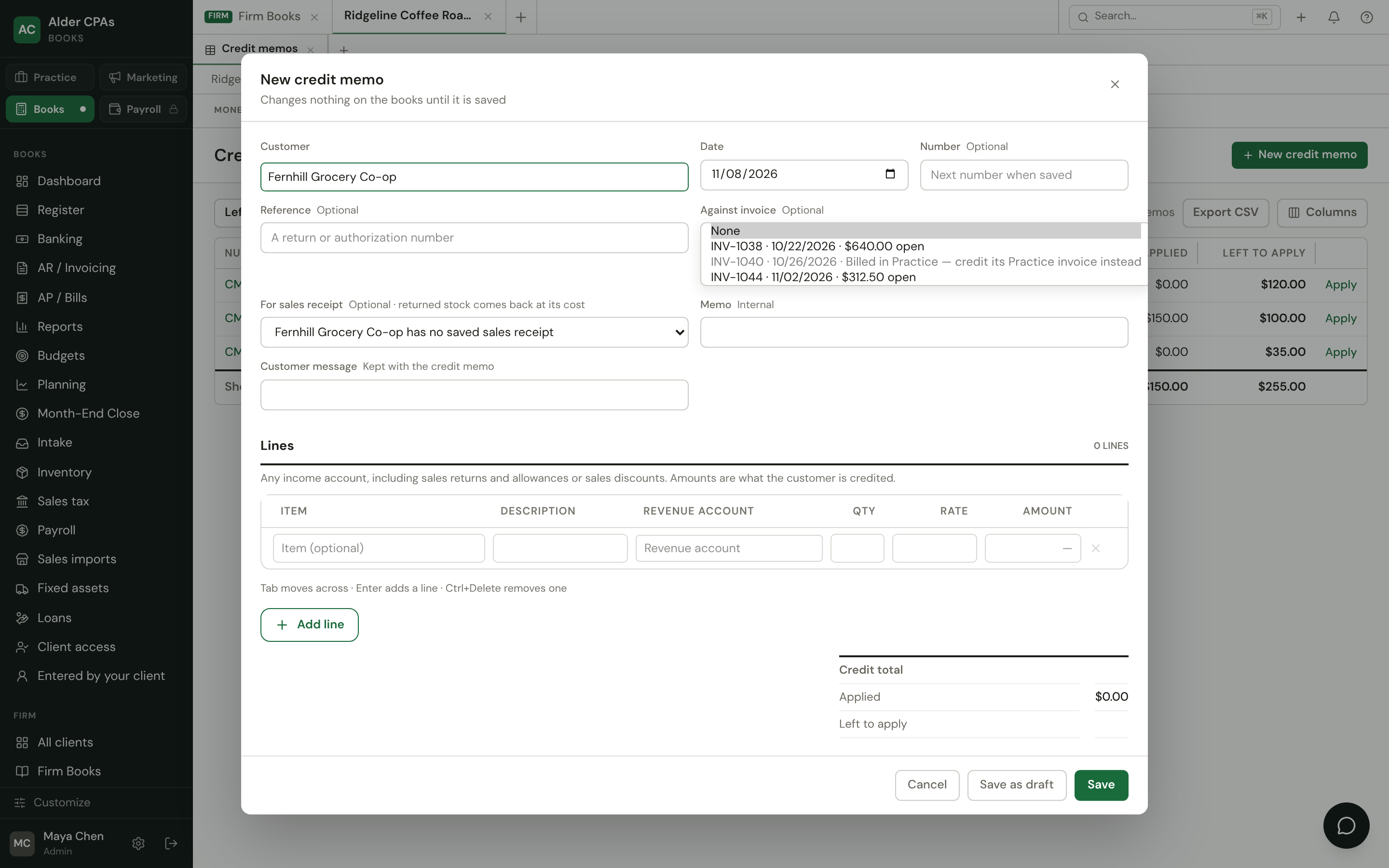 The Against invoice list for Fernhill Grocery Co-op, shown open: INV-1040 is grayed out and reads "Billed in Practice — credit its Practice invoice instead"
Choose any income account for a line, including a contra account such as Sales Returns & Allowances or sales discounts. Using one keeps returns visible on the income statement instead of netting them silently out of sales. Amounts are what the customer is credited, and every figure on a credit memo screen is shown as a positive number.
When you save, Books shows Credit memo CM-1007 saved for $108.00. A draft shows Draft saved. A draft changes nothing on the books until it is saved.
Saving a credit memo needs permission for invoices and customers and permission to send invoices. Writing and changing drafts needs permission for invoices and customers. If a button is turned off, the line under the form says why, for example Save is unavailable: followed by the reason.
Returned goods go back into stock
When a line uses an inventory item, saving the credit memo brings the goods back into stock on the credit memo's date. Give that line a Qty and a Rate: Books won't take an inventory line without a quantity. The entry then also moves the goods' cost from cost of goods sold back to the inventory account.
The cost the goods come back at depends on whether you named the sale:
- With an invoice or sales receipt named, they come back at the cost that sale took them out at. Return everything the sale sold and the two cancel to the cent; return part of it and the goods come back at that share of the sale's cost. You can return at most what that sale sold, less what earlier returns against it already took back. You can name a paid invoice for this.
- With nothing named, they come back at the item's average cost on hand on the credit memo's date, or, if none is on hand, at its last known cost.
Books refuses the save, and says which line and why, if the named sale did not sell that item, if you return more than it sold less what earlier returns took back, or, with no sale named, if the item has never been received (so it has no cost to come back at).
To learn how stock and its cost are tracked, see Inventory.
Sales tax
For a client that charges sales tax, a credit memo gives the tax back the same way an invoice charges it. By default it follows the invoice or sales receipt it is for, and otherwise the customer's tax code (or the client's). You can pick a different code or no tax on the form. Books works the tax out again when you save.
How do I apply a customer credit?
Applying a credit settles one or more of the same customer's open invoices with it.
- On the Credit memos page, click Apply on the credit memo's row. Or open the credit memo and click Apply to invoices.
- Tick each invoice to apply it to. Ticking an invoice fills in its balance, or as much of the credit as you have not yet given to another invoice, whichever is smaller. If the credit memo was entered Against invoice, that invoice is already ticked when it is still open and can take the credit.
- Change any amount in the Apply column, and check the Balance after each invoice.
- Check Apply on. It starts on today's date, or on the credit memo's date if that is later.
- Read the line under the table. It is Books' own check of exactly what will happen, for example Checked: applies $120.00 on 11/08/2026, leaving $0.00 on CM-1006.
- Click Apply $120.00.
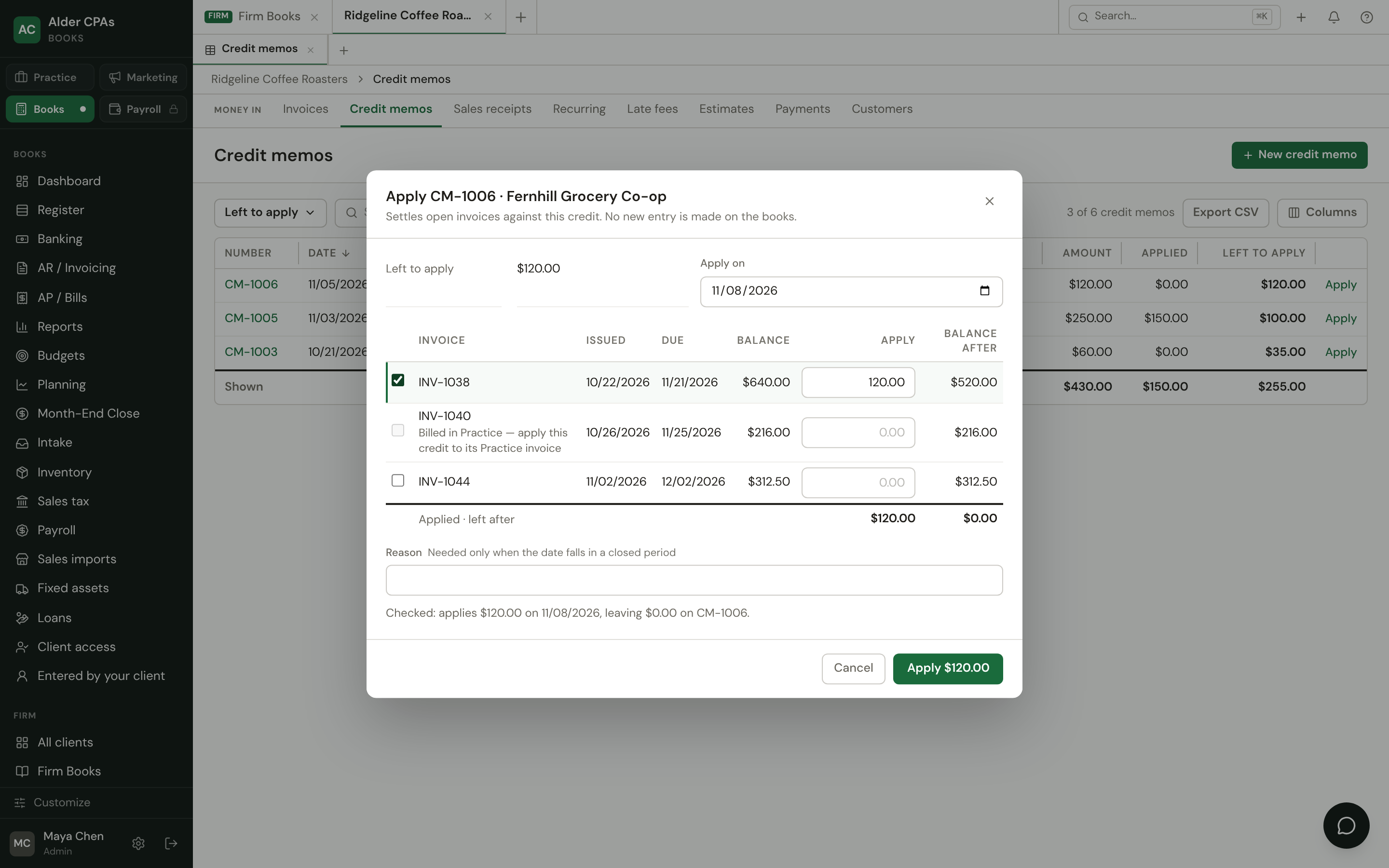 Applying credit memo CM-1006 to Fernhill Grocery Co-op's invoice INV-1038. INV-1040 is listed but can't be ticked: it is billed in Practice
Books confirms it: $120.00 of CM-1006 applied. $0.00 is left to apply. The credit memo then opens with an Applied to invoices section listing each invoice, the date and the amount.
Some things to know:
- Only open invoices of the same customer are listed: saved invoices with a balance left. If there are none, the window says so, and the credit stays on the customer's account, left to apply.
- An invoice billed in Practice is listed but can't be ticked. Its box is turned off, and under its number it says Billed in Practice — apply this credit to its Practice invoice. See If you also use Practice.
- You can apply to several invoices at once, and come back later to apply what is left. Applying more to an invoice that already has some of this credit adds to it.
- The date can't come before the credit memo's own date or the invoice's date.
- An amount can't be more than the invoice's balance, and all the amounts together can't be more than what is left on the credit. Books tells you which before you apply.
- No entry is posted. The credit already reduced what the customer owes when you saved it, so applying it only says which invoices it pays.
To apply the open credits of many customers at once, use More → Match open credits on the All transactions page.
Refund a credit to the customer
When the customer would rather have the money back, pay what is left on the credit from a bank account.
- Open the credit memo and click Refund to customer.
- Choose Paid from, the bank account the money leaves. The client's first bank account is chosen for you.
- Choose the Method: Check, Cash, Card, ACH, Wire or Other.
- Leave Amount blank to refund everything left, or type part of it (up to what is left).
- Check the Date. It starts on today's date (or the credit memo's date, if that is later). It can't be before the credit memo's date or after today.
- Add the Reference (a check number or confirmation) and a Memo if you like.
- Read the summary at the top, then click Refund $35.00.
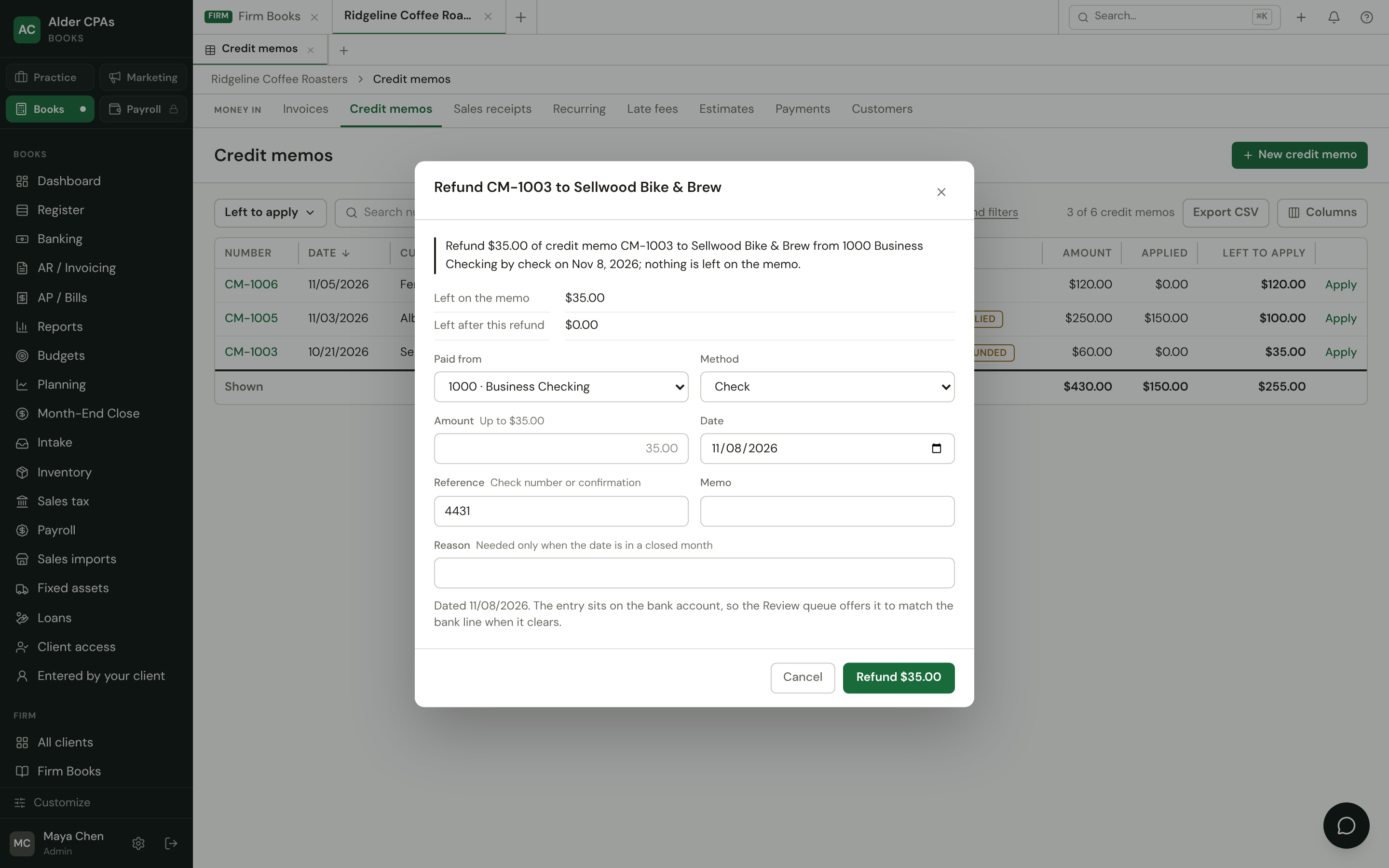 Refunding the $35.00 left on CM-1003 by check
The summary at the top of the window spells out the whole refund before anything is written, for example Refund $35.00 of credit memo CM-1003 to Sellwood Bike & Brew from 1000 Business Checking by check on Nov 8, 2026; nothing is left on the memo.
The refund posts its own entry: it takes the money out of the bank account and charges it back to the customer's receivable, which the credit had reduced. Because the entry sits on the bank account, when the bank line for the refund comes in, the Review queue can offer this entry as its match.
The credit memo then shows a Refunded to the customer section with each refund's date, bank account, method, reference and amount, and a Refunded line in its totals.
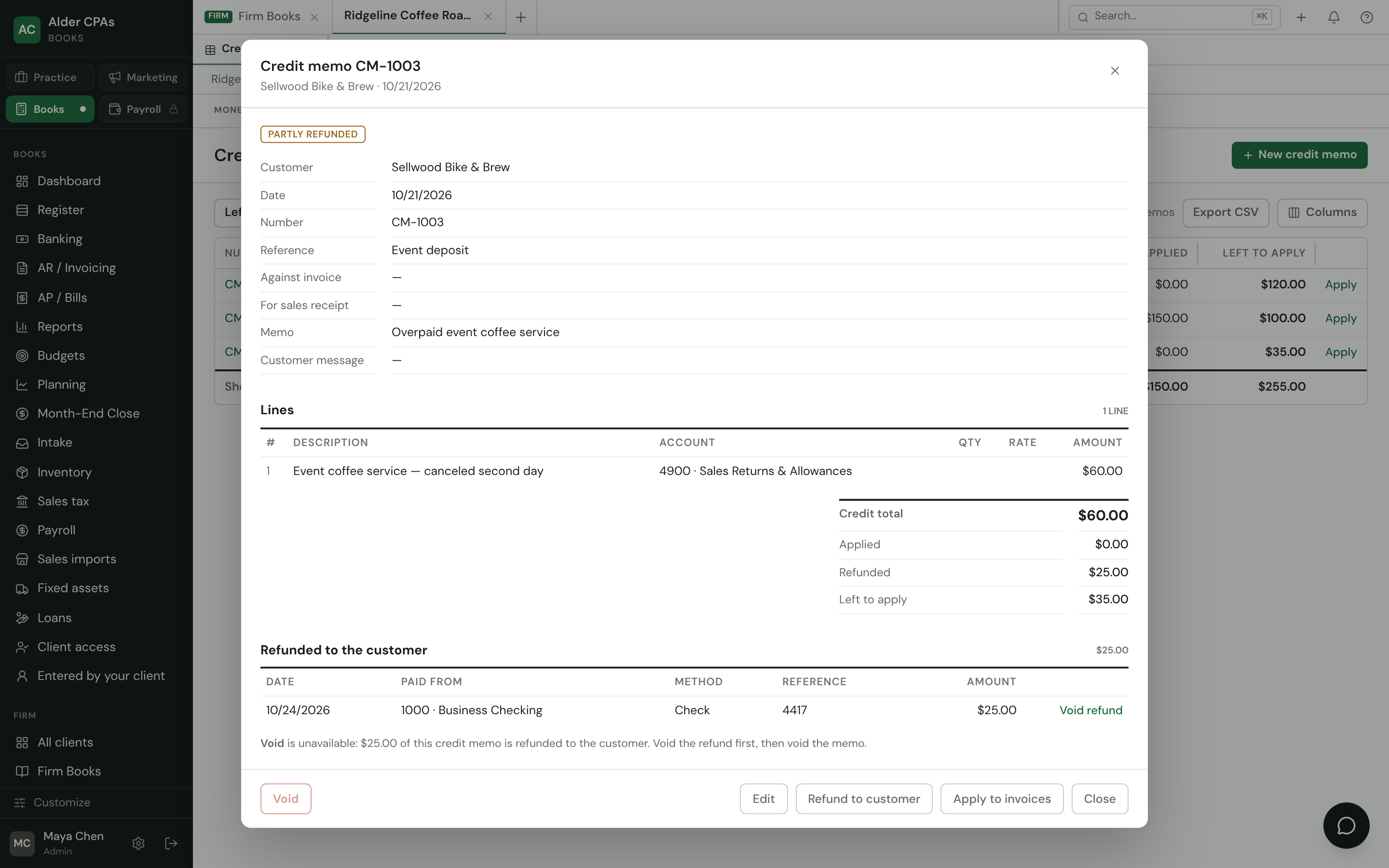 Credit memo CM-1003 with an earlier refund of $25.00 listed
Fix or undo a credit memo
Change a draft, or remove it
Open the draft from the list (clear the status chip first: drafts are not in the Left to apply view). Change anything, then Save as draft or Save. To get rid of a draft, click Remove draft. The draft and its lines are removed for good. It never reached the books, so no balance changes, and Books keeps a record of what it held in the audit history.
Edit a saved credit memo
A saved credit memo is changed in place. Its entry is updated on the same record and keeps a history of what it said before; nothing is reversed and posted again.
- Open the credit memo and click Edit.
- Change the Date, Number, Reference, Memo, Customer message or the lines.
- Click Review changes. Books shows what will change: each field, the new total and how much Accounts Receivable moves, and each ledger line before and after.
- Click Save changes, or Keep editing.
What can't change on a saved credit memo:
- The customer, and the invoice or sales receipt it is for. To move a credit to another customer, void it and enter a new one. To use it on another invoice, just apply it there.
- The total can't go below what is already used. If $150.00 is applied, the total can't drop under $150.00. Unapply it from an invoice, or void a refund, first.
- A credit memo that brought goods back into stock keeps its lines and its date, because the stock was costed on them. Void it and enter a new one instead.
If the change lands in a closed month, Books asks why (at least 10 characters) and checks again with your reason; only someone allowed to change a closed month can go ahead. If a line it changes is on a finished reconciliation, Books warns you and asks you to tick Change it anyway: the reconciliation will be off by this change. Changing only the memo or the customer message never touches the entry.
Unapply a credit from an invoice
In the credit memo's Applied to invoices section, click Unapply beside the invoice. The window explains what happens: the invoice owes that amount again, the credit memo has it back to apply, and the customer's total balance does not change.
A Reason is optional, unless the date falls in a closed month: then give one of at least 10 characters, and only someone allowed to close the books can go ahead. Click Unapply $150.00, or Keep it applied.
The application is reversed, not erased: it is dated today (or on the day it was applied, if that is later) and kept as history.
If the invoice itself is voided, any credit applied to it comes back to the credit memo the same way.
Void a refund
In the Refunded to the customer section, click Void refund. Give a reason of at least 10 characters and click Void refund. The refund's entry is reversed, and the amount is back on the credit memo to apply or refund again. The reversal is dated on the refund's own date while that month is open, and otherwise on today's date.
Void a refund only if the money never actually went out, such as a check you tore up. If it did leave the bank, the bank line will have nothing to match.
Void a credit memo
- Open the credit memo and click Void. It is turned off, with the reason under the memo, while any of the credit is applied or refunded (see Why can't I…).
- Read what voiding does: the customer owes the amount again, and the income the credit reduced is restored.
- Give a Reason of at least 10 characters. It is kept with the void.
- Check Entry reversed on, then click Void credit memo (or Keep credit memo). Until the reason is 10 characters long, the row states the rule, for example 11/05/2026, the credit memo’s date, while that period is open, or today once it is closed. Once it is long enough, Books checks the void and shows the exact date.
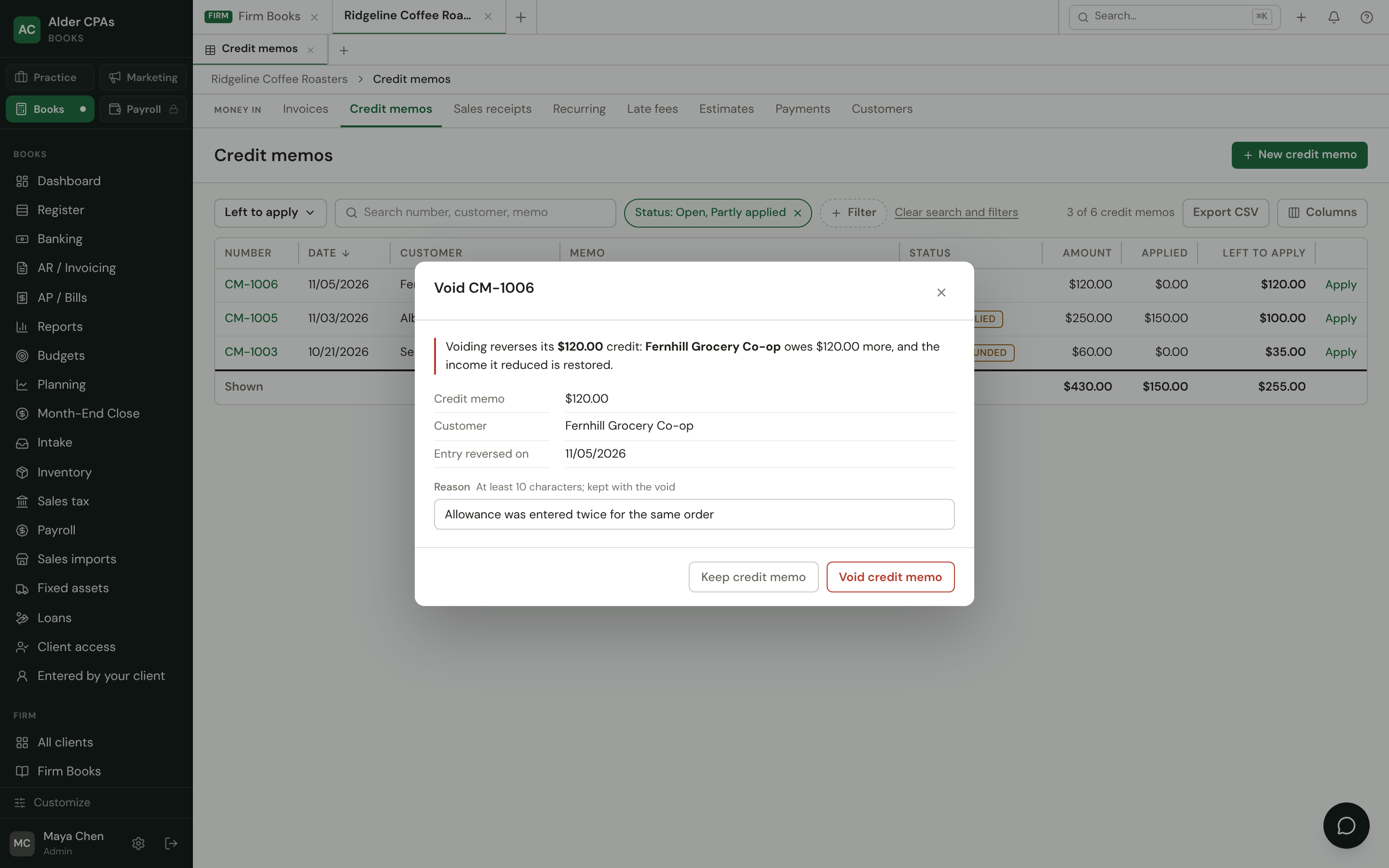 Voiding credit memo CM-1006, with its reason and the date the entry is reversed
The entry is reversed on the credit memo's own date while that month is open. If the month is closed, it is reversed on today's date instead. Both entries stay in the register. If the credit memo brought goods back into stock, voiding takes them back out.
A void credit memo stays in your books as Void and can't be changed, applied or refunded. It is left out of the Left to apply view: clear the status chip to find it, and open it to see the reason it was voided.
Why can't I…
-
…void this credit memo? Part of it is applied to invoices, or refunded, and Void is turned off until it isn't. The line under the memo says which, for example $150.00 of this credit memo is applied to invoices. Unapply it first, then void the memo. or $25.00 of this credit memo is refunded to the customer. Void the refund first, then void the memo.
Use Unapply in the Applied to invoices section, or Void refund in the Refunded to the customer section, then void the memo. A draft is never voided: remove it instead.
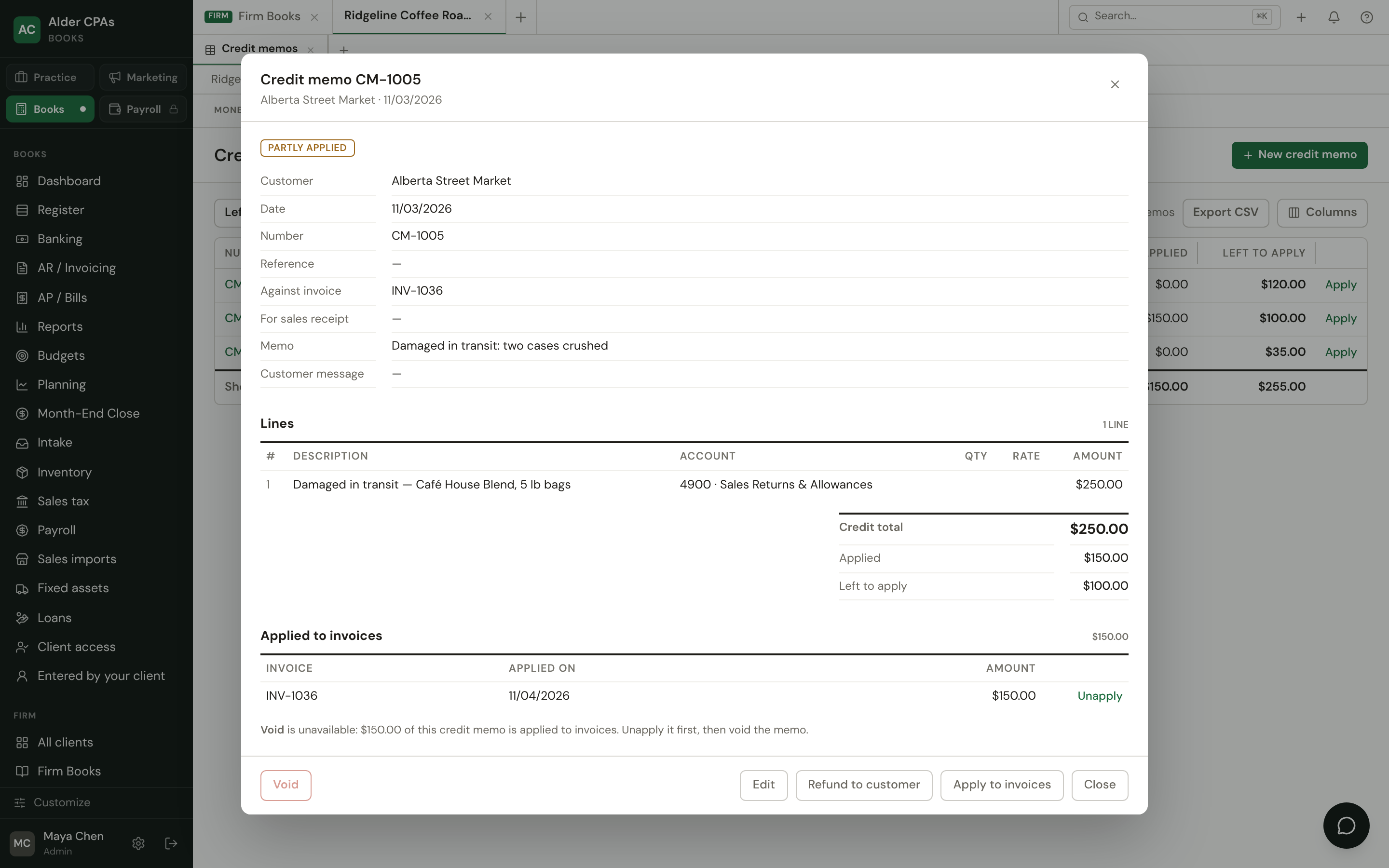 Credit memo CM-1005 with $150.00 applied to INV-1036: Void is turned off, and the line under the memo says why
-
…void it, when it returned goods? The goods have been sold since, so taking them back out would leave the item below zero on hand. Books names the item. Record the stock first, or leave the credit memo as it is (this applies when the client does not allow selling beyond stock).
-
…save it? The message under the form says why. The usual reasons:
- a line is missing a description or amount
- a line has a quantity but no rate (or the other way around)
- an inventory line has no quantity
- the account is not an active income account
- the customer has been archived or merged into another
- the date is in a closed or locked month
- the client has no Accounts Receivable account set under Settings → Account mapping
- a draft names an invoice under Against invoice whose billing has since moved to Practice (Books says Invoice INV-1040 is now billed from Practice; credit its Practice invoice instead, or leave Against invoice blank).
If the date is in a tax year that has already been filed, Books asks you for a reason before it saves.
-
…click Apply to invoices? Nothing is left on the credit memo. The line under it says where the credit went: Nothing is left to apply: the whole credit is applied., Nothing is left to apply: the whole credit is refunded to the customer., or Nothing is left to apply: the credit is applied to invoices and refunded to the customer. To use it again, unapply it from an invoice or void a refund.
-
…choose an invoice under Against invoice? It is grayed out because its billing has moved to Practice: Billed in Practice — credit its Practice invoice instead. Leave Against invoice blank, or credit its Practice invoice instead.
-
…find an invoice to apply it to? Only the same customer's saved invoices with a balance can take a credit. Paid and draft invoices are not listed. An invoice billed in Practice is listed with its box turned off. If the window says the customer has no open invoice, the credit stays on their account for the next one.
-
…apply it on that date? A credit can't be applied before the credit memo's date or the invoice's date. A date in a closed month needs a Reason of at least 10 characters and someone allowed to close the books; a locked month refuses it.
-
…refund it? The credit memo is still a draft (save it first), it is void, or nothing is left on it. A refund can't be dated in the future or before the credit memo, and a closed month needs someone allowed to close the books, with a reason of at least 10 characters.
-
…edit it? It is void, or one of the limits in Edit a saved credit memo applies. The review says which, and what to do instead.
-
…click a button at all? You don't have the permission it needs. Drafts need access to invoices and customers; Save needs that and permission to send invoices; Apply to invoices, Unapply and Refund to customer need permission to apply payments; Void and Void refund need permission to void. A turned-off button says why: in a line under the form or dialog, or when you hover it.
When a month has a closing password, Books asks for it when you apply, unapply, refund or void into that month, then carries on.
If you also use Practice
When a firm moves a client's billing from Practice into Books, the credits Practice was holding come across as credit memos. They appear on this page with everything else, and you can apply them to the client's invoices here.
Books doesn't change, refund or void them: Edit, Refund to customer and Void are turned off, each with its reason, such as This credit memo came from Practice billing, so it is changed there, not here., This credit memo came from Practice billing, so it is refunded there. and This credit memo came from Practice billing, so it is voided there.
It works the other way too. When an invoice's billing moves to Practice, its balance is collected on its Practice invoice. Books still shows the invoice, so you can see it is open, but doesn't offer it for anything that would settle it, and says why:
| Where | What you see |
|---|---|
| Against invoice on a new or draft credit memo | The invoice is listed, grayed out, and can't be chosen: Billed in Practice — credit its Practice invoice instead |
| Apply a credit memo | The invoice is listed with its box turned off: Billed in Practice — apply this credit to its Practice invoice |
| Recording a customer payment | The invoice is listed, dimmed, with its box turned off and the reason beside it: Billed in Practice — record the payment against its Practice invoice |
| Write off… on the invoice | Turned off; hover it for the reason: Billed in Practice — write off its Practice invoice instead |
Shortcuts and tips
| Key | Where | What it does |
|---|---|---|
| Q | Anywhere in Books, outside a text box | Opens Quick add, where Credit Memo starts a new credit memo. |
| Tab / Shift+Tab | The lines | Moves across a line. |
| Enter | The lines | Moves to the next line's description, adding a line at the bottom. |
| Ctrl+Delete | The lines | Removes the current line. |
| ↑ / ↓, then Tab or Enter | Revenue account, after typing part of a name or number | Moves through the matching accounts and takes the highlighted one. |
| Enter | Any amount box | Works out a sum (see below). |
Amount boxes do math. In a line's Rate or Amount, and in the amounts you apply or refund, type a sum such as 6x18, 250-35 or (125+50)/2. When you press Enter or leave the box, it settles to the result, to the cent. Use + and -, *, x or × to multiply, and / or ÷ to divide; parentheses group. A leading =, $, commas and spaces are ignored. Qty takes a plain number.
More details worth knowing:
- Qty × Rate fills the amount. If you type a different amount yourself, Books keeps it and notes under the line that it differs from Qty × Rate. Changing Qty or Rate works it out again.
- Every dialog checks before it writes. Apply, refund, unapply and void each ask Books to run the real checks first and show the result (or the reason it would be refused) before you confirm.
- Name the sale on a return. Picking the invoice or sales receipt brings the goods back at the cost they went out at, and pre-ticks that invoice when you apply the credit.
- Use a returns account. Booking credits to Sales Returns & Allowances keeps returns and allowances visible on the income statement.
- Undoing leaves a record. Unapplying a credit, voiding a refund and voiding a credit memo each leave a dated record instead of erasing anything, so the customer's history always reads true.